Establishing secure connection…Loading editor…Preparing document…

Writ of Habeas Corpus

This template is fully customizable. Edit the text, fill out the fields, and send it for signature. Give it a try!
Writ of Habeas Corpus

What the Writ of Habeas Corpus Is and when it applies

The Writ of Habeas Corpus is a judicial order used to challenge unlawful detention by requiring a custodian to bring a detainee before the court and justify the detention. Historically rooted in common law, the writ protects individual liberty by enabling courts to assess the legal basis for imprisonment, detention, or restraint and to order release where confinement lacks lawful authority. In the United States, both federal and state courts consider habeas petitions, though procedures, grounds, and remedies differ by jurisdiction and case posture, including pretrial, post-conviction, and immigration custody contexts.

Why the Writ of Habeas Corpus matters for liberty and due process

The Writ of Habeas Corpus provides a direct judicial mechanism to contest unlawful detention, secure timely review of imprisonment, and, where appropriate, obtain release or corrective relief while preserving constitutional protections.

Why the Writ of Habeas Corpus matters for liberty and due process

Who commonly prepares and files a habeas petition

Typical users who prepare or file a Writ of Habeas Corpus include attorneys, detainees acting pro se, public defenders, and immigration advocates.

  • Criminal defense attorneys addressing unlawful pretrial detention or post-conviction relief
  • Immigration attorneys seeking release from detention or review of removal orders
  • Pro se litigants who believe their detention violates constitutional or statutory rights

Step-by-step process for preparing and filing a habeas petition

Follow these steps: prepare the petition, file in the correct forum, serve the respondent, and pursue a hearing while meeting jurisdictional rules and deadlines.

  • 01
    Prepare Petition: Describe custody facts, legal grounds, and relief requested.
  • 02
    File Petition: Submit to the appropriate federal or state court clerk per local rules.
  • 03
    Serve Respondent: Deliver writ and supporting materials according to the court's service requirements.
  • 04
    Hearing & Order: Attend the hearing; court issues a release order or denial based on law.

Key filing and record details to include on the record

Case Caption: Court name and docket info
Petitioner ID: Full legal name and date of birth
Custodian ID: Respondent's official title and affiliation
Factual Timeline: Concise dated events
Relief Sought: Exact remedy requested
Signature Block: Typed name, signature, date

Common procedural risks when a writ is incomplete or late

Procedural Dismissal: Court may dismiss for failing local rules
Statute of Limitations: Claims barred by untimely filing
False Statements: Risk of sanctions or perjury charges
Service Defects: Improper service can void proceedings
Waived Claims: Failure to preserve issues on appeal
Jurisdictional Bar: Wrong court prevents relief

Frequent drafting and filing mistakes to avoid

  • Naming the wrong respondent or facility delays service and can require amendment or refiling in a different forum
  • Failing to include a clear, chronological statement of custody facts undermines the petition's credibility and factual sufficiency
  • Neglecting to address state exhaustion requirements or procedural bars can render claims noncognizable in federal court
  • Omitting verified declarations or supporting exhibits leads to evidentiary disputes and possible dismissal

How habeas filing and review typically progress

A concise workflow outlines drafting, filing, service, and judicial review steps; timing and forms vary by court and custody type.

  • Draft: Assemble facts, exhibits, and legal claims for the petition.
  • File: Submit via e-filing or clerk's office per court rules.
  • Serve: Serve the respondent and file proof of service with the court.
  • Review: Court schedules hearing or rules on briefing and relief.

Recommended filing setup and common configuration choices

Set up filings to match court preferences and reduce processing friction; confirm local rules for format and service.

Field Configuration
Filing Method E-filing via court portal preferred where available
Signature Type Typed or scanned signature acceptable per local rules
Service Personal or agency service per court requirement
Supporting Exhibits Attach sworn affidavits and authenticated records

Digital submission and platform considerations for legal filings

Confirm the court's e-filing and e-signature rules, then select secure tools that meet those technical and privacy requirements.

  • Accepted Formats: PDF/A or court-specified PDF formats
  • Integrations: Common integrations include Salesforce, NetSuite, Google Workspace
  • Authentication: Use multi-factor or court-required signer verification

Key filing deadlines and timing considerations

Timeliness and preservation of claims are critical—federal and state rules set distinct filing windows and emergency procedures.

Federal Limit (AEDPA):

One-year limitations period from final judgment (28 U.S.C. §2244(d)(1)).

State Exhaustion Requirement:

Must exhaust state remedies before federal habeas review in most circumstances.

Emergency Petitions:

Courts may expedite hearings for imminent liberty risks.

Tolling Rules:

Statutory and equitable tolling can pause limitation periods.

Immigration Custody:

Separate deadlines and administrative remedies often apply.

Typical milestones from arrest to habeas resolution

A sequential milestone view highlights critical steps—prepare, exhaust remedies if required, file timely, and pursue judicial review.

01

Initial Detention

Custody begins and factual record forms.

02

Administrative Remedies

Exhaust internal or state processes when required.

03

Filing Petition

Prepare and file within statutory deadlines.

04

Court Decision

Hearing, briefing, and judicial order resolving claims.

Essential sections to include in a professional habeas petition

A well-structured petition improves clarity and the court's ability to resolve claims; include legal grounding, factual support, and a clear relief request.

Caption

A complete case caption identifies the court, docket, petitioner, and respondent and frames the petition within the correct jurisdiction and procedural posture.
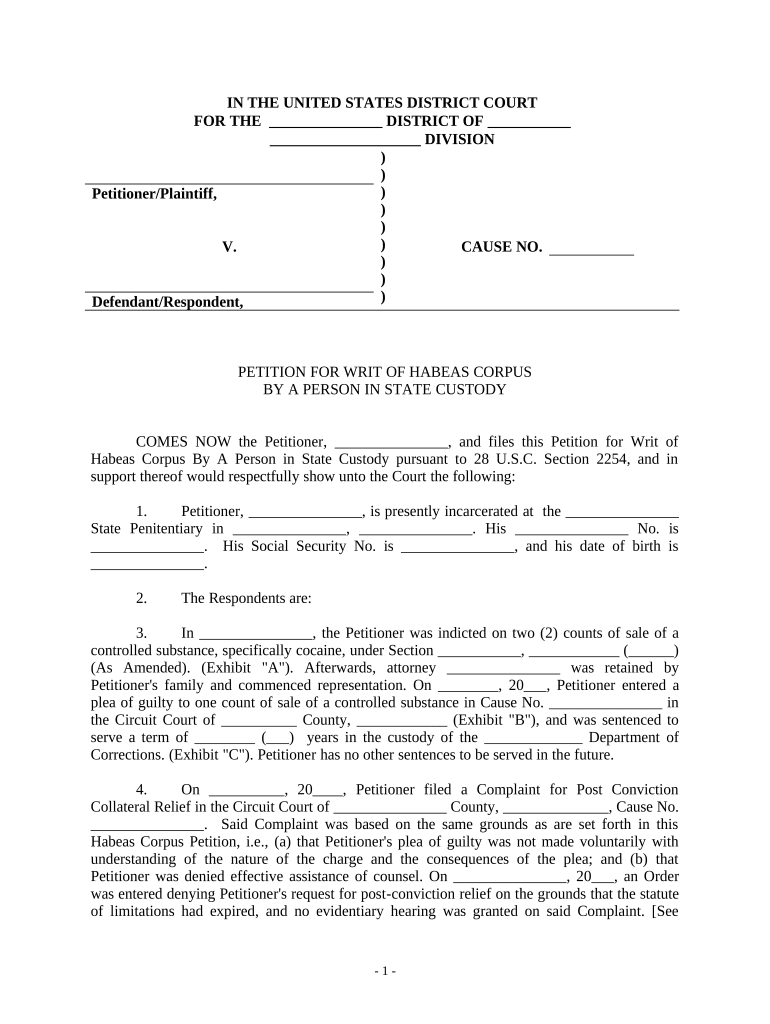
Statement of Facts

A concise, chronological presentation of custody facts and key dates that links factual assertions to the legal grounds asserted in the petition.

Legal Grounds

Explicitly state constitutional or statutory bases for relief and explain how the facts meet each legal element required for habeas relief.

Supporting Exhibits

Attach sworn declarations, court records, and documentary evidence authenticated to support factual claims and jurisdictional assertions.

Verification

Include a signed verification or sworn affidavit attesting to the truth of factual statements, signed under penalty of perjury where required.

Relief Requested

Specify narrowly tailored remedies sought—immediate release, bond, evidentiary hearing, or other specific court orders—to guide judicial action.

How habeas corpus compares to other extraordinary remedies

Use this quick comparison to distinguish habeas from other judicial remedies commonly used to challenge custody or compel action.

Remedy Primary Use Typical Court
Habeas Corpus release federal/state
Mandamus compel duty appellate/trial
Coram Nobis correct error federal post-conviction
Direct Appeal review conviction appellate court

eSignature vendor comparison for filing and signing legal petitions

Compare typical pricing and core capabilities for eSignature platforms commonly used to assemble and sign legal filings; signNow appears first per vendor order rules.

signNow DocuSign Adobe Sign PandaDoc HelloSign
Starting Price $8/user/mo $15/user/mo $14/user/mo $19/user/mo $15/user/mo
Free Trial 7-day trial Varies Varies Varies Varies
Bulk Send Yes Yes Yes Yes Yes
Audit Trail Yes Yes Yes Yes Yes
HIPAA Compliant Yes Yes Yes No No

Frequently asked questions about filing and e-submitting a writ

Answers to common procedural and technical questions about drafting, filing, and validating a Writ of Habeas Corpus.


Need help? Contact support

be ready to get more
Join over 28 million airSlate SignNow users