Establishing secure connection…Loading editor…Preparing document…

Petition to Board of Zoning Appeals for Variance

This template is fully customizable. Edit the text, fill out the fields, and send it for signature. Give it a try!
Petition to Board of Zoning Appeals for Variance

What the Petition to Board of Zoning Appeals for Variance Is

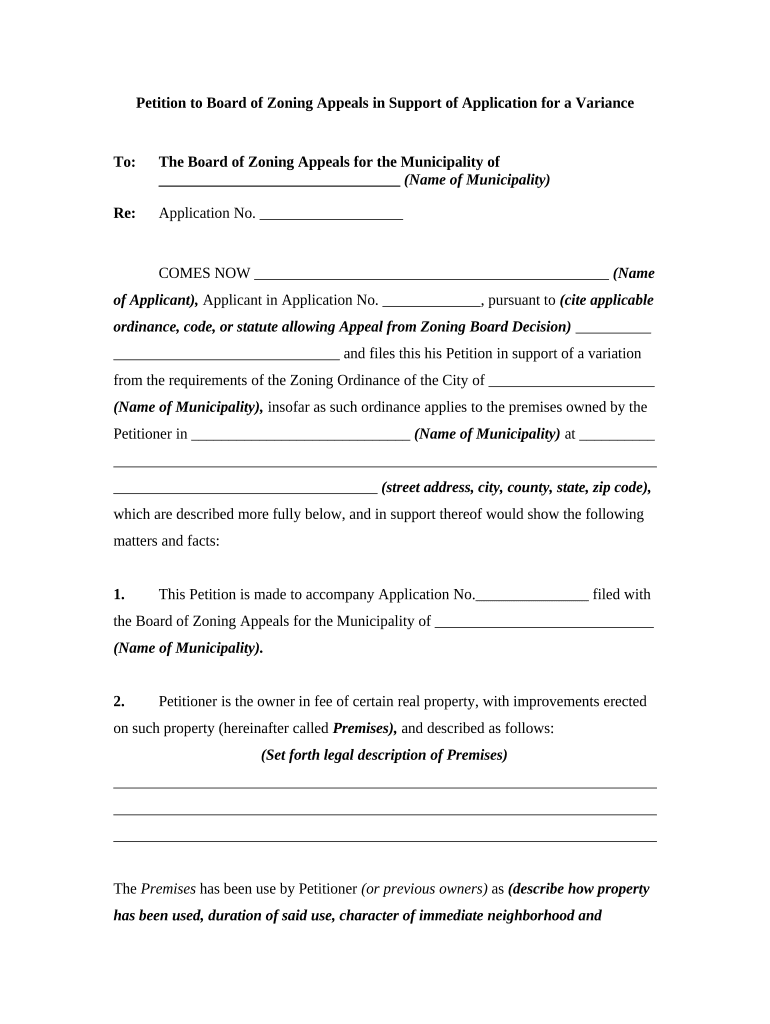
A Petition to the Board of Zoning Appeals for Variance is a formal written request asking a local zoning board to permit an exception to one or more zoning regulations for a specific property. The petition typically explains the requested dimensional or use variance, states the factual circumstances and legal grounds supporting relief, identifies affected parcels and owners, and requests a public hearing. The document initiates the administrative review, public notice, and hearing process that can modify how zoning rules apply to the property in question.

Why You Might File a Variance Petition

A variance petition lets property owners seek relief when strict application of zoning rules creates practical difficulties or unnecessary hardship.

Why You Might File a Variance Petition

Who Typically Prepares or Signs This Petition

Local stakeholders prepare and file variance petitions when a property cannot meet zoning requirements without undue hardship.

  • Property owners or homeowners seeking relief for lot or structure constraints
  • Real estate developers or contractors pursuing project feasibility
  • Land use attorneys or planning consultants preparing legal arguments and exhibits

Step-by-Step: Preparing and Submitting the Petition

Follow these sequential steps to prepare a complete petition, satisfy filing requirements, and track next milestones.

  • 01
    Gather documents: Collect deed, survey, site plan, and tax parcel data before drafting.
  • 02
    Draft petition: Describe the variance, cite hardship, and specify relief sought.
  • 03
    Attach exhibits: Include plans, photos, and neighbor notification affidavits.
  • 04
    File and pay: Submit to municipal zoning office and pay the required fee.

How the Petition Process Typically Flows

A zoning variance petition triggers administrative review, public notice, a hearing, and then a decision with possible appeal rights.

  • Intake review: Staff checks completeness and jurisdiction before acceptance.
  • Public notice: Notice is posted and mailed per local ordinance requirements.
  • Hearing: Applicant presents evidence; neighbors may speak for or against.
  • Decision: Board issues approval, approval with conditions, or denial.

Key Components to Include in a Professional Variance Petition

A complete petition combines legal facts, technical exhibits, and proper certifications so staff and the board can evaluate the request and satisfy public notice rules.

Cover/Caption

Clear title identifying petition type, case number (if available), property address, petitioner, and contact information for municipal correspondence.
Variance Description

Specific numeric relief requested (for example, reduce front setback from 25 ft to 10 ft) with units and referenced zoning code sections.

Statement of Hardship

Concise factual narrative explaining why strict application of the code creates practical difficulty or unnecessary hardship for this particular property.

Exhibits and Plans

Scaled site plan, elevations, photos, and engineer or surveyor stamps as required by local rules to show existing and proposed conditions.

Notices and Affidavits

Proof of mailed or posted notices, ownership affidavits, consent forms from affected parties, and any required certified mail receipts.

Signature and Verification

Authorized signature block with date and notarization or acknowledgment if local regulations require a sworn statement or owner verification.

Suggested Digital Workflow Settings for Online Completion

Set up the e-filing workflow with fields, authentication, and routing to match municipal submission rules.

Field Configuration
Petitioner Contact Required; email and phone; validate format
Document Upload Require PDF site plan; max file size 50 MB
Signature Type Email or SMS OTP authentication
Routing Auto-forward to zoning staff after payment

Platform and Distribution Options for Electronic Submissions

Municipal offices vary: some accept emailed PDFs, others require portal upload or a signed hard copy; confirm local rules before filing.

  • Email: PDF attachments accepted
  • Portal: Online upload with account
  • In-person: Paper filing at counter

eSignature Pricing Comparison for Filing and Signing Petitions

Common eSignature vendors and representative starting prices for organizations that prepare or send legal filings. signNow is listed first per vendor comparison conventions.

signNow DocuSign Adobe Sign PandaDoc HelloSign
Starting Price $8/user/mo $15/user/mo $14/user/mo $19/user/mo $15/user/mo
Free Trial 7-day free trial, no credit card No trial No trial Yes, limited Yes, limited
Bulk Send Yes Yes Yes Yes No
Audit Trail Yes Yes Yes Yes Yes
Envelope Cap No cap 100 envelopes/user/year Varies by plan Varies by plan Varies by plan

Authentication and Security Considerations

Encryption: TLS 1.2/1.3 in transit; AES-256 at rest
Legal Compliance: ESIGN and UETA recognized
Audit Trail: Timestamp, IP address, action log
HIPAA Support: BAA available where required
21 CFR Part 11: Support for regulated workflows
Accessibility: WCAG 2.0 Level AA compliance

Common Risks and Consequences of an Incomplete or Incorrect Petition

Dismissal: Board may reject incomplete filings
Delay: Missing exhibits delay hearing scheduling
Fee Forfeit: Filing fees may be nonrefundable
Evidence Exclusion: Unfiled exhibits may be excluded
Appeal Risk: Procedural errors enable appeals
Notarization Failure: Missing notarization can void verification

Typical Scheduling and Deadlines to Plan For

Deadlines vary by locality; confirm municipal filing cutoffs, public notice lead times, and appeal windows for accurate scheduling.

Filing Cutoff:

Often 2–8 weeks before the next hearing

Public Notice Lead:

Typical notice posted 10–30 days prior to hearing

Hearing Date:

Board schedules a hearing after review and notice

Decision Timeline:

Board issues a decision during or shortly after hearing

Appeal Period:

Local ordinances commonly allow appeals within 30 days

Real-World Examples of Petition Use and Outcomes

Below are anonymized, real customer examples showing common petition scenarios and practical results from preparing petitions and exhibits.

Optica Ventures, LLC

A developer sought a setback variance for an infill lot

  • Board required additional site shading info
  • The petition included stamped plans and a neighbor notice list; the board approved conditional relief with modified plans.

Martin Properties

A homeowner requested a lot coverage variance to add an accessible entry

  • Technical survey established existing coverage limits
  • The board granted a limited variance tied to constructed drainage improvements and recorded conditions.

Practical Tips for a Clear, Complete Petition

Adopt these practices to reduce processing time, improve clarity for reviewers, and lower the likelihood of objections or remands.

Be precise with measurements
Use certified surveys and include scale references so staff can verify numeric variance requests quickly and accurately.
Include clear exhibits
Provide labeled photos, scaled site plans, and colored overlays showing existing versus proposed conditions for easy board review.
Document outreach
Keep records of neighbor notifications and any consent letters; these often reduce opposition at the hearing.
Check municipal checklist
Follow the local filing checklist exactly to avoid intake rejections and hearing delays.

Frequently Asked Questions About Petition Preparation and Filing

Answers to common questions address e-signature use, notarization, supporting exhibits, scheduling, and what to expect after a decision.


Need help? Contact support

be ready to get more
Join over 28 million airSlate SignNow users