
Quick answer: Mac’s built-in Preview app can sign a single PDF for free in under a minute: pick the file, draw or capture a signature, and drop it onto the page. An online eSignature platform such as SignNow does something different. It moves that signature off one Mac and into a shared workflow that tracks who has signed, reminds whoever hasn’t, and keeps a timestamped record of every action.
For most people running this search, the PDF in question is an invoice: a freelancer’s own invoice waiting for a signature, or a vendor invoice a manager has to approve before it gets paid. That distinction, one signer versus several, decides which tool actually fits the job. SignNow’s Mac PDF signing already covers the SignNow side of that workflow in detail; this article puts it next to Preview so the comparison is explicit.
TL;DR
- Preview signs a PDF for free using a trackpad drawing, a camera capture, or a signature synced from a connected iPhone or iPad.
- Preview has no audit trail and no way to route a document to a second signer; it’s a single-user tool.
- Flattening a signature in Preview (File > Export) locks it in place so it can’t be dragged or deleted later, but it doesn’t add any tracking.
- SignNow adds multi-signer routing, automatic reminders, and a timestamped audit trail on top of the same basic signing action.
- About 70-80% of U.S. organizations have already adopted eSignature tools of some kind, per Fortune Business Insights.
- Manual invoice processing averages 14.6 days per invoice; digital workflows cut that to 3-5 days.
- Use Preview when you’re the only signer; use SignNow when someone else needs to sign, approve, or verify who signed.
What Mac Preview can do on its own
The Preview covers three ways to add a signature to a PDF, and all three are included with macOS at no extra cost. Draw one on the trackpad with a finger or the pointer, and Preview will smooth it into a clean line. Hold a signed piece of paper up to the built-in camera, and Preview lifts the signature off the page and turns it into a transparent image. Or, on a Mac running a recent macOS version near a signed-in iPhone or iPad, use Continuity Camera to snap the signature on the phone and have it appear on the Mac automatically.
Every method produces the same result: an image of a signature that gets dropped onto the document and resized. Nothing about the process requires an account, an internet connection after the file is open, or a subscription. It also does not require anyone else’s involvement, which is the point. Preview solves the problem of “I need to sign this,” not “we need to get this signed.”
Step-by-step: sign a PDF invoice on Mac using Preview
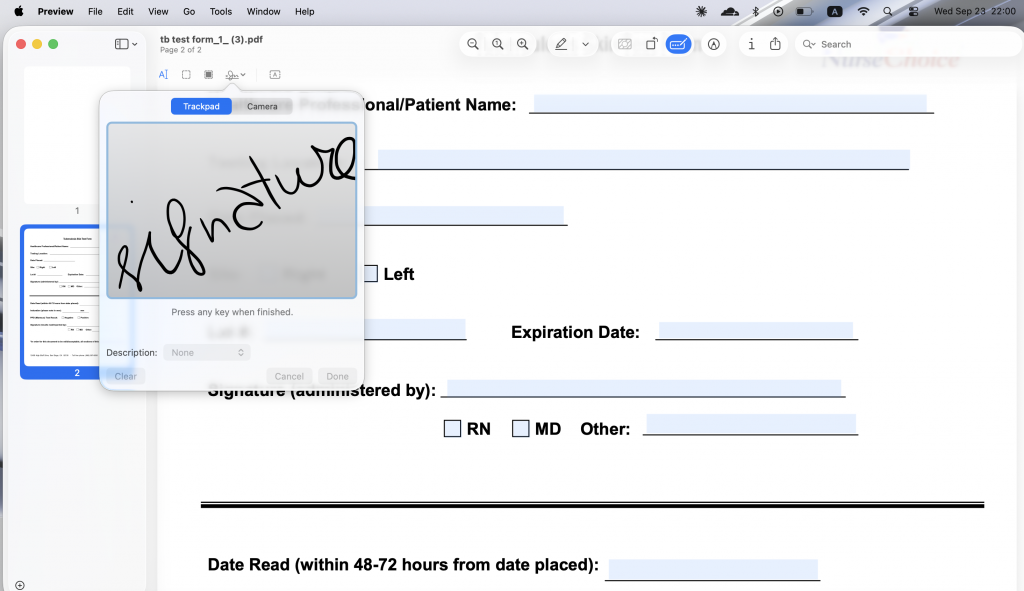
- Open the invoice PDF in Preview (the default app macOS uses for PDFs).
- Click the Markup toolbar icon (the pen-tip symbol), then the signature icon.
- Choose Trackpad, Camera, or an iPhone/iPad to create the signature, following the on-screen prompt for whichever method is selected.
- Drag the signature onto the signature line on the invoice and resize it by pulling the corner handles.
- Go to File > Export, which flattens the signature into the file so it can no longer be dragged, resized, or deleted by anyone who opens it later.
- Save the exported PDF and attach it to a reply email.
The flattening step in step 5 matters more than it looks. Without it, a signature in a PDF is just another movable object: anyone who opens the file in Preview or another PDF editor could nudge it, resize it, or delete it entirely, whether by accident or on purpose. Exporting bakes the signature into the page itself, the same way printing and rescanning would, but without leaving your Mac.
What changes with an online eSignature tool like SignNow
SignNow is a browser- and mobile-based eSignature platform with 28 million users. Instead of signing locally and emailing the result, you upload a document once and assign who needs to sign, approve, or simply receive a copy, and the platform tracks the rest. The Business plan starts at $8 per user per month, billed annually, and includes court-admissible audit trails as a standard feature rather than an add-on.
The practical difference shows up fastest around invoices specifically. SignNow’s own financial-services use case describes helping teams “complete tax forms and share invoices to collect approvals and payments,” which covers both the freelancer sending one invoice and the finance team routing several for sign-off. Signing also isn’t tied to one machine: the SignNow mobile apps for iOS and Android let a signer approve an invoice from a phone if they’re away from a desktop entirely.
Step-by-step: send an invoice for signature with SignNow
- Click the + Create button in the top-left corner and upload the invoice as a Document (PDF, Word, or image files up to 50 MB are supported).
- Add the people who need to act on it and assign signer roles, or add a CC recipient who should only receive the completed copy.
- Accept or skip SignNow’s automatic field detection, depending on whether the invoice already has fillable fields.
- Drag Signature, Text, and Date fields onto the document and assign each one to the correct recipient.
- Use Set Up and Send Invite to check how the form will look to a signer. Configure recipients, reminders, branding, and other settings before sending a document for eSignature.
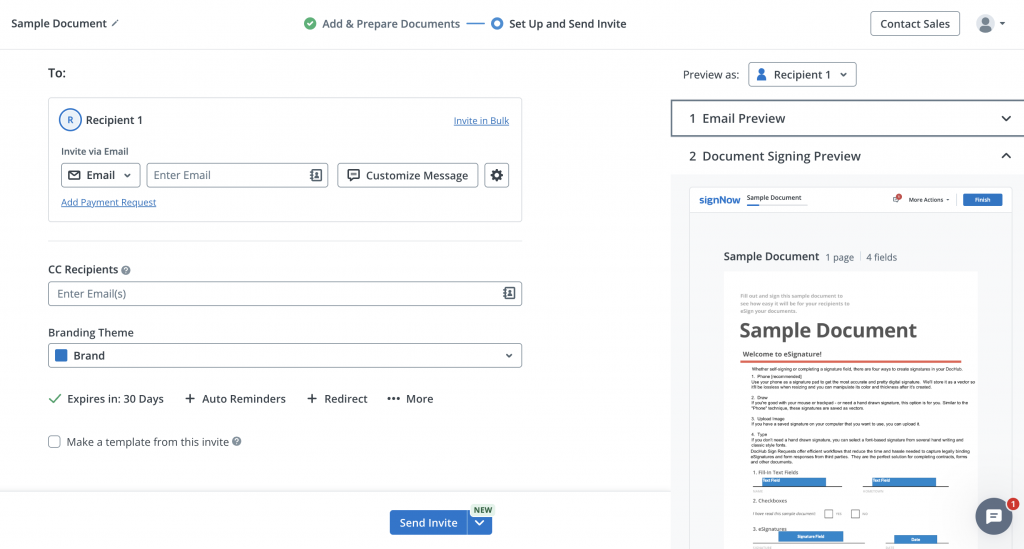
Every step happens in the same session, and the sender can check progress afterward instead of waiting for a reply email to find out whether the invoice was signed.
Is Preview enough, or does an invoice need more than that?
Preview is enough when there’s exactly one signer, and nobody needs proof of how or when the file was signed. It stops being enough the moment a second signature, an approval step, or a defensible record of who signed becomes part of the job.
That gap matters more for invoices than for most other documents. The Association for Financial Professionals’ 2025 Payments Fraud and Control Survey Report
 Open
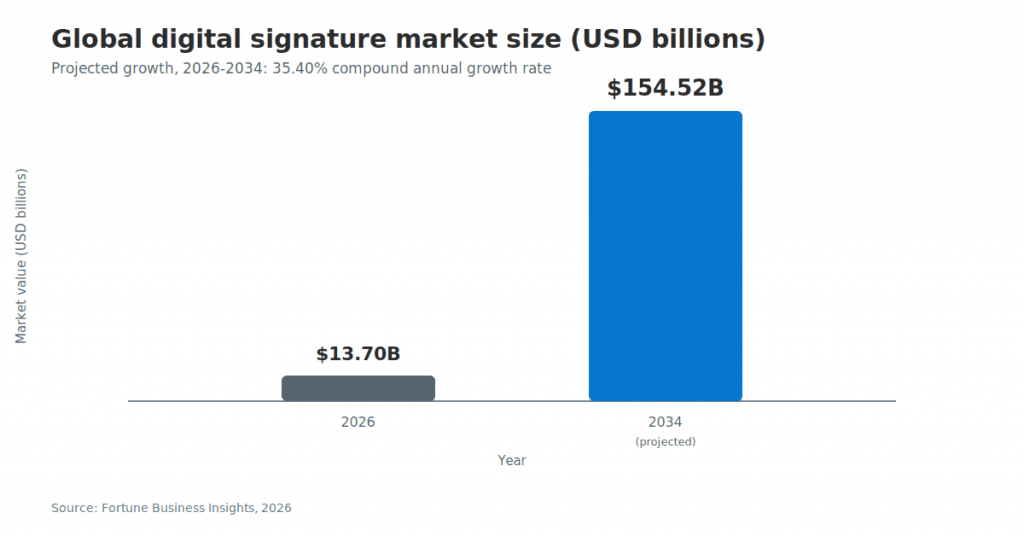
OpenThe shift toward tools that solve this is already underway at scale. The global digital signature market was valued at $13.70 billion in 2026 and is projected to reach $154.52 billion by 2034, a 35.40% compound annual growth rate.
What that buys, in practical terms, is on the SignNow pricing plans page: the Business tier that includes the audit trail and multi-signer routing starts at $8 per user per month, a cost most teams weigh against the price of an unresolved invoice dispute rather than against Preview, which is free regardless.
Preview vs. SignNow: side-by-side comparison
The two tools diverge most on tracking, routing, and proof, not on whether the resulting signature is valid in the first place.
| Criterion | Mac Preview | SignNow |
| Cost | Free, built into macOS | Business plan from $8/user/month, billed annually |
| Signer capacity | One signer, added manually | Multiple signers with assigned roles and signing order |
| Audit trail | None | Full names, emails, IP addresses, and timestamps for every action |
| Tracking and reminders | None; sender has to follow up manually | Automatic notifications and reminders |
| Mobile signing | Trackpad/camera capture; Continuity Camera from iPhone/iPad | Dedicated iOS and Android apps |
| Tamper protection | Manual: File > Export to flatten | Document locked once all parties complete signing; certificate of completion generated |
| Legal basis | ESIGN Act intent-to-sign standard | ESIGN Act and UETA, plus eIDAS SES |
| Templates for repeat invoices | Not available | Unlimited reusable templates (Business plan) |
| Compliance certifications | Not applicable (local app) | ISO 27001, SOC 2 Type II, GDPR |
| Setup required | None; already installed | Account and a paid plan after the free trial |
Both meet the ESIGN Act standard for legal validity as long as the signer intended to sign. The table above is about what happens after that: whether there’s a record, whether someone else can be looped in, and whether the file resists being altered.
Which one should you use to sign your next invoice?
Use Preview when you’re the only signer, and there’s no need to prove who signed later. Use SignNow when someone else has to sign, approve, or verify the signature, or when the invoice is one of many moving through a repeatable process.
A freelance designer signing their own invoice before emailing it to a client only needs Preview: one signature, one file, no approval chain. A small business owner who needs a client to countersign an estimate before work starts needs the opposite; without a way to route the file and confirm it was received, that estimate can sit unsigned in an inbox for days.
The stakes are highest for accounts-payable teams. An AP clerk reviewing a vendor invoice (who) has to verify it, get manager sign-off, and route it for payment (what) from whatever device they’re working on that day (where), before the payment due date arrives (when). Manual, paper-based review runs an average of 14.6 days and about $15 per invoice, against 3-5 days and $2-5 for a digital workflow, according to DocuClipper. The reason (why) is accountability: if a payment is later questioned, the team needs to show who approved it and when, not just that a signature exists somewhere in the file. That’s done (how) by uploading the invoice, assigning an approval role, and letting the platform log each step, the same routing capability behind reusable SignNow templates for invoices that follow the same approval pattern every month.
“SignNow provides us with the flexibility needed to get the right signatures on the right documents, in the right formats, based on our integration with NetSuite. This flexibility will assist us with reducing our turnaround time on signatures so that we can get to the business of doing business.”
— Kodi-Marie Evans, Director of NetSuite Operations, Xerox
Is a signature made in Preview legally binding on an invoice?
Yes. Under the U.S. ESIGN Act (15 U.S.C. § 7001), an electronic signature carries the same legal standing as a handwritten one for interstate commerce, and a Preview signature qualifies as long as the signer intended to sign. UETA, the state-level counterpart adopted in nearly every U.S. state, sets the same standard.
Legal validity is a separate question from evidentiary strength, though, and that’s where the two tools split. A signature drawn or photographed in Preview is a picture, not a certificate: it looks like a signature but carries no cryptographic proof of who created it or when. SignNow’s audit trail records the signer’s full name, email address, IP address, and a timestamp for every action taken on the document, which makes a disputed signature considerably easier to prove after the fact.
Disclaimer: The information contained in this blog post is provided for general informational purposes only and does not constitute formal legal advice.
Final thoughts
Signing an invoice PDF on a Mac can be as simple or as structured as your workflow requires. Preview works well when you only need to add your own signature to a PDF and send it manually. But when invoices need to move between clients, managers, or finance teams, SignNow adds the workflow tools that Preview lacks, including multiple signer roles, signing order, reminders, document tracking, and audit trails.
Instead of emailing PDFs back and forth and following up manually, you can use SignNow to send invoices for signature, track their status, and keep a record of the signing process in one place.
Ready to simplify invoice approvals? Start using SignNow to send, sign, and track invoice PDFs from your Mac—and keep every signature workflow moving.
Glossary
- Audit trail: a timestamped log of every action taken on a document, including who viewed, signed, or approved it and from what IP address.
- Electronic signature: any electronic sound, symbol, or process attached to a record and executed with the intent to sign it, as defined by the ESIGN Act.
- ESIGN Act: the U.S. federal law (15 U.S.C. § 7001) giving electronic signatures the same legal standing as handwritten ones for interstate and international commerce.
- Flattening (PDF): the process of merging an annotation, such as a signature, permanently into a PDF’s page content so it can no longer be moved or deleted.
- UETA: the Uniform Electronic Transactions Act, the state-level law adopted by nearly every U.S. state that mirrors the ESIGN Act’s legal-validity standard.
FAQ
1. Is a Preview signature on a Mac legally binding?
Yes. The ESIGN Act gives electronic signatures the same legal standing as handwritten ones, regardless of which app created them, as long as the signer intended to sign.
2. How do I sign a PDF for free on a Mac?
Open the file in Preview, click the Markup toolbar icon, then the signature icon, and choose to draw, photograph, or import a signature from a connected iPhone or iPad. No account or subscription is required.
3. What’s the difference between an electronic signature and a digital signature?
An electronic signature is any electronic mark made with the intent to sign, including a Preview drawing. A digital signature uses certificate-based cryptography to verify identity and detect tampering, which Preview doesn’t provide.
4. Can more than one person sign the same invoice from a Mac?
Preview has no built-in way to route a file to a second signer; each person signs and forwards it manually, in sequence, by email. SignNow assigns signing order and tracks each signature automatically.
5. How do I stop my Preview signature from being edited after I add it?
Use File > Export after placing the signature. This flattens the annotation into the page so it can no longer be dragged, resized, or removed by anyone who opens the file afterward.
Sources
- What Mac Preview can do on its own
- Step-by-step: sign a PDF invoice on Mac using Preview
- What changes with an online eSignature tool like SignNow
- Step-by-step: send an invoice for signature with SignNow
- Is Preview enough, or does an invoice need more than that?
- Preview vs. SignNow: side-by-side comparison
- Which one should you use to sign your next invoice?
- Is a signature made in Preview legally binding on an invoice?
- Final thoughts
