Edit Sign Catering Proposal Template

Eliminate paperwork and automate document management for higher productivity and endless possibilities. Sign anything from your home, quick and professional. Experience the perfect manner of running your business with airSlate SignNow.

Award-winning eSignature solution

Why use an editable eSignature catering proposal template

An editable eSignature template reduces manual entry and turnaround time, enforces consistent contract language, and preserves a secure audit trail to support compliance and recordkeeping.

Why use an editable eSignature catering proposal template

Typical users who manage and edit catering proposal templates

Catering Manager

The Catering Manager prepares event proposals, adjusts menus and pricing, and uses templates to ensure consistency. They set signer roles for client acceptance and coordinate internal approvals from finance and operations to finalize bookings.

Sales Director

The Sales Director oversees contract terms, reviews pricing templates for compliance, and approves discounts. They use reporting and template versioning to monitor performance and ensure legally sound proposals are issued to clients.

Essential tools for editing and managing the catering proposal template

These capabilities streamline editing, approvals, and reuse of catering proposals while preserving auditability and compliance for client agreements.

Template Library

Store and version reusable catering proposal templates with prefilled fields, making it fast to generate event-specific proposals and ensuring consistent contract language across the team.


Field Types

Support for signature, initial, date, checkbox, dropdown, and calculated fields allows precise capture of quantities, totals, and client selections directly inside the proposal.

Conditional Logic

Show or hide sections and pricing lines based on client selections, reducing errors and simplifying lengthy proposals for different event types and budgets.

Role Assignment

Assign signer roles and set signing order to model approvals from event managers, clients, and finance before the agreement is finalized.

Audit Log

Maintain a secure, time-stamped audit trail for each transaction that records each action, IP addresses, and timestamps required for compliance and internal review.

Integrations

Connect the template to CRMs, document storage, and accounting systems to auto-populate client data and push signed agreements into corporate records.

be ready to get more

Choose a better solution

Integrations and template customization options

Connect the catering proposal template to common tools to reduce rekeying and support end-to-end processes.

Google Docs integration

Import event proposals from Google Docs to preserve layout, then map client and pricing fields to template variables for quick generation of signed agreements without manual copy-paste.

CRM connectivity

Pull client contact and contract terms from your CRM so each proposal is prefilled with account data and stored back to the CRM after signing for a single source of truth.

Dropbox and cloud storage

Save signed proposals automatically to Dropbox or corporate cloud storage with folder rules and naming conventions to simplify retention and auditability.

Custom template variables

Use placeholders for menu items, venue fees, taxes, and discounts to accelerate proposal creation while ensuring consistent formatting and calculations.
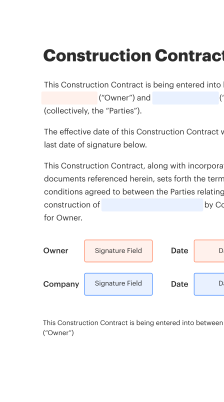
Create and edit your template online in four steps

Use a browser-based editor to customize content, map fields, and define signer roles before sending the template for execution.

  • Open editor: Load the catering proposal template into the online editor.
  • Modify content: Edit pricing, menus, dates, and client details inline.
  • Place fields: Add signature, initials, and required input controls.
  • Save template: Save as a reusable template for future proposals.
Collect signatures
24x
faster
Reduce costs by
$30
per document
Save up to
40h
per employee / month

Quick setup for the edit sign catering proposal template

Prepare a proposal file, add required signature and data fields, assign signers, and send for signature to start collecting legally valid approvals.

  • 01
    Upload proposal: Import PDF or Word proposal into the eSignature platform.
  • 02
    Add signature fields: Place signature, date, and text fields where needed.
  • 03
    Set recipients: Define signers, CCs, and signing order for the workflow.
  • 04
    Send and monitor: Dispatch the envelope and track status in the dashboard.

How to access and review the audit trail for each proposal

An audit trail documents every action taken on a proposal and is essential for compliance and dispute resolution.

01

Locate transaction:

Open the signed document in the dashboard.
02

View audit report:

Select the audit trail or history action.
03

Export evidence:

Download the full audit report as PDF.
04

Check signer IPs:

Confirm timestamps and IP addresses recorded.
05

Verify authentication:

Review the authentication method used by each signer.
06

Attach to record:

Store the audit report with the signed agreement.
be ready to get more

Why choose airSlate SignNow

  • Free 7-day trial. Choose the plan you need and try it risk-free.
  • Honest pricing for full-featured plans. airSlate SignNow offers subscription plans with no overages or hidden fees at renewal.
  • Enterprise-grade security. airSlate SignNow helps you comply with global security standards.
illustrations signature

Typical workflow settings for automated proposal processing

Configure workflow defaults to automate reminders, approval routing, and storage for signed catering proposals.

Setting Name Configuration
Automatic email reminder frequency interval 48 hours
Sequential versus parallel signing order Sequential
Default document retention location Cloud folder
Signer authentication requirement method Email or SMS
Post-signature delivery options Email PDF copy

Device support and platform requirements

The edit sign catering proposal template works across modern desktop browsers and native mobile environments to support signing on multiple devices.

  • Desktop browsers supported: Chrome, Edge, Safari, Firefox
  • Mobile OS support: iOS and Android apps available
  • Offline considerations: Limited offline signing capabilities

Ensure users keep their apps and browsers updated, verify network access for large attachments, and confirm device security settings to maintain document integrity and signature validity.

Security and protection features for the template

Data encryption: AES-256 at rest
TLS transport: TLS 1.2 or higher
Access control: Role-based permissions
Audit logs: Immutable event records
HIPAA options: BAA available
Two-factor: Optional 2FA for users

Industry examples: using the edit sign catering proposal template

Two practical scenarios show how editable templates reduce errors and accelerate approvals for catering agreements.

Local catering company

A small catering firm loads its master menu into a reusable template to standardize pricing and terms for recurring clients.

  • The team preconfigures signature and payment fields in advance.
  • Clients select menus and event details, generating totals automatically.

Resulting in faster approvals, fewer negotiation cycles, and clearer invoicing for each event.

Corporate events manager

An events division creates multiple tailored templates for different event sizes and compliance needs, including venue requirements and insurance clauses.

  • Conditional logic hides irrelevant sections for small orders.
  • Approvals route automatically to legal and finance when thresholds are reached.

Leading to consistent risk controls, faster procurement, and centralized contract retention.

Best practices for secure, accurate catering proposals

Follow these procedures when editing and sending templates to reduce errors, speed approvals, and maintain legal clarity.

Confirm client identity and designate signer responsibilities
Verify the signer's authority before sending a legally binding proposal. Include job title and company name in the document, and require authentication when dealing with high-value contracts or regulated venues to reduce disputes.
Use clear, unambiguous field labels and required markers
Label pricing fields, quantities, and deadlines clearly to avoid confusion. Mark mandatory fields and provide helper text where necessary to guide clients through selections and reduce incomplete submissions.
Keep templates up to date and version controlled
Maintain a single source of truth for terms, menu options, and pricing. Archive older versions and record change dates so teams send only current, approved templates to clients.
Preserve audit trails and secure backups
Ensure every executed proposal includes an audit log, and configure automatic backups to your preferred storage to support compliance and potential disputes.

FAQs about editing and signing the catering proposal template

Answers to common questions about preparing, sending, and troubleshooting editable catering proposal templates and signed agreements.

Feature availability: edit sign catering proposal template across vendors

A concise feature comparison helps evaluate basic capabilities relevant to editing and executing catering proposal templates across major eSignature providers.

Feature signNow (Recommended) DocuSign Adobe Sign
Bulk Send Limited
API Availability
HIPAA-capable
Template Library
be ready to get more

Get legally-binding signatures now!

Retention, backups, and document lifecycle rules

Document retention policies and backup schedules help meet legal and operational requirements for signed catering proposals.

Document retention policy duration (years):

7 years recommended

Backup frequency for signed documents:

Daily incremental backups

Long-term archival storage method:

Encrypted cold storage

Notification schedule for expiring agreements:

90 days before expiration

Destruction schedule and audit record:

Secure deletion after retention period

Pricing and plan notes across eSignature vendors for proposal workflows

High-level comparison of commercial and plan characteristics that affect cost of ownership for editable proposal templates and signing workflows.

Plan signNow (Featured) DocuSign Adobe Sign PandaDoc Dropbox Sign
Billing model Per user monthly Per user monthly Per user monthly Per user monthly Per user monthly
Free trial availability Free trial available Free trial available Free trial available Free trial available Free tier or trial
Enterprise support options Yes, enterprise plans Yes, enterprise plans Yes, enterprise plans Yes, enterprise plans Yes, enterprise plans
Typical small business entry Small business tiers available Small business tiers available Included with Acrobat plans Small business tiers available Small businesses supported
Notes on templates and API Templates and API included in paid plans Templates and API widely available Templates via Acrobat Sign Templates and API available Templates and API available

Simplify complex workflows

Create, execute, and manage workflows of any complexity, electronically from virtually anywhere. Scalable eSignature capabilities allow you to share documents with the right people in the correct order and define roles for each recipient. Execute document workflows faster and easier than ever before.

Automate document management

Optimize complex signing processes with airSlate SignNow’s powerful features to enhance your business. Control your automated eSignature workflows to ensure they're running at peak performance with instant notifications and reminders.

Optimize in team collaboration

Bring teams together in a secure, shared environment. Manage documents, use form templates and notifications to create more efficient cross-organization collaboration. Free your employees from having to spend time on repetitive activities so that they can focus on valuable, business-critical tasks.

Integrate into your existing systems

Run your projects with industry-leading integration. Collect Salesforce, Microsoft Teams, and SharePoint all in one business flow. Connect your software to a single system for endless possibilities and more efficiency.

Stay compliant with industry-leading data security

Feel safe with the knowledge that your data is protected by the latest in encryption security. airSlate SignNow is GDPR and eIDAS compliant and gives you exposure into your signing process with court-admissible audit trails. Set up user authorization and rights to control who has access to what.


walmart logo
exonMobil logo
apple logo
comcast logo
facebook logo
FedEx logo
be ready to get more

Get legally-binding signatures now!