Establishing secure connection… Loading editor… Preparing document…
Navigation

Fill and Sign the 31 Agreement Introducing a New Partner in the Existing Form
Fill and Sign the 31 Agreement Introducing a New Partner in the Existing Form

How it works

Open the document and fill out all its fields.
Apply your legally-binding eSignature.
Save and invite other recipients to sign it.

Rate template

4.4
50 votes
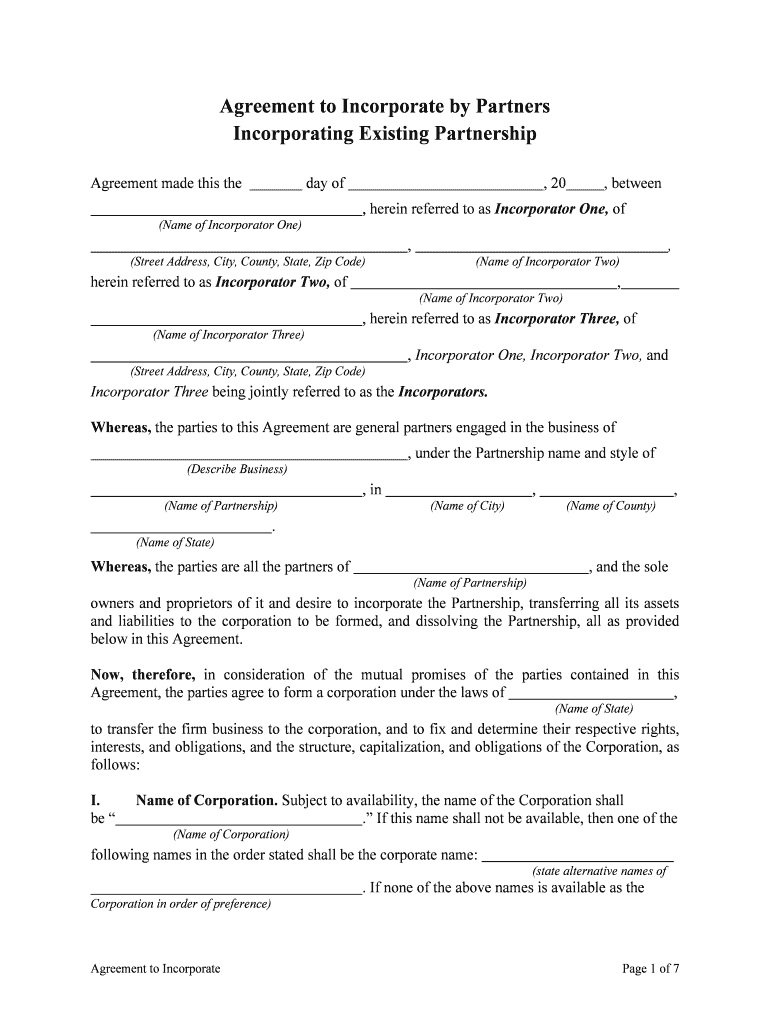
Agreement to IncorporatePage 1 of 7 Agreement to Incorporate by Partners Incorporating Existing Partnership Agreement made this the day of , 20 , between , herein referred to as Incorporator One, of (Name of Incorporator One) , , (Street Address, City, County, State, Zip Code) (Name of Incorporator Two) herein referred to as Incorporator Two, of , (Name of Incorporator Two) , herein referred to as Incorporator Three, of (Name of Incorporator Three) , Incorporator One, Incorporator Two, and (Street Address, City, County, State, Zip Code) Incorporator Three being jointly referred to as the Incorporators. Whereas, the parties to this Agreement are general partners engaged in the business of , under the Partnership name and style of (Describe Business) , in , , (Name of Partnership) (Name of City) (Name of County) . (Name of State) Whereas, the parties are all the partners of , and the sole (Name of Partnership) owners and proprietors of it and desire to incorporate the Partnership, transferring all its assets and liabilities to the corporation to be formed, and dissolving the Partnership, all as provide d below in this Agreement. Now, therefore, in consideration of the mutual promises of the parties contained in this Agreement, the parties agree to form a corporation under the laws of , (Name of State) to transfer the firm business to the corporation, and to fix and determine their respecti ve rights, interests, and obligations, and the structure, capitalization, and obligations of the Corpora tion, as follows: I. Name of Corporation. Subject to availability, the name of the Corporation shall be “ .” If this name shall not be available, then one of the (Name of Corporation) following names in the order stated shall be the corporate name: (state alternative names of . If none of the above names is available as the Corporation in order of preference) Agreement to IncorporatePage 2 of 7 name for the Corporation, then the corporate name shall be chosen as will most close ly and substantially resemble the Partnership name. II. Purpose and Powers. The Corporation shall be formed to take over, assume, conduct, and carry on the business now being conducted by the Partnership under the firm name of , in , , (Name of Partnership) (Name of City) (Name of County) , and to conduct such other lawful business or businesses as (Name of State) subsequently may from time to time be determined by the board of directors. The Corporati on shall have all general powers possessed by Corporations organized under (citation of statute), including all powers necessary or convenient to effect any or all of the corporate purposes/a s follows: A.To sue and be sued, complain and defend in its corporate name B. To have a corporate seal, which may be altered at will, and to use it, or a facsimile of it, by impressing or affixing it or in any other manner reproducing it; C. To make and amend bylaws, not inconsistent with its articles of incorporation or with the laws of this state, for managing the business and regulating the affairs of the corporation; D. To purchase, receive, lease or otherwise acquire, and own, hold, improve, use and otherwise deal with, real or personal property, or any legal or equitable interest in property, wherever located; E. To sell, convey, mortgage, pledge, lease, exchange and otherwise dispose of all or any part of its property; F. To purchase, receive, subscribe for, or otherwise acquire; own, hold, vote, use, sell, mortgage, lend, pledge or otherwise dispose of; and deal in and with shares or other interests in, or obligations of, any other entity; G. To make contracts and guarantees, incur liabilities, borrow money, issue its notes, bonds and other obligations (which may be convertible into or include the option to purchase other securities of the corporation), and secure any of its obligations by mortgage or pledge of any of its property, franchises or income, and make contracts of guaranty and suretyship which are necessary or convenient to the conduct, promotion or attainment of the business of (i) a corporation all of the outstanding stock of which is owned, directly or indirectly, by the contracting corporation, or (ii) a corporation which owns, directly or indirectly, all of the outstanding stock of the contracting corporation, or (iii) a corporation all of the outstanding stock of which is owned, directly or indirectly, by a corporation which owns, directly or indirectly, all of the outstanding stock of the contracting corporation, which contracts of guaranty and suretyship shall be deemed to be necessary or convenient to the conduct, promotion or attainment of the business of the Agreement to IncorporatePage 3 of 7 contracting corporation, and make other contracts of guaranty and suretyship which are necessary or convenient to the conduct, promotion or attainment of the business of the contracting corporation; H.To lend money, invest and reinvest its funds, and receive and hold real and personal property as security for repayment;I. To be a promoter, partner, member, associate or manager of any partnership, joint venture, trust or other entity;J. To conduct its business, locate offices and exercise the powers granted by within or without this state; (cite appropriate statues of State’s Model Business Corporation Act) K. To elect directors and appoint officers, employees and agents of the corporation, define their duties, fix their compensation and lend them money and credit; L. To pay pensions and establish pension plans, pension trusts, profit sharing plans, share bonus plans, share option plans and benefit or incentive plans for any or all of its current or former directors, officers, employees and agents; M. To make donations for the public welfare or for charitable, scientific or educational purposes;N. To transact any lawful business that will aid governmental policy; O. To make payments or donations, or do any other act, not inconsistent with law, that furthers the business and affairs of the corporation. III. Principal Office. The principal office for the transaction of the business of the Corporation shall be located in , and . (Name of County) (Name of State) IV. Capitalization. The authorized capital of the Corporation shall be $ of authorized capital. The authorized capital stock of the Corporation shall be one cl ass of common stock. V. Principal Office. The principal office for the transaction of the business of the Corporation shall be located in , . (Name of County) (Name of State) . VI. Signing Articles; First Directors. The parties to this Agreement, or so many of them as may be necessary for the purpose, shall sign the Articles of Incorporation as Incorporators. The persons named below shall be designated in the Articles of Incorporation as the first direct ors of the Corporation and shall serve as such until their respective successors are duly electe d and qualified. Agreement to IncorporatePage 4 of 7 VII. Officers. The Bylaws to be adopted at the first meeting of the Board of Directors shall provide for the following corporate officers: President, Vice President, and Secretary-Treasurer. The offices shall be filled by the Board of Directors at their first meeting by e lecting the following-named persons, each of whom has agreed to serve in the indicated office for the term designated in the Band at the salary shown after the person's name and until the person's successor is duly elected and qualified: Office Name of Officer Monthly Salary President $ (Name) Vice President $ (Name) Secretary-Treasurer $ (Name) VIII. Capitalization. The authorized capital of the Corporation shall be $ , and the capital stock of the Corporation shall be shares of common stock with a par (Number of Shares) value of $ . IX. Incorporation. The incorporators shall cause the Corporation to be formed within days from the date of this Agreement, pursuant to . (Number) (Citation of Statute) X. Transfer of Partnership Assets to Corporation; Assumption of Obligations Promptly after incorporation and the organizational meeting of the Corporation, the incorporators, as co-partners, shall sell and transfer to the Corporation all the property and assets of the Partnership and Partnership business, including inventory, fixtures, equipment, accounts and notes receivable, bank deposits, good will, and all other personal property, both tangible a nd intangible, and all real property or interests in the same, including leasehold interests and rentals, and shall deliver to the Corporation all books of account and records of the Partnership, and sha ll join in the execution of all the legal instruments necessary or appropriate to the accomplishment of the sale and transfer. The Corporation, through its Directors and officers, shall accept t he assets and shall assume the obligations of the Partnership, if any, which may be outstanding at the time of the transfer, including open and current accounts payable of the Partnership. XI. Valuation of Partnership Assets; Exchange for Corporate Notes or Stock. It is agreed that the fair market value of all the assets and property of the Pa rtnership, less the face amount of the Partnership obligations, if any, to be transferred to the Corporation, shall be determined by from the books of account of the partnership (Name of Accountant) as of the date of transfer following incorporation. Such values shall be determined by standard accounting practices and norms. The Corporation, through its Board of Directors, at the organizational meeting or an adjourned session of such meeting, shall consider the account and report of the accountants and, subject to reappraisal as provided below in this Agreement, sha ll determine the value of the net assets and property so transferred as the value and worth of the Agreement to IncorporatePage 5 of 7 same to the Corporation. Then the Corporation, through the Board of Directors, shall authori ze the issuance of common stock in exchange and payment for such property and assets to the incorporators as provided below. XII. Permit to Issue Shares; Stock Interests of Incorporators. The Corporation, through its Directors, shall immediately after its organizational meeting authorize appli cation to be made by the Corporation to the of (Name of Department, Title of Official) (Name of State) for a permit to issue shares of stock in the Corporation in exchange for the assets and propert y of the Partnership as follows: Names of Incorporators Number of Shares Amount of Consideration $ (Name) (Number) $ (Name) (Number) $ (Name) (Number) The parties agree that the foregoing stock allocation fully and fairly represents the ir respective net interests in the Partnership business and assets, and each party agrees to accept t he number of shares set opposite the party's name in full payment, satisfaction, and settlement of a ll the party's interest in the Partnership and Partnership. If the should determine that the fair (Name of Department, Title of Official) monetary value of the net assets of the Partnership to the Corporation is less than the amount determined above, then, as a condition to issuance of a stock permit, the reappraised val ue as fixed by such shall be accepted as the basis (Name of Department, Title of Official) for issuance of stock, and such adjustments in the number of shares issued shall be made as m ay be appropriate. The proportion of stock to be issued to the several incorporators, as provided above, shall remain the same. XIII. Notices; Transfers; Partnership; Liabilities. The incorporators promptly shall cause all necessary or appropriate legal notices to be given of the proposed transfer of Partnership assets to the Corporation to be formed, and shall make all appropriate arrangements for the determination of tax liabilities of the Partnership, including sales and use taxes, and for the transfer of licenses and permits to the Corporation. The Corporation shall indemnify the incorporators and each of them against all obligations and liabilities of the Pa rtnership which are transferred to and assumed by the Corporation at the time of transfer of Partnership assets. XIV. Continuation of Partners in Corporate Business; Covenant not to Compete. Following incorporation and the assumption of the Partnership business by the Corporation, each of the incorporators shall continue with substantially the same duties and shall devote substantially the same amount of time to the business as previously involved in the operation of Agreement to IncorporatePage 6 of 7 the Partnership, subject to such changes as may be made in assignments and work schedules by the Board of Directors. The incorporators shall receive no other salary for their services to the Corporation than as provided in Section V above. Each of the incorporators agrees that for a period of years after (Number) such incorporator ceases to be an officer or director or employee of the Corporation such incorporator will not engage in the same or any similar kind of business in which the Corpora tion may be engaged at the time of such incorporator's separation within a distance of (Number) miles of , . (Name of City) (Name of State) XV. Restriction on Stock Transfers. Each incorporator may, at the incorporator's election, cause the stock to which the incorporator is entitled to be issued to the incorporator and the incorporator's spouse or other member of the incorporator's immediate family, as joint tenants or otherwise. In addition, an incorporator may, at the incorporator's option, cause a transfer of the incorporator's stock, if held in the incorporator's own name, to the incorporator and the incorporator's spouse or immediate relative. No incorporator, spouse, or member of the incorporator's family shall otherwise assign, transfer, give, or sell any corporate stock except i n accordance with the stock transfer provisions to be inscribed on the stock certificates, i n form and content as set forth in the attached Exhibit A. XVI. Employment of Attorney. The incorporators shall employ (Name of Attorney) as legal counsel for the following purposes: A. To draft , Bylaws, application for a (Articles of Incorporation) permit to issue shares of stock, and notices, and any other documents or instruments related to the transfer of the Partnership assets and business and the formation of this Corporation under the laws of this state; B. To perform all other legal services necessary or convenient to the change in ownership and management of the business from a Partnership to a Corporation; andC. To advise the incorporators and the Corporation with respect to each step necessary in its organization and the accomplishment of the terms and provisions of this Agreement. The charges for all such legal services, fees of all state, county, and other publi c officials, departments, and agencies, and all other necessary costs, including franchise tax, if any, state certificate, and seal, shall be expenses of incorporation to be paid for by t he Corporation, but such part of the same as may be required to be paid prior to the incorporation and organization of the Corporation shall be advanced out of Partnership funds. Such advances shall be repaid by the Corporation to the Incorporators individually, in proportion to their several proprietary interests as set forth above. Agreement to IncorporatePage 7 of 7 WITNESS our signatures as of the day and date first above stated. By: By: (Signature of Incorporator One) (Signature of Incorporator Two) (Signature of Incorporator One) (Printed Name of Incorporator Two) By: (Signature of Incorporator Three) (Printed Name of Incorporator Three)

Helpful hints on finalizing your ‘31 Agreement Introducing A New Partner In The Existing ’ digitally

Are you fed up with the inconvenience of handling paperwork? Look no further than airSlate SignNow, the premier eSignature service for individuals and organizations. Wave farewell to the tedious procedure of printing and scanning documents. With airSlate SignNow, you can easily fulfill and endorse paperwork online. Make use of the powerful tools integrated into this user-friendly and cost-effective platform and transform your methodology for paperwork management. Whether you need to approve documents or collect signatures, airSlate SignNow manages it all seamlessly, with only a few clicks.

Adhere to this detailed guide:

  1. Access your account or sign up for a complimentary trial with our service.
  2. Select +Create to upload a file from your device, cloud, or our template library.
  3. Open your ‘31 Agreement Introducing A New Partner In The Existing ’ in the editor.
  4. Click Me (Fill Out Now) to finalize the form from your end.
  5. Insert and designate fillable fields for others (if necessary).
  6. Proceed with the Send Invite settings to solicit eSignatures from others.
  7. Download, print your version, or convert it into a reusable template.

No need to worry if you want to collaborate with your colleagues on your 31 Agreement Introducing A New Partner In The Existing or send it for notarization—our solution has everything you need to complete such tasks. Sign up with airSlate SignNow today and elevate your document management to a new level!

Here is a list of the most common customer questions. If you can’t find an answer to your question, please don’t hesitate to reach out to us.

Need help? Contact Support

The best way to complete and sign your 31 agreement introducing a new partner in the existing form


Save time on document management with airSlate SignNow and get your 31 agreement introducing a new partner in the existing form eSigned quickly from anywhere with our fully compliant eSignature tool.

How to Sign a PDF Online How to Sign a PDF Online

How to fill out and sign paperwork online

Previously, dealing with paperwork took pretty much time and effort. But with airSlate SignNow, document management is quick and easy. Our robust and easy-to-use eSignature solution enables you to effortlessly complete and electronically sign your 31 agreement introducing a new partner in the existing form online from any internet-connected device.

Follow the step-by-step guidelines to eSign your 31 agreement introducing a new partner in the existing form template online:

  • 1.Sign up for a free trial with airSlate SignNow or log in to your account with password credentials or SSO authentication.
  • 2.Click Upload or Create and import a form for eSigning from your device, the cloud, or our form collection.
  • 3.Click on the file name to open it in the editor and utilize the left-side toolbar to fill out all the blank areas accordingly.
  • 4.Put the My Signature field where you need to eSign your sample. Provide your name, draw, or upload a picture of your handwritten signature.
  • 5.Click Save and Close to accomplish editing your completed form.

Once your 31 agreement introducing a new partner in the existing form template is ready, download it to your device, save it to the cloud, or invite other parties to eSign it. With airSlate SignNow, the eSigning process only takes several clicks. Use our robust eSignature tool wherever you are to manage your paperwork productively!


How to Sign a PDF Using Google Chrome How to Sign a PDF Using Google Chrome

How to complete and sign forms in Google Chrome

Completing and signing documents is easy with the airSlate SignNow extension for Google Chrome. Installing it to your browser is a quick and productive way to manage your forms online. Sign your 31 agreement introducing a new partner in the existing form sample with a legally-binding electronic signature in just a couple of clicks without switching between applications and tabs.

Follow the step-by-step guide to eSign your 31 agreement introducing a new partner in the existing form in Google Chrome:

  • 1.Go to the Chrome Web Store, find the airSlate SignNow extension for Chrome, and add it to your browser.
  • 2.Right-click on the link to a document you need to eSign and select Open in airSlate SignNow.
  • 3.Log in to your account with your credentials or Google/Facebook sign-in option. If you don’t have one, sign up for a free trial.
  • 4.Utilize the Edit & Sign toolbar on the left to complete your template, then drag and drop the My Signature option.
  • 5.Upload a picture of your handwritten signature, draw it, or simply type in your full name to eSign.
  • 6.Make sure all data is correct and click Save and Close to finish editing your paperwork.

Now, you can save your 31 agreement introducing a new partner in the existing form sample to your device or cloud storage, email the copy to other individuals, or invite them to eSign your document via an email request or a secure Signing Link. The airSlate SignNow extension for Google Chrome improves your document processes with minimum time and effort. Start using airSlate SignNow today!


How to Sign a PDF in Gmail How to Sign a PDF in Gmail How to Sign a PDF in Gmail

How to fill out and sign forms in Gmail

When you receive an email with the 31 agreement introducing a new partner in the existing form for approval, there’s no need to print and scan a file or download and re-upload it to a different tool. There’s a better solution if you use Gmail. Try the airSlate SignNow add-on to promptly eSign any paperwork right from your inbox.

Follow the step-by-step guidelines to eSign your 31 agreement introducing a new partner in the existing form in Gmail:

  • 1.Navigate to the Google Workplace Marketplace and look for a airSlate SignNow add-on for Gmail.
  • 2.Install the program with a corresponding button and grant the tool access to your Google account.
  • 3.Open an email containing an attachment that needs approval and utilize the S symbol on the right sidebar to launch the add-on.
  • 4.Log in to your airSlate SignNow account. Select Send to Sign to forward the file to other people for approval or click Upload to open it in the editor.
  • 5.Put the My Signature option where you need to eSign: type, draw, or import your signature.

This eSigning process saves time and only requires a few clicks. Take advantage of the airSlate SignNow add-on for Gmail to update your 31 agreement introducing a new partner in the existing form with fillable fields, sign paperwork legally, and invite other parties to eSign them al without leaving your mailbox. Boost your signature workflows now!


How to Sign a PDF on a Mobile Device How to Sign a PDF on a Mobile Device How to Sign a PDF on a Mobile Device

How to fill out and sign forms in a mobile browser

Need to quickly complete and sign your 31 agreement introducing a new partner in the existing form on a mobile phone while doing your work on the go? airSlate SignNow can help without the need to install additional software programs. Open our airSlate SignNow solution from any browser on your mobile device and add legally-binding electronic signatures on the go, 24/7.

Follow the step-by-step guidelines to eSign your 31 agreement introducing a new partner in the existing form in a browser:

  • 1.Open any browser on your device and go to the www.signnow.com
  • 2.Sign up for an account with a free trial or log in with your password credentials or SSO authentication.
  • 3.Click Upload or Create and import a file that needs to be completed from a cloud, your device, or our form library with ready-made templates.
  • 4.Open the form and complete the blank fields with tools from Edit & Sign menu on the left.
  • 5.Place the My Signature field to the sample, then type in your name, draw, or add your signature.

In a few easy clicks, your 31 agreement introducing a new partner in the existing form is completed from wherever you are. When you're finished editing, you can save the document on your device, create a reusable template for it, email it to other people, or invite them electronically sign it. Make your documents on the go speedy and efficient with airSlate SignNow!


How to Sign a PDF on iPhone How to Sign a PDF on iPhone

How to complete and sign documents on iOS

In today’s corporate environment, tasks must be completed quickly even when you’re away from your computer. With the airSlate SignNow app, you can organize your paperwork and approve your 31 agreement introducing a new partner in the existing form with a legally-binding eSignature right on your iPhone or iPad. Install it on your device to conclude contracts and manage documents from just about anywhere 24/7.

Follow the step-by-step guide to eSign your 31 agreement introducing a new partner in the existing form on iOS devices:

  • 1.Go to the App Store, find the airSlate SignNow app by airSlate, and install it on your device.
  • 2.Launch the application, tap Create to import a template, and choose Myself.
  • 3.Select Signature at the bottom toolbar and simply draw your signature with a finger or stylus to eSign the sample.
  • 4.Tap Done -> Save right after signing the sample.
  • 5.Tap Save or take advantage of the Make Template option to re-use this document later on.

This method is so simple your 31 agreement introducing a new partner in the existing form is completed and signed in just a couple of taps. The airSlate SignNow application works in the cloud so all the forms on your mobile device are kept in your account and are available any time you need them. Use airSlate SignNow for iOS to enhance your document management and eSignature workflows!


How to Sign a PDF on Android How to Sign a PDF on Android

How to complete and sign paperwork on Android

With airSlate SignNow, it’s easy to sign your 31 agreement introducing a new partner in the existing form on the go. Set up its mobile app for Android OS on your device and start improving eSignature workflows right on your smartphone or tablet.

Follow the step-by-step guidelines to eSign your 31 agreement introducing a new partner in the existing form on Android:

  • 1.Go to Google Play, search for the airSlate SignNow app from airSlate, and install it on your device.
  • 2.Log in to your account or register it with a free trial, then import a file with a ➕ button on the bottom of you screen.
  • 3.Tap on the imported file and choose Open in Editor from the dropdown menu.
  • 4.Tap on Tools tab -> Signature, then draw or type your name to electronically sign the form. Complete empty fields with other tools on the bottom if required.
  • 5.Utilize the ✔ button, then tap on the Save option to finish editing.

With an intuitive interface and full compliance with major eSignature laws and regulations, the airSlate SignNow application is the perfect tool for signing your 31 agreement introducing a new partner in the existing form. It even works without internet and updates all document changes once your internet connection is restored and the tool is synced. Fill out and eSign forms, send them for eSigning, and generate re-usable templates anytime and from anywhere with airSlate SignNow.

Sign up and try 31 agreement introducing a new partner in the existing form
  • Close deals faster
  • Improve productivity
  • Delight customers
  • Increase revenue
  • Save time & money
  • Reduce payment cycles

