Establishing secure connection… Loading editor… Preparing document…
Navigation

Fill and Sign the 369 G Form
Fill and Sign the 369 G Form

How it works

Open the document and fill out all its fields.
Apply your legally-binding eSignature.
Save and invite other recipients to sign it.

Rate template

4.5
35 votes
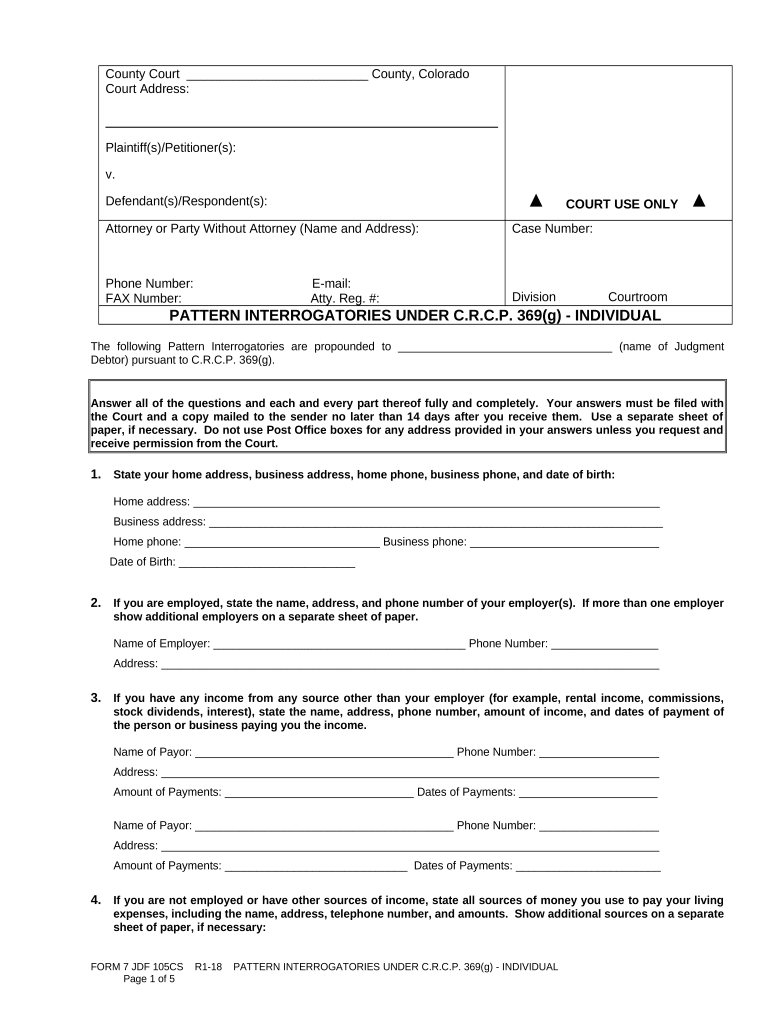
County Court __________________________ County, Colorado Court Address: Plaintiff(s)/Petitioner(s): v. Defendant(s)/Respondent(s): COURT USE ONLY Attorney or Party Without Attorney (Name and Address): Phone Number: E-mail: FAX Number: Atty. Reg. #: Case Number: Division Courtroom PATTERN INTERROGATORIES UNDER C.R.C.P. 369(g) - INDIVIDUAL The following Pattern Interrogatories are propounded to __________________________________ (name of Judgment Debtor) pursuant to C.R.C.P. 369(g). Answer all of the questions and each and every part thereof fully and completely. Your answers must be filed with the Court and a copy mailed to the sender no later than 14 days after you receive them. Use a separate sheet of paper, if necessary. Do not use Post Office boxes for any address provided in your answers unless you request and receive permission from the Court. 1. State your home address, business address, home phone, business phone, and date of birth: Home address: __________________________________________________________________________ Business address: ________________________________________________________________________ Home phone: _______________________________ Business phone: ______________________________ Date of Birth: ____________________________ 2. If you are employed, state the name, address, and phone number of your employer(s). If more than one employer show additional employers on a separate sheet of paper. Name of Employer: ________________________________________ Phone Number: _________________ Address: _______________________________________________________________________________ 3. If you have any income from any source other than your employer (for example, rental income, commissions, stock dividends, interest), state the name, address, phone number, amount of income, and dates of payment of the person or business paying you the income. Name of Payor: _________________________________________ Phone Number: ___________________ Address: _______________________________________________________________________________ Amount of Payments: ______________________________ Dates of Payments: ______________________ Name of Payor: _________________________________________ Phone Number: ___________________ Address: _______________________________________________________________________________ Amount of Payments: _____________________________ Dates of Payments: _______________________ 4. If you are not employed or have other sources of income, state all sources of money you use to pay your living expenses, including the name, address, telephone number, and amounts. Show additional sources on a separate sheet of paper, if necessary: FORM 7 JDF 105CS R1-18 PATTERN INTERROGATORIES UNDER C.R.C.P. 369(g) - INDIVIDUAL Page 1 of 5 Name of Payor: _________________________________________ Phone Number: ___________________ Address: _______________________________________________________________________________ Amount of Payments: $____________________________ Dates of Payments: _______________________ Name of Payor: _________________________________________ Phone Number: ___________________ Address: _______________________________________________________________________________ Amount of Payments: $____________________________ Dates of Payments: _______________________ 5. State whether you own or rent the home you live in, including the amount of rent or house payments you make:  Rent _________________ (monthly rent payment)  Own _________________ (monthly house payment) Name(s) of Owner(s): _____________________________________________________________________ 6. State the name, address, account number and type of account for every financial institution (bank, savings and loan, credit union, brokerage house) where you have an account or where you have signature authority on the account. Provide additional information on a separate sheet of paper, if necessary. Name: _______________________________________________ Address: _______________________________________________________________________________ Type of Account: _____________________________ Account Number (last 4-digits): _______________ Name: _______________________________________________ Address: _______________________________________________________________________________ Type of Account: _____________________________ Account Number (last 4-digits): _______________ Name: _______________________________________________ Address: _______________________________________________________________________________ Type of Account: _____________________________ Account Number (last 4-digits): _______________ 7. If you own or owned during the last four years, or regularly use any automobiles, motorcycles, trucks, RV’s, ATV’s, Jet skis, boats, or trailers, list the make, model, year, VIN, date of purchase, purchase price, name of owner if only used by you. If you no longer own the vehicle, identify date of sale, sale price, and name and address of purchaser. Provide additional information on a separate sheet of paper, if necessary. Make: ________________ Model: _____________ Year: _______ VIN: ___________________________ Purchase Date: _________________Price: _________________ Sale Date: _____________________Price: _________________ Purchaser: __________________________ Address of Purchaser: _____________________________________________________________________ Owner if not you: _________________________________________________________________________ Make: ________________ Model: _____________ Year: _______ VIN: ____________________________ Purchase Date: _________________Price: _________________ Sale Date: _____________________Price: _________________ Purchaser: ___________________________ Address of Purchaser: ______________________________________________________________________ Owner if not you: __________________________________________________________________________ 8. If you own or owned during the last four years, or use any firearms, list the make, model, serial number, date of purchase, purchase price. If you no longer own the firearm, identify date of sale, sale price, and name and address of purchaser. Provide additional information on a separate sheet of paper, if necessary. Make: ________________ Model: _____________ Serial Number: ________________________________ FORM 7 JDF 105CS R1-18 PATTERN INTERROGATORIES UNDER C.R.C.P. 369(g) - INDIVIDUAL Page 2 of 5 Purchase Date: _________________Price: _________________ Sale Date: _____________________Price: _________________ Purchaser: ___________________________ Address of Purchaser: ______________________________________________________________________ Owner if not you: __________________________________________________________________________ Make: ________________ Model: _____________ Serial Number: _______________________________ Purchase Date: _________________Price: _________________ Sale Date: _____________________Price: _________________ Purchaser: __________________________ Address of Purchaser: _____________________________________________________________________ Owner if not you: __________________________________________________________________________ 9. If you own or owned during the last four years, or regularly use any personal property NOT DESCRIBED ABOVE for which the purchase prices was $500.00 or more, describe each item by make, model, date of purchase, purchase price, name of owner if only used by you. If you no longer own the item, identify date of sale, sale price, and name and address of purchaser. Provide additional information on a separate sheet of paper, if necessary. Make: ________________ Model: _____________ Purchase Date: ________________ Price: __________ Sale Date: _____________________Price: _________________ Purchaser: ___________________________ Address of Purchaser: _____________________________________________________________________ Owner if not you: ___________________________________________________ Make: ________________ Model: _____________ Purchase Date: ________________ Price: __________ Sale Date: _____________________Price: _________________ Purchaser: ___________________________ Address of Purchaser: ______________________________________________________________________ Owner if not you: ___________________________________________________ Make: ________________ Model: _____________ Purchase Date: ________________ Price: __________ Sale Date: _____________________Price: _________________ Purchaser: ___________________________ Address of Purchaser: ______________________________________________________________________ Owner if not you: __________________________________________________________________________ 10. State the name, address, and telephone number of your spouse, if you are married and if not, a close relative not living with you, indicating their relationship to you. Name: ____________________________________________ Relationship: _______________________ Address: ________________________________________________________________________________ Phone Number: _____________________________ 11. Produce and attach to your answers, copies of the following documents for the last four years: a. Your federal and state tax returns with all attachments. b. The deed to or the lease for your home. c. Your driver’s license. d. Your last pay stub from your employer(s). e. Your last bank statement(s). 12. If you wish to propose an arrangement to pay the judgment, state the proposed terms: _________________________________________________________________________________________________ _________________________________________________________________________________________________ _________________________________________________________________________________________________ FORM 7 JDF 105CS R1-18 PATTERN INTERROGATORIES UNDER C.R.C.P. 369(g) - INDIVIDUAL Page 3 of 5 If your are self-employed, you must also answer the following questions. 13. What is the full name, address, and phone number of the business? Name: _______________________________________________ Phone Number: ___________________ Address: _______________________________________________________________________________ 14. What does your business do? _____________________________________________________________ 15. On a separate sheet of paper, list the name, address and phone number of each business customer during the past three months, including the amount and reason for any money owed, if any. 16. State the name, address, account number and type of account for every financial institution (bank, savings and loan, credit union, brokerage house) where the business has an account. Provide additional information on a separate sheet of paper, if necessary. Name: __________________________________________________________________________________ Address: ________________________________________________________________________________ Type of Account: _____________________________ Account Number (last 4-digits): ________________ Name: ___________________________________________________________________________________ Address: _________________________________________________________________________________ Type of Account: _____________________________ Account Number (last 4-digits): _________________ 17. If the business owns or owned during the last four years, or regularly uses, any personal property for which it paid $500.00 or more, describe each item by make, model, date of purchase, purchase price, name of owner if only used by you. If the business no longer owns the item, identify date of sale, sale price, and name and address of purchaser. Provide additional information on a separate sheet of paper, if necessary. Make: ________________ Model: _____________ Purchase Date: ________________ Price: __________ Sale Date: _____________________Price: _________________ Purchaser: ___________________________ Address of Purchaser: ______________________________________________________________________ Owner if not you: __________________________________________________________________________ Make: ________________ Model: _____________ Purchase Date: ________________ Price: __________ Sale Date: _____________________Price: _________________ Purchaser: ___________________________ Address of Purchaser: ______________________________________________________________________ Owner if not you: __________________________________________________________________________ Make: ________________ Model: _____________ Purchase Date: ________________ Price: __________ Sale Date: _____________________Price: _________________ Purchaser: ___________________________ Address of Purchaser: ______________________________________________________________________ Owner if not you: __________________________________________________________________________ 18. Produce and attach to your answers, copies of the following documents for the business: a. All bank records for the past three months. b. All payroll records for the past three months. c. Current list of the accounts receivable. d. Profit and Loss Statements for the current and prior year. FORM 7 JDF 105CS R1-18 PATTERN INTERROGATORIES UNDER C.R.C.P. 369(g) - INDIVIDUAL Page 4 of 5 e. Current asset list, including the inventory. Failure to respond fully, accurately and timely to these interrogatories could result in a citation for contempt of court. I do hereby affirm under penalty of perjury that I have read each of the above questions and answered them fully and truthfully.  By checking this box, I am acknowledging I am filling in the blanks and not changing anything else on the form.  By checking this box, I am acknowledging that I have made a change to the original content of this form. Dated: ________________________________ ___________________________________________ Judgment Debtor Subscribed and affirmed, or sworn to before me in the County of ______________________, State of ________________, this ___________ day of _______________, 20______. My Commission Expires: ________________________ ___________________________________________ Notary Public /Deputy Clerk CERTIFICATE OF SERVICE BY MAILING (To be performed by Clerk within three days of filing) I hereby certify that on ______________________(date), I mailed a true and complete copy of the PATTERN INTERROGATORIES UNDER C.R.C.P. 369(g) - INDIVIDUAL by placing them in the United States Mail, postage pre-paid to the Defendant at the address listed below. To: _ ________ _ _ ______________________________________________ Clerk of Court/Deputy Clerk  (If applicable) Plaintiff notified of non-service on ____________________________ (date). Clerk’s Initials _ ___________ FORM 7 JDF 105CS R1-18 PATTERN INTERROGATORIES UNDER C.R.C.P. 369(g) - INDIVIDUAL Page 5 of 5

Practical tips for completing your ‘369 G Form’ online

Are you fed up with the inconvenience of managing paperwork? Look no further than airSlate SignNow, the premier eSignature solution for individuals and enterprises. Say farewell to the lengthy process of printing and scanning documents. With airSlate SignNow, you can effortlessly fill out and sign documents online. Take advantage of the robust features offered by this user-friendly and cost-effective platform and transform your approach to document management. Whether you need to sign forms or gather signatures, airSlate SignNow takes care of it all seamlessly, needing just a few clicks.

Refer to this comprehensive guide:

  1. Log into your account or register for a free trial with our service.
  2. Click +Create to upload a file from your device, cloud storage, or our form library.
  3. Open your ‘369 G Form’ in the editor.
  4. Click Me (Fill Out Now) to finalize the document on your end.
  5. Insert and allocate fillable fields for other involved parties (if necessary).
  6. Proceed with the Send Invite settings to solicit eSignatures from others.
  7. Save, print your version, or convert it into a reusable template.

Don’t be concerned if you need to collaborate with your teammates on your 369 G Form or submit it for notarization—our solution offers everything you require to achieve these tasks. Create an account with airSlate SignNow today and elevate your document management to new levels!

Here is a list of the most common customer questions. If you can’t find an answer to your question, please don’t hesitate to reach out to us.

Need help? Contact Support

The best way to complete and sign your 369 g form

Save time on document management with airSlate SignNow and get your 369 g form eSigned quickly from anywhere with our fully compliant eSignature tool.

How to Sign a PDF Online How to Sign a PDF Online

How to fill out and sign paperwork online

Previously, working with paperwork took pretty much time and effort. But with airSlate SignNow, document management is quick and easy. Our powerful and easy-to-use eSignature solution enables you to easily complete and electronically sign your 369 g form online from any internet-connected device.

Follow the step-by-step guidelines to eSign your 369 g form template online:

  • 1.Register for a free trial with airSlate SignNow or log in to your account with password credentials or SSO authorization option.
  • 2.Click Upload or Create and import a file for eSigning from your device, the cloud, or our form collection.
  • 3.Click on the document name to open it in the editor and utilize the left-side menu to fill out all the empty areas appropriately.
  • 4.Put the My Signature field where you need to approve your form. Provide your name, draw, or upload a picture of your regular signature.
  • 5.Click Save and Close to finish modifying your completed form.

As soon as your 369 g form template is ready, download it to your device, export it to the cloud, or invite other parties to electronically sign it. With airSlate SignNow, the eSigning process only requires a few clicks. Use our powerful eSignature solution wherever you are to manage your paperwork effectively!


How to Sign a PDF Using Google Chrome How to Sign a PDF Using Google Chrome

How to complete and sign paperwork in Google Chrome

Completing and signing documents is easy with the airSlate SignNow extension for Google Chrome. Adding it to your browser is a fast and beneficial way to manage your paperwork online. Sign your 369 g form template with a legally-binding electronic signature in a couple of clicks without switching between applications and tabs.

Follow the step-by-step guide to eSign your 369 g form in Google Chrome:

  • 1.Navigate to the Chrome Web Store, find the airSlate SignNow extension for Chrome, and install it to your browser.
  • 2.Right-click on the link to a form you need to sign and choose Open in airSlate SignNow.
  • 3.Log in to your account with your credentials or Google/Facebook sign-in buttons. If you don’t have one, sign up for a free trial.
  • 4.Use the Edit & Sign menu on the left to complete your sample, then drag and drop the My Signature field.
  • 5.Insert a photo of your handwritten signature, draw it, or simply type in your full name to eSign.
  • 6.Make sure all data is correct and click Save and Close to finish modifying your form.

Now, you can save your 369 g form template to your device or cloud storage, send the copy to other people, or invite them to electronically sign your document via an email request or a protected Signing Link. The airSlate SignNow extension for Google Chrome improves your document processes with minimum time and effort. Try airSlate SignNow today!


How to Sign a PDF in Gmail How to Sign a PDF in Gmail How to Sign a PDF in Gmail

How to complete and sign forms in Gmail

When you get an email containing the 369 g form for approval, there’s no need to print and scan a document or save and re-upload it to a different tool. There’s a better solution if you use Gmail. Try the airSlate SignNow add-on to rapidly eSign any documents right from your inbox.

Follow the step-by-step guidelines to eSign your 369 g form in Gmail:

  • 1.Visit the Google Workplace Marketplace and look for a airSlate SignNow add-on for Gmail.
  • 2.Set up the tool with a related button and grant the tool access to your Google account.
  • 3.Open an email containing an attachment that needs signing and utilize the S sign on the right panel to launch the add-on.
  • 4.Log in to your airSlate SignNow account. Opt for Send to Sign to forward the document to other parties for approval or click Upload to open it in the editor.
  • 5.Drop the My Signature option where you need to eSign: type, draw, or import your signature.

This eSigning process saves efforts and only takes a few clicks. Utilize the airSlate SignNow add-on for Gmail to update your 369 g form with fillable fields, sign documents legally, and invite other parties to eSign them al without leaving your inbox. Boost your signature workflows now!


How to Sign a PDF on a Mobile Device How to Sign a PDF on a Mobile Device How to Sign a PDF on a Mobile Device

How to fill out and sign paperwork in a mobile browser

Need to quickly complete and sign your 369 g form on a mobile phone while working on the go? airSlate SignNow can help without needing to install additional software apps. Open our airSlate SignNow solution from any browser on your mobile device and add legally-binding eSignatures on the go, 24/7.

Follow the step-by-step guidelines to eSign your 369 g form in a browser:

  • 1.Open any browser on your device and follow the link www.signnow.com
  • 2.Create an account with a free trial or log in with your password credentials or SSO authentication.
  • 3.Click Upload or Create and pick a file that needs to be completed from a cloud, your device, or our form library with ready-made templates.
  • 4.Open the form and complete the blank fields with tools from Edit & Sign menu on the left.
  • 5.Place the My Signature field to the sample, then enter your name, draw, or add your signature.

In a few easy clicks, your 369 g form is completed from wherever you are. As soon as you're done with editing, you can save the file on your device, create a reusable template for it, email it to other people, or invite them electronically sign it. Make your documents on the go fast and effective with airSlate SignNow!


How to Sign a PDF on iPhone How to Sign a PDF on iPhone

How to fill out and sign documents on iOS

In today’s business world, tasks must be done quickly even when you’re away from your computer. With the airSlate SignNow mobile app, you can organize your paperwork and approve your 369 g form with a legally-binding eSignature right on your iPhone or iPad. Install it on your device to conclude contracts and manage documents from anywhere 24/7.

Follow the step-by-step guidelines to eSign your 369 g form on iOS devices:

  • 1.Open the App Store, find the airSlate SignNow app by airSlate, and set it up on your device.
  • 2.Launch the application, tap Create to import a form, and choose Myself.
  • 3.Opt for Signature at the bottom toolbar and simply draw your autograph with a finger or stylus to eSign the sample.
  • 4.Tap Done -> Save right after signing the sample.
  • 5.Tap Save or use the Make Template option to re-use this paperwork in the future.

This process is so simple your 369 g form is completed and signed within a couple of taps. The airSlate SignNow application works in the cloud so all the forms on your mobile device remain in your account and are available any time you need them. Use airSlate SignNow for iOS to boost your document management and eSignature workflows!


How to Sign a PDF on Android How to Sign a PDF on Android

How to complete and sign paperwork on Android

With airSlate SignNow, it’s easy to sign your 369 g form on the go. Set up its mobile application for Android OS on your device and start boosting eSignature workflows right on your smartphone or tablet.

Follow the step-by-step guidelines to eSign your 369 g form on Android:

  • 1.Go to Google Play, find the airSlate SignNow application from airSlate, and install it on your device.
  • 2.Sign in to your account or create it with a free trial, then import a file with a ➕ option on the bottom of you screen.
  • 3.Tap on the uploaded file and select Open in Editor from the dropdown menu.
  • 4.Tap on Tools tab -> Signature, then draw or type your name to electronically sign the template. Complete blank fields with other tools on the bottom if needed.
  • 5.Use the ✔ button, then tap on the Save option to end up with editing.

With an intuitive interface and total compliance with main eSignature requirements, the airSlate SignNow application is the best tool for signing your 369 g form. It even operates offline and updates all record modifications when your internet connection is restored and the tool is synced. Complete and eSign forms, send them for eSigning, and generate multi-usable templates whenever you need and from anyplace with airSlate SignNow.

Sign up and try 369 g form
  • Close deals faster
  • Improve productivity
  • Delight customers
  • Increase revenue
  • Save time & money
  • Reduce payment cycles


