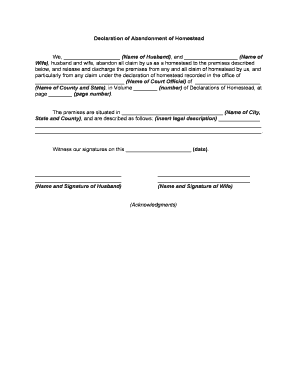
Declaration of Abandonment of Homestead
What the Declaration of Abandonment of Homestead Is
Why a Clear Declaration Matters
Recording a Declaration of Abandonment of Homestead clarifies legal title, notifies taxing authorities and creditors, and resolves disputes about entitlement to homestead exemptions. It reduces future litigation risk and enables accurate property tax assessment when a property no longer qualifies as a primary residence.
Who Commonly Prepares and Uses This Declaration
Typical users include property owners, title companies, county recorders, and attorneys handling real property, tax, and probate matters.
- Individual property owners asserting that a former primary residence no longer qualifies for homestead exemption.
- Title companies recording chain-of-title documents and seeking to clear homestead-related clouds on title.
- Attorneys preparing sworn statements for recording, tax appeals, or creditor disputes involving homestead status.
Step-by-Step: Prepare, Execute, and Record
-
01Identify Property: Confirm legal description or APN.
-
02Draft Declaration: Write concise factual basis for abandonment.
-
03Sign and Notarize: Sign before required witnesses or notary.
-
04Record Document: File with county recorder and pay fees.
Where to File and How the Recording Works
-
Prepare: Gather originals, supporting proofs, and fee payment.
-
Notarize: Execute in presence of notary or required witnesses.
-
Submit: Deliver to county recorder's office or online portal.
-
Receive Indexing: Recorder assigns document number and updates public records.
Configure an Electronic Workflow for Accurate Submission
| Field | Configuration |
|---|---|
| Signer Authentication Method via Email/SMS | Email link by default; SMS code optional for higher assurance. |
| Field Validation Rules and Formats | Require MM/DD/YYYY for dates; enforce numeric parcel numbers and address completeness. |
| Signer Order, Roles and Sequence | Set owner as primary signer, then notary or witness role before recording. |
| Recording Export Format and Package | Produce printable PDF/A package including signed instrument and certificate of completion. |
Pricing and Feature Snapshot for Common eSignature Vendors
| signNow | DocuSign | Adobe Sign | PandaDoc | HelloSign | |
|---|---|---|---|---|---|
| Starting Price | $8/user/mo | $15/user/mo | $14/user/mo | $19/user/mo | $15/user/mo |
| Free Trial | 7-day trial | Varies by plan | Varies by plan | Varies by plan | Varies by plan |
| Bulk Send | Yes, available on plan | Yes, available on plan | Yes, available on plan | Yes, available on plan | Varies |
| Audit Trail | Yes | Yes | Yes | Yes | Yes |
| HIPAA Compliant | Yes | Varies by plan | Varies by plan | Varies by plan | Varies by plan |
Key Risks and Consequences of Errors
Common Preparation Errors to Avoid
- Failing to provide the precise legal description or APN leads to recording delays and may leave the declaration ineffective against subsequent title claims.
- Using inconsistent owner names, such as initials or informal names, can prevent the recorder from linking the declaration to existing title records.
- Omitting notarization or required witness signatures in jurisdictions that demand them will result in rejection or reduced legal weight of the filing.
- Failing to state clear factual grounds for abandonment, including dates and new residence, undermines enforcement and complicates tax and creditor disputes.
Best Practices to Ensure a Valid and Enforceable Declaration
Real-World Examples of How Declarations Are Used
Residential Relocation
A homeowner moved interstate for employment and stopped using the property as a primary residence, but failed to record abandonment formally.
- Title showed homestead exemption incorrectly.
- Recording a clear Declaration of Abandonment of Homestead with supporting utility records and a sworn statement allowed the county to correct tax assessments and removed an unexpected exemption, preventing future tax disputes and easing sale preparations.
Title Clearance for Sale
A property listed for sale showed a homestead claim from an absent owner; buyer financing delayed until the title was cleared.
- Recorded declaration clarified the owner's abandonment status.
- Once recorded, lenders accepted revised title reports and the sale proceeded; the documented abandonment also resolved competing creditor notices and enabled timely closing without further litigation, saving weeks of delay and legal fees.
Timing Expectations and Filing Deadlines
Record Promptly:
Record as soon as abandonment is established; affects next tax year.
County Processing Time:
Local recording offices typically process in 1–4 weeks.
Assessor Adjustments:
Tax assessors may reevaluate exemptions after recorded date.
Challenging Decisions:
File appeals or petitions per county procedures within local deadlines.
Remote Notarization:
RON availability can speed execution; confirm state approval.
Key Milestones from Drafting to Indexing
Draft and Verify
Prepare declaration and verify legal description.
Execute and Authenticate
Sign with required witnesses or notary per jurisdiction.
Record Submission
Submit to recorder and pay recording fees.
Indexing and Notice
Recorder indexes document; assessors and title companies update records.
Digital Signing and Submission Considerations
Use these platform capabilities to sign, notarize, and route the Declaration of Abandonment of Homestead securely and compliantly.
- Integrations: Salesforce, NetSuite, Google Workspace, Microsoft 365.
- File Formats: PDF, PDF/A, DOCX, and HTML supported.
- Security Standards: TLS 1.2/1.3 in transit and AES-256 at rest.
Frequently Asked Questions About Declarations of Abandonment of Homestead
-
Can the declaration be signed electronically?
Yes. Under the federal ESIGN Act (15 U.S.C. ch. 96) and UETA, electronic signatures are generally valid if intent, consent, attribution, and retention are satisfied. However, confirm state exceptions and local recorder acceptance; some counties require wet-ink signatures or specific notarization language.
-
Is notarization required for all states?
Not universally. Notarization and witness requirements vary by state and by document type. Some states accept acknowledgment or notary, others require witnesses for deeds. Check the county recorder or state statutes for precise execution requirements before filing.
-
What happens if the recorder rejects my filing?
Recorder rejection happens for incomplete or incorrect legal descriptions, missing notarization, or fee errors. The office typically returns the document with reasons; correct deficiencies promptly and refile. Keep proof of submission and corrected filings to defend timing or tax disputes.
-
Can a declaration be revoked or canceled later?
Yes, a revocation or corrective declaration can be recorded if the original was erroneous or circumstances change. Draft a clear revocation instrument, have it executed and notarized per jurisdictional rules, and record it where the original was filed to update public records.
-
Who should sign as the owner or authorized agent?
The owner of record must sign or an authorized agent with written proof of authority. For entities, use an officer with corporate authority and attach resolutions or power of attorney. Ensure names match recorded title to avoid rejection.
-
How long should I keep copies and backups?
Retain originals and certified recorded copies for the ownership period plus at least three years. For tax or healthcare impacts, follow federal retention rules—IRS three to six years (IRC §6501(a)), HIPAA six years (45 CFR §164.530(j)).