Affidavit of Collection of Property
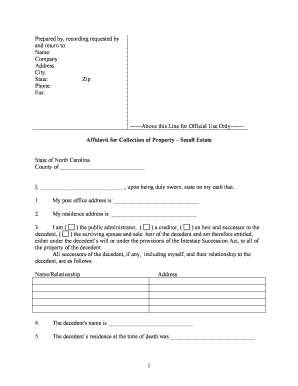
What an Affidavit of Collection of Property Is
Why this affidavit matters for documentation and disputes
An Affidavit of Collection of Property provides formal proof that property was taken or received, establishes chain of custody, and documents authority and dates. Courts, storage providers, and insurers rely on it to resolve ownership disputes and support enforcement actions.

Typical parties who complete or request this affidavit
Common parties include collectors, storage operators, law enforcement, and legal representatives who need a formal property receipt.
- Repossession agents documenting seized collateral after borrower default, including vehicle identification and recovery location details.
- Storage facilities creating formal receipts and inventory when taking custody of customer property during auctions or abandonment.
- Law enforcement and evidence technicians recording seized items to preserve chain-of-custody and exhibit identifiers for prosecutions.
Step-by-step: completing the affidavit accurately
-
01Prepare: Gather IDs, item details, relevant contracts, and any court orders before starting.
-
02Describe: List items precisely with serial numbers, condition, and quantities.
-
03State Authority: Explain the legal basis such as lien, court order, or contractual right.
-
04Sign & Notarize: All parties sign, date, and notarize where state law or receiving party requires.
Configuring an online affidavit workflow
| Field | Configuration |
|---|---|
| Signature Type | Signature + date required |
| Authentication | Email OTP or SMS code |
| Conditional Fields | Show inventory fields when 'items present' checked |
| Retention Policy | Auto-archive signed PDF and audit trail |
Platform capabilities to support affidavits and evidence
Choose a platform that supports PDF, DOCX, secure storage, and integrations with common enterprise systems for affidavit workflows.
- File types: PDF, DOCX, HTML supported.
- Integrations: Salesforce, NetSuite, Google Workspace, Microsoft 365.
- Authentication: Email, SMS, KBA, 2FA options.
How electronic submission and signature capture works
-
Upload: Send a PDF or DOCX of the affidavit to the platform.
-
Place Fields: Add signature, date, and optional initial fields where required.
-
Pick Signers: Enter signer emails and assign roles or sequence.
-
Send & Track: Distribute via email with audit trail and reminders.
Common preparation errors to avoid
- Incomplete item descriptions lead to disputes; omitting serial numbers or quantities weakens enforceability and can complicate insurance or recovery claims.
- Using initials instead of required full signatures, or failing to date and notarize when required, risks rejection by courts or third parties.
- Mismatched names between affidavit and ID or payer records can trigger additional verification, delays, or re-execution of documents.
- Failing to retain the original signed affidavit and audit trail can impede legal defense or evidence authentication in litigation.
Consequences of an incorrect or incomplete affidavit
eSignature plan and feature comparison for affidavit workflows
| signNow | DocuSign | Adobe Sign | PandaDoc | HelloSign | |
|---|---|---|---|---|---|
| Starting Price | $8/user/mo | $15/user/mo | $14/user/mo | $19/user/mo | $15/user/mo |
| Free Trial | Yes, 7-day trial | Verify | Verify | Verify | Verify |
| Bulk Send | Yes | Yes | Yes | Yes | No |
| Audit Trail | Yes | Yes | Yes | Yes | Yes |
| HIPAA Compliant | Yes | Yes | Yes | No | No |
| Envelope Cap | No cap | 100 envelopes/user/year | Varies | Varies | Varies |
File formats and supporting documents to include
Export the completed affidavit as a PDF/A when possible to preserve layout and include an embedded audit trail or certificate of completion for evidentiary support in legal or administrative proceedings.
Photos
Attach high-resolution photographs of items, vehicle VIN plates, or location scenes; include captions and timestamps to strengthen provenance and support chain-of-custody statements.
Contracts
Include copies of underlying contracts, storage agreements, invoices, or court orders that establish authority to collect, to provide context and legal basis for the collection.
Exhibits
Add police reports, towing receipts, or witness statements as exhibits and clearly reference exhibit labels within the affidavit to avoid confusion during review.
Real-world examples of affidavit use
Martin Properties — Tim Martin
Martin Properties digitized unit clearouts to standardize item inventories and owner notices.
- Reduced in-person visits and processing time.
- "I can process and execute all of these documents online with 100% compliance and built-in security. Whether on mobile or working offline, I can get forms back to their necessary parties efficiently."
Fertility Centers — John Butler
A medical center standardized affidavits for equipment transfers and patient property during procedures.
- Improved compliance and recordkeeping.
- "The airSlate SignNow team has been exceptional, responsive, the API has been great, and we're extremely happy that we chose airSlate SignNow as a company."
Timelines and common timing expectations
At Collection:
Complete affidavit on or immediately after taking custody.
Provide Copy:
Deliver copy to owner or custodial party within 72 hours when feasible.
Notarization Timing:
Notarize at signing or as required by state law.
Record Retention:
Retain signed original and audit trail per retention rules.
Dispute Window:
Respond to ownership disputes promptly; statutes vary by state.
Who signs and attests on the affidavit
Property Manager
A property manager documents items removed from units during evictions or cleanouts, relying on clear inventory descriptions, photos, and witness statements to support lien claims, insurance claims, or tenant disputes in state court.
Evidence Technician
An evidence technician documents seized property for chain-of-custody, attaching item tags, serial numbers, and storage location; the affidavit is preserved according to agency retention policies and discovery obligations.
Frequently asked questions about completing and using the affidavit
-
Is notarization required?
Notarization depends on state law and the receiving party's requirements. Many jurisdictions require a notary for deeds or official affidavits; others accept an affidavit without notarization. Check local notary statutes or the recipient's policy before filing.
-
Can it be e-signed?
Yes. Under the federal ESIGN Act (15 U.S.C. ch. 96) and UETA in most states, an affidavit may be electronically signed if the parties consent and the record can be retained; exceptions apply for some court filings and testamentary documents.
-
What if names differ?
Mismatched names between signer and supporting identification can delay acceptance and trigger further verification or re-execution. Use full legal names, attach identification copies, and, when necessary, include an explanatory statement or notarized attestation to reconcile differences.
-
How long to retain?
Retention depends on the record type and applicable laws: retain for the agreement term plus at least three years; tax or audit matters may require six years (IRC §6501) or HIPAA six-year retention (45 CFR §164.530(j)).
-
Who can sign?
An authorized collector, company officer, designated agent, or law enforcement official may sign. Corporations should have an officer or agent with written authorization. When signing for another person, present a valid power of attorney or corporate resolution.
-
Can I amend or revoke?
Yes, amendments require a new signed affidavit or a clearly labeled amendment signed and dated by authorized parties. Revocation depends on legal authority and may require notice to affected parties; consult counsel for disputes or contested property.