Establishing secure connection…Loading editor…Preparing document…

Agreed Order of Continuance

This template is fully customizable. Edit the text, fill out the fields, and send it for signature. Give it a try!
Agreed Order of Continuance

What an Agreed Order of Continuance Is

An Agreed Order of Continuance is a court document signed by the parties (and entered by the judge) that postpones a scheduled hearing, trial date, or other court event by mutual agreement. It records the agreed new date or an agreed extension period, may set related deadlines, and becomes part of the case file once the court signs and files it. The form generally identifies the case caption, relevant dates, the reason for the continuance, and the signatures of counsel or parties before submission to the clerk for judicial entry.

Step-by-Step: Preparing and Submitting an Agreed Order

A clear sequence reduces processing errors — prepare the draft, obtain agreement, file, then obtain judicial entry.

  • 01
    Draft Order: Prepare text with caption, dates, and continuance rationale.
  • 02
    Obtain Agreement: Collect signatures or counsel approval from all parties.
  • 03
    File With Clerk: Submit via court e-file or clerk’s office per local rules.
  • 04
    Judge Entry: Judge signs or orders entry; clerk files and issues new date.

Common Questions and Practical Answers

Answers to frequent questions about signatures, e-filing, and common filing issues when using an Agreed Order of Continuance.


Need help? Contact support

Who Commonly Prepares and Signs These Orders

Several roles participate in preparing and signing an Agreed Order of Continuance; coordination avoids delays.

  • Civil litigants’ counsel who negotiate continuance terms and prepare the draft order.
  • Self-represented (pro se) parties who agree to change a hearing date and must follow local filing rules.
  • Court clerks and case managers who process the filing and docket the judge’s entry.

Confirm responsibilities early: counsel should agree on dates, notify the court per local rules, and preserve proof of service to avoid scheduling disputes.

Why an Agreed Order of Continuance Matters

An Agreed Order documents a mutual change to court scheduling, prevents surprise continuances, preserves the parties’ agreed timeline, and provides an official record for the clerk and the judge. It reduces the need for additional hearings, helps manage witness and counsel availability, and protects parties from default or sanction risk that can arise from unilateral no-shows or missed deadlines.

Why an Agreed Order of Continuance Matters

Key Elements to Include in a Professional Order

A properly structured order is concise, uses the official caption, specifies dates, and includes signatures and service information.

Case Caption

Full party names and court identifier matching prior pleadings to ensure the order is docketed correctly and associated with the right case file.
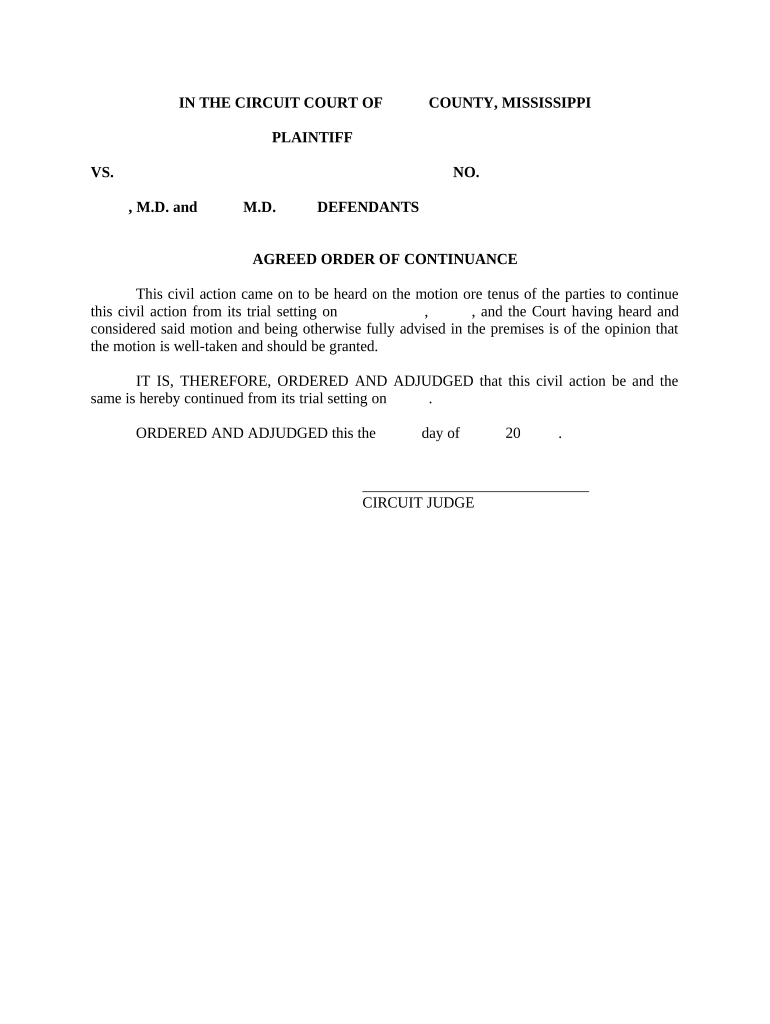
Recitals

Brief statement of the parties’ agreement and reason for the continuance, written neutrally to inform the judge and clerk of the factual basis.

Continuance Terms

Precise language describing the continuance length, new hearing date/time, or scheduling window to avoid ambiguity at docketing.

Deadlines

Any related deadlines (discovery cutoffs, filing of motions) should be adjusted and listed to keep the case timeline consistent.

Signatures

Signature blocks for counsel and parties with printed names, bar numbers for attorneys, and signature dates to demonstrate mutual consent.

Certificate of Service

A statement confirming how and when opposing counsel and parties were served, including method and date, to satisfy court rules.

Data and Privacy Considerations

Minimize PHI: Avoid including health details in the order.
Redact Sensitive: Redact social-security numbers and confidential data.
Use Secure Filing: Use court-authorized e-file systems for submission.
Retain Audit Trail: Keep timestamps and delivery receipts.
Access Controls: Limit document access to case parties.
Verify Local Rules: Follow court guidance on sealed filings.

Consequences of Errors or Noncompliance

Scheduling Delay: Missed deadlines
Default Risk: Potential adverse rulings
Clerical Rejection: Order returned for correction
Sanctions: Court may impose costs
Evidence Issues: Preservation obligations affected
Service Failure: Notice disputes arise

Common Preparation Mistakes to Avoid

  • Failing to confirm the judge’s availability before proposing a new date, which can lead to multiple re-schedulings and wasted effort.
  • Using inconsistent party names or an incorrect case number, causing the clerk to misfile the order or delay entry.
  • Omitting a certificate of service or using an improper service method, which can leave the order ineffective as to unserved parties.
  • Submitting via an unauthorized channel (email or non-approved portal) when the court requires formal e-filing, resulting in the filing being rejected.

How the Order Moves Through the Court System

A typical flow: draft, obtain agreement, file, and then the court signs and dockets the order for official effect.

  • Prepare Draft: Create order using correct caption and dates.
  • Signatures: Collect counsel and party signatures as required.
  • File with Clerk: Submit through e-file or clerk’s office per rules.
  • Judge Entry: Judge signs or issues docket entry; clerk files.

Recommended Digital Workflow Settings

Configure your e-sign and case management system to match court filing requirements and to minimize manual steps.

Field Configuration
Document Format Use PDF/A; include searchable text
Signature Type Collect signature, printed name, and date
Service Evidence Attach certificate of service PDF
Notifications Enable email confirmations for signers

How an Agreed Order Differs from a Motion to Continue

A concise comparison highlights when a mutual agreed order is appropriate versus a contested motion to continue.

Criteria Agreed Order Motion to Continue
Required Signatures all parties moving party only
Court Filing proposed and signed motion and supporting brief
Typical Timing faster entry can require hearing
Contested? yes possible

Technical Considerations for eSignature and eFiling

Match your eSignature platform capabilities to the court’s e-filing and signature requirements to avoid rejections.

  • File Formats: PDF/A and searchable PDF
  • Audit Trail: Timestamps, IP logs, and signer attribution
  • Integrations: Supports Salesforce, NetSuite, Google Workspace

Real-World Examples of Digital Orders and Document Workflows

Two customer stories illustrate how digital signing and routing simplify case-related document handling across industries.

Martin Properties

Tim Martin, Founder at Martin Properties, used online signing to process court-related and transactional documents efficiently.

  • Mobile and offline signing supported for field teams.
  • "I can process and execute all of these documents online with 100% compliance and built-in security. Whether on mobile or working offline, I can get forms back to their necessary parties efficiently."

Optica Ventures LLC

Brian Fitzgibbons, COO at Optica Ventures LLC, highlighted ease of use for clients and internal teams during document exchanges.

  • Simplified interface reduces training time.
  • "The interface is simple and easy-to-use for our team; more importantly, it is just as easy for our customers."

be ready to get more
Join over 28 million airSlate SignNow users