Establishing secure connection… Loading editor… Preparing document…
Navigation

Fill and Sign the Agreement between Sponsor Form
Fill and Sign the Agreement between Sponsor Form

How it works

Open the document and fill out all its fields.
Apply your legally-binding eSignature.
Save and invite other recipients to sign it.

Rate template

4.4
49 votes
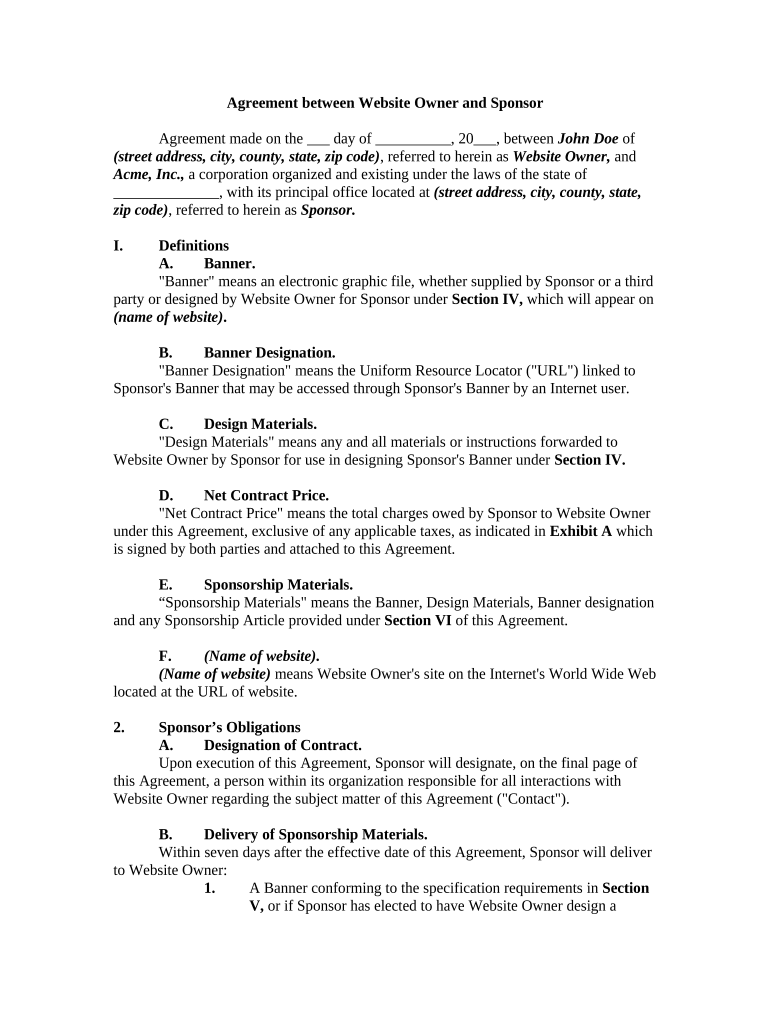
Agreement between Website Owner and Sponsor Agreement made on the ___ day of __________, 20___, between John Doe of (street address, city, county, state, zip code) , referred to herein as Website Owner, and Acme, Inc., a corporation organized and existing under the laws of the state of ______________, with its principal office located at (street address, city, county, state, zip code) , referred to herein as Sponsor. I. Definitions A. Banner. "Banner" means an electronic graphic file, whether supplied by Sponsor or a third party or designed by Website Owner for Sponsor under Section IV, which will appear on (name of website) . B. Banner Designation. "Banner Designation" means the Uniform Resource Locator ("URL") linked to Sponsor's Banner that may be accessed through Sponsor's Banner by an Internet user. C. Design Materials. "Design Materials" means any and all materials or instructions forwarded to Website Owner by Sponsor for use in designing Sponsor's Banner under Section IV. D. Net Contract Price. "Net Contract Price" means the total charges owed by Sponsor to Website Owner under this Agreement, exclusive of any applicable taxes, as indicated in Exhibit A which is signed by both parties and attached to this Agreement. E. Sponsorship Materials. “Sponsorship Materials" means the Banner, Design Materials, Banner designation and any Sponsorship Article provided under Section VI of this Agreement. F. (Name of website) . ( Name of website) means Website Owner's site on the Internet's World Wide Web located at the URL of website. 2. Sponsor’s Obligations A. Designation of Contract. Upon execution of this Agreement, Sponsor will designate, on the final page of this Agreement, a person within its organization responsible for all interactions with Website Owner regarding the subject matter of this Agreement ("Contact"). B. Delivery of Sponsorship Materials. Within seven days after the effective date of this Agreement, Sponsor will deliver to Website Owner: 1. A Banner conforming to the specification requirements in Section V, or if Sponsor has elected to have Website Owner design a Banner under the terms of Section IV of this Agreement, the Design Materials for use in designing Sponsor's Banner; and 2. The URL of the Banner Destination or, if Sponsor has elected to provide a Sponsorship Article under the terms of Section VI of this Agreement, the text of the Sponsorship Article in electronic form (ASCII or any manually agreeable word processing format). C. Rights in Sponsorship Materials. Sponsor is responsible for obtaining all licenses and permissions required to provide, distribute, use, display or access the Sponsorship Materials in all manners and methods contemplated by this Agreement. This obligation extends, but is not limited, to any Banner designed by Website Owner for Sponsor under this Agreement. III. Website Owner’s Obligations Website Owner will place one Banner belonging to Sponsor into rotation on (name of website) . Except as otherwise provided in Exhibit A , positioning of Sponsor's Banner on (name of website) is at the sole discretion of Website Owner. Sponsor's Banner will rotate on (name of website) while this Agreement is in force. IV. Design A. Banner Design Services. At Sponsor's option and for the additional charge indicated in Exhibit A , Website Owner will provide _____ hours of computer graphical design service for design or modification of one Banner. Additional design time may be purchased from Website Owner at an additional charge. B. Sponsor's Obligations. Upon completion of Sponsor's Banner, or any modifications to it, Website Owner will provide the Banner, or a graphical reproduction of it, to Sponsor for review. If Website Owner does not receive specific instructions for modifications to the Banner from Sponsor within 72 hours after providing the Banner to Sponsor, Website Owner will place Sponsor's Banner on (name of website) . C. Work for Hire. The parties agree that that any Banner designed by Website Owner for Sponsor shall be considered a work made for hire as defined by 17 U.S.C.A. § 101(2) . V. Banner Specifications Sponsor's Banner will conform to the following specifications:  Banner File Format: .gif or .jpg;  Banner File Size: Maximum of _______ bytes; and  Banner Dimensions: ______ pixels high by _______ pixels wide. Website Owner reserves the right to refuse, substitute or cancel any Banner or Banner Destination at any time and for any reason whatsoever, without limitation and regardless of whether it conforms to the specifications in this Section V. VI. Sponsorship Article Sponsor may provide to Website Owner relevant textual material to serve as the Banner Destination at a URL designated by Website Owner ("Sponsorship Article"). Any Sponsorship Article submitted may, at Website Owner's sole discretion, appear in various Website Owner services. Website Owner reserves the right to refuse, modify, substitute, cancel and delete any Sponsorship Article at any time and for any reason whatsoever, without limitation. VII. Reports Website Owner may provide Sponsor with reports indicating the number of times: (a) the banner was requested by (name of website) 's server and (b) a (name of website) user accessed Sponsor's Banner Destination. Website Owner makes no guarantee as to the accuracy of, nor shall Website Owner be liable to Sponsor for any claims relating to or deriving from, the information contained in such reports. VIII. Charges and Payment A. Sponsor agrees to pay Website Owner the Net Contract Price specified in Exhibit A . All charges under this agreement are payable to Website Owner within ____days of the billing date and are exclusive of sales, use, ad valorem, personal property and other applicable taxes, which are the responsibility of Sponsor. Website Owner may apply a surcharge to international Sponsors and Sponsors requiring non-English language applications. If full payment is not made within the above-specified time, Sponsor subsequently may be charged up to the maximum legal interest on any unpaid balance. Website Owner may modify Charges upon notice to Sponsor _____ days prior to the annual renewal date, including the first renewal date. All charges are payable in United States dollars and are nonrefundable. B. If the Net Contract Price is less than $________, Website Owner will bill Sponsor for all charges payable under this Agreement promptly after this Agreement is approved by Website Owner. C. If the Net Contract Price is $_______or greater, Sponsor will pay to Website Owner ___% of the Net Contract Price upon approval of this Agreement by Website Owner. Sponsor will be billed for the remainder of the Net Contract Price, and for any additional charges, _____ days after such approval. D. Sponsor will be billed upon expiration of the Initial Term (as defined in Section XIII) and subsequently on an annual basis during the term of this Agreement based on any modifications made to the Banner and on the then-current Sponsorship rates. E. Website Owner will bill Sponsor for any subsequent additional charges incurred under this Agreement, whether additional design charges or other charges, promptly after such charges are incurred. IX. Sponsor Representations and Warranties A. Sponsor is solely responsible for any legal liability arising out of or relating to the Sponsorship Materials. Sponsor represents and warrants to Website Owner that it has full authority to provide and use the Sponsorship Materials as contemplated by this Agreement, and that such provision and use of the Sponsorship Materials do not and will not violate any copyrights, trademarks, trade secrets or other proprietary rights of any third party or create any liability to any third party. Sponsor further warrants that the Sponsorship Materials do not contain any matter that is defamatory or which may cause injury or result in damage to any third party and that the Sponsorship Materials do not contain any matter that is false or deceptive. B. Sponsor also represents and warrants that it will comply with all applicable laws and rules or regulations regarding attorney ethics, conduct and advertising in its performance under this Agreement. Sponsor acknowledges that any breach of Sponsor's representations and warranties in this Agreement is a material breach of this Agreement. Sponsor shall defend, indemnify and hold harmless Website Owner from and against any and all third-party claims, actions, causes of action, liabilities, damages, costs, and expenses, including attorneys' fees, arising out of or related to any facts or alleged facts which, if true, would constitute a breach of such representations or warranties. X. Disclaimer of Warranty Website Owner shall have no liability whatsoever for any claim(s) relating to any Internet user's inability to view Sponsor's Banner or access Sponsor's Banner Destination through Sponsor's Banner. (Name of website) , AND ANY SERVICES PROVIDED ON IT, ARE PROVIDED "AS IS," WITHOUT WARRANTY OF ANY KIND, EXPRESS OR IMPLIED, INCLUDING, BUT NOT LIMITED TO, WARRANTIES OF PERFORMANCE, MERCHANTABILITY, FITNESS FOR A PARTICULAR PURPOSE, ACCURACY, OMISSIONS, COMPLETENESS, CURRENTNESS AND DELAYS. NEITHER WEBSITE OWNER NOR ITS AFFILIATES OR AGENTS MAKE ANY WARRANTY AS TO THE RESULTS THAT MAY BE OBTAINED UNDER THIS AGREEMENT, THAT DISPLAY OF SPONSOR'S BANNER UNDER THIS AGREEMENT WILL BE UNINTERRUPTED, OR THAT DISPLAY OF SPONSOR'S BANNER OR THE ABILITY OF ANY INTERNET USER TO ACCESS SPONSOR'S BANNER DESIGNATION THROUGH SPONSOR'S BANNER WILL BE ERROR FREE. XI. Limitation of Liability WEBSITE OWNER'S, ITS AFFILIATES' AND ITS AGENTS' ENTIRE LIABILITY UNDER THIS AGREEMENT, IF ANY, FOR ANY CLAIM(S) FOR DAMAGES RELATING TO THIS AGREEMENT WHICH ARE MADE AGAINST THEM, WHETHER BASED IN CONTRACT OR TORT (INCLUDING NEGLIGENCE) SHALL BE LIMITED TO THE AMOUNT OF CHARGES PAID BY SPONSOR RELATIVE TO THE PERIOD OF OCCURRENCE OF THE EVENTS WHICH ARE THE BASIS OF THE CLAIM(S). IN NO EVENT WILL WEBSITE OWNER, ITS AFFILIATES OR ITS AGENTS BE LIABLE FOR ANY LOST PROFITS OR ANY CONSEQUENTIAL, EXEMPLARY, INCIDENTAL, INDIRECT OR SPECIAL DAMAGES ARISING FROM OR IN ANY WAY RELATED TO THIS AGREEMENT OR RELATING IN WHOLE OR PART TO SPONSOR'S RIGHTS UNDER THIS AGREEMENT, EVEN IF ADVISED OF THE POSSIBILITY OF SUCH DAMAGES. XII. Limitation of Claims Except for claims relating to charges, no claim, regardless of form, which in any way arises out of this Agreement, may be made, nor action based upon such claim brought, by either party more than one year after the basis for the claim becomes known to the party desiring to assert it. XIII. Term and Termination A. Term and Renewal. This Agreement will become effective on the date of execution and will continue in force for 13 months after such approval . Subsequently, renewal will be automatic for successive one-year periods unless either party gives notice of non-renewal to the other party at least ________days in advance of any renewal date including the first renewal date. B. Termination by Website Owner. Notwithstanding the foregoing, Website Owner may terminate this Agreement immediately upon delivery of written notice of termination to Sponsor. C. Obligations Upon Termination. Upon any termination of this Agreement, Website Owner shall, within a reasonable period of time, delete Sponsor's Banner from Website Owner's server. Sections IX, X, XI, XII and XIV shall survive any termination of this Agreement. XIV . Agency The parties to this Agreement are independent contractors. Neither party is an agent, representative or partner of the other party. Neither party shall have the right, power or authority to enter into any Agreement for or on behalf of, or to incur any obligation or liability of, or to otherwise bind, the other party. This Agreement shall not be interpreted or construed to create association, joint venture or partnership between the parties or to impose any partnership obligation or liability on either party. XV. Assignment Sponsor may not resell, assign or transfer any of its rights or obligations under this Agreement, in whole or in part, without Website Owner's prior written consent, and any attempt to so resell, assign or transfer will be null and void. XVI. Notices All notices under this Agreement must be given in writing to Website Owner at the above stated address of Owner , and to Sponsor: (a) in writing at the above stated address of Sponsor ; (b) via online or facsimile communications; or (c) at such other addresses as the parties may mutually agree. XVII. Entire Agreement This Agreement, including any and all exhibits, comprises the entire understanding between Website Owner and Sponsor with respect to, and supersedes any prior understanding or agreement, oral or written, relating to, the subject matter of this agreement. XVIII. General Provisions This Agreement will be governed by and construed under the laws of the state of ____________ . Except as provided in this Agreement, Website Owner may amend the terms and conditions of this Agreement upon ________ days prior notice. Should any provision of this Agreement be held void, invalid, unenforceable or illegal by a court of law, the remaining provisions will remain valid and enforceable. Failure to enforce any provision of this Agreement will not constitute or be construed as a waiver of such provision or of the right to enforce such provision. XIX. Arbitration Any dispute under this Agreement shall be required to be resolved by binding arbitration of the parties hereto. If the parties cannot agree on an arbitrator, each party shall select one arbitrator and both arbitrators shall then select a third. The third arbitrator so selected shall arbitrate said dispute. The arbitration shall be governed by the rules of the American Arbitration Association then in force and effect. WITNESS our signatures as of the day and date first above stated. ACME, INC. ____________________________ By________________________ JOHN DOE (Name and Office in Corporation) (Attach Exhibit A)

Valuable tips on finalizing your ‘Agreement Between Sponsor’ online

Are you fed up with the inconvenience of managing paperwork? Look no further than airSlate SignNow, the premier eSignature solution for individuals and small to medium-sized businesses. Bid farewell to the monotonous routine of printing and scanning documents. With airSlate SignNow, you can seamlessly complete and sign forms online. Take advantage of the extensive features included in this user-friendly and budget-friendly platform and transform your paperwork management. Whether you need to approve documents or collect electronic signatures, airSlate SignNow takes care of it all effortlessly, requiring just a few clicks.

Follow this detailed guide:

  1. Access your account or initiate a complimentary trial with our service.
  2. Click +Create to upload a document from your device, cloud storage, or our template library.
  3. Open your ‘Agreement Between Sponsor’ in the editor.
  4. Click Me (Fill Out Now) to set up the form on your end.
  5. Add and assign fillable fields for others (if necessary).
  6. Proceed with the Send Invite settings to solicit eSignatures from others.
  7. Save, print your copy, or convert it into a reusable template.

Don't fret if you need to work with your colleagues on your Agreement Between Sponsor or send it for notarization—our solution provides everything you require to accomplish such tasks. Sign up with airSlate SignNow today and enhance your document management to a new standard!

Here is a list of the most common customer questions. If you can’t find an answer to your question, please don’t hesitate to reach out to us.

Need help? Contact Support

The best way to complete and sign your agreement between sponsor form

Save time on document management with airSlate SignNow and get your agreement between sponsor form eSigned quickly from anywhere with our fully compliant eSignature tool.

How to Sign a PDF Online How to Sign a PDF Online

How to fill out and sign paperwork online

Previously, working with paperwork required pretty much time and effort. But with airSlate SignNow, document management is easy and fast. Our robust and user-friendly eSignature solution lets you easily complete and eSign your agreement between sponsor form online from any internet-connected device.

Follow the step-by-step guide to eSign your agreement between sponsor form template online:

  • 1.Register for a free trial with airSlate SignNow or log in to your account with password credentials or SSO authentication.
  • 2.Click Upload or Create and add a form for eSigning from your device, the cloud, or our form collection.
  • 3.Click on the file name to open it in the editor and use the left-side toolbar to fill out all the blank fields appropriately.
  • 4.Place the My Signature field where you need to eSign your sample. Provide your name, draw, or upload a photo of your regular signature.
  • 5.Click Save and Close to accomplish modifying your completed form.

After your agreement between sponsor form template is ready, download it to your device, save it to the cloud, or invite other people to electronically sign it. With airSlate SignNow, the eSigning process only requires a couple of clicks. Use our powerful eSignature solution wherever you are to deal with your paperwork effectively!


How to Sign a PDF Using Google Chrome How to Sign a PDF Using Google Chrome

How to complete and sign forms in Google Chrome

Completing and signing paperwork is easy with the airSlate SignNow extension for Google Chrome. Installing it to your browser is a quick and productive way to deal with your forms online. Sign your agreement between sponsor form sample with a legally-binding eSignature in just a few clicks without switching between tools and tabs.

Follow the step-by-step guidelines to eSign your agreement between sponsor form template in Google Chrome:

  • 1.Go to the Chrome Web Store, search for the airSlate SignNow extension for Chrome, and install it to your browser.
  • 2.Right-click on the link to a document you need to approve and select Open in airSlate SignNow.
  • 3.Log in to your account using your credentials or Google/Facebook sign-in option. If you don’t have one, sign up for a free trial.
  • 4.Use the Edit & Sign toolbar on the left to complete your template, then drag and drop the My Signature field.
  • 5.Upload an image of your handwritten signature, draw it, or simply type in your full name to eSign.
  • 6.Make sure all the details are correct and click Save and Close to finish editing your paperwork.

Now, you can save your agreement between sponsor form sample to your device or cloud storage, email the copy to other individuals, or invite them to electronically sign your document with an email request or a secure Signing Link. The airSlate SignNow extension for Google Chrome improves your document processes with minimum effort and time. Try airSlate SignNow today!


How to Sign a PDF in Gmail How to Sign a PDF in Gmail How to Sign a PDF in Gmail

How to complete and sign forms in Gmail

Every time you get an email containing the agreement between sponsor form for approval, there’s no need to print and scan a file or save and re-upload it to another tool. There’s a better solution if you use Gmail. Try the airSlate SignNow add-on to quickly eSign any documents right from your inbox.

Follow the step-by-step guidelines to eSign your agreement between sponsor form in Gmail:

  • 1.Go to the Google Workplace Marketplace and look for a airSlate SignNow add-on for Gmail.
  • 2.Set up the program with a related button and grant the tool access to your Google account.
  • 3.Open an email with an attachment that needs signing and use the S symbol on the right sidebar to launch the add-on.
  • 4.Log in to your airSlate SignNow account. Select Send to Sign to forward the file to other parties for approval or click Upload to open it in the editor.
  • 5.Place the My Signature option where you need to eSign: type, draw, or upload your signature.

This eSigning process saves time and only requires a few clicks. Use the airSlate SignNow add-on for Gmail to adjust your agreement between sponsor form with fillable fields, sign documents legally, and invite other people to eSign them al without leaving your mailbox. Boost your signature workflows now!


How to Sign a PDF on a Mobile Device How to Sign a PDF on a Mobile Device How to Sign a PDF on a Mobile Device

How to complete and sign paperwork in a mobile browser

Need to rapidly complete and sign your agreement between sponsor form on a mobile phone while working on the go? airSlate SignNow can help without the need to set up extra software apps. Open our airSlate SignNow tool from any browser on your mobile device and create legally-binding electronic signatures on the go, 24/7.

Follow the step-by-step guide to eSign your agreement between sponsor form in a browser:

  • 1.Open any browser on your device and go to the www.signnow.com
  • 2.Register for an account with a free trial or log in with your password credentials or SSO authentication.
  • 3.Click Upload or Create and import a file that needs to be completed from a cloud, your device, or our form collection with ready-made templates.
  • 4.Open the form and complete the empty fields with tools from Edit & Sign menu on the left.
  • 5.Place the My Signature field to the form, then type in your name, draw, or add your signature.

In a few simple clicks, your agreement between sponsor form is completed from wherever you are. As soon as you're done with editing, you can save the file on your device, build a reusable template for it, email it to other individuals, or ask them to eSign it. Make your documents on the go quick and efficient with airSlate SignNow!


How to Sign a PDF on iPhone How to Sign a PDF on iPhone

How to complete and sign documents on iOS

In today’s business community, tasks must be done rapidly even when you’re away from your computer. Using the airSlate SignNow mobile app, you can organize your paperwork and approve your agreement between sponsor form with a legally-binding eSignature right on your iPhone or iPad. Install it on your device to conclude contracts and manage documents from anywhere 24/7.

Follow the step-by-step guide to eSign your agreement between sponsor form on iOS devices:

  • 1.Go to the App Store, search for the airSlate SignNow app by airSlate, and install it on your device.
  • 2.Open the application, tap Create to import a form, and select Myself.
  • 3.Opt for Signature at the bottom toolbar and simply draw your autograph with a finger or stylus to eSign the form.
  • 4.Tap Done -> Save after signing the sample.
  • 5.Tap Save or use the Make Template option to re-use this paperwork in the future.

This process is so easy your agreement between sponsor form is completed and signed in just a couple of taps. The airSlate SignNow application works in the cloud so all the forms on your mobile device are kept in your account and are available any time you need them. Use airSlate SignNow for iOS to enhance your document management and eSignature workflows!


How to Sign a PDF on Android How to Sign a PDF on Android

How to complete and sign forms on Android

With airSlate SignNow, it’s simple to sign your agreement between sponsor form on the go. Install its mobile application for Android OS on your device and start improving eSignature workflows right on your smartphone or tablet.

Follow the step-by-step guide to eSign your agreement between sponsor form on Android:

  • 1.Open Google Play, search for the airSlate SignNow app from airSlate, and install it on your device.
  • 2.Sign in to your account or register it with a free trial, then import a file with a ➕ key on the bottom of you screen.
  • 3.Tap on the uploaded document and choose Open in Editor from the dropdown menu.
  • 4.Tap on Tools tab -> Signature, then draw or type your name to eSign the sample. Complete empty fields with other tools on the bottom if needed.
  • 5.Use the ✔ button, then tap on the Save option to finish editing.

With a user-friendly interface and full compliance with major eSignature standards, the airSlate SignNow application is the perfect tool for signing your agreement between sponsor form. It even works offline and updates all form adjustments once your internet connection is restored and the tool is synced. Fill out and eSign forms, send them for eSigning, and generate multi-usable templates whenever you need and from anywhere with airSlate SignNow.

Sign up and try Agreement between sponsor form
  • Close deals faster
  • Improve productivity
  • Delight customers
  • Increase revenue
  • Save time & money
  • Reduce payment cycles

