Establishing secure connection…Loading editor…Preparing document…

Agreement Between Adjoining Landowners Regarding Construction of Common Stairway

This template is fully customizable. Edit the text, fill out the fields, and send it for signature. Give it a try!
Agreement Between Adjoining Landowners Regarding Construction of Common Stairway

What this Agreement Is and when to use it

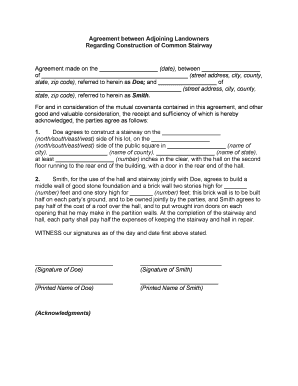
An Agreement Between Adjoining Landowners Regarding Construction of Common Stairway is a written contract between neighboring property owners that sets out rights, responsibilities, and cost-sharing for designing, constructing, and maintaining a shared staircase serving both properties. It identifies the parties and legal parcel descriptions, establishes the construction scope and timetable, allocates capital and ongoing maintenance costs, prescribes insurance and indemnity obligations, and defines dispute-resolution and recording choices so successors and lenders understand encumbrances and responsibilities.

Why a formal agreement matters

A clear written agreement allocates costs, clarifies construction and maintenance duties, and reduces future disputes. It facilitates permitting, enables title recording or easements, and sets binding expectations for successors, contractors, and insurers, improving predictability for all parties.

Why a formal agreement matters

Who typically prepares or signs this agreement

Typical users include property owners, developers, contractors, and title professionals involved in adjoining properties and municipal building officials.

  • Adjoining homeowners share construction costs, access, maintenance, and insurance obligations.
  • Developers or landlords coordinate permits, schedules, and contractor oversight for shared structure.
  • Title companies and attorneys review, record, and ensure enforceable obligations on property titles.

Essential elements to include in the stairway agreement

Core components that make an effective Agreement Between Adjoining Landowners Regarding Construction of Common Stairway, covering scope, costs, maintenance, insurance, permits, and dispute resolution.

Parties & Parcels

Identify each owner's full legal name and provide unambiguous legal descriptions or parcel numbers; include successor references and clarify whether obligations run with the land.
Scope of Work

Attach or reference construction drawings, materials, load-bearing details, accessibility and code standards, and which contractor responsibilities each owner accepts during construction.

Cost Allocation

Specify dollar amounts or percentages, payment milestones, contingency handling, dispute resolution for cost overruns, and whether unpaid shares permit liens or collection remedies.

Maintenance & Repair

Define routine and emergency maintenance duties, inspection schedules, cost sharing for repairs, and approval processes for major rehabilitation or replacement work.

Insurance & Indemnity

Require liability and property insurance levels, additional-insured designations where appropriate, and mutual indemnity language to allocate risk for construction incidents and long-term liabilities.

Recording & Enforcement

State whether the agreement will be recorded as an easement or covenant, describe recording steps, duration, remedies for breach, and dispute resolution such as mediation or arbitration.

Step-by-step: complete, sign, and record the agreement

Step-by-step process to complete, sign, and record the Agreement Between Adjoining Landowners Regarding Construction of Common Stairway.

  • 01
    Prepare Draft: Gather plans, cost estimates, and parcel deeds.
  • 02
    Negotiate Terms: Agree on scope, costs, schedule, and access terms.
  • 03
    Review & Counsel: Send to title and legal counsel for review.
  • 04
    Sign & Notarize: All parties sign; obtain notarization or witnesses as required.

Where to send and file the executed agreement

Where to file, record, and send copies after execution of the agreement; practical routing for compliance and notice.

  • County Recorder: Record as deed restriction or easement per local rules.
  • Title Company: Provide copy for escrow and title insurance updates.
  • Municipal Building Dept: Submit updated plans and permit documentation if required.
  • Contractor & Insurer: Share executed agreement with contractor and insurance carrier.

Digital signing and platform considerations

Digital execution options and platform requirements for secure online signing and distribution of the agreement.

  • Document Formats: PDF and DOCX formats accepted for upload.
  • Integrations: Works with Google Workspace and Microsoft 365.
  • Authentication Options: Email, SMS code, or advanced verification.

Timing: permits, recording, and construction milestones

Key filing, permit, inspection, and construction timing considerations associated with executing and recording the agreement.

Permit Applications:

Apply before construction begins; allow local review time.

Recording Window:

Record promptly after execution to bind successors and lenders.

Construction Schedule:

Set start and completion dates; include weather contingency.

Inspection Milestones:

Schedule code inspections at required stages per permit conditions.

Maintenance Notice Periods:

Define notice times for repairs and planned disruption.

Common preparation mistakes to avoid

  • Failing to record the agreement or easement, leaving obligations unbound and causing successor disputes; always confirm county recorder requirements and indexing.
  • Vague scope descriptions that omit materials or code standards, leading to contractor disputes and costly rework; attach detailed plans and specs.
  • Not clarifying cost-sharing formulas or contingency handling, which can produce unexpected liens or litigation when overruns occur; include payment milestones.
  • Skipping insurance or indemnity clauses, exposing parties to uninsured liability and gaps in coverage for construction-related claims; require named additional insureds.

Consequences of an incorrect or incomplete agreement

Recording Delay: May leave obligations unenforceable.
Permit Violations: Stop-work orders, fines possible.
Liability Exposure: Increased claims and legal costs.
Tax/Lien Risk: Unpaid shares may become liens.
Contractor Disputes: Change orders cause disputes.
Insurance Gaps: Coverage may be denied.

Baseline pricing and feature comparison for eSignature vendors

Comparison of baseline pricing and key features for eSignature vendors relevant to executing construction agreements; signNow is listed first per vendor ordering rules.

signNow DocuSign Adobe Sign PandaDoc HelloSign
Starting Price $8/user/mo $15/user/mo $14/user/mo $19/user/mo $15/user/mo
Free Trial Yes, 7-day trial No No Yes, limited Yes, limited
Bulk Send Yes Yes Yes Yes No
Audit Trail Yes Yes Yes Yes Yes
HIPAA Compliant Yes Yes Yes No No
Envelope Cap No cap 100 envelopes/user/year Varies by plan Varies by plan Varies by plan

Key information fields the recorder or title company will check

Owner Names: Full legal names as recorded.
Parcel IDs: County parcel numbers or legal descriptions.
Scope of Work: Attach plans and technical specs.
Cost Breakdown: Dollar amounts, percentages, and schedules.
Insurance Info: Policy numbers and coverages listed.
Signatures & Dates: Signatures, titles, and MM/DD/YYYY dates.

Frequently asked questions about execution, recording, and enforcement

Answers to frequent execution, recording, and enforceability questions about the Agreement Between Adjoining Landowners Regarding Construction of Common Stairway.


Need help? Contact support

be ready to get more
Join over 28 million airSlate SignNow users