Establishing secure connection… Loading editor… Preparing document…
Navigation

Fill and Sign the Agreement Funding Form
Fill and Sign the Agreement Funding Form

How it works

Open the document and fill out all its fields.
Apply your legally-binding eSignature.
Save and invite other recipients to sign it.

Rate template

4.8
44 votes
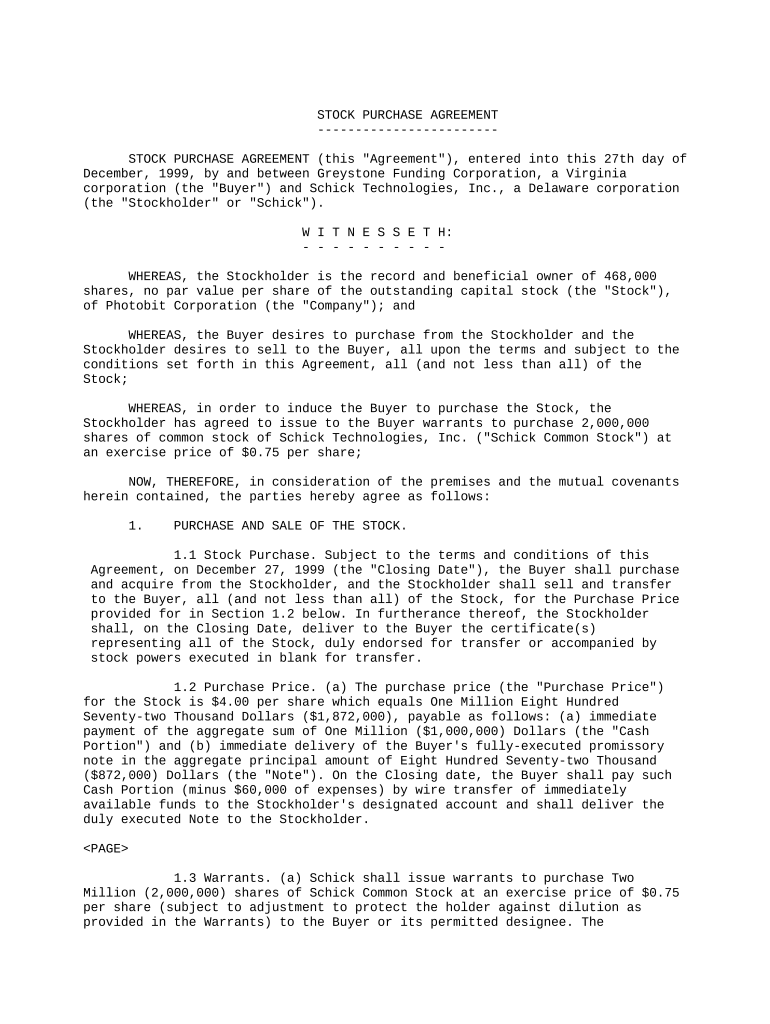
STOCK PURCHASE AGREEMENT ------------------------ STOCK PURCHASE AGREEMENT (this "Agreement"), entered into this 27th day of December, 1999, by and between Greystone Funding Corporation, a Virginia corporation (the "Buyer") and Schick Technologies, Inc., a Delaware corporation (the "Stockholder" or "Schick"). W I T N E S S E T H: - - - - - - - - - - WHEREAS, the Stockholder is the record and beneficial owner of 468,000 shares, no par value per share of the outstanding capital stock (the "Stock"), of Photobit Corporation (the "Company"); and WHEREAS, the Buyer desires to purchase from the Stockholder and the Stockholder desires to sell to the Buyer, all upon the terms and subject to the conditions set forth in this Agreement, all (and not less than all) of the Stock; WHEREAS, in order to induce the Buyer to purchase the Stock, the Stockholder has agreed to issue to the Buyer warrants to purchase 2,000,000 shares of common stock of Schick Technologies, Inc. ("Schick Common Stock") at an exercise price of $0.75 per share; NOW, THEREFORE, in consideration of the premises and the mutual covenants herein contained, the parties hereby agree as follows: 1. PURCHASE AND SALE OF THE STOCK. 1.1 Stock Purchase. Subject to the terms and conditions of this Agreement, on December 27, 1999 (the "Closing Date"), the Buyer shall purchase and acquire from the Stockholder, and the Stockholder shall sell and transfer to the Buyer, all (and not less than all) of the Stock, for the Purchase Price provided for in Section 1.2 below. In furtherance thereof, the Stockholder shall, on the Closing Date, deliver to the Buyer the certificate(s) representing all of the Stock, duly endorsed for transfer or accompanied by stock powers executed in blank for transfer. 1.2 Purchase Price. (a) The purchase price (the "Purchase Price") for the Stock is $4.00 per share which equals One Million Eight Hundred Seventy-two Thousand Dollars ($1,872,000), payable as follows: (a) immediate payment of the aggregate sum of One Million ($1,000,000) Dollars (the "Cash Portion") and (b) immediate delivery of the Buyer's fully-executed promissory note in the aggregate principal amount of Eight Hundred Seventy-two Thousand ($872,000) Dollars (the "Note"). On the Closing date, the Buyer shall pay such Cash Portion (minus $60,000 of expenses) by wire transfer of immediately available funds to the Stockholder's designated account and shall deliver the duly executed Note to the Stockholder. 1.3 Warrants. (a) Schick shall issue warrants to purchase Two Million (2,000,000) shares of Schick Common Stock at an exercise price of $0.75 per share (subject to adjustment to protect the holder against dilution as provided in the Warrants) to the Buyer or its permitted designee. The Stockholder shall, on the Closing Date, deliver such duly executed warrants to the Buyer. (b) the Buyer shall return the Warrants to Schick if DVI Financial Services, Inc. has not consented to the creation of a second lien on certain of Schick's assets prior to February 15, 2000. 2. REPRESENTATIONS AND WARRANTIES OF THE STOCKHOLDER. In connection with the sale of the Stock to the Buyer, the Stockholder hereby represents and warrants to the Buyer as follows: 2.1 Title to the Stock. The Stockholder is the valid and lawful record and beneficial owner of all of the Stock, all of which Stock has been duly authorized and validly issued and is fully paid and non-assessable, and is free and clear of all pledges, liens, claims, charges, options, calls, encumbrances, restrictions and assessments whatsoever (except any restrictions which may be created by operation of state or federal securities laws). On the Closing Date, the Buyer shall receive from the Stockholder good, valid and marketable title to all of the Stock, free and clear of all pledges, liens, claims, charges, options, calls, encumbrances, restrictions and assessments whatsoever. 2.2 Valid and Binding Agreement; No Breach. Subject to the Shareholders Agreement, (a) The Stockholder has full legal right, power and authority to execute and deliver this Agreement and to consummate the transactions contemplated hereby. This Agreement, when executed and delivered by the Stockholder, constitutes and will constitute the legal, valid and binding obligation of the Stockholder, enforceable against the Stockholder in accordance with its terms, except to the extent that such enforceability may be limited by bankruptcy, insolvency, reorganization and other laws affecting creditors' rights generally, and except that the remedy of specific performance or similar equitable relief is available only at the discretion of the court before which enforcement is sought. (b) Neither the execution and delivery of this Agreement or the by the Stockholder, nor compliance with the terms and provisions of this Agreement on the part of the Stockholder, will: (i) violate any statute or regulation of any governmental authority, domestic or foreign, affecting either Company or the Stockholder; (ii) require the issuance of any authorization, license, consent or approval of any federal or state governmental agency, or any other person; or (iii) conflict with or result in a breach of any of the terms, conditions or provisions of any judgment, order, injunction, decree, agreement or other agreement or 2 instrument to which either Company or the Stockholder is a party, or by which either Company or the Stockholder is bound, or constitute a default thereunder. (c) Consents. All necessary disclosures to and agreements and consents of (a) any parties to any material contracts and/or any licensing authorities which are material to either Company's business, and (b) any governmental authorities or agencies to the extent required in connection with the transactions contemplated by this Agreement, shall have been obtained and true and complete copies thereof delivered to the Buyer. (d) Settlement of Accounts. All debts, liabilities and other monetary obligations owed to the Company by the Stockholder and/or any of its Affiliates shall have been fully paid to the subject Company, such that no such debts, liabilities or obligations shall be outstanding on the Closing Date other than those incurred in the regular course of business. 2.3 Capital Structure; Equity Ownership. (a) Subject to the Shareholder Agreement, there are no outstanding subscriptions, options, rights, warrants, convertible securities or other agreements or calls, demands or commitments obligating the Stockholder to transfer any shares of the Stock. (b) The Stock represents all of the issued and outstanding shares of the Company that are owned by the Stockholder. (c) There are no actions, suits or proceedings pending or threatened against or affecting the Stockholder that involve or relate to the Stock. 2.4 Stockholder Board of Director Approval. This Agreement and the sale of the Stock by the Stockholder has been approved by the Stockholder's Board of Directors and duly executed resolutions of the Stockholder's Board of Directors have been delivered to the Buyer. 2.5 Waiver of Right of First Refusal. (a) The Buyer shall have attempted to obtain notice of the waiver of the Right of First Refusal pursuant to the Shareholders Agreement, dated August 1, 1997, by and among Photobit Corporation, its founders and certain of its shareholders (the "Shareholder Agreement") from: (i) the Company pursuant to Section 3.2 of the Shareholder Agreement; and (ii) from all of the founders pursuant to Section 3.3 of the Shareholder Agreement. (b) Notwithstanding the foregoing, however, in the event that the Company or any of the founders exercise the Right of First Refusal under the Shareholder 3 Agreement, the Stock subject to such exercise shall be sold by the Buyer to the exercising parties at a price of $4 per share. 3. REPRESENTATIONS AND WARRANTIES OF THE BUYER. In connection with the Buyer's purchase of the Stock from the Stockholder, the Buyer hereby represents and warrants to the Stockholder as follows: 3.1 Organization, Good Standing and Qualification. The Buyer is a corporation duly organized, validly existing and in good standing under the laws of the Commonwealth of Virginia, with all necessary power and authority to execute and deliver this Agreement and to consummate the transactions contemplated hereby. 3.2 Valid and Binding Agreement. Subject to the Shareholder Agreement, this Agreement constitutes and will constitute the legal, valid and binding obligations of the Buyer, enforceable against the Buyer in accordance with their respective terms, except to the extent that such enforceability may be limited by bankruptcy, insolvency, reorganization and other laws affecting creditors' rights generally, and except that the remedy of specific performance or similar equitable relief is available only at the discretion of the court before which enforcement is sought. 3.3 No Breach of Statute or Contract. Neither the execution and delivery of this Agreement by the Buyer, nor compliance with the terms and provisions of this Agreement on the part of the Buyer, will: (a) violate any statute or regulation of any governmental authority, domestic or foreign, affecting the Buyer; or (b) require the issuance of any authorization, license, consent or approval of any federal or state governmental agency. 3.4 Investment. The Buyer is purchasing the Stock for its own account for investment, and not with a view to the resale or distribution thereof in violation of any applicable securities laws. 4. INDEMNIFICATION. 4.1 Survival. This Agreement and all covenants, agreements, representations and warranties made herein and in the certificates delivered pursuant hereto, shall survive the execution and delivery to the Buyer of this Agreement, and shall continue in full force and effect for so long as the Stock is owned by the Buyer. Whenever in this Agreement any of the parties hereto is referred to, such reference shall be deemed to include the successors and permitted assigns of such party; and all covenants, promises and agreements in this Agreement contained, by or on behalf of the Stockholder, shall inure to the benefit of the successors and assigns of the Buyer. 4 4.2 General. (a) The Stockholder shall defend, indemnify and hold harmless the Buyer from, against and in respect of any and all claims, losses, costs, expenses, obligations, liabilities, damages, recoveries and deficiencies, including interest, penalties and reasonable attorneys' fees, that the Buyer may incur, sustain or suffer ("Losses") as a result of (i) any misrepresentation or breach of warranty by the Stockholder under this Agreement, and/or (ii) any failure by the Stockholder to perform any of the covenants or agreements of the Stockholder contained in this Agreement. (b) The Buyer shall defend, indemnify and hold harmless the Stockholder from, against and in respect of any and all claims, losses, costs, expenses, obligations, liabilities, damages, recoveries and deficiencies, including interest, penalties and reasonable attorneys' fees, that the Stockholder may incur, sustain or suffer as a result of any breach of, or failure by the Buyer to perform, any of the representations, warranties, covenants or agreements of the Buyer contained in this Agreement. 5. POST-CLOSING EVENTS. 5.1 Further Assurances. From time to time from and after the Closing Date, the parties will execute and deliver to each other any and all further agreements, instruments, certificates and other documents as may reasonably be requested by the other party in order more fully to consummate the transactions contemplated hereby, and to effect an orderly transition of the business being acquired by the Buyer hereunder. 6. COSTS. 6.1 Finder's or Broker's Fees. Each of the Buyer and the Stockholder represents and warrants that neither they nor any of their respective Affiliates have dealt with any broker or finder in connection with the transaction contemplated by this Agreement, and no broker or other person is entitled to any commission or finder's fee in connection with this transaction. 7. FORM OF AGREEMENT. 7.1 Effect of Headings. The Section headings used in this Agreement are included for purposes of convenience only, and shall not affect the construction or interpretation of any of the provisions hereof. 7.2 Entire Agreement; Waivers. This Agreement and the other agreements and instruments referred to herein constitute the entire agreement between the parties pertaining to the subject matter hereof, and supersede all prior agreements or understandings as to such subject matter. No party hereto has made any representation or warranty or given any covenant to the other except as set forth in this Agreement, and the other agreements and instruments 5 referred to herein. No waiver of any of the provisions of this Agreement shall be deemed, or shall constitute, a waiver of any other provisions, whether or not similar, nor shall any waiver constitute a continuing waiver. No waiver shall be binding unless executed in writing by the party making the waiver. 7.3 Counterparts. This Agreement may be executed simultaneously in any number of counterparts, each of which shall be deemed an original, but all of which together shall constitute one and the same instrument. 8. PARTIES. 8.1 Parties in Interest. Nothing in this Agreement, whether expressed or implied, is intended to confer any rights or remedies under or by reason of this Agreement on any persons other than the parties to it and their respective heirs, executors, administrators, personal representatives, successors and permitted assigns, nor is anything in this Agreement intended to relieve or discharge the obligations or liability of any third persons to any party to this Agreement, nor shall any provision give any third persons any right of subrogation or action over or against any party to this Agreement. 8.2 Notices. All notices, requests, demands and other communications under this Agreement shall be in writing and shall be deemed to have been duly given on the date of service if served personally on the party to whom notice is to be given, on the day after the delivery thereof to a recognized overnight courier service for next-day delivery with all charges prepaid or billed to the account of the sender, or on the third day after mailing if mailed to the party to whom notice is to be given, by first class mail, registered or certified, postage prepaid, and properly addressed as follows: (a) If to the Stockholder: Schick Technologies, Inc. 31-00 47th Avenue Long Island City, NY 11101 Attn: David Schick Telecopier # 718-729-3469 (b) If to the Buyer: Greystone Funding Corporation 152 West 57th Street, 60th Floor New York, New York 10019 Attn: Stephen Rosenberg Telecopier # 212-649-9701 6 or to such other address as either party shall have specified by notice in writing given to the other party. 9. MISCELLANEOUS. 9.1 Amendments and Modifications. No amendment or modification of this Agreement shall be valid unless made in writing and signed by or on behalf of the party to be charged therewith. 9.2 Non-Assignability; Binding Effect. Neither this Agreement, nor any of the rights or obligations of the parties hereunder, shall be assignable by any party hereto without the prior written consent of all other parties hereto, except that the Buyer may, without the consent of the Stockholder, at any time and from time to time upon or after the Closing, assign as collateral to the Buyer's lenders or other financing institutions any or all of the Buyer's rights to indemnification under this Agreement. Otherwise, this Agreement shall be binding upon and shall inure to the benefit of the parties hereto and their respective heirs, executors, administrators, personal representatives, successors and permitted assigns. 9.3 Governing Law; Jurisdiction. The parties hereto hereby consent to the jurisdiction of all courts of the State of New York and the United States District Court for the Southern District of New York, as well as to the jurisdiction of all courts from which an appeal may be properly taken from such courts, for the purpose of any suit, action or other proceeding arising out of or with respect to this Agreement, the Note, the Warrants, any other agreements, instruments, certificates or other documents executed in connection herewith or therewith, or any of the transactions contemplated hereby or thereby, or any of the parties' obligations hereunder or thereunder. The parties hereto hereby expressly waive any and all objections which they may have as to venue in any of such courts, and also waive trial by jury in any such suit, action or proceeding. The Buyer or Stockholder may file a copy of this Agreement as evidence of the foregoing waiver of right to jury trial. 9.4 Schick and the Buyer hereby confirm their intent and agree that, by the sale of the Stock hereunder, Schick is selling, assigning, transferring and contributing the Stock absolutely and irrevocably and not as collateral or security. If, notwithstanding the parties' intent to effect an absolute sale, assignment, transfer and contribution, the transactions contemplated hereby are characterized as a financing, Schick hereby grants the Buyer a security interest in the Stock and this Agreement shall be deemed a security agreement, within the meaning of the Uniform Commercial Code, which (or a copy hereof) the Buyer may file in an applicable filing office. Each of Schick and the Buyer hereby agrees to treat the sale of the stock as a sale and contribution for tax, reporting and accounting purposes (except to the extent that such assignment is not recognized due to the reporting of taxes on a consolidated basis where applicable and the application of consolidated financial reporting principles under GAAP). Schick agrees to respond to any inquiries with respect to the sale of the Stock hereunder by confirming the sale, assignment, transfer and contribution of the stock to the Buyer, and to note on its financial statements that the Stock has been sold to the Buyer. 7 IN WITNESS WHEREOF, the parties have executed this Agreement on and as of the date first set forth above. BUYER: GREYSTONE FUNDING CORPORATION BY: /s/ Robert R. Barolak ------------------------ NAME: ROBERT R. BAROLAK TITLE: VICE PRESIDENT STOCKHOLDER: SCHICK TECHNOLOGIES, INC. BY: /s/ David Schick ---------------------- NAME: DAVID SCHICK TITLE: CEO 8

Practical advice on crafting your ‘Agreement Funding’ online

Are you fed up with the inconvenience of handling paperwork? Look no further than airSlate SignNow, the premier electronic signature solution for individuals and small to medium-sized businesses. Bid farewell to the time-consuming routine of printing and scanning documents. With airSlate SignNow, you can effortlessly finish and sign documents online. Utilize the extensive features packed into this straightforward and cost-effective platform and transform your approach to document management. Whether you need to sign forms or collect electronic signatures, airSlate SignNow manages it all effortlessly, with just a few clicks.

Follow this detailed guide:

  1. Log into your account or register for a free trial with our service.
  2. Click +Create to upload a file from your device, cloud storage, or our form library.
  3. Open your ‘Agreement Funding’ in the editor.
  4. Click Me (Fill Out Now) to finalize the document on your end.
  5. Add and designate fillable fields for other participants (if necessary).
  6. Proceed with the Send Invite settings to solicit eSignatures from others.
  7. Save, print your version, or convert it into a reusable template.

Don’t fret if you need to collaborate with your colleagues on your Agreement Funding or send it for notarization—our solution provides you with everything required to accomplish such tasks. Create an account with airSlate SignNow today and enhance your document management to a new level!

Here is a list of the most common customer questions. If you can’t find an answer to your question, please don’t hesitate to reach out to us.

Need help? Contact Support

The best way to complete and sign your agreement funding form

Save time on document management with airSlate SignNow and get your agreement funding form eSigned quickly from anywhere with our fully compliant eSignature tool.

How to Sign a PDF Online How to Sign a PDF Online

How to complete and sign documents online

In the past, coping with paperwork took pretty much time and effort. But with airSlate SignNow, document management is easy and fast. Our powerful and user-friendly eSignature solution lets you effortlessly complete and electronically sign your agreement funding form online from any internet-connected device.

Follow the step-by-step guidelines to eSign your agreement funding form template online:

  • 1.Register for a free trial with airSlate SignNow or log in to your account with password credentials or SSO authentication.
  • 2.Click Upload or Create and import a file for eSigning from your device, the cloud, or our form library.
  • 3.Click on the document name to open it in the editor and utilize the left-side toolbar to complete all the empty areas properly.
  • 4.Drop the My Signature field where you need to eSign your form. Provide your name, draw, or upload an image of your regular signature.
  • 5.Click Save and Close to accomplish editing your completed form.

Once your agreement funding form template is ready, download it to your device, export it to the cloud, or invite other individuals to eSign it. With airSlate SignNow, the eSigning process only requires a few clicks. Use our powerful eSignature solution wherever you are to deal with your paperwork successfully!


How to Sign a PDF Using Google Chrome How to Sign a PDF Using Google Chrome

How to complete and sign forms in Google Chrome

Completing and signing documents is easy with the airSlate SignNow extension for Google Chrome. Installing it to your browser is a fast and efficient way to deal with your paperwork online. Sign your agreement funding form sample with a legally-binding electronic signature in just a few clicks without switching between applications and tabs.

Follow the step-by-step guidelines to eSign your agreement funding form template in Google Chrome:

  • 1.Navigate to the Chrome Web Store, find the airSlate SignNow extension for Chrome, and add it to your browser.
  • 2.Right-click on the link to a form you need to eSign and select Open in airSlate SignNow.
  • 3.Log in to your account with your credentials or Google/Facebook sign-in buttons. If you don’t have one, you can start a free trial.
  • 4.Utilize the Edit & Sign menu on the left to complete your sample, then drag and drop the My Signature option.
  • 5.Upload a photo of your handwritten signature, draw it, or simply type in your full name to eSign.
  • 6.Make sure all information is correct and click Save and Close to finish modifying your paperwork.

Now, you can save your agreement funding form template to your device or cloud storage, send the copy to other people, or invite them to electronically sign your document via an email request or a secure Signing Link. The airSlate SignNow extension for Google Chrome improves your document processes with minimum time and effort. Start using airSlate SignNow today!


How to Sign a PDF in Gmail How to Sign a PDF in Gmail How to Sign a PDF in Gmail

How to complete and sign forms in Gmail

Every time you get an email containing the agreement funding form for approval, there’s no need to print and scan a document or save and re-upload it to a different tool. There’s a much better solution if you use Gmail. Try the airSlate SignNow add-on to promptly eSign any paperwork right from your inbox.

Follow the step-by-step guide to eSign your agreement funding form in Gmail:

  • 1.Navigate to the Google Workplace Marketplace and look for a airSlate SignNow add-on for Gmail.
  • 2.Install the tool with a corresponding button and grant the tool access to your Google account.
  • 3.Open an email with an attachment that needs signing and use the S key on the right panel to launch the add-on.
  • 4.Log in to your airSlate SignNow account. Choose Send to Sign to forward the document to other parties for approval or click Upload to open it in the editor.
  • 5.Drop the My Signature option where you need to eSign: type, draw, or upload your signature.

This eSigning process saves efforts and only takes a few clicks. Utilize the airSlate SignNow add-on for Gmail to adjust your agreement funding form with fillable fields, sign documents legally, and invite other people to eSign them al without leaving your inbox. Improve your signature workflows now!


How to Sign a PDF on a Mobile Device How to Sign a PDF on a Mobile Device How to Sign a PDF on a Mobile Device

How to fill out and sign paperwork in a mobile browser

Need to rapidly submit and sign your agreement funding form on a smartphone while doing your work on the go? airSlate SignNow can help without needing to install extra software apps. Open our airSlate SignNow solution from any browser on your mobile device and create legally-binding eSignatures on the go, 24/7.

Follow the step-by-step guide to eSign your agreement funding form in a browser:

  • 1.Open any browser on your device and follow the link www.signnow.com
  • 2.Create an account with a free trial or log in with your password credentials or SSO option.
  • 3.Click Upload or Create and add a file that needs to be completed from a cloud, your device, or our form collection with ready-to go templates.
  • 4.Open the form and complete the empty fields with tools from Edit & Sign menu on the left.
  • 5.Put the My Signature area to the sample, then type in your name, draw, or upload your signature.

In a few simple clicks, your agreement funding form is completed from wherever you are. When you're done with editing, you can save the file on your device, create a reusable template for it, email it to other individuals, or ask them to electronically sign it. Make your documents on the go quick and productive with airSlate SignNow!


How to Sign a PDF on iPhone How to Sign a PDF on iPhone

How to complete and sign forms on iOS

In today’s business world, tasks must be done quickly even when you’re away from your computer. Using the airSlate SignNow application, you can organize your paperwork and approve your agreement funding form with a legally-binding eSignature right on your iPhone or iPad. Set it up on your device to conclude contracts and manage documents from just about anywhere 24/7.

Follow the step-by-step guidelines to eSign your agreement funding form on iOS devices:

  • 1.Open the App Store, search for the airSlate SignNow app by airSlate, and set it up on your device.
  • 2.Open the application, tap Create to add a form, and select Myself.
  • 3.Select Signature at the bottom toolbar and simply draw your autograph with a finger or stylus to eSign the form.
  • 4.Tap Done -> Save right after signing the sample.
  • 5.Tap Save or use the Make Template option to re-use this paperwork later on.

This process is so easy your agreement funding form is completed and signed in just a few taps. The airSlate SignNow app works in the cloud so all the forms on your mobile device are kept in your account and are available any time you need them. Use airSlate SignNow for iOS to enhance your document management and eSignature workflows!


How to Sign a PDF on Android How to Sign a PDF on Android

How to complete and sign paperwork on Android

With airSlate SignNow, it’s easy to sign your agreement funding form on the go. Install its mobile app for Android OS on your device and start boosting eSignature workflows right on your smartphone or tablet.

Follow the step-by-step guide to eSign your agreement funding form on Android:

  • 1.Go to Google Play, search for the airSlate SignNow app from airSlate, and install it on your device.
  • 2.Sign in to your account or register it with a free trial, then import a file with a ➕ option on the bottom of you screen.
  • 3.Tap on the uploaded document and choose Open in Editor from the dropdown menu.
  • 4.Tap on Tools tab -> Signature, then draw or type your name to eSign the template. Fill out empty fields with other tools on the bottom if needed.
  • 5.Utilize the ✔ button, then tap on the Save option to finish editing.

With a user-friendly interface and total compliance with primary eSignature laws and regulations, the airSlate SignNow application is the perfect tool for signing your agreement funding form. It even operates without internet and updates all form changes once your internet connection is restored and the tool is synced. Fill out and eSign documents, send them for approval, and create re-usable templates whenever you need and from anyplace with airSlate SignNow.

Sign up and try Agreement funding form
  • Close deals faster
  • Improve productivity
  • Delight customers
  • Increase revenue
  • Save time & money
  • Reduce payment cycles


