Establishing secure connection… Loading editor… Preparing document…
Navigation

Fill and Sign the Agreement to Manage an Internet Domain Form
Fill and Sign the Agreement to Manage an Internet Domain Form

How it works

Open the document and fill out all its fields.
Apply your legally-binding eSignature.
Save and invite other recipients to sign it.

Rate template

4.8
38 votes
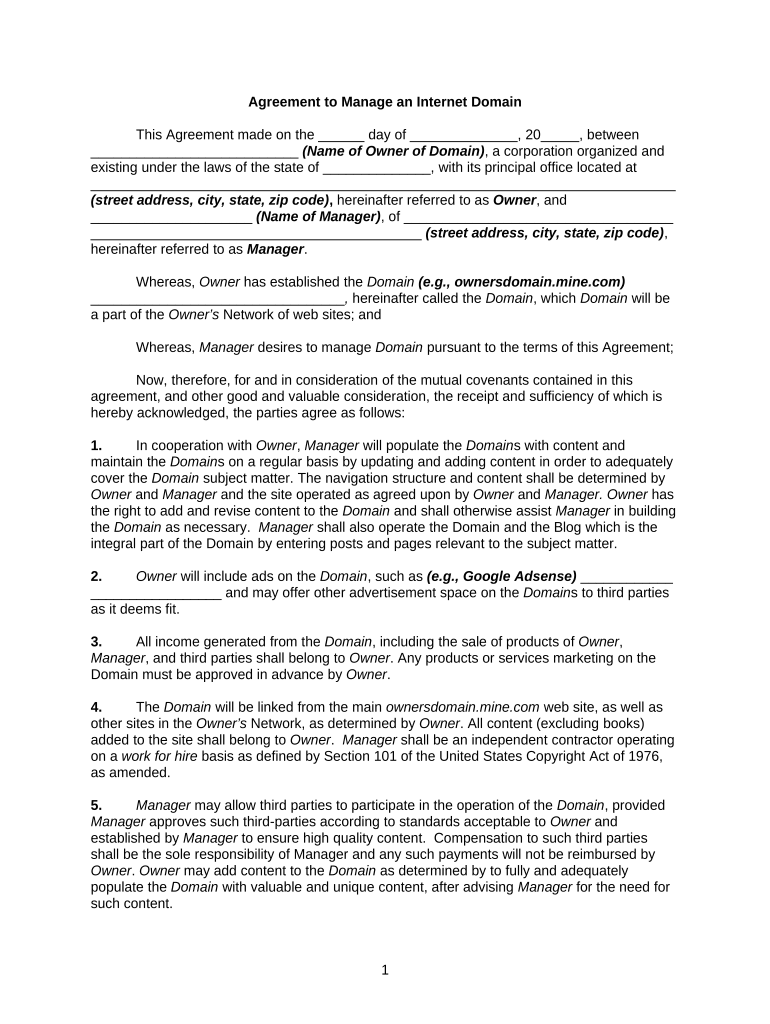
Agreement to Manage an Internet Domain This Agreement made on the ______ day of ______________, 20_____, between ___________________________ (Name of Owner of Domain) , a corporation organized and existing under the laws of the state of ______________, with its principal office located at ____________________________________________________________________________ (street address, city, state, zip code) , hereinafter referred to as Owner , and _____________________ (Name of Manager) , of ___________________________________ ___________________________________________ (street address, city, state, zip code) , hereinafter referred to as Manager . Whereas, Owner has established the Domain (e.g., ownersdomain.mine.com) _________________________________ , hereinafter called the Domain , which Domain will be a part of the Owner’s Network of web sites; and Whereas, Manager desires to manage Domain pursuant to the terms of this Agreement; Now, therefore, for and in consideration of the mutual covenants contained in this agreement, and other good and valuable consideration, the receipt and sufficiency of which is hereby acknowledged, the parties agree as follows: 1. In cooperation with Owner , Manager will populate the Domain s with content and maintain the Domain s on a regular basis by updating and adding content in order to adequately cover the Domain subject matter. The navigation structure and content shall be determined by Owner and Manager and the site operated as agreed upon by Owner and Manager. Owner has the right to add and revise content to the Domain and shall otherwise assist Manager in building the Domain as necessary. Manager shall also operate the Domain and the Blog which is the integral part of the Domain by entering posts and pages relevant to the subject matter. 2. Owner will include ads on the Domain , such as (e.g., Google Adsense) ____________ _________________ and may offer other advertisement space on the Domain s to third parties as it deems fit. 3. All income generated from the Domain , including the sale of products of Owner , Manager , and third parties shall belong to Owner . Any products or services marketing on the Domain must be approved in advance by Owner . 4. The Domain will be linked from the main ownersdomain.mine.com web site, as well as other sites in the Owner’s Network, as determined by Owner . All content (excluding books) added to the site shall belong to Owner . Manager shall be an independent contractor operating on a work for hire basis as defined by Section 101 of the United States Copyright Act of 1976, as amended. 5. Manager may allow third parties to participate in the operation of the Domain , provided Manager approves such third-parties according to standards acceptable to Owner and established by Manager to ensure high quality content. Compensation to such third parties shall be the sole responsibility of Manager and any such payments will not be reimbursed by Owner . Owner may add content to the Domain as determined by to fully and adequately populate the Domain with valuable and unique content, after advising Manager for the need for such content. 1 6. Manager shall not duplicate the content residing on the Domain with content from other web sites or Domain s without the consent of Owner , which consent shall not be unreasonably withheld. Any existing domains containing duplicate content under the control of Manager shall be removed and to the extent possible such domain and content will be redirected to the Domain . 7. Marketing and advertising the Domain many be undertaken by Owner and/or Manager , provided that all Owner advertising and marketing rules and regulations are complied with in the preparation and publication of such advertisements. Owner and Manager shall consult on all advertising and marketing efforts. Except as Manager and Owner may agree, all marketing and advertising expenditures shall be the sole responsibility of the party placing the advertising. Press releases may be released by Owner regarding the Domain , subject to drafts being approved by Manager prior to release. 8. Mailing lists or Newsletters may be established by Owner and Manager for people to join who are interested in the subject matter of the Domain, with mailings and release of newsletters being from Manager and Owner . 9. Compensation: Manager shall receive: A. $_________ per month beginning ______________ (date) , and continuing for a period of six (6) months (and thereafter as extended by Owner and Manager ) until Manager ’s portion of the revenue share provisions below equal or exceed $__________, at which time Manager shall only receive the revenue share. Once Manager ’s portion of the revenue generated from the Domain as provided herein equals or exceeds $____________, the Revenue generated from the Domain shall be divided according to the income type as follows: 1. For ad revenue such as Google Adwords, the revenue shall be divided 50/50 between Owner and Manager . 2. For form sales tracked from the Domain , Manager shall receive 25%. On forms created, copyrighted and contributed by Manager and accepted by Owner , Manager shall receive 50%. 3. For e-books written and copyrighted by Manager and approved by Owner for marketing on the site, 80% to Manager and 20% to Owner . 4. For Membership or listing fees, if any, 60% to Manager and 40% to Owner . 5. For all other forms of revenue, Owner and Manager shall agree by separate amendment to this Agreement. B. Manager and Owner shall consult to develop and create as much revenue as possible from the Domain . At the time of writing this Agreement, not all methods of generating income have been determined. C. Owner shall provide a report to Manager monthly of all revenue generated from the Domain . Manager shall likewise provide a report to Owner of income generated from the Domain s. Payment to Manager and/or Owner shall be made for the prior months’ revenues by the 16 th of next month. Owner and Manager shall also report to the 2 other any marketing or advertising expenditures. Owner and Manager shall consult at least on a bi-weekly basis to discuss the Domain s, methods to generate revenue, as well as other matters concerning the Domain s. 10. This Agreement shall extend for a period of ________ years unless terminated according to the terms hereof, and shall be renewed in consecutive ___ year periods. Termination shall be according to the following terms: A. Manager may resign as Manager during any terms, for any reason and except as otherwise provided herein, and thereafter forgo all future payments provided hereunder. Manager shall be paid for all payments up and including the date of termination. B. Manager may be terminated for cause, defined as failure to manage the Domain on an ongoing and reasonable basis or violating the policies of Owner as to content and/or posting. In such event, Manager shall cease to receive the payments provided hereunder as of the date of termination. 11. Manager may assign Manager s duties to a third party with the consent of Owner and continue to receive payments provided herein. Any compensation to such third party will be sole responsibility of Manager and will come out of the compensation of Manager. 12. Each party does hereby covenant and agree that for and during the entire term of this Agreement, any trade secrets, information, data, figures, sales figures, projections, estimates, customer lists, tax records, personnel history, accounting procedures, promotions, and the like, shall be considered and kept as the private and privileged records and will not be divulged to any person, firm, corporation, or other entity except on the direct authorization of the President of Owner and Manager. Further, upon termination of this Agreement for any cause, each party agrees that it will continue to treat as private and privileged any such information, trade secrets, data, figures, projections, estimates, customer lists, tax records, personnel history, accounting procedures, and the like, and will not release any such information to any person, firm, corporation, or other entity, except upon direct written authority of the President of Owner and Manager. The respective parties and either party shall be entitled to an injunction by any competent court to enjoin and restrain the unauthorized disclosure of such information. 13. The parties represent and warrant at all times and for the benefit of each party that (a) each party has full power and authority to enter into this Agreement and to convey the rights granted hereunder; and (b) each party will perform all of its obligations under this Agreement. 14. Manager and Owner acknowledges that any breach of its obligations under this Agreement with respect to the Intellectual Property or Confidential Information of Owner or Manager will cause Manager or Owner irreparable injury for which there are inadequate remedies at law. Owner or Manager will be entitled to seek injunctive relief in addition to all other remedies provided by this Agreement or available at law. 15. Limitation of Liability and Disclaimer of Warranties : TO THE FULLEST EXTENT PERMISSIBLE PURSUANT TO APPLICABLE LAW, EACH PARTY EXPRESSLY DISCLAIMS ALL WARRANTIES OR CONDITIONS OF ANY KIND, EXPRESS OR IMPLIED, INCLUDING WITHOUT LIMITATION, IMPLIED WARRANTIES OF TITLE, NON- INFRINGEMENT, MERCHANTABILITY AND FITNESS FOR A PARTICULAR PURPOSE. UNDER NO CIRCUMSTANCES SHALL EITHER PARTY BE LIABLE TO THE OTHER PARTY, OR ANY THIRD PARTY, FOR DIRECT, INDIRECT, INCIDENTAL, CONSEQUENTIAL, SPECIAL OR EXEMPLARY DAMAGES (EVEN IF THAT PARTY HAS 3 BEEN ADVISED OF THE POSSIBILITY OF SUCH DAMAGES), ARISING FROM THE PRODUCTS, SERVICES, OR FORMS, OR ANY OTHER PROVISION OF THIS AGREEMENT, INCLUDING, BUT NOT LIMITED TO, LOSS OF REVENUE, ANTICIPATED PROFITS, LOST BUSINESS, COSTS OF DELAY, OR LIABILITIES TO THIRD PARTIES ARISING, DIRECTLY OR INDIRECTLY, FROM THIS AGREEMENT. WITHOUT LIMITING THE FOREGOING, OWNER AND MANAGER SPECIFICALLY DISCLAIMS ANY WARRANTY (A) THAT THE SERVICE WILL BE UNINTERRUPTED OR ERROR-FREE, (B) THAT DEFECTS WILL BE CORRECTED, (C) THAT THERE WILL BE NO VIRUSES OR OTHER HARMFUL COMPONENTS, (D) THAT THE SECURITY METHODS EMPLOYED WILL BE SUFFICIENT, OR (E) THE CORRECTNESS, ACCURACY, OR RELIABILITY OF INFORMATION PROVIDED TO THE PUBLIC. 16. Service Interruption. Owner and Manager will make reasonable efforts to keep the Domain operational 24 hours a day, 365 days a year. However, each party understands and agrees that certain technical difficulties may, from time to time, result in temporary service interruptions. Owner and Manager understand and acknowledge that it is normal to have a certain amount of system downtime and further agrees not to hold the other liable for any of the consequences of such interruptions 17. ANY WARRANTIES EXPRESSLY SET FORTH IN THIS AGREEMENT ARE LIMITED WARRANTIES AND ARE THE ONLY WARRANTIES MADE BY THE PARTIES. THE PARTIES EXPRESSLY DISCLAIM, AND HEREBY EXPRESSLY WAIVE, ALL OTHER WARRANTIES, EXPRESS OR IMPLIED, INCLUDING, WITHOUT LIMITATION, THE IMPLIED WARRANTIES OF MERCHANTABILITY; FITNESS FOR A PARTICULAR PURPOSE; THAT ANY SPECIFIC PRODUCT WILL BE ACCEPTED BY A PARTICULAR COURT; THE CURRENTNESS OF ANY COURT, INTERACTIVE, AND NON-INTERACTIVE FORM; AND NON-INFRINGEMENT OF THIRD-PARTY RIGHTS. 18. IN NO EVENT SHALL EITHER PARTY BE LIABLE FOR LOSS OF PROFITS, COST OF PROCUREMENT OF SUBSTITUTE GOODS OR SERVICES, OR INCIDENTAL, INDIRECT, SPECIAL, AND CONSEQUENTIAL OR OTHER SIMILAR DAMAGES UNDER ANY CONTRACT, TORT, STRICT LIABILITY OR OTHER LEGAL OR EQUITABLE THEORY. THE LIABILITY OF EITHER PARTY FOR ANY CLAIM ARISING OUT OF OR IN CONNECTION WITH THIS AGREEMENT SHALL NOT EXCEED THE AMOUNT PAID TO OWNER DURING THE TWELVE (12) MONTHS FROM WHEN THE CLAIM AROSE. 19. Illegal Purposes. The Domain may not be used for purposes which violate any copyright, trademark, patent or other intellectual property right of any third party; which are obscene or abusive; which violate a person's right to privacy; which degrade others on the basis of gender, race, class, ethnicity, national origin, religion, sexual preference, disability or other classification; or which otherwise violate any applicable local, state or federal law. By way of example and not of limitation, the Domain may not be used for fraudulent purposes. 20. Defamation; Libel. Manager will not publish any content that is defamatory or libelous. Note that an allegation of defamatory or libelous expression. 21. Copyright. Manager shall not improperly use any copyrighted material without permission of the owner of the copyright. 4 22. Relationship of Parties. The parties shall perform all of their duties under this Agreement as independent contractors. Nothing in this Agreement shall be construed to give either party the power to direct or control the daily activities of the other party, or to construe the parties as having the relationship of a principal and agent, employer and employee, franchisor and franchisee, partners, joint venturers, or co-owners. 23. Governing Law. This Agreement shall be governed by, construed, and enforced in accordance with the laws of the State of _______________. 24. Notices. Any notice provided for or concerning this Agreement shall be in writing and shall be deemed sufficiently given when sent by certified or registered mail if sent to the respective address of each party as set forth at the beginning of this Agreement. 25. Mandatory Arbitration. Any dispute under this Agreement shall be required to be resolved by binding arbitration of the parties hereto. If the parties cannot agree on an arbitrator, each party shall select one arbitrator and both arbitrators shall then select a third. The third arbitrator so selected shall arbitrate said dispute. The arbitration shall be governed by the rules of the American Arbitration Association then in force and effect. 26. Entire Agreement. This Agreement shall constitute the entire agreement between the parties and any prior understanding or representation of any kind preceding the date of this Agreement shall not be binding upon either party except to the extent incorporated in this Agreement. 27 Modification of Agreement. Any modification of this Agreement or additional obligation assumed by either party in connection with this Agreement shall be binding only if placed in writing and signed by each party or an authorized representative of each party. 28. Assignment of Rights. The rights of each party under this Agreement are personal to that party and may not be assigned or transferred to any other person, firm, corporation, or other entity without the prior, express, and written consent of the other party. 29. In this Agreement, any reference to a party includes that party's heirs, executors, administrators, successors and assigns, singular includes plural and masculine includes feminine. 30. This Agreement may be executed in counterparts, each of which shall be deemed to be an original and all of which together shall be deemed to be one and the same instrument. WITNESS our signatures as of the day and date first above stated. _______________________________ (Name of Owner) ________________________ By:_________________________ (P rinted name) __________________________ ________________________ (P rinted name & Office in Corporation) (Signature of Manager) __________________________ (Signature of Officer) 5

Valuable suggestions for preparing your ‘Agreement To Manage An Internet Domain’ online

Are you fed up with the burdens of handling paperwork? Search no further than airSlate SignNow, the premier eSignature platform for individuals and enterprises. Bid farewell to the tedious routine of printing and scanning documents. With airSlate SignNow, you can effortlessly complete and sign documents online. Take advantage of the extensive features integrated into this user-friendly and affordable platform and transform your method of document management. Whether you need to endorse forms or gather signatures, airSlate SignNow manages everything with ease, needing just a few clicks.

Follow this comprehensive guide:

  1. Access your account or register for a free trial with our service.
  2. Click +Create to upload a document from your device, cloud, or our template collection.
  3. Open your ‘Agreement To Manage An Internet Domain’ in the editor.
  4. Click Me (Fill Out Now) to prepare the document on your end.
  5. Add and assign fillable fields for other parties (if necessary).
  6. Proceed with the Send Invite options to request eSignatures from others.
  7. Download, print a copy for yourself, or convert it into a reusable template.

Don’t fret if you need to work with your colleagues on your Agreement To Manage An Internet Domain or send it for notarization—our solution has everything needed to accomplish such tasks. Sign up with airSlate SignNow today and enhance your document management to a new standard!

Here is a list of the most common customer questions. If you can’t find an answer to your question, please don’t hesitate to reach out to us.

Need help? Contact Support
Sample agreement to manage an internet domain
Agreement to manage an internet domain template
Agreement to manage an internet domain example
GoDaddy Registration Agreement
Domain Broker Service Agreement
Website Marketing Agreement
Domain expired
Website hosting Agreement
Sample agreement to manage an internet domain
Agreement to manage an internet domain template
Agreement to manage an internet domain template word
Free agreement to manage an internet domain

The best way to complete and sign your agreement to manage an internet domain form

Save time on document management with airSlate SignNow and get your agreement to manage an internet domain form eSigned quickly from anywhere with our fully compliant eSignature tool.

How to Sign a PDF Online How to Sign a PDF Online

How to fill out and sign forms online

In the past, dealing with paperwork took pretty much time and effort. But with airSlate SignNow, document management is quick and easy. Our powerful and easy-to-use eSignature solution allows you to easily fill out and eSign your agreement to manage an internet domain form online from any internet-connected device.

Follow the step-by-step guidelines to eSign your agreement to manage an internet domain form template online:

  • 1.Register for a free trial with airSlate SignNow or log in to your account with password credentials or SSO authentication.
  • 2.Click Upload or Create and add a file for eSigning from your device, the cloud, or our form catalogue.
  • 3.Click on the file name to open it in the editor and use the left-side menu to complete all the blank areas properly.
  • 4.Put the My Signature field where you need to eSign your form. Provide your name, draw, or import an image of your regular signature.
  • 5.Click Save and Close to finish modifying your completed form.

Once your agreement to manage an internet domain form template is ready, download it to your device, save it to the cloud, or invite other people to eSign it. With airSlate SignNow, the eSigning process only requires several clicks. Use our powerful eSignature tool wherever you are to manage your paperwork efficiently!


How to Sign a PDF Using Google Chrome How to Sign a PDF Using Google Chrome

How to fill out and sign forms in Google Chrome

Completing and signing paperwork is easy with the airSlate SignNow extension for Google Chrome. Installing it to your browser is a quick and effective way to manage your forms online. Sign your agreement to manage an internet domain form sample with a legally-binding eSignature in just a couple of clicks without switching between programs and tabs.

Follow the step-by-step guide to eSign your agreement to manage an internet domain form in Google Chrome:

  • 1.Navigate to the Chrome Web Store, find the airSlate SignNow extension for Chrome, and add it to your browser.
  • 2.Right-click on the link to a form you need to eSign and choose Open in airSlate SignNow.
  • 3.Log in to your account with your password or Google/Facebook sign-in buttons. If you don’t have one, sign up for a free trial.
  • 4.Utilize the Edit & Sign toolbar on the left to complete your template, then drag and drop the My Signature option.
  • 5.Insert a picture of your handwritten signature, draw it, or simply type in your full name to eSign.
  • 6.Verify all the details are correct and click Save and Close to finish editing your form.

Now, you can save your agreement to manage an internet domain form template to your device or cloud storage, send the copy to other people, or invite them to electronically sign your document via an email request or a secure Signing Link. The airSlate SignNow extension for Google Chrome improves your document processes with minimum effort and time. Start using airSlate SignNow today!


How to Sign a PDF in Gmail How to Sign a PDF in Gmail How to Sign a PDF in Gmail

How to complete and sign paperwork in Gmail

Every time you receive an email containing the agreement to manage an internet domain form for signing, there’s no need to print and scan a document or save and re-upload it to another program. There’s a much better solution if you use Gmail. Try the airSlate SignNow add-on to quickly eSign any documents right from your inbox.

Follow the step-by-step guide to eSign your agreement to manage an internet domain form in Gmail:

  • 1.Navigate to the Google Workplace Marketplace and locate a airSlate SignNow add-on for Gmail.
  • 2.Install the program with a corresponding button and grant the tool access to your Google account.
  • 3.Open an email containing an attached file that needs approval and use the S symbol on the right sidebar to launch the add-on.
  • 4.Log in to your airSlate SignNow account. Choose Send to Sign to forward the document to other people for approval or click Upload to open it in the editor.
  • 5.Put the My Signature option where you need to eSign: type, draw, or upload your signature.

This eSigning process saves time and only takes a couple of clicks. Take advantage of the airSlate SignNow add-on for Gmail to adjust your agreement to manage an internet domain form with fillable fields, sign forms legally, and invite other people to eSign them al without leaving your mailbox. Boost your signature workflows now!


How to Sign a PDF on a Mobile Device How to Sign a PDF on a Mobile Device How to Sign a PDF on a Mobile Device

How to complete and sign paperwork in a mobile browser

Need to quickly fill out and sign your agreement to manage an internet domain form on a smartphone while working on the go? airSlate SignNow can help without needing to install extra software apps. Open our airSlate SignNow solution from any browser on your mobile device and create legally-binding eSignatures on the go, 24/7.

Follow the step-by-step guide to eSign your agreement to manage an internet domain form in a browser:

  • 1.Open any browser on your device and follow the link www.signnow.com
  • 2.Register for an account with a free trial or log in with your password credentials or SSO authentication.
  • 3.Click Upload or Create and add a file that needs to be completed from a cloud, your device, or our form catalogue with ready-made templates.
  • 4.Open the form and fill out the empty fields with tools from Edit & Sign menu on the left.
  • 5.Add the My Signature area to the form, then enter your name, draw, or add your signature.

In a few easy clicks, your agreement to manage an internet domain form is completed from wherever you are. Once you're finished editing, you can save the document on your device, create a reusable template for it, email it to other people, or invite them eSign it. Make your documents on the go speedy and efficient with airSlate SignNow!


How to Sign a PDF on iPhone How to Sign a PDF on iPhone

How to complete and sign forms on iOS

In today’s corporate environment, tasks must be accomplished rapidly even when you’re away from your computer. With the airSlate SignNow application, you can organize your paperwork and sign your agreement to manage an internet domain form with a legally-binding eSignature right on your iPhone or iPad. Set it up on your device to conclude contracts and manage documents from just about anywhere 24/7.

Follow the step-by-step guidelines to eSign your agreement to manage an internet domain form on iOS devices:

  • 1.Go to the App Store, search for the airSlate SignNow app by airSlate, and install it on your device.
  • 2.Open the application, tap Create to import a form, and choose Myself.
  • 3.Select Signature at the bottom toolbar and simply draw your autograph with a finger or stylus to eSign the sample.
  • 4.Tap Done -> Save right after signing the sample.
  • 5.Tap Save or utilize the Make Template option to re-use this paperwork in the future.

This method is so easy your agreement to manage an internet domain form is completed and signed within a few taps. The airSlate SignNow app works in the cloud so all the forms on your mobile device remain in your account and are available whenever you need them. Use airSlate SignNow for iOS to boost your document management and eSignature workflows!


How to Sign a PDF on Android How to Sign a PDF on Android

How to complete and sign forms on Android

With airSlate SignNow, it’s easy to sign your agreement to manage an internet domain form on the go. Set up its mobile app for Android OS on your device and start improving eSignature workflows right on your smartphone or tablet.

Follow the step-by-step guide to eSign your agreement to manage an internet domain form on Android:

  • 1.Go to Google Play, find the airSlate SignNow app from airSlate, and install it on your device.
  • 2.Sign in to your account or create it with a free trial, then import a file with a ➕ key on the bottom of you screen.
  • 3.Tap on the imported file and select Open in Editor from the dropdown menu.
  • 4.Tap on Tools tab -> Signature, then draw or type your name to electronically sign the template. Fill out empty fields with other tools on the bottom if required.
  • 5.Use the ✔ button, then tap on the Save option to finish editing.

With a user-friendly interface and total compliance with main eSignature standards, the airSlate SignNow app is the perfect tool for signing your agreement to manage an internet domain form. It even operates without internet and updates all record modifications once your internet connection is restored and the tool is synced. Fill out and eSign documents, send them for eSigning, and generate multi-usable templates whenever you need and from anyplace with airSlate SignNow.

Sign up and try Agreement to manage an internet domain form
  • Close deals faster
  • Improve productivity
  • Delight customers
  • Increase revenue
  • Save time & money
  • Reduce payment cycles

