Establishing secure connection…Loading editor…Preparing document…

Agreement for Sale of Commercial Water Well

This template is fully customizable. Edit the text, fill out the fields, and send it for signature. Give it a try!
Agreement for Sale of Commercial Water Well

What the Agreement for Sale of Commercial Water Well Covers

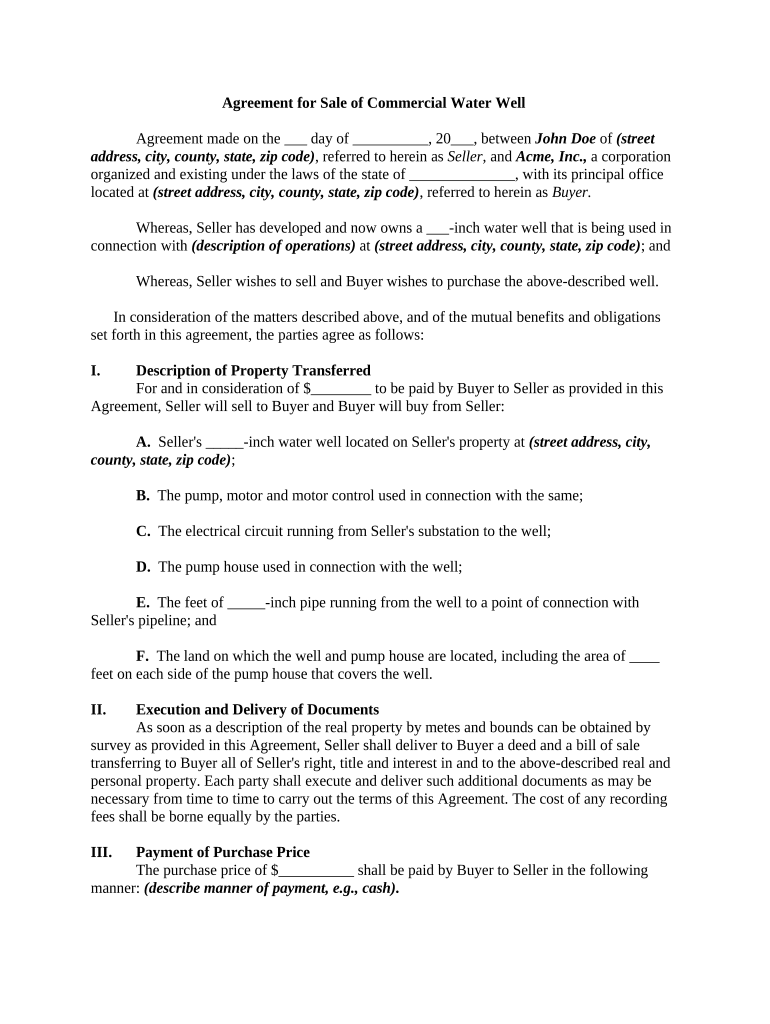
The Agreement for Sale of Commercial Water Well is a legally enforceable contract that transfers ownership of a commercial groundwater well, its equipment, and any associated water rights from a seller to a buyer. The agreement defines the well by legal description and registration numbers, sets the purchase price and payment schedule, allocates representations and warranties about condition and title, assigns responsibility for environmental liabilities and permits, and outlines access, maintenance, and recording requirements. Properly drafted, the document clarifies post-closing obligations, adjusts for liens or easements, and supports smooth recording with the county recorder.

Why a Formal Sale Agreement Matters

A clear written agreement reduces disputes over ownership, water-rights transfer, and environmental responsibility. It protects both parties by documenting inspection rights, inspection contingencies, payment terms, remedies for breach, and the process for recording the conveyance and transferring permits.

Why a Formal Sale Agreement Matters

Who Typically Uses This Agreement

Typical parties who use this agreement include commercial property owners, water utilities, and agricultural or industrial buyers involved in groundwater asset transfers.

  • Commercial property owners transferring well ownership and related equipment during asset sales.
  • Municipalities or water utilities acquiring private wells for public supply operations or consolidation.
  • Agribusinesses, developers, and industrial firms buying operational water well assets for production use.

Step-by-Step: Completing the Agreement

Follow these sequential actions to prepare, execute, and record the sale with minimal delay and legal exposure.

  • 01
    Gather Documents: Collect deed, permits, test reports, and maintenance logs.
  • 02
    Verify Ownership: Confirm title, liens, and encumbrances through a title search.
  • 03
    Draft Agreement: Describe the asset, payment terms, representations, and contingencies.
  • 04
    Close and Record: Execute signatures, notarize where required, and file with county recorder.

Core Elements a Professional Agreement Should Include

A complete agreement packages identification, payment mechanics, warranties, environmental rules, and operational rights to eliminate ambiguity and support recording and regulatory compliance.

Parties

Precisely identify seller, buyer, and authorized signers, including corporate form and contact details, and attach any corporate resolutions or powers of attorney that establish signing authority on behalf of entities.
Property Description

Provide a full legal description, parcel and permit numbers, GPS coordinates, and a referenced survey or exhibit so the exact well and associated land rights are clearly and unambiguously identified for recording and enforcement.

Consideration

Specify total purchase price, deposit and escrow handling, payment schedule, conditions for release of funds, and any holdbacks tied to inspection or environmental clearing to avoid payment disputes.

Representations

Include seller warranties about title, ownership, absence of liens, valid permits, and operational condition, and define remedies, indemnities, and discovery periods for false statements.

Environmental

Allocate responsibility for existing contamination, required remediation, testing timelines, and insurance or escrow for potential cleanup costs, referencing applicable state water quality laws where needed.

Access & Maintenance

Define access easements, maintenance responsibilities, rights to repair or upgrade equipment, notice requirements for access, and shared-cost arrangements for ongoing operation or emergency repairs.

Security and Compliance Considerations

Encryption: TLS 1.2/1.3 in transit
Data at Rest: AES-256 encryption at rest
Legal Frameworks: ESIGN and UETA compliance
HIPAA Support: HIPAA-compliant with BAA available
Audit Trail: Tamper-evident audit trail retained
Authentication: Multi-factor signer authentication available

Setting Up an Online Signing Workflow

Configure fields, signature order, and attachments to capture all required approvals before routing for notarization and final recording.

Field Configuration
Signature Field Required; enforce signer order; attach ID verification
Date Field Auto-populate on signature; consistent MM/DD/YYYY format
Notary Block Include notary acknowledgement with space for seal and date
Conditional Fields Show environmental contingency clauses only if contamination indicated
Attachments Require survey, permits, and pump test PDFs prior to final sign

Where to Send and How the Routing Works

After preparing the agreement, route to each signer, complete any required notarization, then deliver recorded copies to stakeholders and file the original as required.

  • Send to Buyer: Email or platform link to buyer for signature
  • Buyer Signs: Buyer completes signature and date fields online
  • Notarization Step: Arrange in-person or RON notarization as required
  • Record Document: File deed or conveyance with county recorder office

Digital Tools and Platform Requirements

Choose a platform that supports secure eSignatures, required attachments, conditional logic, and outputs suitable for county recording.

  • File Formats: PDF and DOCX supported
  • Integrations: Salesforce, NetSuite, Google Workspace supported
  • Authentication: Email, SMS code, or advanced verification

eSignature Pricing and Feature Comparison

Pricing and feature overview for eSignature platforms commonly used to execute and manage sale agreements and accompanying documents.

signNow DocuSign Adobe Sign PandaDoc HelloSign
Starting Price $8/user/mo $15/user/mo $14/user/mo $19/user/mo $15/user/mo
Free Trial 7-day free trial, no card required Varies by vendor Varies by vendor Varies by vendor Varies by vendor
Bulk Send Yes Yes Yes Yes No
Audit Trail Yes Yes Yes Yes Yes
HIPAA Compliant Yes Yes Yes No No
Envelope Cap No envelope cap 100 envelopes/user/year Varies Varies Varies

Key Penalties and Legal Risks to Avoid

Invalid Transfer: Transaction voidable; litigation risk
Missing Signatures: Contract unenforceable without valid signatures
Title Defects: Liens or encumbrances survive sale
Environmental Liability: Cleanup costs and regulatory fines
Tax Reporting: Form 1099-S or backup withholding
Delay in Recording: Priority loss; purchaser exposure

Common Mistakes When Preparing the Agreement

  • Failing to include the well’s parcel number, GPS coordinates, or recorded deed references creates ambiguity and increases title and boundary disputes.
  • Using vague language about water allocation, permitted uses, or historic withdrawal rates can lead to regulatory challenges and operational disputes after transfer.
  • Not providing construction permits, pump test data, or maintenance logs undermines buyer due diligence and may trigger warranty claims or post-closing litigation.
  • Failing to record or clearly assign access and utility easements can block maintenance access, reduce usability, and create disputes among neighboring properties.

Practical Tips to Improve Accuracy and Speed

Adopt these practices to reduce negotiation time, minimize legal risk, and streamline recording and post-closing administration.

Use precise legal descriptions
Avoid colloquial addresses; cite parcel numbers, recorded deed references, and the well’s permit or registration identifier. Attach a survey or site map as an exhibit to prevent boundary disputes and ensure accurate recording.
Confirm water-rights transferability
Review state water allocation rules and permitting to confirm the well’s water rights are transferable. Obtain required regulatory approvals or written consent before closing to avoid invalid transfers.
Include environmental protections
Require baseline contamination testing, specify responsibility for remediation of existing conditions, and set insurance or escrow requirements for cleanup costs to protect the buyer from legacy liabilities.
Plan for recording and taxes
Specify who will record the conveyance, allocate payment of recording or transfer fees, and address potential tax reporting obligations such as Form 1099-S where applicable.

Agreement vs Deed: Which Instrument Is Appropriate?

Compare a standalone sale agreement with a deed or conveyance to decide the appropriate instrument for transferring title and water rights.

Criteria Agreement Deed
Transfer Type contractual assignment legal conveyance
Recording Required usually always recommended
Water Rights Included can be included often includes by deed
Typical Use asset sale, conditions title transfer, permanent ownership

Key Milestones from Offer to Recorded Conveyance

Track these numbered milestones to maintain schedule, manage contingencies, and preserve legal priority during the transaction lifecycle.

01

Negotiation & Offer

Agree on price, contingencies, and due diligence deadlines

02

Due Diligence Period

Complete inspections, title search, and permit verification within agreed time

03

Closing Date

Execute agreement, transfer funds, and obtain all signatures

04

Recordation

File conveyance or deed with county recorder to perfect title

Important Timing Rules and Filing Considerations

Be aware of effective dates, recording timing, and any tax or reporting deadlines that may apply to a property or asset transfer.

Effective Date vs Closing:

Effective date governs obligations; closing finalizes transfer and payment

Record within county:

Record deed or conveyance promptly to protect against subsequent claims

Tax reporting obligations:

Determine whether Form 1099-S or other federal reporting is required

Notarization timing:

Complete notarization at or before closing as state law requires

Document retention:

Retain signed originals and reproducible electronic copies per schedule

Frequently Asked Questions and Practical Answers

Answers to common legal, technical, and procedural questions when preparing or executing a sale of a commercial water well.


Need help? Contact support

be ready to get more
Join over 28 million airSlate SignNow users