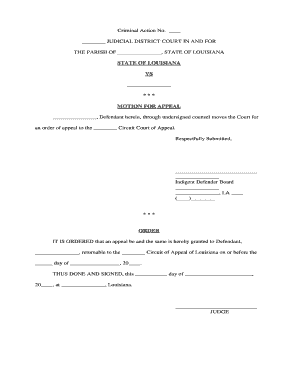
Appeal Form
What an Appeal Form Is and when it is used
Why completing the Appeal Form correctly matters
A complete, well-organized Appeal Form preserves legal rights, prevents procedural dismissals, and creates an auditable record. It standardizes the information reviewers need and reduces processing delays while documenting the appellant's requested remedy and supporting evidence.
Who typically files or completes an Appeal Form
Choose the party type that matches who has standing and authority to file; some agencies require a designated representative or attorney to submit appeals on behalf of an organization.
- Individual appellants seeking reversal of benefits or licensing decisions — self-represented or with counsel.
- Human resources or compliance officers filing internal employment grievances or disciplinary appeals.
- Insurance claimants or agents requesting claim reconsideration on behalf of a policyholder.
Step-by-step completion process
-
01Gather documents: Collect decision letter, evidence, and prior communications.
-
02Complete form: Enter fields exactly and attach supporting exhibits in order.
-
03Confirm deadlines: Verify the agency's filing deadline and required delivery method.
-
04Submit and track: Send via the prescribed channel and retain proof of filing.
Typical routing and review flow after filing
-
File: Appellant submits form through agency portal or mail.
-
Acknowledge: Agency issues receipt and case number.
-
Review: Staff or adjudicator evaluates record and evidence.
-
Decision: Agency issues written determination with next steps.
Digital workflow settings to consider
| Field | Configuration |
|---|---|
| Authentication | Email plus SMS code or KBA when required |
| Accepted Attachments | PDF, DOCX; name files by exhibit number |
| Notifications | Email confirmations and audit trail logging |
| Routing | Sequential reviewer order with deadline reminders |
Technical formats and system compatibility
Ensure your eSubmission method preserves metadata and the audit trail required for attribution and potential judicial review.
- Formats: PDF and DOCX are widely accepted
- Integrations: Salesforce, NetSuite, Google Workspace supported
- Security: TLS 1.2/1.3 in transit; AES-256 at rest
Common deadlines and timing expectations
Agency internal appeal:
Often 30 days from the decision date
Request for hearing:
Frequently 10–30 days after filing the appeal
Final administrative deadline:
May be specified as 60–90 days for decision issuance
Judicial review window:
Varies after exhaustion of administrative remedies
Extensions:
Some agencies permit written extension requests
Key milestones from submission to final outcome
Submission and Receipt
File appeal and obtain confirmation or case number
Preliminary Review
Agency checks jurisdiction and completeness of filing
Evidence Exchange
Parties may submit additional exhibits and responses
Decision Issued
Written determination with appeal or judicial options
Common preparation mistakes to avoid
- Missing or incorrect case number causing misrouting and processing delays when the agency cannot identify the record.
- Late filing beyond the stated deadline resulting in dismissal for untimeliness without consideration on the merits.
- Incomplete evidence or unnumbered exhibits making it difficult for reviewers to verify factual claims and slowing adjudication.
- Sending to the wrong office or using an unsupported file format that leads to rejection or loss of metadata.
Risks and consequences of an incorrect or late appeal
Practical tips for accurate and efficient Appeal Form completion
How electronic Appeal Forms compare with paper submissions
| Format | Electronic | Paper |
|---|---|---|
| Legality | valid under esign | handwritten accepted |
| Authentication | audit trail, mfa possible | notary or witness |
| Turnaround | typically faster | slower by mail |
| Recordkeeping | easier to store and search | physical storage needed |
Representative eSignature vendor pricing and capabilities
| signNow | DocuSign | Adobe Sign | PandaDoc | HelloSign | |
|---|---|---|---|---|---|
| Starting Price | $8/user/mo | $15/user/mo | $14/user/mo | $19/user/mo | $15/user/mo |
| Free Trial | 7-day free trial | Varies | Varies | Varies | Varies |
| Bulk Send | Yes | Yes | Yes | Yes | No |
| Audit Trail | Yes | Yes | Yes | Yes | Yes |
| HIPAA Compliant | Yes | Yes | Yes | No | No |
Frequently asked questions about Appeal Forms
-
Can I sign an Appeal Form electronically?
Yes. Electronic signatures are generally enforceable under the ESIGN Act (15 U.S.C. ch. 96) and UETA where adopted, provided the signer's intent and attribution are documented and any industry exceptions do not apply.
-
What if I miss the filing deadline?
Missing an appeal deadline often results in dismissal unless the agency allows equitable tolling or an extension; immediately contact the agency to inquire about exception processes and document any extenuating circumstances.
-
Which supporting documents should I attach?
Attach the original decision letter, all documents relied upon in the initial decision, new evidence supporting your grounds, and an exhibit index; label and reference exhibits clearly in the appeal narrative.
-
Is notarization or witnesses required?
Not usually for routine appeals, but sworn affidavits or certified statements may require notarization depending on state rules or the agency's evidence requirements—verify with the receiving office.
-
How do I correct an error after submission?
Promptly notify the agency in writing, request permission to file an amended appeal or supplement the record, and retain proof of both the original and corrected submissions.
-
How is protected health information handled?
If appeals include PHI, use a HIPAA-compliant process and ensure a Business Associate Agreement is in place where required; limit disclosures to the minimum necessary.