Establishing secure connection…Loading editor…Preparing document…

Application Forma Pauperis

This template is fully customizable. Edit the text, fill out the fields, and send it for signature. Give it a try!
Application Forma Pauperis

What the Application Forma Pauperis Is and When It Applies

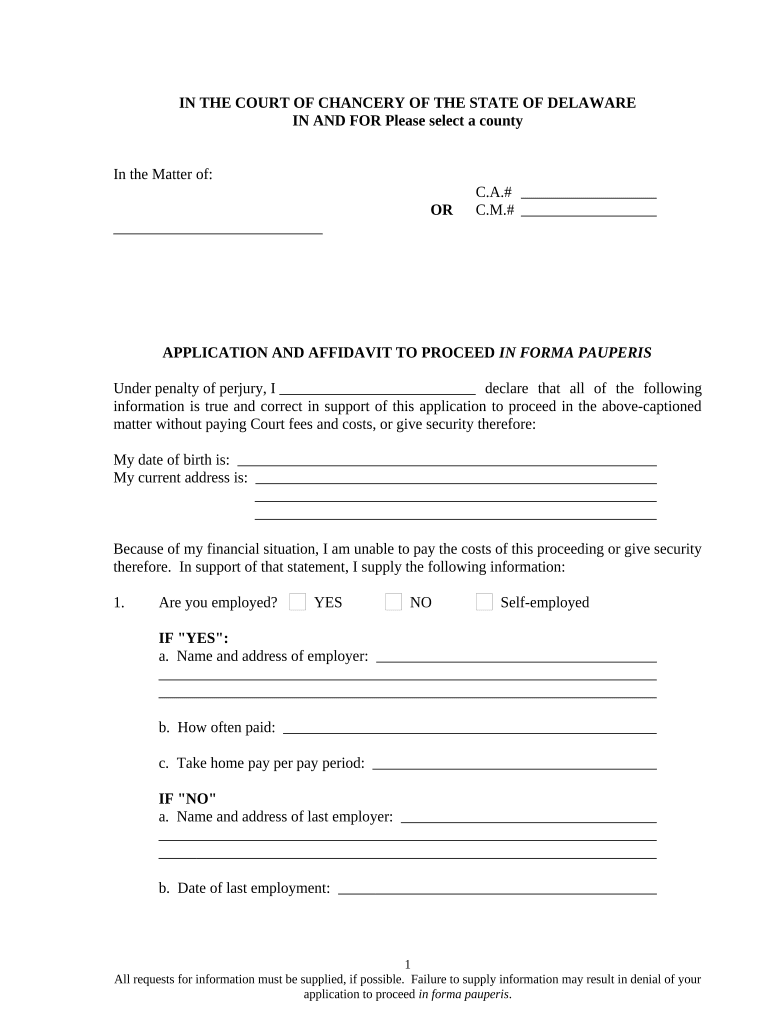
The Application Forma Pauperis is a court filing used by an individual seeking waiver of court filing fees and related costs because they cannot afford them. It typically requires a sworn statement of income, assets, monthly expenses, and any dependents, and it asks the court to permit proceeding without prepayment. Courts evaluate financial statements and may request supporting documentation; some jurisdictions treat misstatements as sanctionable conduct. The form does not replace the underlying pleading — it accompanies the complaint, petition, or appellate filing when submitted to a clerk.

Why Completing an Accurate Application Forma Pauperis Matters

A properly prepared application allows a litigant to seek access to the court system without an upfront fee and reduces administrative delays. Courts grant waivers when the record shows genuine inability to pay; incomplete or inconsistent information can cause denial or require immediate cure. Electronic completion and a clear supporting packet improve review speed while preserving the applicant’s sworn attestation.

Why Completing an Accurate Application Forma Pauperis Matters

Who Typically Files an Application Forma Pauperis

The form is most often completed by self-represented litigants, attorneys on behalf of low-income clients, and public interest organizations assisting eligible individuals.

  • Pro se litigants who cannot afford court costs and who attest to limited income and assets.
  • Legal aid and public defender staff preparing fee-waiver petitions on clients’ behalf.
  • Court clerks and intake officers who verify completeness and route applications for judicial review.

Typical Roles Involved in Completing or Reviewing the Form

Pro Se Applicant

An individual representing themselves who completes the financial disclosure, signs under penalty of perjury, and provides supporting proof when available. Accuracy is critical because false statements can lead to sanctions or criminal exposure.

Court Clerk

Court staff accepts the application, checks for required fields and signatures, and forwards it to the judge or judicial officer for determination; clerks may request supplemental proof or return incomplete forms for correction.

Core Components of a Professional Application Forma Pauperis

A complete, court-ready application organizes identity, financial statements, supporting documents, and a clear signature block so a judicial officer can make a timely decision without unnecessary follow-up.

Court Caption

Court name and docket information should match the accompanying complaint or appeal to avoid administrative rejection and to ensure the judge can identify the underlying matter quickly.
Applicant Information

Full legal name, mailing address, birthdate, and contact phone or email as required by the local rule; use the name on government ID to prevent identity mismatches.

Income Statement

List gross and net income sources, pay frequency, and employer details. Include public benefits and irregular income like tips to provide a complete eligibility picture.

Assets and Debts

Itemize bank balances, vehicles, property, loans, and credit card balances. Small inaccuracies can slow review—round amounts but avoid omissions.

Monthly Expenses

Detail housing, utilities, medical costs, transportation, and dependent support to demonstrate necessary living expenses that limit ability to pay court fees.

Signature Block

Applicant must sign and date under penalty of perjury. Include notary or witness attestation only if a jurisdiction’s local rule requires it.

Step-by-Step: Complete and Submit an Application Forma Pauperis

Follow these steps to prepare a clean, court-ready application for fee waiver consideration.

  • 01
    Prepare Documents: Gather pay stubs, benefit letters, bank statements.
  • 02
    Complete Form: Enter all fields truthfully and fully.
  • 03
    Sign Under Oath: Sign and date; notarize if required.
  • 04
    Submit to Clerk: File with complaint or as directed by court rules.

Where and How to File or Deliver the Application

Choosing the correct submission method depends on the court and jurisdiction; follow local rules for filing and retain proof of delivery when possible.

  • Electronic Court Filing: Attach the application when e-filing your case.
  • In-Person Delivery: Bring the signed form to the clerk’s office.
  • Mail or Courier: Send certified mail and keep tracking number.
  • Email Intake (Limited): Use only if local rules explicitly permit email filing.

Configuring an Online Workflow for Application Forma Pauperis

Set up a simple eSubmission workflow to collect applicant data, verify identity, and capture a legally valid signature.

Field Configuration
Document Upload Require PDF/ DOCX with size limits
Authentication Method Email link plus optional SMS code
Required Attachments Configure mandatory file fields for proofs
Signature Type Allow e-signature with audit trail

Technical Requirements for eSubmission and eSigning

Use a platform that supports PDF and DOCX uploads, audit trails, and secure signer authentication to meet court and regulatory expectations.

  • File Formats: PDF and DOCX supported
  • Signer Authentication: Email link or SMS code
  • Audit Trail: IP, timestamp, action log

Comparing eSignature Vendors for Completing and Submitting the Application Forma Pauperis

Vendor pricing, trial availability, and compliance features vary; the table compares starting price, trial, bulk send capability, audit trail, HIPAA compliance, and envelope limits.

signNow DocuSign Adobe Sign PandaDoc HelloSign
Starting Price $8/user/mo $15/user/mo $14/user/mo $19/user/mo $15/user/mo
Free Trial 7-day free trial Yes Yes Yes Yes
Bulk Send Yes Yes Yes Yes No
Audit Trail Yes Yes Yes Yes Yes
HIPAA Compliant Yes Yes Yes No No
Envelope Cap No cap 100 envelopes/user/year Varies by plan Varies by plan Varies by plan

Security and Compliance Controls to Protect Applicant Data

Encryption: TLS 1.2/1.3; AES-256 at rest
Certifications: SOC 2 Type II; ISO 27001 available
HIPAA Support: BAA available for covered entities
Audit Trail: Timestamps, IP, action history
Access Controls: Role-based permissions and SSO
Accessibility: WCAG 2.0 Level AA support

Penalties and Risks from Incorrect or Fraudulent Applications

Denial of Waiver: Application may be denied
Case Dismissal: Procedural defects can lead to dismissal
Sanctions: Court may impose monetary sanctions
Perjury Exposure: False statements may trigger criminal charges
Fee Liability: Court can require retroactive payment
Delay: Incomplete forms cause processing delays

Common Pitfalls When Preparing an Application Forma Pauperis

  • Omitting income sources such as informal work or benefits leads to requests for supplemental proof and delays.
  • Filing an unsigned or undated affidavit is routinely returned as incomplete and may be rejected by the clerk.
  • Providing inconsistent figures between bank statements and the application invites closer scrutiny or referral to the judge.
  • Relying on screenshots or low-quality attachments instead of certified statements can lengthen review and verification time.

Best Practices to Improve Acceptance and Speed Up Review

Adopt these practical steps to increase the likelihood of a smooth review and to minimize clerical follow-up.

Assemble a clear package
Include labeled supporting documents (pay stubs, benefits letters, bank statements) and a checklist. Organized attachments reduce clerk review time and help the judge make a faster decision.
Use consistent figures
Round consistently and avoid conflicting entries across sections. If income varies month to month, provide an explanatory note and representative documentation to explain averages or seasonal changes.
Follow local rules
Check the specific court’s local rules for required language, notarization, or supporting affidavits. Local variations often determine whether additional attestation or witness statements are necessary.
Preserve proof of submission
Keep receipt, tracking number, or e-filing confirmation and the platform’s certificate of completion. Proof of timely submission is essential for appeals and future motions.

Practical Examples of Typical Applications and Outcomes

Two concise scenarios illustrate how applicants and clinics prepare a complete submission and what courts commonly decide.

Community Legal Clinic

A clinic assembles a client packet with pay stubs and benefit letters to support a waiver request

  • Clinic flags low monthly income and high medical bills
  • Judge grants the waiver based on clear documentation and the case proceeds without prepayment, avoiding initial dismissal.

Self-Represented Applicant

An individual completes the form, signs under penalty of perjury, and attaches bank statements

  • The clerk requests one clarifying document
  • After providing the missing statement the court accepts the application and allows filing without fee.

Timing Considerations and Typical Processing Expectations

Submit the application at the time of the initial filing or as soon as inability to pay becomes apparent; courts generally act within days to weeks depending on caseload.

At Filing:

File the application with the complaint or petition

Supplement Requests:

Respond promptly to clerks’ requests for additional documents

Preliminary Rulings:

Some courts issue immediate administrative determinations

Judge Review:

Judicial review may take several business days

Appeal Deadlines:

Meet appellate filing deadlines even if waiver is pending

Frequently Asked Questions About the Application Forma Pauperis

Answers to common questions about e-signatures, notarization, supporting evidence, and consequences of incorrect or incomplete applications.


Need help? Contact support

be ready to get more
Join over 28 million airSlate SignNow users