Establishing secure connection…Loading editor…Preparing document…

Checklist for Drafting Articles of Association

This template is fully customizable. Edit the text, fill out the fields, and send it for signature. Give it a try!
Checklist for Drafting Articles of Association

What the Checklist for Drafting Articles of Association Covers

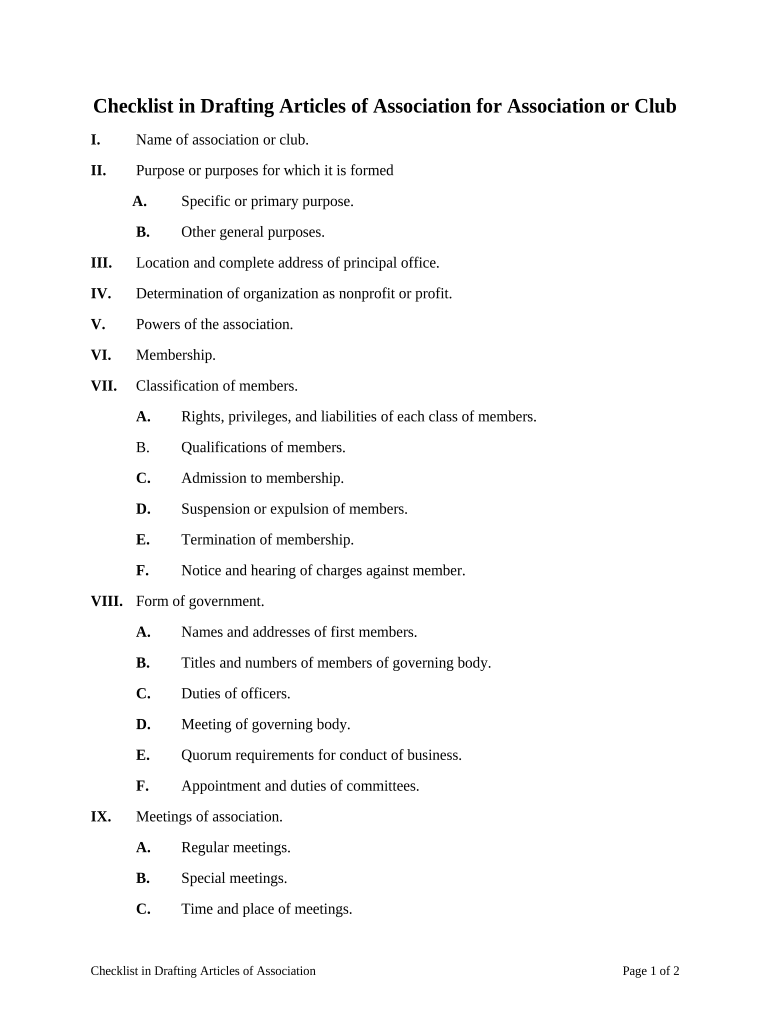
This Checklist for Drafting Articles of Association is a structured guide that helps organizers capture the essential governance, registration, and compliance details needed when preparing an entity’s foundational document. It addresses corporate name and purpose, share capital and classes, registered agent and address, incorporator and director details, voting and meeting rules, and initial bylaws or member agreements. The checklist is designed to reduce errors that lead to filing rejections, tax classification problems, or internal governance disputes by ensuring consistent, complete information is collected before submission to state authorities and stakeholders.

Why Use a Checklist for Drafting Articles of Association

A checklist ensures accuracy, helps demonstrate statutory compliance, reduces filing delays, and documents decisions that affect governance, taxes, and investor expectations. It creates an audit trail that supports later amendments and protects against inadvertent personal liability for officers or incorporators.

Why Use a Checklist for Drafting Articles of Association

Who Typically Completes This Checklist

The checklist is used by company founders, corporate counsel, incorporators, and formation services to capture required details before filing.

  • Founders and incorporators — Prepare initial filings and choose governance rules for the new entity.
  • Corporate counsel and attorneys — Review legal language, ensure compliance with state statutes and investor terms.
  • Registered agents and formation services — Verify mailing addresses, filing details, and acceptance of service information.

Core Components to Include on the Checklist

A professional checklist groups items into identification, capital structure, governance, officers and agents, filing logistics, and attachment schedules so drafters can confirm every statutory and practical element is addressed before signoff.

Entity Identity

Full legal name, DBA or trade names, and exact capitalization and punctuation as it will appear on the filed document; mismatched names cause rejections.
Registered Agent

Name and physical address of the registered agent for service of process and consent to appointment where required by state law.

Capital Structure

Authorized share classes, number of shares, par value (if any), rights and preferences, and restrictions on transfer or issuance.

Governance Rules

Board composition, director appointment/ removal procedures, quorum and voting thresholds, and procedures for shareholder or member meetings.

Officers & Incorporators

Names, offices, business addresses, and signatures for incorporators, initial directors, and officers where the filing or internal adoption requires them.

Attachments

Bylaws or members’ agreement, subscription forms, share certificates template, and any special provisions such as drag/ tag rights or buy‑sell terms.

Step-by-Step: From Draft to Filed Articles

Follow a consistent sequence to draft, approve, and file Articles of Association so that governance and tax treatments align from day one.

  • 01
    Draft Core Terms: Populate entity name, purpose, capital, and registered agent.
  • 02
    Internal Approval: Obtain incorporator or board approval and record minutes or written consent.
  • 03
    Prepare Attachments: Finalize bylaws, subscription agreements, and share allocations.
  • 04
    File with State: Submit to Secretary of State and pay applicable filing fees.

Configuring an Online Checklist Workflow

Design the digital workflow to mirror legal steps: collect inputs, require approvals, enable signatures, and store files with audit trails.

Form Template Create a reusable template with required fields and conditional sections.
Approval Routing Set sequential approvers: incorporator → counsel → board secretary.
Signature Order Enforce role-based signing order where statutory signatures are required.
Authentication Level Require email + SMS or advanced auth for high-risk signers.
Record Storage Archive final PDF and audit log in secure cloud storage.

Digital Signing and eSubmission Considerations

Ensure the provider complies with ESIGN and UETA, offers tamper-evident signed documents, and supports export to your corporate records system.

  • File Formats: PDF and DOCX supported
  • Authentication: Email, SMS, or KBA
  • Integrations: CRM and cloud storage

Where to File, Send, and Store Completed Articles

Identify destinations for the executed articles: state filing office, registered agent, corporate minute book, and tax counsel for election planning.

  • State Filing Office: Submit to the Secretary of State or equivalent agency.
  • Registered Agent: Provide a copy to the registered agent for service of process records.
  • Corporate Records: Store executed articles and minutes in the official minute book.
  • Tax Advisor: Share to confirm EIN and entity classification strategy.

Key Timing Items to Track on the Checklist

Record time-sensitive items such as the intended effective date, filing submission, and deadlines for tax elections and initial meetings.

Intended Effective Date:

Enter the date articles should become effective; governs when rights and duties begin.

Filing Submission:

Note Secretary of State processing time and preferred delivery method.

Initial Board Meeting:

Schedule for adopting bylaws, appointing officers, and issuing shares.

Tax Election Deadlines:

Track S-corp or other elections with advisor to meet IRS windows.

Document Retention Start:

Log when retention periods begin for corporate and tax records.

Milestone Sequence from Draft to Corporate Record

Use a numbered sequence to confirm all approvals, filings, and record transfers occur in order and within statutory windows.

01

Draft Completion

Assemble articles, exhibits, and supporting resolutions for review.

02

Internal Approval

Obtain required incorporator or board signatures and minutes.

03

State Filing

Deliver the executed document and pay filing fee to the state.

04

Record Retention

Store executed originals, electronic copies, and audit logs securely.

Common Drafting and Filing Errors to Avoid

  • Using an unavailable or reserved name; failure to check Secretary of State name availability causes rejections and delays.
  • Leaving capital structure vague; ambiguous share classes or missing par values can trigger shareholder disputes and tax uncertainty.
  • Incorrect registered agent address or missing consent; improper service information may invalidate service of process.
  • Failing to align tax elections and effective dates; late elections can create unintended tax consequences or retroactive liabilities.

Risks and Consequences of Incomplete or Incorrect Checklists

Filing Rejection: Delay and additional fees
Tax Misclassification: Unintended corporate tax status
Liability Exposure: Officer or director risk
Recordkeeping Gaps: Audit or investor trust issues
Contract Invalidity: Faulty governance terms
Regulatory Noncompliance: Penalties or enforcement

Essential Data Elements to Capture

Company Name: Exact legal name
Registered Agent: Name and physical address
Authorized Shares: Classes and quantities
Incorporator Info: Name and contact details
Governing Law: State selected for interpretation
Effective Date: MM/DD/YYYY

eSignature Vendor Comparison for Completing the Checklist

Compare common platform capabilities and starting prices for eSignature providers used to execute and archive Articles of Association; signNow appears first for easy reference.

signNow DocuSign ($15/user/mo) Adobe Sign ($14/user/mo) PandaDoc ($19/user/mo) HelloSign ($15/user/mo)
Starting Price $8/user/mo $15/user/mo $14/user/mo $19/user/mo $15/user/mo
Free Trial 7-day free trial No No Yes, limited Yes, limited
Bulk Send Yes Yes Yes Yes No
Audit Trail Yes Yes Yes Yes Yes
Envelope Cap No cap 100 envelopes/user/year No cap No cap No cap

Examples: How Teams Use the Checklist in Practice

Real organizations use checklists to reduce reviews and ensure consistent filings across jurisdictions.

Optica Ventures

Optica standardized articles across multiple formations to reduce rework and investor questions.

  • Checklist ensured consistent capital tables across entities.
  • "The interface is simple and easy-to-use for our team; more importantly, it is just as easy for our customers." This consistency reduced formation time and back-and-forth with counsel.

Fertility Centers of Illinois

A healthcare provider used the checklist to align corporate governance with patient privacy controls.

  • Checklist flagged HIPAA retention links early.
  • "The airSlate SignNow team has been exceptional, responsive, the API has been great, and we're extremely happy that we chose airSlate SignNow as a company." The result improved compliance handoffs and record management.

Frequently Asked Questions About the Checklist

Answers to common questions about validity, signatures, amendments, and filing help reduce confusion when completing Articles of Association.


Need help? Contact support

be ready to get more
Join over 28 million airSlate SignNow users