Establishing secure connection…Loading editor…Preparing document…

Assignee’s Assumption of Duties and Obligations of Assigned Contract

This template is fully customizable. Edit the text, fill out the fields, and send it for signature. Give it a try!
Assignee’s Assumption of Duties and Obligations of Assigned Contract

What the Assignee’s Assumption of Duties and Obligations of Assigned Contract Is

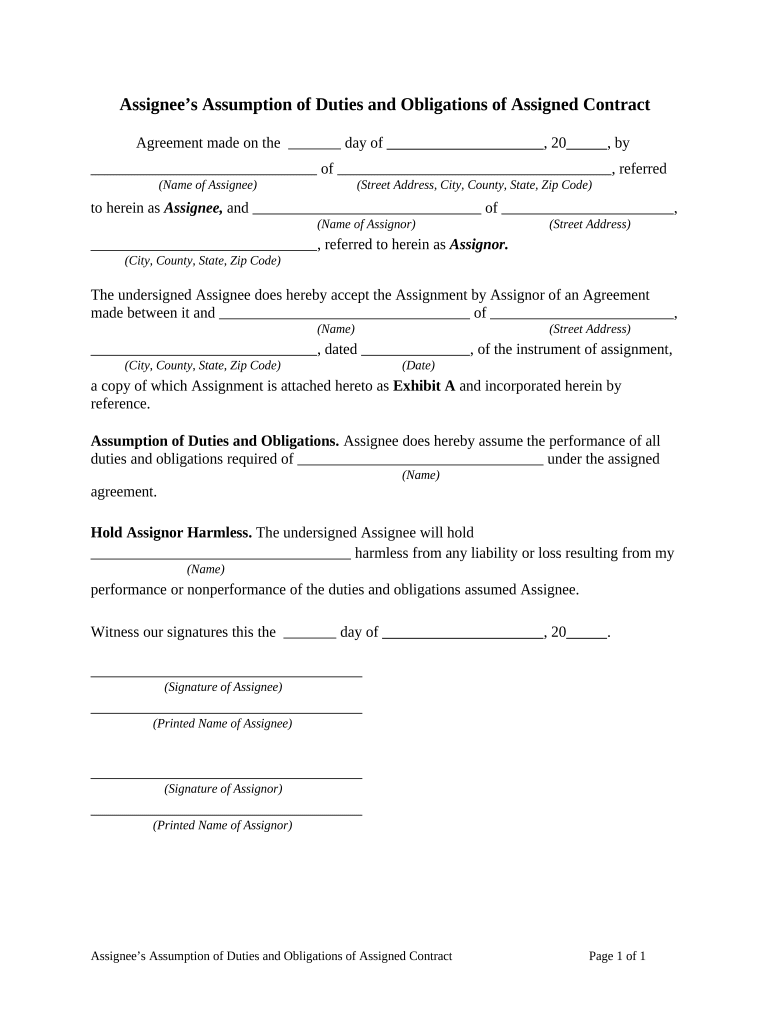
An Assignee’s Assumption of Duties and Obligations of Assigned Contract is a written agreement by which a designated assignee accepts the contractual duties, rights, and liabilities previously held by the assignor under an existing contract. The document names the original contract, identifies the parties, describes which obligations transfer, and records whether the assignor remains liable. It clarifies the effective date of assignment, any required consents, and any conditions precedent. Courts treat properly executed assignments as enforceable subject to the original contract terms, applicable state law, and any required third-party approvals.

Why a Clear Assumption Agreement Matters

A clear assumption agreement reduces ambiguity about who performs obligations, who may enforce rights, and who bears liability if performance fails. It documents consent, records notice to relevant parties, and creates a written chain of title for contractual duties.

Why a Clear Assumption Agreement Matters

Who Typically Prepares or Signs This Assumption

Common users include parties to a transfer, their counsel, and counterparties who must consent to an assignment.

  • Assignor or seller preparing to transfer contractual duties.
  • Assignee or buyer accepting ongoing obligations and liabilities.
  • Contract counterparties or lenders providing consent to the assignment.

Core Elements to Include in a Professional Assumption Agreement

A well-drafted Assignee’s Assumption of Duties and Obligations of Assigned Contract should be precise about scope, timing, and liability allocation to avoid disputes and preserve enforceability.

Parties

Full legal names and business types for assignor, assignee, and any consenting counterparty; include addresses and contact information to identify each party unequivocally.
Referenced Contract

Explicitly identify the original contract by title, date, parties, and any exhibit or contract number so the scope of transferred duties is unambiguous.

Scope of Assignment

Describe which duties, rights, and obligations are transferred and which (if any) remain with the assignor; include any excluded sections or limited delegations.

Effective Date

State the effective date of the assignment and any conditions precedent such as third-party consent, payment, or regulatory approvals.

Liability Allocation

Specify whether the assignor remains secondarily liable, whether novation occurs, and how indemnities and liabilities will be handled post-assignment.

Consent and Notices

Include counterparty consent language or a mechanics section for notice, service addresses, and how party communications must be delivered.

Required Information and Essential Metadata

Assignor Name: Legal entity name
Assignee Name: Legal entity name
Contract ID: Original contract reference
Effective Date: MM/DD/YYYY
Consent Status: Consent obtained or pending
Signatures: Signed and dated

Step-by-Step: How to Complete an Assumption Agreement

Follow these sequential steps to prepare, execute, and deliver an enforceable Assignee’s Assumption of Duties and Obligations of Assigned Contract.

  • 01
    1. Identify the contract: Locate the original contract and collect reference data.
  • 02
    2. Draft the assignment: Specify scope, effective date, and liability terms.
  • 03
    3. Obtain consents: Request required counterparty, lender, or regulator consent.
  • 04
    4. Execute and deliver: Sign, notarize if required, and send notice to stakeholders.

How to Customize and Submit the Agreement Online

Configure a digital workflow to automate routing, signatures, and confirmations for assignment transactions.

Field Configuration
Signer Order Sequential routing: Assignor → Assignee → Counterparty
Authentication Method Email link with optional SMS code or ID verification
Document Versioning Enable version control and audit trail
Notifications Automatic email confirmations on signature events

Typical Online Assignment Workflow

A digital signing flow reduces turnaround time and creates an auditable trail of consent and execution.

  • Upload Document: Sender uploads final assignment template to the platform.
  • Place Fields: Add signature, date, and initial fields where required.
  • Send to Signers: Route to assignor, assignee, and consenting parties.
  • Capture Audit Trail: Platform records timestamps, IP, and authentication details.

Distribution and Technical Requirements for eSubmission

Use platforms that export signed PDFs, preserve audit trails, and support required authentication levels.

  • File Formats Supported: PDF, DOCX, and printable images
  • Integrations: CRM and storage integrations such as Salesforce and NetSuite
  • Authentication Options: Email, SMS code, KBA, or advanced methods

Key Timing Considerations and Typical Deadlines

Time-bound steps in an assignment process help ensure validity and protect parties from unexpected liabilities.

Effective Date Specification:

Declare MM/DD/YYYY to fix transfer of duties and potential liability.

Counterparty Consent Period:

Allow a defined response period, commonly 10–30 days for consent.

Notice to Lender or Third Party:

Provide immediate written notice if contract includes lender consent clauses.

Record Delivery:

Deliver executed document and certificate of completion within business days.

Retention Start Date:

Begin retention counting from the effective date of assignment.

Milestones from Preparation to Final Notice

Track these sequential milestones to manage approvals and protect against disputed obligations.

01

Draft and Review

Prepare assignment language and coordinate internal approvals.

02

Request Counterparty Consent

Send consent request and allow the agreed response period.

03

Assignee Acceptance

Obtain formal assignee signature and acknowledgment of obligations.

04

Issue Notice

Send notice of assignment to all relevant parties and record delivery.

Common Mistakes to Avoid When Preparing an Assumption

  • Failing to identify the exact contract reference, causing ambiguity over which obligations transferred.
  • Omitting counterparty or lender consent when the contract requires it, risking breach or rescission.
  • Using vague scope language such as 'all rights' without specifying excluded obligations or limitations.
  • Neglecting to record whether the assignor remains secondarily liable or whether novation occurs.

Risks and Practical Consequences of an Incorrect Assignment

Breach Liability: Assignee assumes performance risk
Secondary Liability: Assignor may remain liable
Counterparty Rejection: Contract may be unenforceable
Regulatory Risk: Industry rules may limit assignment
Tax Withholding: Reporting obligations may shift
Recordkeeping Failure: Loss of documentary proof

Real-World Examples of Assignment Use

These concise case notes show how assignment and assumption documents are used in practice.

Optica Ventures LLC

Optica used an assumption agreement to transfer vendor obligations during portfolio restructuring.

  • The team emphasized clear notice procedures.
  • The documented assignment reduced transition friction and preserved service continuity while keeping liability allocation transparent for lenders and counterparties.

Martin Properties

A property manager assigned lease obligations to a new operator during sale.

  • The assignee accepted duties and provided insurance certificates.
  • By capturing consents and insurance obligations in the assumption, Martin Properties minimized post-closing disputes and ensured uninterrupted tenant services.

eSignature Vendor Pricing and Feature Snapshot for Assignment Workflows

Compare typical starting prices and feature criteria relevant to signing and delivering assumption agreements; signNow appears first in the vendor list.

signNow DocuSign Adobe Sign PandaDoc HelloSign
Starting Price $8/user/mo $15/user/mo $14/user/mo $19/user/mo $15/user/mo
Free Trial 7-day free trial, no credit card required Varies by vendor Varies by vendor Varies by vendor Varies by vendor
Bulk Send Yes Yes Yes Yes No
Audit Trail Yes Yes Yes Yes Yes
HIPAA Compliant Yes Yes Yes No No

Frequently Asked Questions and Troubleshooting

Answers to common execution, validity, and delivery issues encountered with assignment and assumption documents.


Need help? Contact support

be ready to get more
Join over 28 million airSlate SignNow users