Establishing secure connection…Loading editor…Preparing document…

Assignment of Accounts Receivable Regarding Manufactured Goods

This template is fully customizable. Edit the text, fill out the fields, and send it for signature. Give it a try!
Assignment of Accounts Receivable Regarding Manufactured Goods

What this Assignment document is and when it applies

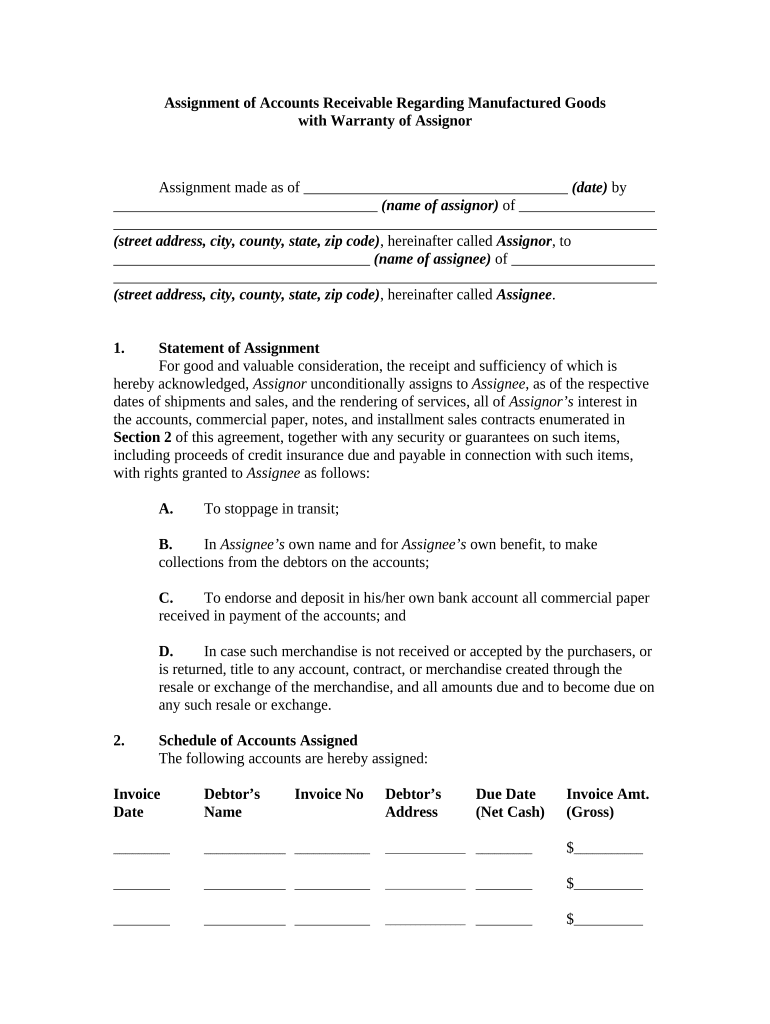
An Assignment of Accounts Receivable Regarding Manufactured Goods is a written transfer by which a seller or manufacturer (the assignor) transfers rights to collect specified receivables arising from the sale or delivery of manufactured goods to another party (the assignee). The document describes which accounts or invoices are assigned, whether the assignment is absolute or security-based, any retained responsibilities for collection, and any notice or filing obligations needed to perfect the assignee’s rights under applicable law.

Why organizations use this assignment

Assignments clarify who may collect receivables and establish priority for lenders or buyers of receivables, reducing disputes and supporting financing arrangements under the UCC and relevant state law.

Why organizations use this assignment

Typical parties that prepare or sign this assignment

Who prepares or receives this form and why it matters.

  • Manufacturers and suppliers that sell goods on credit and may sell receivables to improve cash flow.
  • Banks, factoring firms, and financiers that require a perfected interest in accounts receivable as collateral.
  • Legal and collections teams ensuring assignment language and UCC perfection protect priority and enforceability.

Primary signer roles and their responsibilities

Credit Manager

The Credit Manager typically prepares or reviews the schedule of assigned receivables, confirms invoice numbers and amounts, and verifies collection controls. They coordinate notice to account debtors and ensure records align with the UCC filing and company credit policy.

Chief Financial Officer

The CFO or authorized officer signs for the assigning entity when required, approves the assignment terms, and confirms the assignment’s impact on balance sheet presentation, tax treatment, and lender covenants. Legal review is often coordinated through the CFO’s office.

Security and compliance basics to note

Encryption: TLS 1.2/1.3
Data at rest: AES-256 encryption
Certifications: SOC 2 Type II
Healthcare BAA: HIPAA with BAA required
21 CFR support: 21 CFR Part 11 compliant
Audit trail: Comprehensive signing history

Core components every professional assignment should include

A complete Assignment of Accounts Receivable Regarding Manufactured Goods clearly lists parties, describes the receivables, states the scope (absolute vs. security), includes consideration, identifies governing law, and specifies notice and filing instructions to perfect rights.

Parties

Full legal names, business type, and contact details for assignor and assignee; include authorized signatory details.
Receivable Description

Precise invoice numbers, date ranges, or formulas describing assigned accounts to avoid ambiguity.

Type of Assignment

State whether absolute transfer or security interest and whether future receivables are included.

Consideration

Specify monetary payment, credit, or other agreed value supporting the transfer.

Perfection Steps

UCC-1 filing instructions, jurisdiction, and any required debtor notices.

Governing Law

Designate the state law that will govern interpretation and enforcement.

Step-by-step: completing and executing the assignment

Follow these sequential steps to create, sign, and perfect an assignment so the assignee can enforce or collect assigned receivables with minimized legal risk.

  • 01
    Prepare Draft: Describe receivables and consider absolute vs. security assignment.
  • 02
    Legal Review: Confirm language, governing law, and notice provisions.
  • 03
    Execute Document: Authorized signatories sign and date the assignment.
  • 04
    Perfect Interest: File UCC-1 and provide debtor notice if required.

Where to send, file, and deliver copies after execution

Routing the signed assignment and completing administrative filings ensures priority and practical ability to collect assigned receivables.

  • To Assignee: Provide fully executed original for records and collections.
  • To Account Debtors: Send notice of assignment when required or contractually mandated.
  • UCC Filing Office: File UCC-1 with the Secretary of State where debtor is located.
  • Lenders/Financiers: Deliver copies to lenders per intercreditor arrangements.

Online workflow settings for secure completion and filing

Configure your digital workflow to capture consent, maintain audit records, and support UCC perfection steps when assigning receivables.

Field Configuration
Signature Type Electronic signature with audit trail
Authentication Email or SMS two-factor as needed
Document Retention PDF/A copy retained with metadata
Notifications Automatic copy to assignee and filing contacts

Digital signing and file-format requirements

Choose a platform that preserves the signed PDF, audit trail, and signer authentication data.

  • File formats: PDF, DOCX supported
  • Integrations: Salesforce, NetSuite, Google Workspace
  • Authentication: Email, SMS, or advanced ID checks

Key timing considerations and deadlines

Timely execution, UCC filing, and debtor notice affect priority, enforceability, and potential lender covenants. Track these dates carefully.

Execution Date:

Date on which rights transfer and obligations begin

UCC Filing:

File promptly after execution to perfect priority

Debtor Notice:

Send when contract or state law requires notification

Retention Start:

Retention period begins on execution date

Tax Reporting:

Consider IRS implications when receivables are sold

Milestone timeline from draft to perfected assignment

A clear milestone plan reduces missed steps that could compromise priority or collection rights.

01

Draft Finalized

Terms, schedules, and consideration agreed upon.

02

Execution

Authorized officers sign and date the agreement.

03

UCC Filing

File UCC-1 in debtor’s jurisdiction to perfect.

04

Debtor Notification

Deliver notice as required to enable collection.

Common preparation errors to avoid

  • Vague assignment descriptions that fail to specify invoices or date ranges, leading to disputes over which receivables were intended.
  • Failing to file a UCC-1 promptly or filing in the wrong jurisdiction, which can subordinate the assignee to other secured creditors.
  • Not notifying account debtors when notice is contractually required, which can create collection and proof-of-rights complications.
  • Using inconsistent legal names or omitting EINs, causing clerical rejections or mismatches with state filing systems.

Legal and commercial risks from incorrect assignments

Priority Loss: Unperfected interest
Collection Bar: Debtor payment disputes
Tax Exposure: Incorrect reporting
Contract Breach: Violates existing covenants
Filing Rejection: Clerical filing errors
Litigation Risk: Competing creditor suits

eSignature vendor pricing and feature snapshot

Price and feature differences matter when selecting an eSignature solution for assignments. The table below compares starting price, trial options, bulk send availability, audit trails, HIPAA compliance, and envelope caps.

signNow DocuSign Adobe Sign PandaDoc HelloSign
Starting Price $8/user/mo $15/user/mo $14/user/mo $19/user/mo $15/user/mo
Free Trial 7-day free trial Varies by plan Varies by plan Varies by plan Varies by plan
Bulk Send Yes Yes Yes Yes No
Audit Trail Yes Yes Yes Yes Yes
Envelope Cap No envelope cap 100 envelopes/user/year Varies by plan Varies by plan Varies by plan

Frequently asked questions and quick answers

Answers to common questions on enforceability, filing, signing authority, and electronic execution for assignments of receivables.


Need help? Contact support

be ready to get more
Join over 28 million airSlate SignNow users