Establishing secure connection…Loading editor…Preparing document…

Petition to Enjoin Nonjudicial Foreclosure Sale

This template is fully customizable. Edit the text, fill out the fields, and send it for signature. Give it a try!
Petition to Enjoin Nonjudicial Foreclosure Sale

What the Petition to Enjoin a Nonjudicial Foreclosure Sale Is

The Petition to Enjoin Nonjudicial Foreclosure Sale is a court filing that asks a judge to halt a scheduled trustee sale or similar nonjudicial foreclosure proceeding. The petition alleges procedural or substantive defects—such as improper notice, erroneous assignment, or servicing errors—and requests temporary injunctive relief while disputes are resolved. It ordinarily attaches the deed of trust, assignments, notice copies, payment histories, title reports, affidavits, and a proposed order. Local court filing, service, and emergency-relief rules determine timing and specific supporting documentation required for judicial consideration.

Why Filing This Petition Matters

A timely petition can secure an emergency stay or temporary restraining order that preserves the property and buyer protections while legal claims are litigated. It protects equitable interests, creates leverage for settlement or discovery, and prevents irretrievable loss of property rights if defects in the foreclosure process are shown.

Why Filing This Petition Matters

Who Typically Files or Responds

Typical filers include homeowners facing imminent trustee sales, title insurers protecting marketable title, and attorneys representing affected parties.

  • Homeowners and borrowers seeking to stop an imminent trustee sale and preserve occupancy.
  • Title companies or purchasers protecting against defective title or unresolved liens before closing.
  • Lenders, servicers, or trustees defending procedures or seeking to clarify notice compliance.

Step-by-step: Prepare and File the Petition

Follow a clear sequence: draft allegations, compile exhibits, request emergency relief if needed, file with the proper court, serve all interested parties, and appear at the scheduled hearing.

  • 01
    Draft Petition: Allege defects, cite law, and request relief.
  • 02
    Attach Exhibits: Include loan file, notices, assignments, title report.
  • 03
    File with Court: Submit original and required number of copies.
  • 04
    Serve Parties: Comply with service rules; use certified mail.

Essential Case Identifiers and Document Data

Borrower Name: Full legal name as on government ID
Property Address: Street, city, state, and ZIP
Loan Number: Lender account or loan identifier
Trustee Name: Name of trustee or servicing agent
Sale Date: Date and time of scheduled sale
Recording Info: Book, page, or instrument number

Anatomy of a Professional Petition

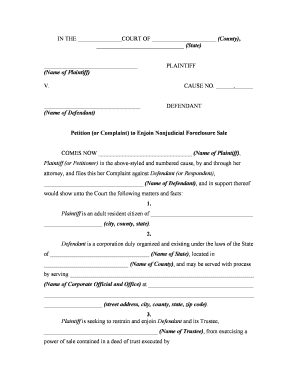
A complete petition combines a clear caption, factual narrative, legal claims, supporting exhibits, precise relief requested, and a clean proposed order for the judge to sign.

Caption

Use the court caption naming plaintiff(s), defendant(s), county, case number if known, and the document title. Accurate captioning ensures proper service and avoids clerical rejection by court clerks.
Factual Allegations

Detail chronological events: loan origination, assignments, notices received, attempted communications, and the trustee sale timeline. Include dates, names, and copies of any defective notices or missing disclosures.

Legal Claims

Identify statutory and common-law grounds supporting injunctive relief, e.g., violation of notice statutes, breach of contract, lack of standing, wrongful foreclosure, unfair practices. Cite controlling statutes and relevant case law where available.

Evidence Attachments

Attach loan documents, recorded assignments, notice copies, payment histories, trustee deeds, title reports, and affidavits. Ensure exhibits are labeled, paginated, and referenced precisely in the pleading to streamline judicial review.

Relief Sought

Specify temporary restraining order, preliminary injunction, or stay of sale sought, and detail narrow relief requested such as preservation of status quo, escrow, or appointment of a receiver, plus proposed bond amount.

Proposed Order

Include a clean proposed order for the judge to sign that mirrors the petition's requests, sets hearing deadlines, and includes findings required for injunctive relief to assist judicial clerks and expedite consideration.

Online Workflow Settings for Petition Preparation and Signature

Configure an online workflow to prepare, sign, notarize, and file petitions with secure audit trails and conditional fields for court exhibits and sworn statements.

Field Name and Editor Configuration How to set up each field and behavior
Select Document to Upload and Verify PDF or DOCX; ensure exhibits are legible
Place Signature and Date Fields Add signature, initial, and date placeholders
Authentication Level and Access Controls Email/SMS code; set identity verification level
Notary and RON Options Setup Enable remote notarization, record A/V if used

Where to File and How Documents Are Routed

Submitting a petition involves preparing the pleading and exhibits, filing with the appropriate clerk, serving interested parties, and requesting an expedited hearing or TRO if urgent.

  • Prepare Filing: Assemble petition and exhibits electronically or in paper.
  • File with Clerk: Submit to county clerk or civil court intake.
  • Serve Trustee: Serve trustee, lender, and title insurer per rules.
  • Request Hearing: Request expedited hearing and temporary relief as needed.

Digital Signing and eFiling Requirements

Digital filing and e-sign workflows require secure audit trails, signer authentication, and compatibility with court e-filing standards where available.

  • Formats Supported: PDF, DOCX, and scanned images
  • Authentication: Email, SMS code, or KBA
  • Integrations: Court E-Filing, CM/ECF, and cloud

Penalties and Risks of an Incorrect or Late Petition

Loss of Property: Sale proceeds may foreclose rights
Bond Risk: Court may require security or bond
Contempt Sanctions: Improper filings can trigger sanctions
Service Defects: Improper service can dismiss petition
Evidence Shortfall: Insufficient proof likely causes denial
Attorney Costs: Extended litigation increases fees

Common Mistakes to Avoid

  • Failing to serve all necessary parties or using incorrect service methods often results in dismissal or delay; verify statute and local rules before filing.
  • Submitting unsigned or unverified affidavits, missing exhibits, or unsecured electronic copies can cause the clerk to reject or the court to continue the hearing.
  • Relying on incorrect party names or mistaken trustee identity can undermine standing and lead to jurisdictional challenges that are time-consuming to remedy.
  • Delaying emergency petitions until the last minute may limit available relief; courts expect prompt filing supported by affidavits demonstrating imminent irreparable harm.

Practical Example Scenarios

Two practical scenarios illustrate common grounds and procedural outcomes when seeking to enjoin a nonjudicial foreclosure sale.

Borrower Emergency Petition

A homeowner filed an emergency petition after discovering a recorded assignment that occurred after the published sale date and improper notice to the borrower.

  • Court granted TRO based on likely success on merits.
  • The petitioner attached the deed of trust, recorded assignments, certified mail receipts, and a payment ledger; the prompt evidentiary record convinced the judge to halt the sale pending a preliminary injunction hearing where detailed discovery proceeded.

Title Company Intervention

A title insurer intervened to enjoin a trustee sale after uncovering a prior unrecorded modification that affected lien priority and buyer risk.

  • Judge ordered temporary stay to resolve title chain.
  • The insurer provided title searches, escrow communications, and recorded instrument searches; the court used those exhibits to schedule an expedited hearing and ultimately required corrective recording and purchaser notice before any sale could proceed.

eSignature Pricing and Capability Comparison

Comparison of core eSignature pricing and capability dimensions relevant to preparing and signing a petition to enjoin nonjudicial foreclosure sale.

signNow DocuSign Adobe Sign PandaDoc HelloSign
Starting Price $8/user/mo $15/user/mo $14/user/mo $19/user/mo $15/user/mo
Free Trial 7-day free trial Varies by plan Varies by plan Varies by plan Varies by plan
Bulk Send Yes Varies by plan Yes Yes Varies by plan
Audit Trail Yes Yes Yes Yes Yes
HIPAA Compliant Yes Yes Yes No No
Envelope Cap No cap 100 envelopes/user/year Varies by plan Varies by plan Varies by plan

FAQs: Common Questions About Petitioning to Enjoin a Nonjudicial Foreclosure Sale

Answers to common procedural and e-sign questions about petitions to enjoin nonjudicial foreclosure sales, including filing, service, evidence, and electronic signing limitations.


Need help? Contact support

be ready to get more
Join over 28 million airSlate SignNow users