Establishing secure connection… Loading editor… Preparing document…
Navigation

Fill and Sign the Attorney for Name Superior Court of California County Form
Fill and Sign the Attorney for Name Superior Court of California County Form

How it works

Open the document and fill out all its fields.
Apply your legally-binding eSignature.
Save and invite other recipients to sign it.

Rate template

4.7
51 votes
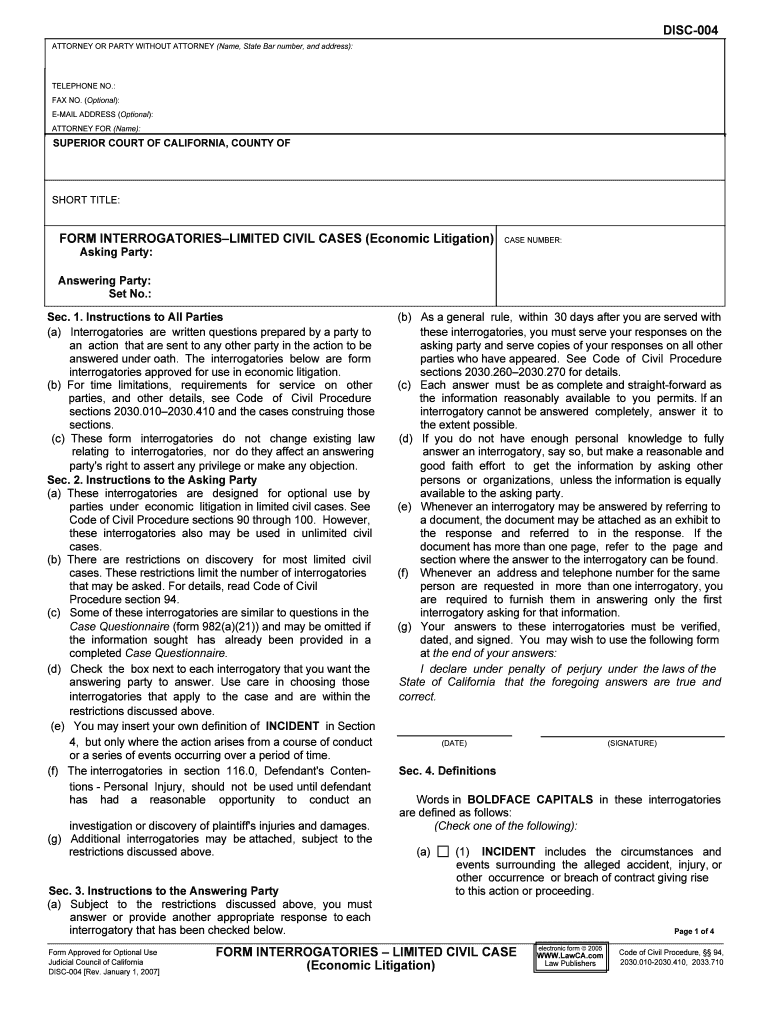
DISC-004ATTORNEY OR PARTY WITHOUT ATTORNEY (Name, State Bar number, and address): TELEPHONE NO.: FAX NO. (Optional): E-MAIL ADDRESS (Optional ): ATTORNEY FOR (Name): SUPERIOR COURT OF CALIFORNIA, COUNTY OF SHORT TITLE: FORM INTERROGATORIES– LIMITED CIVIL CASES (Economic Litigation) CASE NUMBER:Asking Party: Answering Party: Set No.: Sec. 1. Instructions to All Parties (b) As a general rule, within 30 days after you are served with(a) Interrogatories are written questions prepared by a party to these interrogatories, you must serve your responses on thean action that are sent to any other party in the action to be asking party and serve copies of your responses on all otheranswered under oath. The interrogatories below are form parties who have appeared. See Code of Civil Procedureinterrogatories approved for use in economic litigation. sections 2030.260–2030.270 for details.(b) For time limitations, requirements for service on other (c) Each answer must be as complete and straight-forward asparties, and other details, see Code of Civil Procedure the information reasonably available to you permits. If ansections 2030.010–2030.410 and the cases construing those interrogatory cannot be answered completely, answer it tosections. the extent possible. (c) These form interrogatories do not change existing law(d) If you do not have enough personal knowledge to fully relating to interrogatories, nor do they affect an answering answer an interrogatory, say so, but make a reasonable andparty's right to assert any privilege or make any objection. good faith effort to get the information by asking otherSec. 2. Instructions to the Asking Party persons or organizations, unless the information is equally(a) These interrogatories are designed for optional use byavailable to the asking party.parties under economic litigation in limited civil cases. See (e) Whenever an interrogatory may be answered by referring toCode of Civil Procedure sections 90 through 100. However, a document, the document may be attached as an exhibit tothese interrogatories also may be used in unlimited civil the response and referred to in the response. If thecases. document has more than one page, refer to the page and(b) There are restrictions on discovery for most limited civil section where the answer to the interrogatory can be found.cases. These restrictions limit the number of interrogatories (f)Whenever an address and telephone number for the samethat may be asked. For details, read Code of Civil person are requested in more than one interrogatory, youProcedure section 94. are required to furnish them in answering only the first(c) Some of these interrogatories are similar to questions in the interrogatory asking for that information.Case Questionnaire (form 982(a)(21)) and may be omitted if(g) Your answers to these interrogatories must be verified,the information sought has already been provided in adated, and signed. You may wish to use the following formcompleted Case Questionnaire. at the end of your answers:(d) Check the box next to each interrogatory that you want the I declare under penalty of perjury under the laws of theanswering party to answer. Use care in choosing those State of California that the foregoing answers are true andinterrogatories that apply to the case and are within thecorrect.restrictions discussed above. (e) You may insert your own definition of INCIDENT in Section 4, but only where the action arises from a course of conduct (DATE) (SIGNATURE)or a series of events occurring over a period of time.(f) The interrogatories in section 116.0, Defendant's Conten- Sec. 4. Definitionstions - Personal Injury, should not be used until defendanthas had a reasonable opportunity to conduct an Words in BOLDFACE CAPITALS in these interrogatories are defined as follows:investigation or discovery of plaintiff's injuries and damages. (Check one of the following):(g) Additional interrogatories may be attached, subject to the restrictions discussed above. (a) (1)INCIDENT includes the circumstances and events surrounding the alleged accident, injury, or other occurrence or breach of contract giving rise Sec. 3. Instructions to the Answering Party to this action or proceeding.(a) Subject to the restrictions discussed above, you mustanswer or provide another appropriate response to each interrogatory that has been checked below. Page 1 of 4Form Approved for Optional Use Code of Civil Procedure, §§ 94,Judicial Council of California 2030.010-2030.410, 2033.710DISC-004 [Rev. January 1, 2007] FORM INTERROGATORIES – LIMITED CIVIL CASE (Economic Litigation) electronic form  2005 WWW.LawCA.com Law Publishers DISC-004 (2) INCIDENT means (insert your definition here or on a 102.0 General Background Information - Individual separate, attached sheet labeled "Sec. 4(a) (2)"): 102.1 State your name, any other names by which you have been known, and your ADDRESS. 102.2 State the date and place of your birth.102.3 State, as of the time of the INCIDENT, your driver's (b) YOU OR ANYONE ACTING ON YOUR BEHALF license number, the state of issuance, the expiration date,includes you, your agents, your employees, your insurance and any restrictions.companies, their agents, their employees, your attorneys, youraccountants, your investigators, and anyone else acting on your 102.4 State each residence ADDRESS for the last fivebehalf. years and the dates you lived at each ADDRESS. (c) PERSON includes a natural person, firm, association,102.5 State the name, ADDRESS, and telephone numberorganization, partnership, business, trust, corporation, or public of each employer you have had over the past five years andentity. the dates you worked for each. (d) DOCUMENT means a writing, as defined in EvidenceCode section 250, and includes the original or a copy of hand- 102.6 Describe your work for each employer you have hadwriting, typewriting, printing, photostating, photographing,over the past five years.electronically stored information, and every other means of recording upon any tangible thing and form ofcommunicating or representation, including letters, words,102.7 State the name and ADDRESS of each academic orpictures, sounds, or symbols, or combinations of them. vocational school you have attended, beginning with high school, and the dates you attended each.(e) HEALTH CARE PROVIDER includes any PERSONreferred to in Code of Civil Procedure section 667.7(e)(3). 102.8 If you have ever been convicted of a felony, state, for each, the offense, the date and place of conviction, and the court and case number. (f) ADDRESS means the street address, including the city,state, and zip code.Sec. 5. Interrogatories 102.9 State the name, ADDRESS, and telephone numberThe following interrogatories have been approved by the of any PERSON for whom you were acting as an agent orJudicial Council under Code of Civil Procedure section 2033.710: employee at the time of the INCIDENT.CONTENTS 102.10 Describe any physical, emotional, or mental 101.0 Identity of Persons Answering These Interrogatories disability or condition that you had that may have102.0 General Background Information - Individual contributed to the occurrence of the INCIDENT.103.0 General Background Information - Business Entity104.0 Insurance 102.11 Describe the nature and quantity of any alcoholic105.0 [Reserved] beverage, marijuana, or other drug or medication of any106.0 Physical, Mental, or Emotional Injuries kind that you used within 24 hours before the INCIDENT.107.0 Property Damage108.0 Loss of Income or Earning Capacity 103.0 General Background Information - Business Entity109.0 Other Damages110.0 Medical History 103.1 State your current business name and ADDRESS,111.0 Other Claims and Previous Claims type of business entity, and your title.112.0 Investigation - General113.0 [Reserved] 104.0 Insurance114.0 Statutory or Regulatory Violations 104.1 State the name and ADDRESS of each insurance115.0 Claims and Defenses company and the policy number and policy limits of each116.0 Defendant's Contentions - Personal Injury policy that may cover you, in whole or in part, for the117.0 [Reserved] damages related to the INCIDENT.120.0 How the Incident Occurred - Motor Vehicle125.0 [Reserved] 105.0 [Reserved]130.0 [Reserved] 106.0 Physical, Mental, or Emotional Injuries135.0 [Reserved] 106.1 Describe each injury or illness related to the150.0 Contract INCIDENT.160.0 [Reserved]170.0 [Reserved] 106.2 Describe your present complaints about each 101.0 Identity of Persons Answering These injury or illness related to the INCIDENT.Interrogatories 101.1 State the name, ADDRESS, telephone number, and 106.3 State the name, ADDRESS, and telephone number relationship to you of each PERSON who prepared or of each HEALTH CARE PROVIDER who treated orassisted in the preparation of the responses to these examined you for each injury or illness related to theinterrogatories. (Do not identify anyone who simply typed or INCIDENT and the dates of treatment or examination.reproduced the responses.) Page 2 of 4DISC-004 [Rev. January 1, 2007] FORM INTERROGATORIES– LIMITED CIVIL CASE(Economic Litigation) DISC-004 106.4 State the type of treatment or examination given to 111.0 Other Claims and Previous Claims you by each HEALTH CARE PROVIDER for each injury or 111.1 Identify each personal injury claim that YOU ORillness related to the INCIDENT. ANYONE ACTING ON YOUR BEHALF have made within the past ten years and the dates. 106.5 State the charges made by each HEALTH CARE PROVIDER for each injury or illness related to the 111.2 State the case name, court, and case number ofINCIDENT. each personal injury action or claim filed by YOU OR 106.6 State the nature and cost of each health care service ANYONE ACTING ON YOUR BEHALF within the past ten related to the INCIDENT not previously listed (for example, years.medication, ambulance, nursing, prosthetics).112.0 Investigation - General 106.7 State the nature and cost of the health care services 112.1 State the name, ADDRESS, and telephone number you anticipate in the future as a result of the INCIDENT. of each individual who has knowledge of facts relating to theINCIDENT, and specify his or her area of knowledge. 106.8 State the name and ADDRESS of each HEALTH CARE PROVIDER who has advised you that you may need 112.2 State the name, ADDRESS, and telephone numberfuture health care services as a result of the INCIDENT. of each individual who gave a written or recorded statement relating to the INCIDENT and the date of the statement.107.0 Property Damage 112.3 State the name, ADDRESS, and telephone number107.1 Itemize your property damage and, for each item, of each PERSON who has the original or a copy of a written state the amount or attach an itemized bill or estimate. or recorded statement relating to the INCIDENT.108.0 Loss of Income or Earning Capacity 112.4 Identify each document or photograph that describes or depicts any place, object, or individual concerning the INCIDENT or plaintiff's injuries, or attach 108.1 State the name and ADDRESS of each employer or a copy. (if you do not attach a copy, state the name, other source of the earnings or income you have lost as a ADDRESS, and telephone number of each PERSON result of the INCIDENT. who had the original document or photograph or a copy.) 108.2 Show how you compute the earnings or income you 112.5 Identify each other item of physical evidence that have lost, from each employer or other source, as a result of shows how the INCIDENT occurred or the nature or extentthe INCIDENT. of plaintiff's injuries, and state the location of each item, and the name, ADDRESS, and telephone number of each PERSON who has it. 108.3 State the name and ADDRESS of each employer or other source of the earnings or income you expect to lose inthe future as a result of the INCIDENT. 113.0 [Reserved] 108.4 Show how you compute the earnings or income you 114.0 Statutory or Regulatory Violations expect to lose in the future, from each employer or othersource, as the result of the INCIDENT. 114.1 If you contend that any PERSON involved in theINCIDENT violated any statute, ordinance, or regulation and109.0 Other Damages that the violation was a cause of the INCIDENT, identify 109.1 Describe each other item of damage or cost that you each PERSON and the statute, ordinance, or regulation. attribute to the INCIDENT, stating the dates of occurrenceand the amount. 115.0 Claims and Defenses110.0 Medical History 115.1 State in detail the facts upon which you base your110.1 Describe and give the date of each complaint or claims that the PERSON asking this interrogatory is injury, whether occurring before or after INCIDENT, thatresponsible for your damages.involved the same part of your body claimed to have beeninjured in the INCIDENT. 115.2 State in detail the facts upon which you base your contention that you are not responsible, in whole or in part, 110.2 State the name, ADDRESS, and telephone number for plaintiff's damages. of each HEALTH CARE PROVIDER who examined ortreated you for each injury or complaint, whether occurring 115.3 State the name, ADDRESS, and the telephonebefore or after the INCIDENT, that involved the same part of number of each PERSON, other than the PERSON askingyour body claimed to have been injured in the INCIDENT this interrogatory, who is responsible, in whole or in part, forand the dates of examination or treatment. damages claimed in this action. Page 3 of 4DISC-004 [Rev. January 1, 2007] FORM INTERROGATORIES– LIMITED CIVIL CASE(Economic Litigation) DISC-004116.0 Defendant's Contentions - Personal Injury 120.4 For each vehicle involved in the INCIDENT, state the name, ADDRESS, and telephone number of each [See Instruction 2(f)] occupant other than the driver. 116.1 If you contend that any PERSON, other than you or plaintiff, contributed to the occurrence of the INCIDENT or 120.5 For each vehicle involved in the INCIDENT, state thethe injuries or damages claimed by plaintiff, state the name, name, ADDRESS, and telephone number of each regis-ADDRESS, and telephone number of each individual who tered owner.has knowledge of the facts upon which you base yourcontention. 120.6 For each vehicle involved in the INCIDENT, state the name, ADDRESS, and telephone number of each lessee. 116.2 If you contend that plaintiff was not injured in the INCIDENT, state the name, ADDRESS, and telephone 120.7 For each vehicle involved in the INCIDENT, state thenumber of each individual who has knowledge of the facts name, ADDRESS, and telephone number of each ownerupon which you base your contention. other than the registered owner or lien holder. 116.3 If you contend that the injuries or the extent of the 120.8 For each vehicle involved in the INCIDENT, state the injuries claimed by plaintiff were not caused by the name of each owner who gave permission or consent to theINCIDENT, state the name, ADDRESS, and telephone driver to operate the vehicle.number of each individual who has knowledge of the factsupon which you base your contention. 150.0 Contract 116.4 If you contend that any of the services furnished by 150.1 Identify all DOCUMENTS that are part of the any HEALTH CARE PROVIDER were not related to the agreement and for each state the name, ADDRESS, andINCIDENT, state the name, ADDRESS, and telephone telephone number of the PERSON who has each DOCU-number of each individual who has knowledge of the facts MENT.upon which you base your contention. 150.2 State each part of the agreement not in writing, the116.5 If you contend that any of the costs of services name, ADDRESS, and telephone number of each PERSON furnished by any HEALTH CARE PROVIDER were agreeing to that provision, and the date that part of theunreasonable, identify each service that you dispute, the agreement was made.cost, and the HEALTH CARE PROVIDER. 150.3 Identify all DOCUMENTS that evidence each part of116.6 If you contend that any part of the loss of earnings or the agreement not in writing, and for each state the name, income claimed by plaintiff was unreasonable, identify each ADDRESS, and telephone number of the PERSON whopart of the loss that you dispute and each source of the has each DOCUMENT.income or earnings. 150.4 Identify all DOCUMENTS that are part of each mod- ification to the agreement, and for each state the name 116.7 If you contend that any of the property damage ADDRESS, and telephone number of the PERSON who claimed by plaintiff was not caused by the INCIDENT, has each DOCUMENT.identify each item of property damage that you dispute. 150.5 State each modification not in writing, the date, and the name, ADDRESS, and telephone number of the PERSON agreeing to the modification, and the 116.8 If you contend that any of the costs of repairing the date the modification was made. property damage claimed by plaintiff were unreasonable,identify each cost item that you dispute. 150.6 Identify allDOCUMENTSthat evidence each 116.9 If you contend that, within the last ten years, plaintiff modification of the agreement not in writing and for each made a claim for personal injuries that are related to the state the name, ADDRESS, and telephone number of theinjuries claimed in the INCIDENT, identify each related injury PERSON who has each DOCUMENT.and the date. 150.7 Describe and give the date of every act or omission116.10 If you contend that, within the past ten years, that you claim is a breach of the agreement. plaintiff made a claim for personal injuries that are related tothe injuries claimed in the INCIDENT, state the name, court, 150.8 Identify each agreement excused and state why per-and case number of each action filed. formance was excused.117.0 [Reserved] 150.9 Identify each agreement terminated by mutual agree-120.0 How the Incident Occurred - Motor Vehicle ment and state why it was terminated, including dates. 120.1 State how the INCIDENT occurred.150.10 Identify each unenforceable agreement and state120.2 For each vehicle involved in the INCIDENT, state the the facts upon which your answer is based. year, make, model, and license number. 120.3 For each vehicle involved in the INCIDENT, state the 150.11 Identify each ambiguous agreement and state the name, ADDRESS, and telephone number of the driver. facts upon which your answer is based. Page 4 of 4DISC-004 [Rev. January 1, 2007] FORM INTERROGATORIES–LIMITED CIVIL CASE(Economic Litigation)

Useful tips for finishing your ‘Attorney For Name Superior Court Of California County ’ online

Are you fed up with the annoyance of managing paperwork? Search no further than airSlate SignNow, the premier electronic signature solution for individuals and businesses. Bid farewell to the lengthy procedure of printing and scanning documents. With airSlate SignNow, you can seamlessly complete and sign documents online. Utilize the robust features integrated into this user-friendly and budget-friendly platform and transform your method of document administration. Whether you need to approve forms or gather electronic signatures, airSlate SignNow handles everything effortlessly, needing just a few clicks.

Follow this detailed guide:

  1. Sign in to your account or register for a complimentary trial with our service.
  2. Click +Create to upload a file from your device, cloud storage, or our template library.
  3. Open your ‘Attorney For Name Superior Court Of California County ’ in the editor.
  4. Click Me (Fill Out Now) to complete the form on your part.
  5. Insert and allocate fillable fields for others (if needed).
  6. Continue with the Send Invite settings to request eSignatures from others.
  7. Save, print your copy, or transform it into a reusable template.

No need to worry if you have to collaborate with others on your Attorney For Name Superior Court Of California County or send it for notarization—our solution provides everything you require to accomplish such tasks. Create an account with airSlate SignNow today and take your document management to a new height!

Here is a list of the most common customer questions. If you can’t find an answer to your question, please don’t hesitate to reach out to us.

Need help? Contact Support
California substitution of attorney rules
How do I get a certified copy of my name change in California
Substitution of attorney with court Order
Substitution of attorney criminal case
Substitution of attorney form California Family Law
Substitution of attorney without court Order
Substitution of attorney criminal California
Substitution of attorney California
California State Bar Attorney search by Name
California substitution of attorney Rules
Substitution of attorney--Civil (without court order)
California Bar Association Attorney search

The best way to complete and sign your attorney for name superior court of california county form


Save time on document management with airSlate SignNow and get your attorney for name superior court of california county form eSigned quickly from anywhere with our fully compliant eSignature tool.

How to Sign a PDF Online How to Sign a PDF Online

How to complete and sign paperwork online

Previously, dealing with paperwork took lots of time and effort. But with airSlate SignNow, document management is easy and fast. Our robust and user-friendly eSignature solution enables you to effortlessly complete and electronically sign your attorney for name superior court of california county form online from any internet-connected device.

Follow the step-by-step guidelines to eSign your attorney for name superior court of california county form template online:

  • 1.Register for a free trial with airSlate SignNow or log in to your account with password credentials or SSO authorization option.
  • 2.Click Upload or Create and add a file for eSigning from your device, the cloud, or our form catalogue.
  • 3.Click on the file name to open it in the editor and use the left-side menu to fill out all the blank fields properly.
  • 4.Place the My Signature field where you need to approve your sample. Provide your name, draw, or import an image of your regular signature.
  • 5.Click Save and Close to accomplish modifying your completed form.

As soon as your attorney for name superior court of california county form template is ready, download it to your device, export it to the cloud, or invite other people to eSign it. With airSlate SignNow, the eSigning process only requires several clicks. Use our robust eSignature solution wherever you are to handle your paperwork productively!


How to Sign a PDF Using Google Chrome How to Sign a PDF Using Google Chrome

How to fill out and sign forms in Google Chrome

Completing and signing paperwork is easy with the airSlate SignNow extension for Google Chrome. Adding it to your browser is a quick and efficient way to manage your forms online. Sign your attorney for name superior court of california county form template with a legally-binding eSignature in just a couple of clicks without switching between programs and tabs.

Follow the step-by-step guidelines to eSign your attorney for name superior court of california county form template in Google Chrome:

  • 1.Navigate to the Chrome Web Store, locate the airSlate SignNow extension for Chrome, and install it to your browser.
  • 2.Right-click on the link to a document you need to approve and choose Open in airSlate SignNow.
  • 3.Log in to your account using your password or Google/Facebook sign-in buttons. If you don’t have one, sign up for a free trial.
  • 4.Use the Edit & Sign toolbar on the left to complete your template, then drag and drop the My Signature option.
  • 5.Add an image of your handwritten signature, draw it, or simply type in your full name to eSign.
  • 6.Make sure all information is correct and click Save and Close to finish modifying your form.

Now, you can save your attorney for name superior court of california county form template to your device or cloud storage, send the copy to other people, or invite them to electronically sign your document with an email request or a protected Signing Link. The airSlate SignNow extension for Google Chrome enhances your document workflows with minimum effort and time. Try airSlate SignNow today!


How to Sign a PDF in Gmail How to Sign a PDF in Gmail How to Sign a PDF in Gmail

How to complete and sign paperwork in Gmail

Every time you receive an email containing the attorney for name superior court of california county form for approval, there’s no need to print and scan a document or save and re-upload it to another tool. There’s a much better solution if you use Gmail. Try the airSlate SignNow add-on to promptly eSign any documents right from your inbox.

Follow the step-by-step guide to eSign your attorney for name superior court of california county form in Gmail:

  • 1.Navigate to the Google Workplace Marketplace and locate a airSlate SignNow add-on for Gmail.
  • 2.Install the tool with a corresponding button and grant the tool access to your Google account.
  • 3.Open an email with an attached file that needs signing and use the S sign on the right sidebar to launch the add-on.
  • 4.Log in to your airSlate SignNow account. Choose Send to Sign to forward the document to other parties for approval or click Upload to open it in the editor.
  • 5.Place the My Signature option where you need to eSign: type, draw, or upload your signature.

This eSigning process saves time and only requires a couple of clicks. Utilize the airSlate SignNow add-on for Gmail to update your attorney for name superior court of california county form with fillable fields, sign paperwork legally, and invite other parties to eSign them al without leaving your inbox. Improve your signature workflows now!


How to Sign a PDF on a Mobile Device How to Sign a PDF on a Mobile Device How to Sign a PDF on a Mobile Device

How to complete and sign documents in a mobile browser

Need to rapidly submit and sign your attorney for name superior court of california county form on a smartphone while doing your work on the go? airSlate SignNow can help without the need to set up extra software programs. Open our airSlate SignNow solution from any browser on your mobile device and add legally-binding eSignatures on the go, 24/7.

Follow the step-by-step guide to eSign your attorney for name superior court of california county form in a browser:

  • 1.Open any browser on your device and go to the www.signnow.com
  • 2.Register for an account with a free trial or log in with your password credentials or SSO option.
  • 3.Click Upload or Create and pick a file that needs to be completed from a cloud, your device, or our form library with ready-to go templates.
  • 4.Open the form and fill out the empty fields with tools from Edit & Sign menu on the left.
  • 5.Add the My Signature field to the form, then type in your name, draw, or add your signature.

In a few simple clicks, your attorney for name superior court of california county form is completed from wherever you are. As soon as you're finished editing, you can save the document on your device, create a reusable template for it, email it to other people, or invite them electronically sign it. Make your paperwork on the go quick and productive with airSlate SignNow!


How to Sign a PDF on iPhone How to Sign a PDF on iPhone

How to fill out and sign paperwork on iOS

In today’s business world, tasks must be accomplished quickly even when you’re away from your computer. With the airSlate SignNow mobile app, you can organize your paperwork and sign your attorney for name superior court of california county form with a legally-binding eSignature right on your iPhone or iPad. Set it up on your device to conclude contracts and manage documents from anyplace 24/7.

Follow the step-by-step guidelines to eSign your attorney for name superior court of california county form on iOS devices:

  • 1.Open the App Store, search for the airSlate SignNow app by airSlate, and install it on your device.
  • 2.Launch the application, tap Create to add a template, and select Myself.
  • 3.Opt for Signature at the bottom toolbar and simply draw your signature with a finger or stylus to eSign the form.
  • 4.Tap Done -> Save after signing the sample.
  • 5.Tap Save or take advantage of the Make Template option to re-use this document in the future.

This process is so easy your attorney for name superior court of california county form is completed and signed in a few taps. The airSlate SignNow app works in the cloud so all the forms on your mobile device are kept in your account and are available any time you need them. Use airSlate SignNow for iOS to enhance your document management and eSignature workflows!


How to Sign a PDF on Android How to Sign a PDF on Android

How to fill out and sign documents on Android

With airSlate SignNow, it’s simple to sign your attorney for name superior court of california county form on the go. Set up its mobile application for Android OS on your device and start boosting eSignature workflows right on your smartphone or tablet.

Follow the step-by-step guide to eSign your attorney for name superior court of california county form on Android:

  • 1.Navigate to Google Play, search for the airSlate SignNow application from airSlate, and install it on your device.
  • 2.Sign in to your account or create it with a free trial, then import a file with a ➕ option on the bottom of you screen.
  • 3.Tap on the uploaded document and select Open in Editor from the dropdown menu.
  • 4.Tap on Tools tab -> Signature, then draw or type your name to eSign the sample. Fill out blank fields with other tools on the bottom if required.
  • 5.Utilize the ✔ key, then tap on the Save option to end up with editing.

With an easy-to-use interface and full compliance with primary eSignature requirements, the airSlate SignNow app is the best tool for signing your attorney for name superior court of california county form. It even works without internet and updates all record changes once your internet connection is restored and the tool is synced. Fill out and eSign documents, send them for eSigning, and generate multi-usable templates anytime and from anywhere with airSlate SignNow.

Sign up and try Attorney for name superior court of california county form
  • Close deals faster
  • Improve productivity
  • Delight customers
  • Increase revenue
  • Save time & money
  • Reduce payment cycles

