Establishing secure connection…Loading editor…Preparing document…

Arizona Easement for Access to Trail

This template is fully customizable. Edit the text, fill out the fields, and send it for signature. Give it a try!
Arizona Easement for Access to Trail

What the Arizona Easement for Access to Trail Is

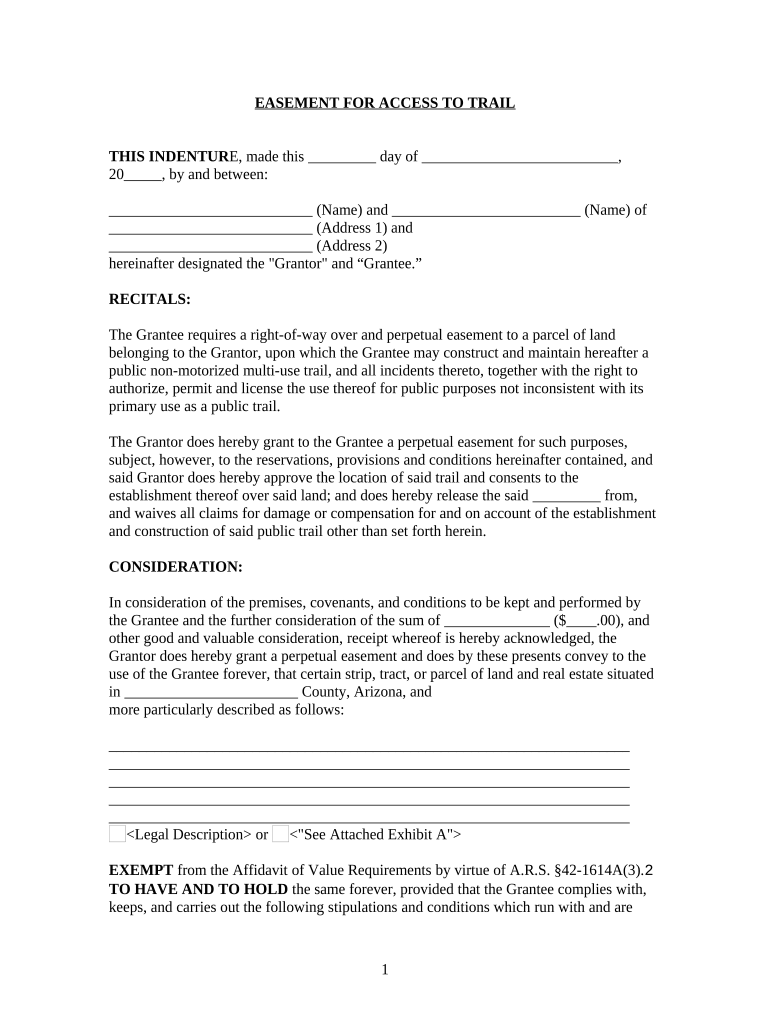
The Arizona Easement for Access to Trail is a written legal instrument used to grant permanent or temporary rights to cross private property for public or private trail access. It typically records the parties (grantor and grantee), the exact location and dimensions of the access corridor, permitted uses, maintenance responsibilities, duration or termination conditions, and any limitations or indemnities. In Arizona this instrument is recorded in county land records to provide constructive notice and to bind successors in title when executed, acknowledged, and recorded according to state requirements.

Why a Proper Easement Matters for Trail Access

Use an Arizona Easement for Access to Trail to secure legal access, clarify maintenance and liability, and protect long-term trail continuity. Properly executed and recorded easements reduce title disputes, provide notice to future owners, and formalize responsibilities between landowners and trail managers.

Why a Proper Easement Matters for Trail Access

Who Typically Prepares and Signs These Easements

Who completes an Arizona Easement for Access to Trail depends on project role and land ownership status.

  • Private landowners granting passage across their property for public or private recreational use.
  • Municipalities, counties, and land trusts establishing trail corridors and public access rights.
  • Trail managers, hiking clubs, and developers securing legal rights for construction, maintenance, or easement enforcement.

Step-by-Step: Complete and Record the Easement

Follow these sequential steps to complete, execute, and record an Arizona Easement for Access to Trail correctly.

  • 01
    Prepare Draft: Draft easement with legal description and obligations.
  • 02
    Obtain Signatures: Authorized parties sign before a notary or via RON if permitted.
  • 03
    Record Document: File in county recorder's office where property is located.
  • 04
    Notify Parties: Provide recorded copy to grantee, grantor, and relevant agencies.

How Online and Offline Workflows Flow for Easement Processing

This overview explains routing, signing, and recording workflows for trail access easements in Arizona, step-by-step.

  • Upload: Attach deed, map, and exhibits before assigning signers.
  • Assign: Set signer order and authentication level.
  • Sign: Sign electronically or in person; capture notarization if required.
  • Record: Submit to county recorder with acknowledgement and recording fees.

Core Components to Include in a Professional Easement

Key elements of a professional Arizona Easement for Access to Trail help ensure clarity, enforceability, and practical administration across ownership changes.

Parties

Identify grantor(s) and grantee(s) with full legal names, contact information, and authority statements; include organizational signatory names, titles, and proof of authority for entities to avoid later challenge.
Legal Description

Provide a precise legal description, parcel number, and a mapped exhibit with coordinates or metes and bounds; imprecise descriptions can impede recording and boundary enforcement.

Scope

Define permitted uses, user categories, vehicle or equestrian access, hours, and seasonal restrictions; clear scope prevents disputes about acceptable trail activities and maintenance burdens and liabilities.

Maintenance

Allocate maintenance duties, performance standards, cost-sharing formulas, inspection intervals, and who may make repairs; include notice procedures for needed repairs or emergency access and reimbursement terms.

Liability

Address indemnification, liability limits, insurance requirements, and whether the grantee assumes tort responsibility; specify responsibility for claim defense and limits on consequential damages and waiver clauses.

Recording

Include notary acknowledgement, exhibit references, and instructions for county recorder submission; require recording to bind successors and include recording fees and payment responsibility and return address.

Security and Compliance Notes

Encryption: TLS 1.2/1.3 in transit; AES-256 at rest.
Certifications: SOC 2 Type II, ISO 27001, PCI DSS.
HIPAA: BAA available for covered entities.
ESIGN/UETA: Legal e-signature frameworks supported.
Audit Trail: Detailed timestamp, IP, and action log.
Accessibility: WCAG 2.0 Level AA compliance.

Common Preparation Errors to Avoid

  • Using vague property descriptions or failing to attach a recorded exhibit leads to ambiguous boundaries and recording rejection in many counties.
  • Not securing proper authority for signers (company officers, trustees) can cause later disputes and title insurance exceptions.
  • Failing to record the easement promptly undermines notice to successors and may allow subsequent purchasers to claim unencumbered title.
  • Omitting maintenance, access hours, or liability clauses creates operational conflicts and increases litigation risk between parties.

Risks and Consequences of Incorrect Easements

Recording Delay: Loss of constructive notice.
Improper Authority: Easement voidable by successor.
Ambiguous Terms: Enforcement disputes and litigation.
Tax Treatment: Potential change in property tax basis.
Insurance Gaps: Liability exposure for owner.
Notarization Missing: Recorder may refuse filing.

Recommended Online Workflow Settings

Configure an online signing workflow to collect signatures, apply notarization, and capture the audit trail for the Arizona easement.

Field Configuration
Authentication Use email verification or SMS one-time code.
Notarization Enable Remote Online Notarization where state permits.
Field Validation Require formatted dates, numeric widths, and required initial fields.
Delivery Auto-send recorded copy to all signers and county records.

Pricing and Feature Comparison for eSignature Vendors

Compare common eSignature vendors for signing and recording workflows relevant to Arizona Easement for Access to Trail projects.

signNow DocuSign Adobe Sign PandaDoc HelloSign
Starting Price $8/user/mo $15/user/mo $14/user/mo $19/user/mo $15/user/mo
Free Trial 7-day free trial Varies by plan Varies by plan Varies by plan Varies by plan
Bulk Send Yes (Business Premium) Varies by plan Varies by plan Varies by plan Varies by plan
Audit Trail Yes Yes Yes Yes Yes
HIPAA Compliant Yes (BAA available) Yes (BAA available) Yes (BAA available) Varies by plan Varies by plan

Timing Expectations for Drafting, Signing, and Recording

Typical timing milestones for an Arizona trail easement include drafting, signing, notarization, recording, and distribution of recorded documents.

Draft Completion:

Allow one to two weeks for survey and legal description review.

Signing Period:

Schedule signings within thirty days to avoid rescission risk.

Notarization:

Complete notarization at signing; or use RON where allowed.

Recording:

Record promptly at county recorder; delay risks priority loss.

Distribution:

Send recorded copies to all parties immediately after recording.

Milestones: From Negotiation to Recording

Key milestones from negotiation to post-recording define the easement lifecycle and keep project stakeholders aligned.

01

Negotiation

Agree on scope, access limits, and basic compensation terms.

02

Drafting

Prepare legal description, exhibits, and maintenance clauses for review.

03

Execution

Obtain signatures and complete notarization or RON session.

04

Recording & Notice

File with county recorder and provide copies to successors.

Platform and File Requirements for eSigning and Recording

Electronic completion and submission require platform support for PDF, notarization, and recording workflows compatible with county requirements.

  • File Formats: PDF and DOCX supported.
  • Integrations: Works with Google Drive, Box, NetSuite.
  • Notary Support: Supports RON where state law allows.

Practical Examples of Easement Use and Outcomes

Real-world examples show how easements were negotiated, recorded, and managed in Arizona trail projects.

County Park Easement

A county negotiated a permanent easement to connect two trail segments across private parcels, clarifying maintenance obligations and public access rules.

  • Recorded with exhibits and GPS coordinates.
  • The recorded easement reduced title exceptions, guided annual maintenance budgeting, and provided clear enforcement paths for trespass or unauthorized use; future conveyances reflected the encumbrance without dispute and ensured grantor cooperation for seasonal closures.

Trail Conservancy Easement

A land trust accepted a donated easement with perpetual public access, attaching a detailed maintenance endowment and stewardship plan to fund long-term care.

  • Endowment funds tied to inspection benchmarks.
  • The instrument specified public access hours, ADA considerations, and an annual inspection process; it also required recorded proof of endowment investment, enabling the conservancy to meet bonding conditions and manage liabilities.

Practical Tips to Improve Accuracy and Speed

Adopt these practical tips to reduce risk and speed execution for Arizona trail easements and recording.

Use Clear Maps
Attach a high-resolution map with parcel boundaries, a metes and bounds description, and GPS coordinates. Include labeled exhibits and a reduced-scale map for recorder convenience to prevent misfiling and to ensure title examiners and surveyors can verify the corridor.
Confirm Authority
Obtain written proof that signers have authority to convey or accept easements, such as corporate resolutions, trust certificates, or power of attorney. Forward supporting documentation to title companies and recorders to avoid post-recording challenges.
Preserve Proof
Keep original executed documents, notarizations, and RON session logs where used. Store digitally with tamper-evident seals and maintain printed copies in a secure file to satisfy recorder, tax, and litigation needs.
Coordinate Recording
Confirm exact county recording requirements, fee schedules, and page templates before submission. Use county-specific transmittal covers and confirm acceptance hours to avoid rejections and priority loss, and instruct parties on fee payment responsibility.

Frequently Asked Questions About Easement Preparation and Recording

Answers to frequent questions about completing, signing, notarizing, and recording an Arizona Easement for Access to Trail.


Need help? Contact support

be ready to get more
Join over 28 million airSlate SignNow users