Establishing secure connection…Loading editor…Preparing document…

Arizona Small Estate Affidavit

This template is fully customizable. Edit the text, fill out the fields, and send it for signature. Give it a try!
Arizona Small Estate Affidavit

What the Arizona Small Estate Affidavit Is and when it applies

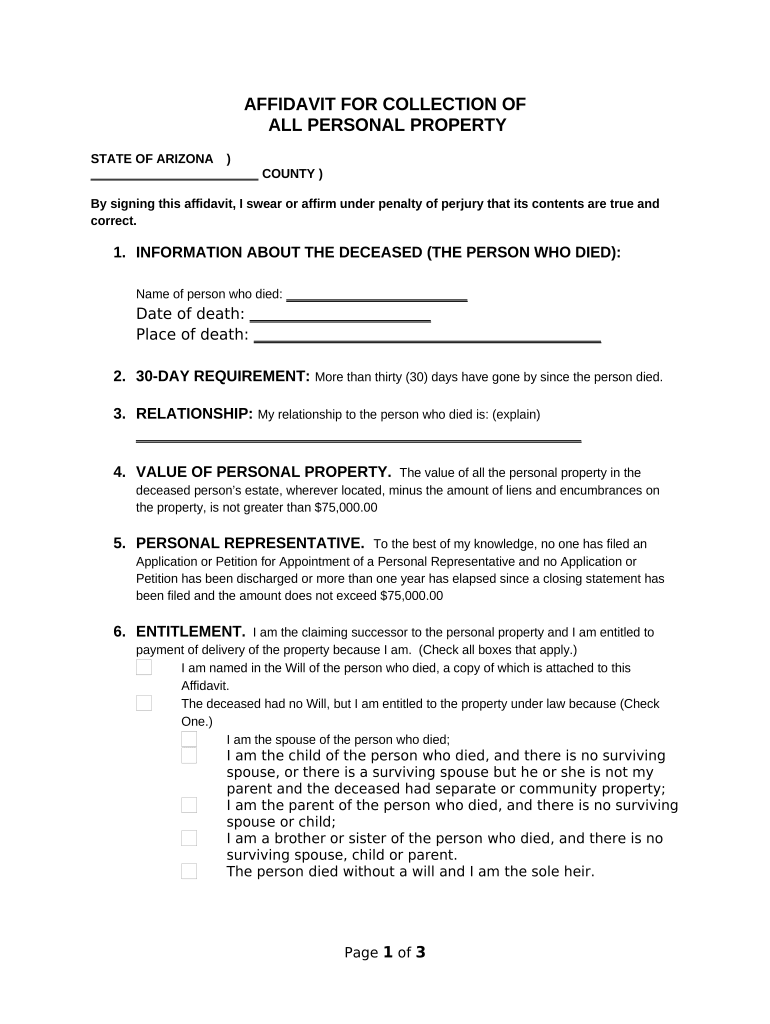
The Arizona Small Estate Affidavit is a sworn, written statement that lets an eligible person claim certain personal property of a deceased person without full probate administration. It is typically used when the decedent's qualifying assets fall below a statutory threshold and there is no estate administration pending. The affidavit identifies the decedent, lists assets and values, establishes the affiant's relationship and right to inherit, and is presented to banks, vehicle agencies, or other custodians to effect transfers of titled property or release funds.

Why people choose a Small Estate Affidavit in Arizona

A small estate affidavit streamlines transfer of modest assets by avoiding formal probate, reducing time, cost, and administrative steps while providing a sworn record for custodians and third parties.

Why people choose a Small Estate Affidavit in Arizona

Who typically completes an Arizona Small Estate Affidavit

The affidavit is usually completed by people with immediate legal interest in the decedent's estate who need to collect or transfer assets quickly.

  • Surviving spouse or closest heir who will receive personal property and can attest to the estate value and relationship.
  • Named beneficiary or alternate personal representative handling small, non-titled assets or requesting bank account releases.
  • Estate attorney or paralegal preparing a simple affidavit when full probate would be disproportionate to estate size.

Use this form only when the estate falls within Arizona's small estate criteria and no conflicting probate proceedings exist.

Step-by-step: completing an Arizona Small Estate Affidavit

Follow these practical steps to prepare, authenticate, and submit the affidavit for asset transfer.

  • 01
    Gather Documents: Collect death certificate, account statements, and ID.
  • 02
    Complete Affidavit: Fill fields accurately and list assets with values.
  • 03
    Notarize: Sign before a notary public or authorized official.
  • 04
    Submit to Custodian: Present affidavit to bank, MVD, or other holder.

Core elements included in a professional Arizona Small Estate Affidavit

A complete affidavit organizes eligibility, sworn statements, and supporting facts so custodians can rely on the affiant's authority to receive or transfer assets.

Eligibility Threshold

A clear statement that total qualifying personal property falls at or below the applicable small estate limit, permitting use of the affidavit instead of probate.
Decedent Identification

Full legal name, last known address, and date of death to link the affidavit to official records and avoid mistaken identity.

Affiant Statement

A sworn declaration describing the affiant's relationship to decedent and factual basis for claiming the assets under Arizona law.

Asset Schedule

Itemized list naming custodians (banks, MVD, title companies) and estimated values for each asset the affiant seeks to claim or transfer.

Creditor Notice

Language confirming payment of known debts or explanation of creditor notice procedures when required by state rules.

Notary Attestation

A completed notary block with signature, seal, and date to authenticate the affiant's sworn statement for third parties.

Essential data fields to include and preserve

Decedent ID: Full legal name
Affiant Contact: Phone and mailing address
Asset Description: Custodian and account details
Estimated Value: Dollar amount per item
Death Certificate: Attach certified copy
Notary Details: Date, signature, seal

How an affidavit moves from form to asset transfer

The affidavit follows a short transactional path: prepare documents, authenticate, present to the custodian, and receive property or funds.

  • Prepare: Complete the affidavit and assemble supporting items.
  • Authenticate: Have the affidavit notarized or witnessed per requirements.
  • Present: Deliver affidavit and documentation to the asset holder.
  • Receive: Custodian releases property or funds to the affiant.

Common eSubmission and processing settings for digital completion

Configure your online workflow to match authentication and custody requirements before sending the affidavit to signers or custodians.

Field Configuration
Authentication Method Notary + ID verification | Photo ID and in-person options
Document Template Prefill decedent and affiant sections | Lock critical fields
Signer Order Affiant signs first | Notary signs last
Storage Encrypted repository | Access logs enabled

Time-sensitive steps and typical processing expectations

Certain tasks tied to a small estate claim have ordinary timelines; plan for short administrative waits and known statutory windows.

Affidavit Preparation:

Complete before contacting custodians; allow 1–3 business days.

Notarization:

Schedule with notary; same-day in-person or RON options may apply.

Bank Review:

Banks typically take 5–15 business days to verify documents.

MVD / Title Transfers:

Vehicle and title transfers often take 1–4 weeks for processing.

Creditor Notices:

Allow statutory creditor notice periods where required by state law.

Key milestones from affidavit to completed transfer

A typical timeline moves through preparation, authentication, submission, and final release of assets.

01

Preparation

Assemble death certificate and account information, then complete the affidavit.

02

Authentication

Sign in presence of notary or use authorized RON workflow for remote notarization.

03

Submission to Custodian

Deliver affidavit and required documents to banks, MVD, or title holder for review.

04

Asset Release

Custodian verifies, records, and transfers property or funds to the affiant.

Common mistakes to avoid when using a small estate affidavit

  • Underestimating the statutory threshold and using the affidavit when formal probate is required leads to rejected claims or later disputes.
  • Failing to attach a certified death certificate or official account statements causes custodians to refuse the affidavit.
  • Listing incorrect asset values or omitting titled property (vehicles, real estate) can delay transfers and prompt additional documentation requests.
  • Not verifying local notary or RON rules before execution may result in invalid authentication for the receiving custodian.

Potential legal and practical risks from incorrect affidavits

Invalid Claim: Asset return denied
Bank Refusal: Account access blocked
Delayed Distribution: Longer estate resolution
Civil Liability: Wrongful transfer exposure
Tax Exposure: Reporting inconsistencies
Criminal Penalties: Fraud allegations possible

Digital signing and technical requirements for eSubmission

If you choose to complete and sign digitally, ensure the platform supports notarization, secure storage, and the file formats your custodian accepts.

  • File Formats: PDF and DOCX supported
  • Integrations: Works with common cloud storage
  • Security: TLS and AES encryption

Confirm the receiving institution accepts electronic or remotely notarized affidavits; retain audit trails and notarization recordings where applicable to prove validity and chain of custody.

Recommended online workflow settings for affidavits

Set up your digital workflow with strong signer authentication and locked fields to reduce disputes and editing after notarization.

Field Configuration
Authentication Multi-factor | ID verification required
Prefill Lock decedent fields | Reduce entry errors
Notary Recording Enable audio-video capture for RON
Audit Trail Capture IP, timestamps, signer actions

Download formats and supporting documents to include

Provide custodians with a clear set of documents in accepted formats to speed verification and transfers.

Download Options

Save signed affidavit as a flattened PDF/A for long-term preservation and consistent display across custodians and record systems.

Supporting Documents

Attach a certified death certificate, account statements, title documents, and any relevant beneficiary designations when presenting the affidavit.

Record Copies

Keep at least one original notarized copy and two certified copies for banks or motor vehicle agencies that request originals.

Notary Acknowledgement

Include the full notary block and any RON certificate or recording reference to prove the notarization chain.

How the Small Estate Affidavit differs from common alternatives

Compare the affidavit with probate and other transfer mechanisms to determine the appropriate path for asset distribution.

Criteria Small Estate Affidavit Summary Probate
When to use low-value personal property larger estates, complex assets
Court Involvement minimal or none formal court supervision
Typical Duration days to weeks months to over a year
Cost low to moderate higher, with attorney fees

Typical eSignature platform pricing and features (vendors compared)

Platform choice affects authentication, notarization support, and per-user cost. The table below summarizes starting prices and key feature availability across common vendors.

signNow DocuSign Adobe Sign PandaDoc HelloSign
Starting Price $8/user/mo $15/user/mo $14/user/mo $19/user/mo $15/user/mo
Free Trial 7-day free trial No No Yes, limited Yes, limited
Bulk Send Yes Yes Yes Yes No
Audit Trail Yes Yes Yes Yes Yes
HIPAA Compliant Yes Yes Yes No No

Who can sign the affidavit and what their roles mean

Affiant — Heir or Personal Representative

The affiant is the person completing the affidavit who claims the decedent's assets. They must state their relationship, contact details, and provide a sworn statement proving entitlement; inaccurate or false statements can expose the affiant to civil or criminal liability.

Probate Clerk — Court Administrative Official

A probate or county clerk reviews submitted affidavits when filing or recording is requested. Clerks validate procedural compliance and advise on local requirements but do not adjudicate disputed title or entitlement claims without a formal probate matter.

Practical examples of when an affidavit resolves straightforward transfers

These short scenarios illustrate common real-world uses and expected outcomes when the affidavit is correctly prepared and accepted.

Surviving Spouse Bank Release

A surviving spouse assembles the death certificate and affidavit

  • Bank requires certified death certificate
  • The bank releases a small checking account balance after verifying the affidavit and affiant identity, avoiding probate.

Vehicle Title Transfer

An adult child lists a vehicle in the affidavit

  • MVD requires signed affidavit and title
  • Motor vehicle division issues a transfer and new title when the affidavit and title match state requirements, often faster than probate.

FAQs and troubleshooting for Arizona Small Estate Affidavits

Answers to frequent questions about eligibility, notarization, electronic filing, and handling common objections from custodians.


Need help? Contact support

be ready to get more
Join over 28 million airSlate SignNow users