Establishing secure connection… Loading editor… Preparing document…
Navigation

Fill and Sign the Between Name of Designer of Form
Fill and Sign the Between Name of Designer of Form

How it works

Open the document and fill out all its fields.
Apply your legally-binding eSignature.
Save and invite other recipients to sign it.

Rate template

4.4
46 votes
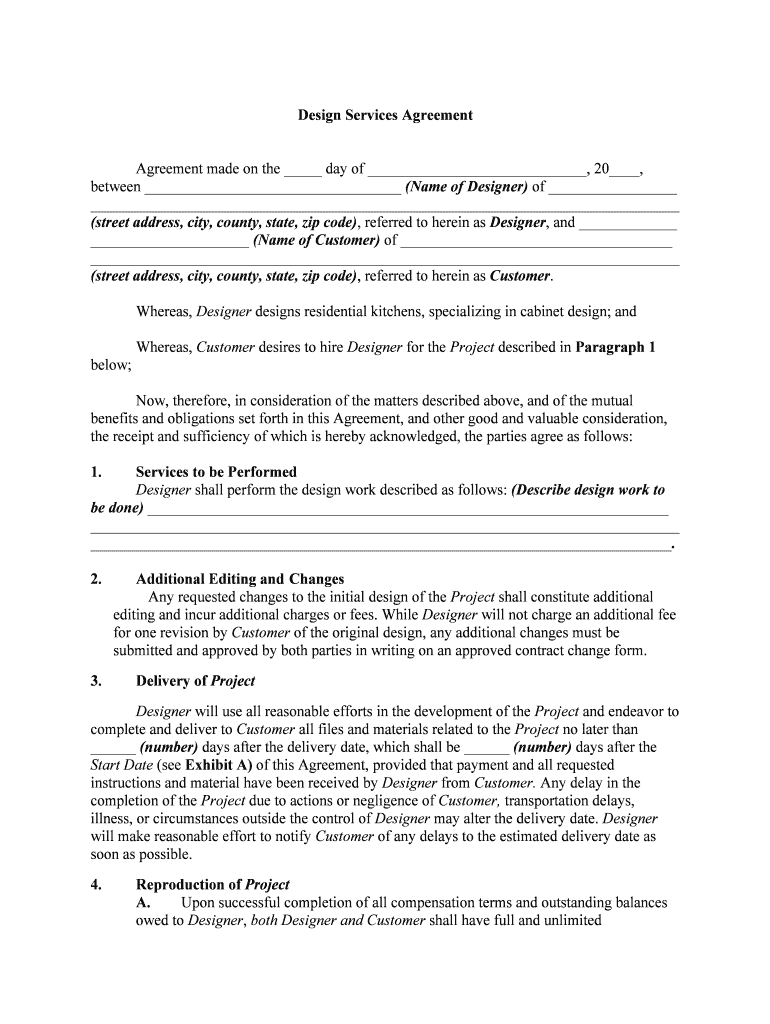
Design Services Agreement Agreement made on the _____ day of _____________________________, 20____, between __________________________________ (Name of Designer) of _________________ ______________________________________________________________________________ (street address, city, county, state, zip code), referred to herein as Designer, and _____________ _____________________ (Name of Customer) of ____________________________________ ______________________________________________________________________________ (street address, city, county, state, zip code), referred to herein as Customer.Whereas, Designer designs residential kitchens, specializing in cabinet design; andWhereas, Customer desires to hire Designer for the Project described in Paragraph 1 below;Now, therefore, in consideration of the matters described above, and of the mutual benefits and obligations set forth in this Agreement, and other good and valuable consideration, the receipt and sufficiency of which is hereby acknowledged, the parties agree as follows: 1. Services to be PerformedDesigner shall perform the design work described as follows: (Describe design work to be done) _____________________________________________________________________ ___________________________________________________________________________________________________________________________________________________________.2. Additional Editing and Changes Any requested changes to the initial design of the Project shall constitute additional editing and incur additional charges or fees. While Designer will not charge an additional fee for one revision by Customer of the original design, any additional changes must be submitted and approved by both parties in writing on an approved contract change form. 3. Delivery of Project Designer will use all reasonable efforts in the development of the Project and endeavor to complete and deliver to Customer all files and materials related to the Project no later than ______ (number) days after the delivery date, which shall be ______ (number) days after the Start Date (see Exhibit A) of this Agreement, provided that payment and all requested instructions and material have been received by Designer from Customer. Any delay in the completion of the Project due to actions or negligence of Customer, transportation delays, illness, or circumstances outside the control of Designer may alter the delivery date. Designer will make reasonable effort to notify Customer of any delays to the estimated delivery date as soon as possible. 4.Reproduction of Project A.Upon successful completion of all compensation terms and outstanding balances owed to Designer, both Designer and Customer shall have full and unlimited reproduction rights to the Project. B.Customer may not reproduce or otherwise use design mock-ups, drafts, sketches etc., created by Designer during work on the Project but not included into the final version of the Project. Such artwork belongs solely to Designer who may use it at his own discretion. 5. Ownership of Artwork and Source Files Except for Customer's Proprietary Material (defined below) contained in the Project, Designer shall hold all right, title, and interest in all original artwork, whether in draft, mock-up, concept or final development for the Project . Specifically, but without limitation, Designer shall hold all right, title, and interest in and to the following:A.All text, graphics or digital components of the Project (the Content), B.All layouts, logos, structures or arrangements or other components of any materials presented to Customer that comprises the Project, C. All literal and non literal expressions of ideas that operate, cause, create, direct, manipulate, access, or otherwise affect the Content, and D. All copyrights, patents, trade secrets, and other intellectual or industrial property rights in the Project or any component or characteristic thereof. Customer shall not do anything that may infringe upon or in any way undermine Designer's right, title, and interest in the Project, as described in this Paragraph 5. Notwithstanding the above, Customer shall retain and, Designer shall have no proprietary rights whatsoever in Customer's intellectual property rights in any and all text, images or other components and/or materials owned by Customer, or which Customer has the legal right to use, that are delivered to Designer, including but not limited to software, related documentation, Customer marketing material, logos, and tag lines (Customer's Proprietary Material). Designer agree that he shall not use Customer's Proprietary Material for any other purpose than those expressly set forth in this Agreement. 5. Compensation In return for the Project that is completed and delivered under this Agreement, Customer shall compensate Designer, pursuant to the terms of Exhibit A attached hereto. [n the event Customer fails to make any of the payments referenced in Exhibit A by the deadline set forth in Exhibit A, Designer has the right, but is not obligated, to pursue any or all of the following remedies: A.Terminate the Agreement, B.Withhold all files, artwork, source, commitments or any other service to be performed by Designer for Customer, and/orC.Bring legal action. Customer is fully responsible for all material costs as outlined in Exhibit A, and accepts responsibility for all additional material costs that Designer may incur in the development of this Project. 6. Confidentiality Customer and Designer acknowledge and agree that the Project and all other documents and information related to the development of the Project, excluding however, Customer's Proprietary Material, (the Confidential Information) will constitute valuable trade secrets of Designer. Customer shall keep the Confidential Information in confidence and shall not, at any time during or after the term of this Agreement, without Designer's prior written consent, disclose or otherwise make available to anyone, either directly or indirectly, all or any part of the Confidential Information. 7. Limited Warranty and Limitation on Damages Designer warrants the Project will conform to the Project in accordance with the plans and instruction originally given to Designer. If the Project does not conform to the Project as aforesaid, Designer shall only be responsible to make one attempt in good faith to bring the Project into conformance at Designer ' sole expense and without charge to Customer , This warranty shall be the exclusive warranty available to Customer. Customer waives any other warranty, express or implied. Customer acknowledges that Designer is not responsible for fixing any problems, errors or omissions on the Project, once mass produced or after Customer has tested, proofed and approved the Project. Except as otherwise expressly stated herein, Customer waives any claim for damages, direct or indirect, and agrees that its sole and exclusive remedy for damages (either in contract or tort) is the return of the consideration paid to Designer as set forth in Exhibit A attached hereto. This limited warranty shall become void and expire 60 days after the delivery of the Project by Designer. Under no circumstances shall Designer be liable for any consequential damages.8. Independent Contractor Designer is retained as an independent contractor. Designer will be fully responsible for payment of his own income taxes on all compensation earned under this Agreement. Customer will not withhold or pay any income tax, social security tax, or any other payroll taxes on Designers' behalf. Designer understands that he will not be entitled to any fringe benefits that Customer provides for its employees generally or to any statutory employment benefits, including without limitation worker's compensation or unemployment insurance. 9. Availability of Materials, Logos, Graphics and other Collateral Customer agrees to make available to Designer, for Designer ' use in performing the services required by this Agreement, such materials as Customer and Designer may agree in writing for such purpose. Failure to provide Designer with Materials in the requested formats may result in additional delays or fees in addition to those stated in Exhibit A. 10.Right to Remove Project In the event Customer fails to make any of the payments set forth on Exhibit A within the time prescribed in Exhibit A, Designer has the right to immediately cease all work on the Project until payment in full is paid. 11. Indemnification Customer warrants that everything it gives or instructs Designer to include in the Project is legally owned or licensed to Customer. Customer agrees to indemnify and hold Designer harmless from any and all claims brought by any third-party relating to Customer's Proprietary Material provided by Customer to Designer including any and all demands, liabilities, losses, reasonable associated costs and claims including reasonable attorney's fees arising out of injury caused by Customer's Proprietary Material supplied by Customer to Designer, copyright infringement, and defective products sold as a result of Customer's distribution of the Project. 12. Use of Project for Promotional Purposes Customer acknowledges that Designer retains the right to use the Project for promotional purposes and/or to cross-link it with other marketing venues developed by Designer . 13.Right to Style or to Make Derivative Works Subject to Section 4 above, Designer has the exclusive rights in making any derivative similar works of the Project and any similarities between Customer's Project and future Projects constitutes Designer's methods and style and shall remain the right of Designer. 14. Trademarks, Logos and other Intellectual Property Issues Customer is responsible for any Copyright or Trademark issues related to the creation and use of Project files by Customer. Customer shall be solely responsible for any Trademark or Copyright searches pertaining to the Project unless otherwise contracted for in the Project. Designer will not knowingly copy other rightfully trademarked or copyrighted material. 15.No Waiver The failure of either party to this Agreement to insist upon the performance of any of the terms and conditions of this Agreement, or the waiver of any breach of any of the terms and conditions of this Agreement, shall not be construed as subsequently waiving any such terms and conditions, but the same shall continue and remain in full force and effect as if no such forbearance or waiver had occurred. 16. Governing Law This Agreement shall be governed by, construed, and enforced in accordance with the laws of the State of ______________________. 17. Notices Any notice provided for or concerning this Agreement shall be in writing and shall be deemed sufficiently given when sent by certified or registered mail if sent to the respective address of each party as set forth at the beginning of this Agreement. 18. Mandatory Arbitration Any dispute under this Agreement shall be required to be resolved by binding arbitration of the parties hereto. If the parties cannot agree on an arbitrator, each party shall select one arbitrator and both arbitrators shall then select a third. The third arbitrator so selected shall arbitrate said dispute. The arbitration shall be governed by the rules of the American Arbitration Association then in force and effect. 19.Entire Agreement This Agreement shall constitute the entire agreement between the parties and any prior understanding or representation of any kind preceding the date of this Agreement shall not be binding upon either party except to the extent incorporated in this Agreement. 20.Modification of Agreement Any modification of this Agreement or additional obligation assumed by either party in connection with this Agreement shall be binding only if placed in writing and signed by each party or an authorized representative of each party. 21.Assignment of Rights The rights of each party under this Agreement are personal to that party and may not be assigned or transferred to any other person, firm, corporation, or other entity without the prior, express, and written consent of the other party. 22. Counterparts This Agreement may be executed in any number of counterparts, each of which shall be deemed to be an original, but all of which together shall constitute but one and the same instrument. WITNESS our signatures as of the day and date first above stated._____________________________ _____________________________CUSTOMER DESIGNER Exhibit A Payment and Working Schedule I. Customer agrees to pay a Fee of $_____________ for the implementation of the Project by Designer. 2. Designer will start the work on the Project only after the full payment of the due Fee. The exact date when Designer will actually start to work on the Project ____________________________ (Start Date) will not exceed 10 working days after the payment of the Fee. Customer will be informed about the Start Date of the Project after the payment. 3. In __________ (number of days for sketches) after the Start Date, Designer will provide the Customer with up to _______ (number of sketches) variants of design to choose from. 4. Customer should choose and approve one of the variants. Further work on the Project will be based on the chosen variant. 5. Designer shall continues to work on the Project regularly sending the results to the Customer for review and approval and make necessary alterations until the Customer is satisfied with the result. The total number of reviews could not exceed ______ alterations or _____ working days from the date when Customer was provided with design variants for selection. 6. Further work on the improvement of the Project after the allowed number of reviews or working days is exceeded is possible only after the payment of additional fee quoted by the sales representative. WITNESS our signatures as of the day and date first above stated.___________________________ ___________________________ CUSTOMERDESIGNER

Useful suggestions for finalizing your ‘Between Name Of Designer Of’ online

Are you fed up with the inconvenience of handling paperwork? Look no further than airSlate SignNow, the premier electronic signature platform for both individuals and businesses. Say farewell to the lengthy procedure of printing and scanning documents. With airSlate SignNow, you can effortlessly finalize and sign paperwork online. Utilize the powerful features integrated into this user-friendly and economical platform and transform your document management strategy. Whether you need to authorize forms or gather eSignatures, airSlate SignNow manages it all seamlessly, requiring only a few clicks.

Follow this comprehensive guide:

  1. Log into your account or register for a complimentary trial with our service.
  2. Click +Create to upload a file from your device, cloud storage, or our template repository.
  3. Open your ‘Between Name Of Designer Of’ in the editor.
  4. Click Me (Fill Out Now) to finalize the document on your end.
  5. Insert and allocate fillable fields for other participants (if necessary).
  6. Proceed with the Send Invite settings to solicit eSignatures from others.
  7. Save, print your version, or convert it into a multi-usable template.

No need to worry if you need to collaborate with your colleagues on your Between Name Of Designer Of or send it for notarization—our solution offers everything you need to complete such endeavors. Sign up with airSlate SignNow today and elevate your document management to new levels!

Here is a list of the most common customer questions. If you can’t find an answer to your question, please don’t hesitate to reach out to us.

Need help? Contact Support

The best way to complete and sign your between name of designer of form

Save time on document management with airSlate SignNow and get your between name of designer of form eSigned quickly from anywhere with our fully compliant eSignature tool.

How to Sign a PDF Online How to Sign a PDF Online

How to fill out and sign paperwork online

Previously, working with paperwork required lots of time and effort. But with airSlate SignNow, document management is quick and easy. Our powerful and easy-to-use eSignature solution allows you to effortlessly complete and eSign your between name of designer of form online from any internet-connected device.

Follow the step-by-step guidelines to eSign your between name of designer of form template online:

  • 1.Sign up for a free trial with airSlate SignNow or log in to your account with password credentials or SSO authorization option.
  • 2.Click Upload or Create and import a file for eSigning from your device, the cloud, or our form library.
  • 3.Click on the document name to open it in the editor and utilize the left-side menu to fill out all the blank fields appropriately.
  • 4.Put the My Signature field where you need to eSign your sample. Type your name, draw, or import a photo of your regular signature.
  • 5.Click Save and Close to finish editing your completed document.

After your between name of designer of form template is ready, download it to your device, export it to the cloud, or invite other parties to electronically sign it. With airSlate SignNow, the eSigning process only takes a couple of clicks. Use our powerful eSignature solution wherever you are to handle your paperwork productively!


How to Sign a PDF Using Google Chrome How to Sign a PDF Using Google Chrome

How to complete and sign forms in Google Chrome

Completing and signing paperwork is easy with the airSlate SignNow extension for Google Chrome. Installing it to your browser is a quick and effective way to deal with your forms online. Sign your between name of designer of form sample with a legally-binding eSignature in just a few clicks without switching between applications and tabs.

Follow the step-by-step guidelines to eSign your between name of designer of form in Google Chrome:

  • 1.Navigate to the Chrome Web Store, search for the airSlate SignNow extension for Chrome, and add it to your browser.
  • 2.Right-click on the link to a form you need to eSign and select Open in airSlate SignNow.
  • 3.Log in to your account with your password or Google/Facebook sign-in buttons. If you don’t have one, you can start a free trial.
  • 4.Utilize the Edit & Sign toolbar on the left to fill out your sample, then drag and drop the My Signature field.
  • 5.Add a photo of your handwritten signature, draw it, or simply type in your full name to eSign.
  • 6.Verify all data is correct and click Save and Close to finish modifying your paperwork.

Now, you can save your between name of designer of form sample to your device or cloud storage, email the copy to other people, or invite them to electronically sign your form via an email request or a secure Signing Link. The airSlate SignNow extension for Google Chrome improves your document processes with minimum effort and time. Start using airSlate SignNow today!


How to Sign a PDF in Gmail How to Sign a PDF in Gmail How to Sign a PDF in Gmail

How to fill out and sign documents in Gmail

When you receive an email with the between name of designer of form for signing, there’s no need to print and scan a document or save and re-upload it to another program. There’s a better solution if you use Gmail. Try the airSlate SignNow add-on to promptly eSign any paperwork right from your inbox.

Follow the step-by-step guide to eSign your between name of designer of form in Gmail:

  • 1.Visit the Google Workplace Marketplace and look for a airSlate SignNow add-on for Gmail.
  • 2.Set up the tool with a corresponding button and grant the tool access to your Google account.
  • 3.Open an email with an attachment that needs approval and use the S key on the right sidebar to launch the add-on.
  • 4.Log in to your airSlate SignNow account. Select Send to Sign to forward the document to other parties for approval or click Upload to open it in the editor.
  • 5.Place the My Signature option where you need to eSign: type, draw, or import your signature.

This eSigning process saves efforts and only requires a few clicks. Use the airSlate SignNow add-on for Gmail to adjust your between name of designer of form with fillable fields, sign paperwork legally, and invite other people to eSign them al without leaving your mailbox. Improve your signature workflows now!


How to Sign a PDF on a Mobile Device How to Sign a PDF on a Mobile Device How to Sign a PDF on a Mobile Device

How to complete and sign paperwork in a mobile browser

Need to quickly submit and sign your between name of designer of form on a mobile phone while working on the go? airSlate SignNow can help without needing to set up extra software applications. Open our airSlate SignNow solution from any browser on your mobile device and add legally-binding eSignatures on the go, 24/7.

Follow the step-by-step guide to eSign your between name of designer of form in a browser:

  • 1.Open any browser on your device and go to the www.signnow.com
  • 2.Create an account with a free trial or log in with your password credentials or SSO authentication.
  • 3.Click Upload or Create and add a file that needs to be completed from a cloud, your device, or our form collection with ready-to go templates.
  • 4.Open the form and complete the blank fields with tools from Edit & Sign menu on the left.
  • 5.Add the My Signature area to the sample, then enter your name, draw, or add your signature.

In a few easy clicks, your between name of designer of form is completed from wherever you are. Once you're done with editing, you can save the file on your device, create a reusable template for it, email it to other individuals, or invite them eSign it. Make your documents on the go fast and efficient with airSlate SignNow!


How to Sign a PDF on iPhone How to Sign a PDF on iPhone

How to complete and sign paperwork on iOS

In today’s business world, tasks must be done rapidly even when you’re away from your computer. With the airSlate SignNow app, you can organize your paperwork and sign your between name of designer of form with a legally-binding eSignature right on your iPhone or iPad. Set it up on your device to conclude contracts and manage forms from anywhere 24/7.

Follow the step-by-step guide to eSign your between name of designer of form on iOS devices:

  • 1.Go to the App Store, find the airSlate SignNow app by airSlate, and install it on your device.
  • 2.Launch the application, tap Create to add a form, and select Myself.
  • 3.Choose Signature at the bottom toolbar and simply draw your signature with a finger or stylus to eSign the sample.
  • 4.Tap Done -> Save after signing the sample.
  • 5.Tap Save or take advantage of the Make Template option to re-use this document in the future.

This method is so simple your between name of designer of form is completed and signed in just a few taps. The airSlate SignNow app works in the cloud so all the forms on your mobile device remain in your account and are available whenever you need them. Use airSlate SignNow for iOS to improve your document management and eSignature workflows!


How to Sign a PDF on Android How to Sign a PDF on Android

How to complete and sign documents on Android

With airSlate SignNow, it’s easy to sign your between name of designer of form on the go. Install its mobile app for Android OS on your device and start improving eSignature workflows right on your smartphone or tablet.

Follow the step-by-step guide to eSign your between name of designer of form on Android:

  • 1.Go to Google Play, search for the airSlate SignNow application from airSlate, and install it on your device.
  • 2.Log in to your account or create it with a free trial, then add a file with a ➕ option on the bottom of you screen.
  • 3.Tap on the imported file and select Open in Editor from the dropdown menu.
  • 4.Tap on Tools tab -> Signature, then draw or type your name to electronically sign the sample. Complete blank fields with other tools on the bottom if needed.
  • 5.Use the ✔ button, then tap on the Save option to finish editing.

With an easy-to-use interface and full compliance with main eSignature requirements, the airSlate SignNow app is the best tool for signing your between name of designer of form. It even operates offline and updates all document modifications when your internet connection is restored and the tool is synced. Fill out and eSign documents, send them for approval, and generate multi-usable templates anytime and from anyplace with airSlate SignNow.

Sign up and try Between name of designer of form
  • Close deals faster
  • Improve productivity
  • Delight customers
  • Increase revenue
  • Save time & money
  • Reduce payment cycles

