Establishing secure connection…Loading editor…Preparing document…

BIR Form 2551Q

This template is fully customizable. Edit the text, fill out the fields, and send it for signature. Give it a try!
BIR Form 2551Q

What the BIR Form 2551Q Is and when it applies

BIR Form 2551Q is the Philippines Bureau of Internal Revenue (BIR) Quarterly Percentage Tax Return used to report and pay percentage tax obligations for taxpayers required to file that schedule. It records taxable receipts for the quarter, calculates percentage tax due, and documents payments made through authorized channels. Because this is an official foreign tax return, confirm filing and signature requirements with the BIR or an accredited tax agent before relying on electronic workflows governed by U.S. e-signature law.

Why accurate completion matters

Accurate completion ensures compliance with Philippine tax rules, avoids assessment or penalties, and provides an auditable record of quarterly obligations. Properly completed returns also support timely reconciliation of payments and simplify year‑end tax reporting.

Why accurate completion matters

Who typically prepares and files this return

The form is prepared by taxpayers subject to percentage tax, their in‑house accounting teams, or accredited tax agents.

  • Business owners and finance teams responsible for local tax compliance and quarterly reporting.
  • Certified public accountants and accredited BIR agents preparing returns and payments on behalf of clients.
  • Payroll or accounting service providers handling multi‑jurisdictional filings and reconciliation.

Confirm delegation and power‑of‑attorney arrangements where a tax agent files on behalf of the taxpayer.

Core sections you will complete on BIR Form 2551Q

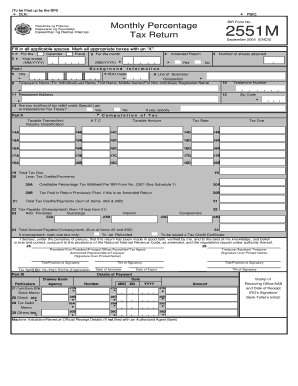
The form groups taxpayer identifiers, reporting period, computation details, payment information, attachments, and a certification section where the preparer or authorized signatory attests to accuracy.

Taxpayer Identification

Includes TIN, registered name, business address, and RDO code used to route and match the return to the taxpayer account.
Reporting Period

Specifies quarter and year being reported; this field determines the filing cycle and payment due dates.

Computation Summary

Shows gross receipts subject to percentage tax, applicable tax rate, and line-by-line calculation of tax due and any adjustments.

Payment Details

Records tax payment method, payment reference number, and the amount applied to the return.

Required Attachments

May include supporting schedules, receipts, or bank payment confirmations depending on the nature of the transactions reported.

Certification and Signature

Signature block for taxpayer or authorized agent plus printed name, title, and date of signing to attest to the return's truthfulness.

Essential fields to verify before signing

TIN: Taxpayer Identification Number
Registered Name: Official business name
RDO Code: Revenue district office
Reporting Period: Quarter and year
Taxable Amount: Gross receipts subject to tax
Signature Block: Name, title, date

Step-by-step: how to complete BIR Form 2551Q

Follow this sequence to reduce errors and ensure supporting evidence is available at filing.

  • 01
    Gather documents: Collect sales records, receipts, and payment confirmations.
  • 02
    Compute tax: Apply the correct percentage rate to taxable receipts.
  • 03
    Enter details: Populate TIN, period, computation lines, and payment fields.
  • 04
    Sign and file: Execute the certification and submit via authorized channel.

How to set up an online completion workflow

Configure validation, signer roles, and attachments to streamline completion and create an audit trail.

Field Configuration
Validation Rules Require numeric format for TIN and amounts
Signer Authentication Use email + optional SMS for identity
Routing Set sequential signing for preparer, reviewer, and approver
Attachments Require payment confirmation upload

Where completed returns are typically submitted

Use authorized filing channels and preserve proof of submission when sending completed returns.

  • BIR electronic channels: eFPS or eBIRForms where available
  • Authorized banks: Banks and payment channels that accept tax payments
  • Tax agent submission: Accredited agents can file on taxpayer's behalf
  • Record retention: Keep signed return and payment receipt copies

Technical considerations for digital completion

Choose a platform that supports PDF and Word forms, secure storage, and an audit trail for signed returns.

  • File formats: PDF and DOCX supported
  • Integrations: Connectors for accounting systems
  • Security: Encryption and audit logs

Ensure the platform's export produces an unalterable signed copy and retains metadata (timestamps, IP, signer identity) to support audit or dispute resolution.

Timing and filing expectations for quarterly returns

Quarterly returns follow a periodic schedule; understanding deadlines and payment timing reduces exposure to late penalties.

Quarterly Filing Schedule:

File for each calendar quarter as required by local tax rules.

Payment Deadline:

Tax payment is due on the same schedule as the return or per BIR guidance.

Late Filing Consequences:

Late submission may trigger interest, surcharges, or penalties.

Extension Availability:

Extensions are typically limited; verify with tax authority or agent.

Processing Time Expectations:

Allow time for payment reconciliation and receipt issuance.

Common mistakes to avoid when preparing the form

  • Entering an incorrect TIN or mismatched registered name that prevents automated matching and reconciliation.
  • Reporting gross receipts inconsistently with supporting invoices or bank records, causing audit adjustments.
  • Failing to include required attachment or payment confirmation resulting in a rejected or queried filing.
  • Using initials or incomplete signatory details rather than full name and title in the certification block.

Key risks and potential consequences

Late Filing Penalty: Subject to statutory surcharge
Interest Accrual: Interest on unpaid tax balance
Underpayment Risk: Assessment and additional charges
Incorrect Computation: May trigger audit or notice
Mismatched Information: Causes reconciliation delays
Agent Misfiling: Liability if authorization is insufficient

eSignature vendor comparison for preparing and signing returns

Typical buyer considerations include starting price, trial availability, bulk send, audit trails, HIPAA coverage, and any envelope or usage caps.

signNow DocuSign Adobe Sign PandaDoc HelloSign
Starting Price $8/user/mo $15/user/mo $14/user/mo $19/user/mo $15/user/mo
Free Trial 7-day free trial Trial available Trial available Trial available Trial available
Bulk Send Yes Yes Yes Yes No
Audit Trail Yes Yes Yes Yes Yes
HIPAA Compliant Yes Yes Yes No No
Envelope Cap No cap 100 envelopes/user/year Plan-dependent Plan-dependent Plan-dependent

Quarterly filing milestones from preparation to retention

Use this milestone sequence to manage a recurring quarterly workflow for returns and payments.

01

Prepare Records

Gather invoices, receipts, and bank statements within the quarter for accurate computation.

02

Compute Tax Liability

Apply the applicable percentage to taxable receipts and verify calculations.

03

Submit Return and Pay

File through authorized channel and obtain payment confirmation.

04

Archive and Reconcile

Store signed return and payment proof for audits and reconciliation.

Frequently asked questions about BIR Form 2551Q

Answers address common execution, signing, correction, and retention questions encountered by filers and agents.


Need help? Contact support

be ready to get more
Join over 28 million airSlate SignNow users