Establishing secure connection… Loading editor… Preparing document…
Navigation

Fill and Sign the Booth Rental Form 497331041
Fill and Sign the Booth Rental Form 497331041

How it works

Open the document and fill out all its fields.
Apply your legally-binding eSignature.
Save and invite other recipients to sign it.

Rate template

4.4
51 votes
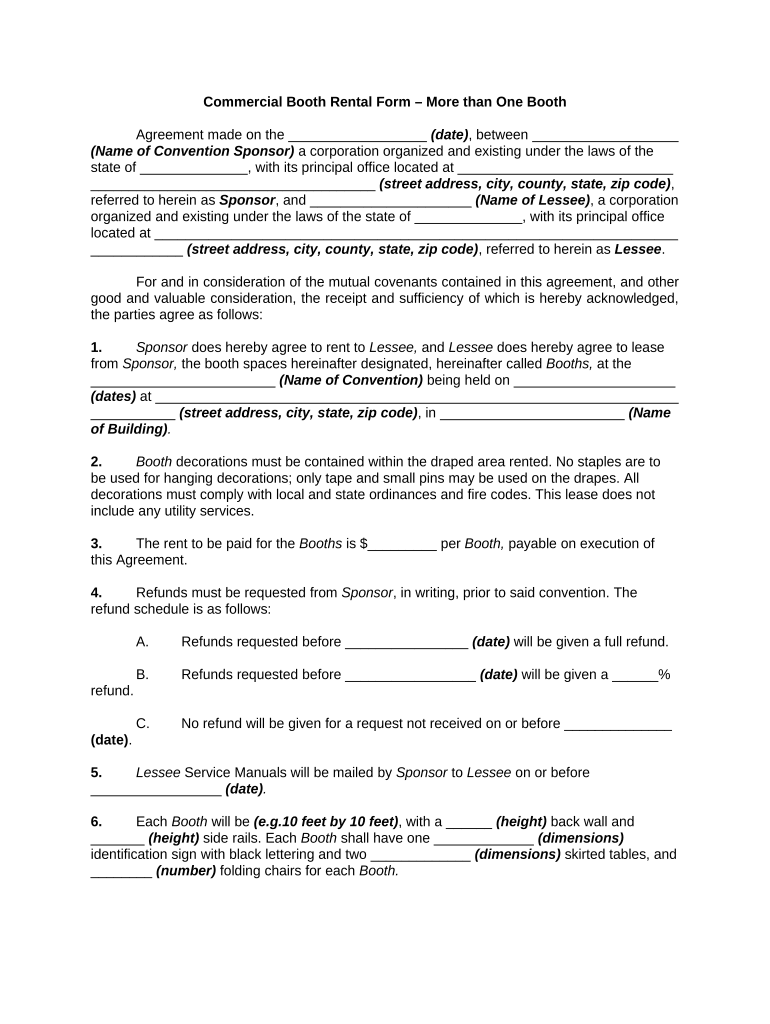
Commercial Booth Rental Form – More than One Booth Agreement made on the __________________ (date) , between ___________________ (Name of Convention Sponsor) a corporation organized and existing under the laws of the state of ______________, with its principal office located at ____________________________ _____________________________________ (street address, city, county, state, zip code) , referred to herein as Sponsor , and _____________________ (Name of Lessee) , a corporation organized and existing under the laws of the state of ______________, with its principal office located at ____________________________________________________________________ ____________ (street address, city, county, state, zip code) , referred to herein as Lessee . For and in consideration of the mutual covenants contained in this agreement, and other good and valuable consideration, the receipt and sufficiency of which is hereby acknowledged, the parties agree as follows: 1. Sponsor does hereby agree to rent to Lessee, and Lessee does hereby agree to lease from Sponsor, the booth spaces hereinafter designated, hereinafter called Booths, at the ________________________ (Name of Convention) being held on _____________________ (dates) at ____________________________________________________________________ ___________ (street address, city, state, zip code) , in ________________________ (Name of Building) . 2. Booth decorations must be contained within the draped area rented. No staples are to be used for hanging decorations; only tape and small pins may be used on the drapes. All decorations must comply with local and state ordinances and fire codes. This lease does not include any utility services. 3. The rent to be paid for the Booths is $_________ per Booth, payable on execution of this Agreement. 4. Refunds must be requested from Sponsor , in writing, prior to said convention. The refund schedule is as follows: A. Refunds requested b efore ________________ (date) will be given a full refund. B. Refunds requested b efore _________________ (date) will be given a ______% refund. C. No refund will be given for a request not received on or before ______________ (date) . 5. Lessee Service Manuals will be mailed by Sponsor to Lessee on or before _________________ (date) . 6. Each Booth will be (e.g.10 feet by 10 feet) , with a ______ (height) back wall and _______ (height) side rails. Each Booth shall have one _____________ (dimensions) identification sign with black lettering and two _____________ (dimensions) skirted tables, and ________ (number) folding chairs for each Booth. 7. Booth spaces and numbers are designated in the diagram attached hereto as Exhibit A , attached hereto and made a part hereof. Lessee hereby rents Booth numbers ___________________ (name) . 8. Management and Supervision The exposition shall be governed by the rules and regulations issued by Sponsor. 9. Installation of Exhibits A. All exhibits must be fully installed by __________ (time) on _________________ (date) . After this hour no installation work will be permitted without special permission from the Sponsor . The Convention facility will be available to Lessee s on the morning of ________________ (date) , for installation work. B. Lessee shall not place articles in front of other Booth s or install any decoration exceeding _________ (number) feet in height. No perpendicular obstruction over _________ (number) feet in height shall extend forward more than _______ (number) feet from the back wall, and none over ________ (number) inches in height shall extend forward for the remaining ________ (number) feet to the front of Booth . C. All exhibits must be confined to the limits of the Lessee 's space, as indicated on the diagram labeled Exhibit A , attached to this Agreement. 10. Hours of Convention A. Convention will begin ______________ (date) , at _________ (time) and close ________________ (date) , following the annual banquet. The morning sessions are scheduled between __________ (time) and __________ (time) , and the afternoon sessions are scheduled between __________ (time) and _________ (time) . B. All exhibits must remain intact until _________ (time) on _____________ (date) , and may not be packed or removed until _________ (time) on ______________ (date) . 11. Irregular Advertising The exposition is limited to those persons, firms, corporations, and other entities that have contracted and paid for exhibit space in exposition facility. No other persons, firms, corporations, or other entities will be permitted to demonstrate products, solicit orders, or distribute advertising matter on the floor of the Convention or in exposition facility. Any person violating this rule will be promptly ejected from the Convention hall. 12. Booths Sponsor shall erect Convention Booth s of uniform style, according to indications on diagram and will provide name signs and Booth numerals. 13. Liability Each Lessee must make provision for the safeguarding of its goods from the time they are placed in its Booth until they are removed by the Lessee . Special security personnel will be employed for the convention, but Sponsor will not be responsible for, or guarantee to Lessee , the safety of exhibit material against fire, accident, theft, or any loss or injury whatsoever. Lessee shall assume all liability for damage to exposition facility caused by its exhibit, and shall indemnify Sponsor from and against any liability that might ensue by reason of its exhibit or presence at the Sponsor convention. 14. Failure to Pay for or Occupy Space If the spaces assigned to Lessee are not fully paid for by ______________ (date) , Sponsor may, at its option, terminate this Agreement and reassign the space to another Lessee . The defaulting Lessee shall be entitled to the refund of any sums paid in advance to Sponsor in partial payment for such space. 15. Use of Exhibit Booth Lessee agrees that it will use the Booth for the display of and the marketing of (description of goods and/or services) __________________________________________ ____________________________________________________________________________ . Lessee agrees that it will display only those items which have been approved in advance by Sponsor. Lessee understands and agrees that Sponsor , in its sole discretion, may refuse at any time to allow Lessee to display any items which for any reason Sponsor deems inappropriate. Lessee Agrees that it will not close sales while at the Convention nor use or permit the Booth to be used for any illegal, disorderly or improper purpose or in violation of any laws, ordinances or rules or regulations, including any fire codes, health regulations, electrical codes, ordinances and rules and regulations established by the City of _____________________ (name of city) , or Sponsor . Lessee agrees to keep the Booth neat, clean and free of debris at all times during the Convention. 16. Promotional Materials and Marketing Activities Lessee agrees that the use and distribution of promotional materials at or around the Convention area immediately prior to and during the Convention, including but not limited to flyers, circulars, and souvenirs, is subject to approval by Sponsor and must be distributed within the limits of Lessee 's Booth space. Furthermore, Lessee agrees that all marketing activities during the Convention, including but not limited to live demonstrations and the use of costumed representatives, are subject to approval by Sponsor and must be confined to the limits of Lessee 's Booth space. 17. Removal of Goods A. Lessee shall remove its goods and all of its property from the Convention grounds within ________ (number of hours) hours after the official closing of the Convention, which is _________ (time) on ________________ (date of closing) . Any goods and property not removed by Lessee within ____________ (number of hours) hours after the official closing of the Convention shall be considered abandoned and Sponsor may dispose of such goods and property in any manner Sponsor deems fit. Sponsor shall be reimbursed by Lessee for any expenses incurred by Sponsor in disposing of such goods. B. Lessee shall leave the Booth in the condition in which the Booth was received by Lessee prior to commencement of the Convention and Lessee shall be responsible for the removal and disposal of all boxes, signs, displays or any other items used by Lessee in the Booth during the course of the Convention. If Lessee fails to leave the Booth in the condition in which to Booth was received by Lessee , Sponsor shall have the right to clean up Lessee 's Booth and the cost of clean-up shall be billed to and paid for by Lessee . 18. Lessee 's Liability for Negligence Lessee shall indemnify Sponsor against all liability resulting from the negligence of Lessee , and shall reimburse Sponsor for any loss or expense incurred by Sponsor by reason of such negligence. 19. Rejection of Exhibits Sponsor reserves the right to reject or prohibit any exhibit, proposed exhibit, or part of any exhibit, including, but not limited to, any person, article, conduct, printed matter, catalogue, or souvenir, that, in its opinion, is not suitable to and in keeping with the character of the Convention. 20. Termination on Default If Lessee shall fail to comply with any of the terms and conditions of this Agreement, Sponsor may terminate this Agreement immediately, in which case Sponsor shall have no further liability or obligation to Lessee . Sponsor’s rights under this paragraph shall include but be not limited to the right to expel Lessee from the Booth and Convention. 21. Dismantling of Exhibits Lessee shall not, without the written consent of Sponsor , dismantle its exhibit or do any packing prior to ________ (time) on ______________ (date) . All exhibits shall be dismantled, packed, and removed by _________ (time) on ______________ (date) . 22. Failure to Hold Convention or Provide Space Should Sponsor fail to hold its convention as provided in this Agreement, or to furnish to Lessee the space described in this Agreement, it shall promptly refund to Lessee all sums paid under this Agreement, and such refund shall be accepted by Lessee in full settlement of all loss or damage suffered by Lessee on account of such failure to hold the convention. 23. Severability The invalidity of any portion of this Agreement will not and shall not be deemed to affect the validity of any other provision. If any provision of this Agreement is held to be invalid, the parties agree that the remaining provisions shall be deemed to be in full force and effect as if they had been executed by both parties subsequent to the expungement of the invalid provision. 24. No Waiver The failure of either party to this Agreement to insist upon the performance of any of the terms and conditions of this Agreement, or the waiver of any breach of any of the terms and conditions of this Agreement, shall not be construed as subsequently waiving any such terms and conditions, but the same shall continue and remain in full force and effect as if no such forbearance or waiver had occurred. 25. Governing Law This Agreement shall be governed by, construed, and enforced in accordance with the laws of the State of ______________. 26. Notices Any notice provided for or concerning this Agreement shall be in writing and shall be deemed sufficiently given when sent by certified or registered mail if sent to the respective address of each party as set forth at the beginning of this Agreement. 27. Mandatory Arbitration Any dispute under this Agreement shall be required to be resolved by binding arbitration of the parties hereto. If the parties cannot agree on an arbitrator, each party shall select one arbitrator and both arbitrators shall then select a third. The third arbitrator so selected shall arbitrate said dispute. The arbitration shall be governed by the rules of the American Arbitration Sponsor then in force and effect. 28. Entire Agreement This Agreement shall constitute the entire agreement between the parties and any prior understanding or representation of any kind preceding the date of this Agreement shall not be binding upon either party except to the extent incorporated in this Agreement. 29. Modification of Agreement Any modification of this Agreement or additional obligation assumed by either party in connection with this Agreement shall be binding only if placed in writing and signed by each party or an authorized representative of each party. 30. Assignment of Rights The rights of each party under this Agreement are personal to that party and may not be assigned or transferred to any other person, firm, corporation, or other entity without the prior, express, and written consent of the other party. WITNESS our signatures as of the day and date first above stated. ___________________________ __________________________ (Name of Sponsor) (Name of Lessee) By:______________________________ By:_____________________________ _____________________________ _____________________________ (Printed name & Office in Corporation) (Printed name & Office in Corporation _____________________________ _____________________________ (Signature of Officer) (Signature of Officer) (Attach Exhibits)

Valuable advice for finishing your ‘Booth Rental Form 497331041’ online

Are you fed up with the inconvenience of handling paperwork? Look no further than airSlate SignNow, the premier eSignature platform for individuals and small to medium-sized businesses. Bid farewell to the monotonous routine of printing and scanning documents. With airSlate SignNow, you can easily complete and sign documents online. Take advantage of the extensive features offered by this user-friendly and affordable platform and transform your approach to document management. Whether you need to sign forms or collect electronic signatures, airSlate SignNow manages it all effortlessly, with just a few clicks.

Adhere to this detailed tutorial:

  1. Log into your account or initiate a free trial with our service.
  2. Click +Create to upload a file from your device, cloud storage, or our form library.
  3. Access your ‘Booth Rental Form 497331041’ in the editor.
  4. Click Me (Fill Out Now) to set up the document on your end.
  5. Add and assign fillable fields for others (if needed).
  6. Proceed with the Send Invite settings to request eSignatures from others.
  7. Save, print your version, or convert it into a reusable template.

Don't worry if you need to work together with your teammates on your Booth Rental Form 497331041 or send it for notarization—our platform provides everything you need to accomplish those tasks. Sign up with airSlate SignNow today and enhance your document management to new levels!

Here is a list of the most common customer questions. If you can’t find an answer to your question, please don’t hesitate to reach out to us.

Need help? Contact Support
Salon booth rental form
Booth rental form template
Booth rental form pdf
Free booth rental agreement pdf
Salon booth rental agreement PDF
Booth rental form template word
Free booth rental form
Simple booth rental agreement

The best way to complete and sign your booth rental form 497331041

Save time on document management with airSlate SignNow and get your booth rental form 497331041 eSigned quickly from anywhere with our fully compliant eSignature tool.

How to Sign a PDF Online How to Sign a PDF Online

How to complete and sign forms online

Previously, coping with paperwork required pretty much time and effort. But with airSlate SignNow, document management is easy and fast. Our robust and easy-to-use eSignature solution lets you easily complete and electronically sign your booth rental form 497331041 online from any internet-connected device.

Follow the step-by-step guide to eSign your booth rental form 497331041 template online:

  • 1.Register for a free trial with airSlate SignNow or log in to your account with password credentials or SSO authorization option.
  • 2.Click Upload or Create and import a file for eSigning from your device, the cloud, or our form catalogue.
  • 3.Click on the document name to open it in the editor and utilize the left-side menu to complete all the empty areas accordingly.
  • 4.Put the My Signature field where you need to eSign your sample. Provide your name, draw, or import a photo of your handwritten signature.
  • 5.Click Save and Close to finish modifying your completed document.

As soon as your booth rental form 497331041 template is ready, download it to your device, export it to the cloud, or invite other people to electronically sign it. With airSlate SignNow, the eSigning process only takes a few clicks. Use our powerful eSignature tool wherever you are to deal with your paperwork productively!


How to Sign a PDF Using Google Chrome How to Sign a PDF Using Google Chrome

How to fill out and sign documents in Google Chrome

Completing and signing paperwork is simple with the airSlate SignNow extension for Google Chrome. Installing it to your browser is a fast and beneficial way to manage your paperwork online. Sign your booth rental form 497331041 sample with a legally-binding eSignature in just a couple of clicks without switching between tools and tabs.

Follow the step-by-step guide to eSign your booth rental form 497331041 form in Google Chrome:

  • 1.Go to the Chrome Web Store, locate the airSlate SignNow extension for Chrome, and install it to your browser.
  • 2.Right-click on the link to a form you need to approve and select Open in airSlate SignNow.
  • 3.Log in to your account with your credentials or Google/Facebook sign-in option. If you don’t have one, sign up for a free trial.
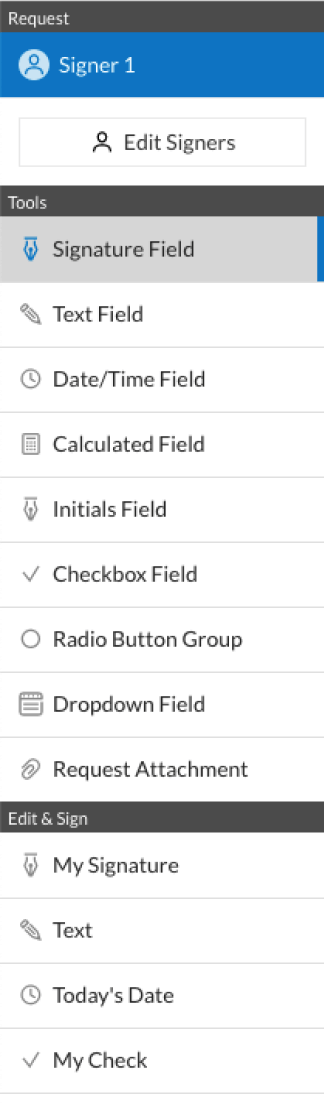
  • 4.Use the Edit & Sign toolbar on the left to complete your template, then drag and drop the My Signature field.
  • 5.Upload a photo of your handwritten signature, draw it, or simply type in your full name to eSign.
  • 6.Verify all the details are correct and click Save and Close to finish modifying your paperwork.

Now, you can save your booth rental form 497331041 sample to your device or cloud storage, email the copy to other individuals, or invite them to electronically sign your document with an email request or a protected Signing Link. The airSlate SignNow extension for Google Chrome improves your document workflows with minimum time and effort. Start using airSlate SignNow today!


How to Sign a PDF in Gmail How to Sign a PDF in Gmail How to Sign a PDF in Gmail

How to fill out and sign paperwork in Gmail

Every time you get an email with the booth rental form 497331041 for approval, there’s no need to print and scan a document or save and re-upload it to a different program. There’s a better solution if you use Gmail. Try the airSlate SignNow add-on to rapidly eSign any paperwork right from your inbox.

Follow the step-by-step guidelines to eSign your booth rental form 497331041 in Gmail:

  • 1.Go to the Google Workplace Marketplace and look for a airSlate SignNow add-on for Gmail.
  • 2.Set up the tool with a related button and grant the tool access to your Google account.
  • 3.Open an email with an attachment that needs signing and utilize the S key on the right panel to launch the add-on.
  • 4.Log in to your airSlate SignNow account. Choose Send to Sign to forward the file to other people for approval or click Upload to open it in the editor.
  • 5.Put the My Signature field where you need to eSign: type, draw, or import your signature.

This eSigning process saves efforts and only requires a few clicks. Utilize the airSlate SignNow add-on for Gmail to update your booth rental form 497331041 with fillable fields, sign forms legally, and invite other parties to eSign them al without leaving your inbox. Boost your signature workflows now!


How to Sign a PDF on a Mobile Device How to Sign a PDF on a Mobile Device How to Sign a PDF on a Mobile Device

How to complete and sign documents in a mobile browser

Need to rapidly fill out and sign your booth rental form 497331041 on a mobile phone while working on the go? airSlate SignNow can help without the need to set up extra software programs. Open our airSlate SignNow solution from any browser on your mobile device and create legally-binding electronic signatures on the go, 24/7.

Follow the step-by-step guidelines to eSign your booth rental form 497331041 in a browser:

  • 1.Open any browser on your device and go to the www.signnow.com
  • 2.Sign up for an account with a free trial or log in with your password credentials or SSO option.
  • 3.Click Upload or Create and add a file that needs to be completed from a cloud, your device, or our form catalogue with ready-to go templates.
  • 4.Open the form and fill out the empty fields with tools from Edit & Sign menu on the left.
  • 5.Place the My Signature area to the sample, then type in your name, draw, or upload your signature.

In a few easy clicks, your booth rental form 497331041 is completed from wherever you are. Once you're done with editing, you can save the document on your device, build a reusable template for it, email it to other individuals, or invite them electronically sign it. Make your paperwork on the go quick and effective with airSlate SignNow!


How to Sign a PDF on iPhone How to Sign a PDF on iPhone

How to fill out and sign forms on iOS

In today’s business world, tasks must be done rapidly even when you’re away from your computer. Using the airSlate SignNow application, you can organize your paperwork and sign your booth rental form 497331041 with a legally-binding eSignature right on your iPhone or iPad. Set it up on your device to conclude contracts and manage forms from anyplace 24/7.

Follow the step-by-step guidelines to eSign your booth rental form 497331041 on iOS devices:

  • 1.Go to the App Store, search for the airSlate SignNow app by airSlate, and install it on your device.
  • 2.Open the application, tap Create to upload a form, and choose Myself.
  • 3.Opt for Signature at the bottom toolbar and simply draw your signature with a finger or stylus to eSign the form.
  • 4.Tap Done -> Save right after signing the sample.
  • 5.Tap Save or take advantage of the Make Template option to re-use this document in the future.

This process is so easy your booth rental form 497331041 is completed and signed in just a few taps. The airSlate SignNow application works in the cloud so all the forms on your mobile device are kept in your account and are available any time you need them. Use airSlate SignNow for iOS to improve your document management and eSignature workflows!


How to Sign a PDF on Android How to Sign a PDF on Android

How to fill out and sign forms on Android

With airSlate SignNow, it’s easy to sign your booth rental form 497331041 on the go. Set up its mobile application for Android OS on your device and start improving eSignature workflows right on your smartphone or tablet.

Follow the step-by-step guidelines to eSign your booth rental form 497331041 on Android:

  • 1.Go to Google Play, search for the airSlate SignNow app from airSlate, and install it on your device.
  • 2.Log in to your account or register it with a free trial, then add a file with a ➕ button on the bottom of you screen.
  • 3.Tap on the uploaded file and select Open in Editor from the dropdown menu.
  • 4.Tap on Tools tab -> Signature, then draw or type your name to electronically sign the form. Fill out empty fields with other tools on the bottom if required.
  • 5.Utilize the ✔ button, then tap on the Save option to end up with editing.

With an intuitive interface and total compliance with main eSignature laws and regulations, the airSlate SignNow application is the perfect tool for signing your booth rental form 497331041. It even operates offline and updates all record changes once your internet connection is restored and the tool is synced. Complete and eSign forms, send them for eSigning, and make multi-usable templates anytime and from anywhere with airSlate SignNow.

Sign up and try Booth rental form 497331041
  • Close deals faster
  • Improve productivity
  • Delight customers
  • Increase revenue
  • Save time & money
  • Reduce payment cycles