Establishing secure connection…Loading editor…Preparing document…

Letter Advising of Trial Date

This template is fully customizable. Edit the text, fill out the fields, and send it for signature. Give it a try!
Letter Advising of Trial Date

What the Letter Advising of Trial Date Is and When It’s Used

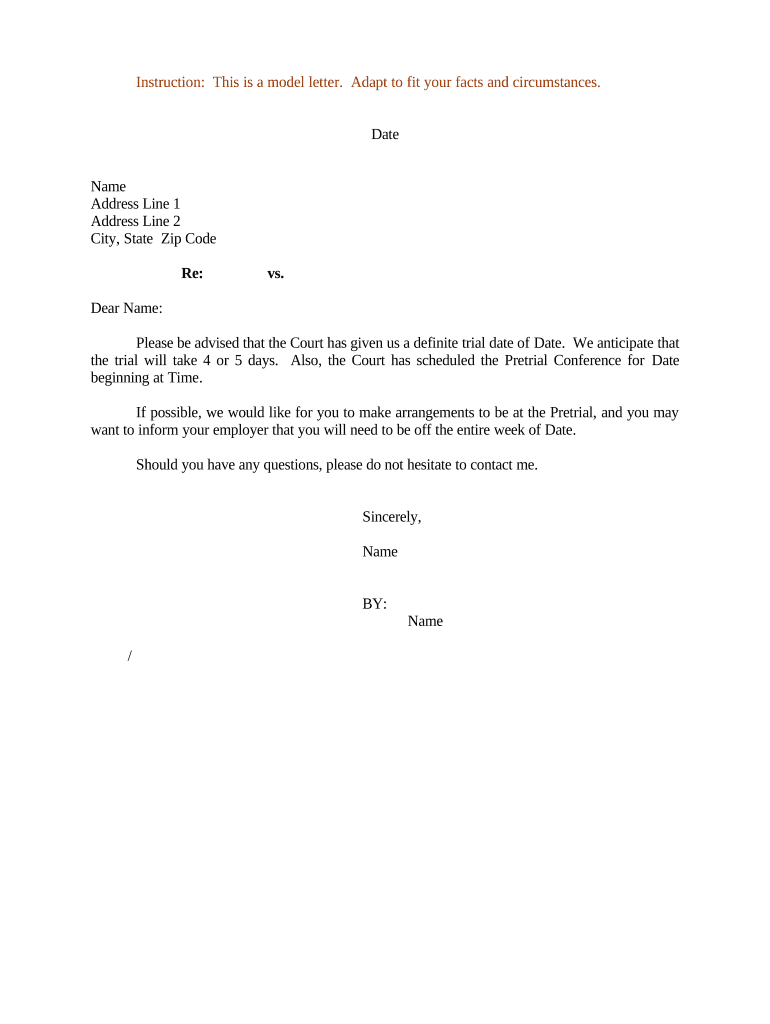
A Letter Advising of Trial Date is a formal written notice, typically prepared by counsel or the court, that communicates the scheduled trial date, time, courtroom or virtual link, and related procedural obligations. The letter summarizes docket information, pretrial deadlines, document exchange requirements, and any court-ordered conferences. It functions as both a practical checklist and record of notice, helping parties coordinate witness availability, exhibits, and filings while creating evidence of timely communication for the court file.

Why a Clear Trial Date Letter Matters

A concise, accurate letter reduces scheduling disputes, confirms responsibilities, and documents notice on the record. It helps avoid last-minute continuances, evidence exclusion, and potential sanctions by making deadlines and service methods explicit for all parties.

Why a Clear Trial Date Letter Matters

Who Typically Sends and Receives This Letter

Counsel, parties, and court staff rely on the letter to coordinate logistics and confirm that notice has been provided to all required recipients.

  • Plaintiff counsel: Confirms trial readiness, witness lists, and exhibit exchange deadlines to opposing counsel and clients.
  • Defense counsel: Verifies availability, preserves objections, and schedules witnesses and motions in limine within court deadlines.
  • Court clerk/administrator: Records the date, issues calendar call times, and provides e-filing or in-court appearance instructions.

Essential Elements to Include in the Letter Advising of Trial Date

Including key components ensures the letter is actionable, consistent with court practice, and useful as a record for counsel and the clerk.

Case Caption

List the full case caption exactly as on the docket, including party names and the court name so the letter is unambiguous for filing and service.
Docket Number

Provide the precise docket or cause number; courts and e-filing systems rely on this identifier to route notices and maintain the official record.

Trial Date/Time

State the full trial date and start time, include calendar call details and time zone to prevent confusion for remote or out-of-state participants.

Location/Link

Give courtroom address, room number, or secure virtual hearing link and access instructions, plus any check-in requirements ordered by the court.

Pretrial Requirements

Summarize deadlines for witness lists, exhibit exchange, motions in limine, joint pretrial statements, and any filings the court specifically ordered.

Attachments

Attach the court order, scheduling notice, exhibit list template, and any forms the court requires for calendar or trial management.

Required Information and Fields at a Glance

Case Caption: Exact party names
Court Name: Official court title
Docket Number: Precise case number
Trial Date: MM/DD/YYYY format
Location: Room or link
Contact Info: Attorney phone/email

Step-by-Step: Preparing and Issuing the Letter

Follow these steps to draft, serve, and record the Letter Advising of Trial Date in a way that aligns with court procedure and minimizes dispute risks.

  • 01
    Confirm Date: Verify trial date and judge assignment on the court calendar.
  • 02
    Draft Letter: Include caption, docket, date, time, venue, and pretrial deadlines.
  • 03
    Serve Parties: Use court-allowed service: e-file, email if agreed, certified mail, or personal service as required.
  • 04
    File Proof: File a certificate of service or notice with the clerk to record distribution.

Where to File and How Notices Typically Travel

Routes depend on local rules. Choose the method that creates a verifiable record and complies with the court’s e-filing and service requirements.

  • File with Clerk: Submit via court clerk or the authorized e-filing portal.
  • Serve Opposing Counsel: Deliver by permitted service methods or as counsel has agreed in writing.
  • Send to Client: Provide a copy to your client for case planning and witness coordination.
  • Archive Copy: Store a signed and timestamped copy in your case management system.

Digital Format and Authentication Considerations

Digital letters should use accepted file formats, preserve an audit trail, and employ appropriate signer authentication to support later verification.

  • PDF Format: Use searchable PDF or PDF/A for filing.
  • E-filing Portal: Follow court size and naming conventions.
  • Signer Authentication: Retain email, IP, or SMS validation records.

Retain evidence of delivery and signature; under ESIGN and UETA, an audit trail that shows intent, attribution, and retention supports enforceability when parties consent to electronic records.

Common Pretrial and Trial Deadlines to Track

Court orders set various deadlines; list them clearly in the letter so parties can meet filing and exchange requirements before trial.

Calendar Call:

Often the morning of trial; confirms readiness and timing.

Pretrial Conference:

Usually 7–14 days before trial for case management and settlement discussions.

Motions in Limine Deadline:

Commonly due 14–30 days before trial; check local rules.

Exhibit Exchange Deadline:

Exchange exhibit lists and copies at least 7–14 days before trial.

Trial Date:

Day trial begins; confirm start time and courtroom location.

Common Mistakes When Preparing the Letter

  • Providing an ambiguous date or omitting time zone and courtroom details can cause missed appearances and last-minute continuances.
  • Failing to attach the controlling court order or scheduling notice leaves recipients unable to verify authority for the trial date.
  • Assuming email notice is sufficient where local rules require service by the clerk or in-person delivery risks noncompliance.
  • Not specifying remote-hearing instructions, exhibit submission format, or technology requirements can delay the hearing and exclude evidence.

Penalties and Risks of an Incorrect or Untimely Letter

Missed Deadlines: Default judgment risk
Sanctions: Monetary or case sanctions
Evidence Exclusion: Late exhibits may be barred
Hearing Delays: Continuance or rescheduling
Increased Costs: Extra attorney and court fees
Contempt Risk: Court may enforce orders

eSignature Plan Comparison for Sending Trial Notices

A concise vendor comparison showing starter pricing and core distribution limits relevant when selecting an eSignature provider for trial communications.

signNow DocuSign Adobe Sign PandaDoc HelloSign
Starting Price $8/user/mo $15/user/mo $14/user/mo $19/user/mo $15/user/mo
Free Trial 7-day trial Varies by plan Varies by plan Varies by plan Varies by plan
Bulk Send Yes Varies by plan Varies by plan Varies by plan Varies by plan
Audit Trail Yes Yes Yes Yes Yes
Envelope Cap No envelope cap 100 envelopes/user/year Varies Varies Varies

Frequently Asked Questions and Practical Answers

Answers to common questions about e-signing, service, revisions, and retention for a Letter Advising of Trial Date.


Need help? Contact support

be ready to get more
Join over 28 million airSlate SignNow users