Establishing secure connection…Loading editor…Preparing document…

Agreement for Sale of Business

This template is fully customizable. Edit the text, fill out the fields, and send it for signature. Give it a try!
Agreement for Sale of Business

What the Agreement for Sale of Business Is

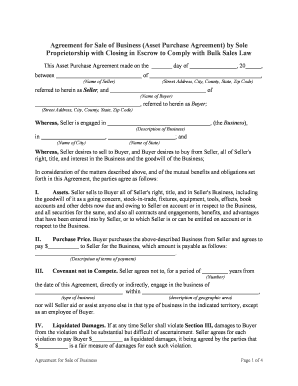
The Agreement for Sale of Business is a legally binding contract that records the transfer of a business or its assets from a seller to a buyer. It defines the purchase price, payment terms, assets and liabilities included or excluded, representations and warranties, indemnities, closing conditions, and post-closing obligations such as noncompete or transitional services. Well‑drafted agreements incorporate schedules and exhibits (asset lists, assigned contracts, employee information and IP schedules), and specify the governing law and dispute resolution mechanism to reduce ambiguity and litigation risk.

Why a Clear Agreement Matters

A clear Agreement for Sale of Business allocates risk, documents consideration, and controls closing mechanics. It creates enforceable obligations on transfer, tax treatment, and post-closing duties, which protects buyers, sellers, lenders, and third parties.

Why a Clear Agreement Matters

Who Typically Prepares and Signs This Agreement

Common participants in transactions involving a sale of business include buyers, sellers, corporate counsel, lenders, and brokers, each with distinct responsibilities.

  • Buyers: acquiring entities that need clear representations, indemnities, closing deliverables, and defined asset scope for integration and financing.
  • Sellers: owners or corporate sellers who must accurately disclose liabilities, tax positions, and contracts being assigned or retained.
  • Advisors and lenders: attorneys, accountants, escrow agents, and banks reviewing enforceability, tax consequences, and security interests prior to funding.

Essential Sections to Include in a Professional Agreement

A complete Agreement for Sale of Business contains several standard sections and exhibits; include clear definitions and cross-references to attached schedules to prevent ambiguity.

Purchase Price

Specify the total consideration, payment schedule, escrow arrangements, and adjustments (working capital, inventory true-up) to avoid later disputes about amounts owed.
Assets Included

List tangible and intangible assets to be transferred, including equipment, inventory, IP, customer lists, and assigned contracts; use exhibits for itemized schedules.

Liabilities Assumed

Clarify which liabilities transfer to the buyer and which remain with the seller, including tax obligations, lease liabilities, and pending claims or litigation.

Reps & Warranties

Set out seller and buyer representations, including authority, title, no undisclosed liabilities, financial statements accuracy, and compliance with laws.

Closing Mechanics

Describe closing conditions, required deliverables, escrow instructions, funding mechanics, and procedures for delivering certificates or assignments at closing.

Post‑Closing Obligations

Include indemnities, covenant periods (noncompete, non-solicit), transition support, employee matters, and procedures for resolving post-closing purchase price adjustments.

Key Information the Agreement Must Capture

Buyer Legal Name: Full registered entity name
Seller Legal Name: Full registered entity name
Business Description: Primary trade name and NAICS code
Purchase Price: Specific amount and currency
Assets Schedule: Exhibit reference and item count
Closing Date: MM/DD/YYYY format required

Stepwise Process: From Draft to Closing

Follow a consistent sequence from initial draft to post-closing reconciliation to reduce errors and avoid last‑minute holdups.

  • 01
    Draft Agreement: Prepare a complete draft with exhibits and schedules attached for review.
  • 02
    Negotiate Terms: Exchange redlines, confirm representations, and resolve escrow and indemnity details.
  • 03
    Execute Documents: Obtain signatures, notarizations, and any consents or third‑party approvals required for closing.
  • 04
    Close and Post‑Close: Fund payments, transfer assets, file required notices, and reconcile final adjustments.

How to Configure an Online Signing Workflow

Set workflow fields and authentication to match the transaction's risk profile; include auditors, escrow agents, and optional notarization steps.

Field Configuration
Authentication Method Email link, SMS code, or stronger KBA depending on risk
Document Format Use PDF or DOCX; lock final PDF before signing
Template Library Create reusable templates with conditional fields for common clauses
Bulk Send Enable for multi-party or multi-unit transactions where applicable

Where to Send, File, or Submit the Signed Agreement

After execution, distribute copies to each party and file or record with relevant third parties and government bodies as required.

  • Buyer and Seller: Each party retains an original signed copy and a signed PDF for corporate records.
  • Lender / Escrow: Provide executed documents to lender and escrow agent before funding or disbursement.
  • Assigning Counterparties: Send assignment notices to counterparties of material contracts as required by contract terms.
  • Government Filings: File UCC‑1, transfer tax returns, or business registration changes if required by state law.

Digital Signing, Formats, and Integration Considerations

Choose a platform that supports PDF/DOCX, audit trails, and needed integrations with your CRM or document management systems.

  • File Formats: PDF and DOCX supported
  • Integrations: Salesforce, NetSuite, Google Workspace
  • Audit & Security: Tamper-evident PDFs, timestamped audit logs

Common Deadlines and Timing Expectations

Track statutory filing deadlines, closing date, and interim milestones such as due diligence cutoffs and payment deadlines to avoid penalties or missed obligations.

Due Diligence Deadline:

Defined period for buyer investigations and material adverse discovery

Signing Date:

Date parties execute the agreement and deliver initial closing items

Closing Date:

Date on which funds transfer and title to assets pass

Post‑Closing Adjustments:

Period to reconcile working capital and inventory true-ups

Tax Filings:

File applicable transfer tax or information returns per state and IRS rules

Key Transaction Milestones

A sequential view of the deal lifecycle clarifies responsibilities and helps coordinate counsel, escrow, and financing.

01

Letter of Intent

Nonbinding framework and exclusivity terms are agreed upon.

02

Due Diligence

Buyer reviews financials, contracts, employee matters and compliance.

03

Signing

Parties execute the definitive agreement and deliver closing conditions.

04

Closing

Funds wired, assets transferred, and notices filed as required.

Common Preparation and Drafting Mistakes to Avoid

  • Vague asset descriptions that omit serial numbers or account identifiers, creating disputes over what transferred and what was retained.
  • Incomplete schedules and missing exhibits for assigned contracts, employees, or IP, which can block closing or cause post‑closing litigation.
  • Failure to confirm signatory authority or corporate resolutions, leading to claims the agreement is void or subject to ratification.
  • Neglecting tax implications such as allocation of purchase price or required information returns, creating unexpected tax liabilities.

Principal Risks and Potential Consequences

Tax Exposure: Incorrect allocations can trigger audits or liabilities
Breach Damages: Failure to perform may produce monetary damages
Undisclosed Liabilities: Hidden claims may survive closing and create losses
Title Problems: Defects in asset title can derail use or resale
Escrow Failure: Improper escrow terms can delay payment or remedy
Regulatory Penalties: Noncompliance with filings or approvals may incur fines

Illustrative Use Cases and Customer Experiences

Real-world examples show how consistent drafting, digital execution, and attachments reduce friction in closing complex sales of business.

Optica Ventures (COO)

Optica used streamlined templates to close asset transfers faster

  • The platform simplified external signings and reduced turnaround time
  • The COO reported improved customer ease and fewer signature errors after switching to an electronic workflow.

Martin Properties (Founder)

A regional real estate operator processed all documents online for multiple portfolio sales

  • Mobile signing enabled off‑site closings
  • The founder noted full compliance and efficient returns even when parties were remote.

Comparison: eSignature Vendors for Executing Sale Agreements

Choose an eSignature provider that supports audit trails, appropriate authentication, and any required compliance such as HIPAA or 21 CFR Part 11; pricing and caps vary by vendor and plan.

signNow DocuSign Adobe Sign PandaDoc HelloSign
Starting Price $8/user/mo $15/user/mo $14/user/mo $19/user/mo $15/user/mo
Free Trial 7‑day free trial, no credit card required Varies by vendor and plan Varies by vendor and plan Varies by vendor and plan Varies by vendor and plan
Bulk Send Yes (Business Premium+) Available on paid enterprise plans Available on paid plans Available on paid plans Available on some paid plans
Audit Trail Yes — timestamped IP and audit logs Yes — timestamped logs Yes — timestamped logs Yes — timestamped logs Yes — timestamped logs
HIPAA Compliant Yes — BAA available Varies; BAA may be available Varies; BAA may be available Varies by plan Varies by plan
Envelope Cap No envelope cap (unlimited sends) 100 envelopes/user/year cap Varies by plan Varies by plan Varies by plan

Supporting Documents Commonly Attached

Attach exhibits and ancillary documents referenced in the agreement to ensure obligations are clear and enforceable.

Asset Schedule

Detailed list of tangible and intangible assets with locations and identifiers, used to determine what is transferred at closing and for post‑closing verification.

Assigned Contracts

List of contracts to be assigned with notice language and consents; include counterparty contact details and any required assignment approvals.

Employee Roster

Exhibit listing employees, key employment agreements, benefits status, and whether offers will be extended by the buyer post-closing.

Tax Allocation

Purchase price allocation among asset classes for tax reporting; used to prepare required returns and to support positions in audits.

Representative Signatory Roles

Buyer — Chief Financial Officer

The buyer's CFO typically reviews payment mechanics, escrow arrangements, and reps and warranties related to financial statements. They coordinate funding timing with lenders and confirm that settlement instructions match banking details.

Seller — Owner / Corporate Officer

The seller or authorized corporate officer confirms authority to sell assets, completes disclosure schedules, and provides required certificates at closing. They are responsible for obtaining necessary third‑party consents prior to funding.

Practical Tips for Accurate and Efficient Completion

Adopt standardized templates, verify names and authorities, and coordinate signers and notaries in advance to minimize delays at closing.

Use Clear Definitions
Define key terms such as 'Assets', 'Excluded Assets', and 'Closing' to prevent interpretation disputes and reduce the need for amendment.
Attach Complete Schedules
Provide fully completed exhibits for assets, contracts, and employees; incomplete schedules are a leading cause of closing postponements.
Confirm Signer Authority
Obtain corporate resolutions or power of attorney where required; verify names match formation documents to avoid execution challenges.
Preserve the Audit Trail
Use an eSignature solution that timestamps actions, records IP addresses, and retains a certificate of completion for evidentiary purposes.

Frequently Asked Questions About the Agreement for Sale of Business

Answers to common questions on validity, notarization, digital signing, and filing requirements to help parties avoid common execution problems.


Need help? Contact support

be ready to get more
Join over 28 million airSlate SignNow users