Establishing secure connection… Loading editor… Preparing document…
Navigation

Fill and Sign the Ca 460 Form
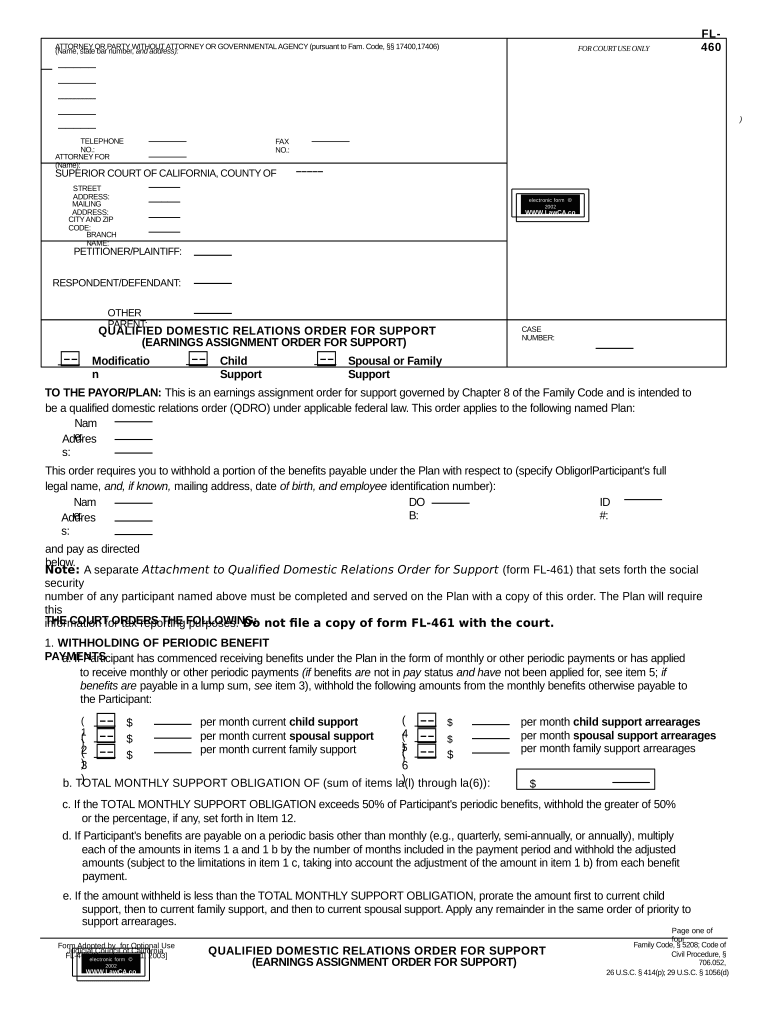
Fill and Sign the Ca 460 Form

How it works

Open the document and fill out all its fields.
Apply your legally-binding eSignature.
Save and invite other recipients to sign it.

Rate template

4.4
34 votes
––––– ––––– ––––– ––––– ––––– ––––– ––––– ––––– ––––– ––––– ––––– ––––– ––––– ––––– ––––– ––––– –– –– ––––– –– ––––– ––––– ––––– ––––– ––––– ––––– ––––– ––––– –– –– ––––– –– ––––– ––––– –– –– ––––– ––––– –– ––––– ––––– F L - 4 6 0ATTORNEY OR PARTY WITHOUT ATTORNEY OR GOVERNMENTAL AGENCY (pursuant to Fam. Code, §§ 17400,17406) (Name, state bar number, and address): FOR COURT USE ONLY ) TELEPHONE NO.: FAX NO.: ATTORNEY FOR (Name): SUPERIOR COURT OF CALIFORNIA, COUNTY OF STREET ADDRESS: MAILING ADDRESS: CITY AND ZIP CODE: BRANCH NAME: PETITIONER/PLAINTIFF: RESPONDENT/DEFENDANT: OTHER PARENT: QUALIFIED DO MESTIC RELATIO NS O RDER FOR SUPPO RT (EARNINGS ASSIGNMENT ORDER FOR SUPPORT) CASE NUMBER: Modificatio n Child Support Spousal or Family Support TO THE PAYOR/PLAN: This is an earnings assignment order for support governed by Chapter 8 of the Family Code and is intended to be a qualified domestic relations order (QDRO) under applicable federal law. This order applies to the following named Plan: Nam e: Addres s: This order requires you to withhold a portion of the benefits payable under the Plan with respect to (specify ObligorlParticipant's full legal name, and, if known, mailing address, date of birth, and employee identification number): Nam e: DO B: ID #: Addres s: and pay as directed below. Note: A separate Attachment to Qualifed Domestic Relations Order for Support (form FL-461) that sets forth the social security number of any participant named above must be completed and served on the Plan with a copy of this order. The Plan will require this information for tax reporting purposes. Do not fie a copy of form FL-461 with the court.THE COURT ORDERS THE FOLLOWING: 1. WITHHOLDING OF PERIODIC BENEFIT PAYMENTS a. If Participant has commenced receiving benefits under the Plan in the form of monthly or other periodic payments or has applied to receive monthly or other periodic payments (if benefits are not in pay status and have not been applied for, see item 5; if benefits are payable in a lump sum, see item 3), withhold the following amounts from the monthly benefits otherwise payable to the Participant: ( 1 ) $ per month current child support per month current spousal support per month current family support ( 4 ) $ ( 2 ) $ ( 5 ) $ ( 3 ) $ ( 6 ) $ per month child support arrearages per month spousal support arrearages per month family support arrearages b. TOTAL MONTHLY SUPPORT OBLIGATION OF (sum of items la(l) through la(6)): $ c. If the TOTAL MONTHLY SUPPORT OBLIGATION exceeds 50% of Participant's periodic benefits, withhold the greater of 50% or the percentage, if any, set forth in Item 12. d. If Participant's benefits are payable on a periodic basis other than monthly (e.g., quarterly, semi-annually, or annually), multiply each of the amounts in items 1 a and 1 b by the number of months included in the payment period and withhold the adjusted amounts (subject to the limitations in item 1 c, taking into account the adjustment of the amount in item 1 b) from each benefit payment. e. If the amount withheld is less than the TOTAL MONTHLY SUPPORT OBLIGATION, prorate the amount first to current child support, then to current family support, and then to current spousal support. Apply any remainder in the same order of priority to support arrearages. Page one of four Q UALIFIED DOMESTIC RELATIONS ORDER FO R SUPPORT (EARNINGS ASSIGNMENT ORDER FOR SUPPORT) Family Code, § 5208; Code of Civil Procedure, § 706.052, 26 U.S.C. § 414(p); 29 U.S.C. § 1056(d)Form Adopted by for Optional Use Judicial Council of California FL-460 [Rev. January 1, 2003] el ectr onic form ã 2002 WWW.LawCA.co m L a w P u b l i s h e r s el ectr onic form ã 2002 WWW.LawCA.co m L a w P u b l i s h e r s ––––– ––––– ––––– ––––– –– ––––– –– ––––– ––––– –– ––––– ––––– ––––– ––––– ––––– ––––– ––––– ––––– ––––– ––––– ––––– ––––– ––––– ––––– ––––– ––––– ––––– –– ––––– –– ––––– ––––– ––––– ––––– ––––– –––––PETITIONER/PLAINTIFF: CASE NUMBER: RESPONDENT/DEFENDANT: OTHER PARENT: 2. ARREARAGES: For purposes of this order, the total arrearages are set as follows (interest that has not been calculated or included is not waived): ) Amoun t As of (date) a . Child support: $ b . Spousal support: $ C . Family support: $ 3. WITHHOLDING FROM LUMP SUM DISTRIBUTIONS: Withhold from any lump sum distributions currently payable to Participant under the Plan as follows: a. An amount equal to the total of the support arrearages, if any, set forth in item 2. b. To the extent the amounts withheld under item 3a are for child support arrearages, withhold from the lump sum distribution and pay over to the appropriate taxing authorities an additional amount sufficient to satisfy the Plan's mandatory federal and state income tax withholding obligations with respect to those arrearages and with respect to all additional amounts withheld under this item 3b. Any amounts withheld under this item 3b shall not be applied to reduce the amount of the child support arrearages. c. To the extent the amounts withheld under item 3a are for support arrearages other than child support, withhold from those amounts and pay over to the appropriate taxing authorities an additional amount sufficient to satisfy the Plan's mandatory federal and state income tax withholding obligations with respect to those arrearages. Any amounts withheld under this item 3c shall be applied proportionally to reduce the amount of the family support arrearages and spousal support arrearages. Cl. If the amounts withheld under item 3a are less than the total of the support arrearages, if any, set forth in item 2, prorate the amounts first to child support arrearages, then to family support arrearages, and then to spousal support arrearages. e. If the amounts to be withheld under items 3a and 3b would exceed the total amount of the lump sum distribution currently payable, withhold the entire amount of the lump sum distribution, allocate therefrom an amount sufficient to satisfy the Plan's mandatory federal and state income tax withholding obligations with respect to the amount of such distribution, and allocate the balance to satisfaction of the child support arrearages. Any income tax withheld under this item 3e shall not be applied to reduce the amount of the child support arrearages. f. The limitations on withholding set forth in item 1 and item 12 do not apply to the withholding provisions of this item 3. 4. DISTRIBUTE AMOUNTS WITHHELD OR ALLOCATED AS FOLLOWS: a. Child Support: All amounts withheld or payable for child support under this order are for the benefit of (specifyname(s) of each Alternate Payee, with date of birth, if available): Name of each child Date of birth of each child b. Amounts withheld for child support shall be paid to (specify name, capacity, and mailing address of agent to receive payments) (hereinafter ''Agent''): Nam e: Capacit y: Addres s: c. Spousal or Family Support (1) All amounts withheld or payable for spousal/family support under this order are for the benefit of (specify name of Spousal or Family Alternate Payee, with date of birth, if available): Nam e: DO B: Note: A separate Statement of Confidential Information that sets forth the social security number of any Spousal or Family Alternate Payee named in item 4c(l) must be completed and served on the Plan with a copy of this order. The Plan will re- quire this information for tax reporting purposes. Do not file a copy of the Statement of Confidential Information with the court. (2) Amounts withheld for spousal/family support shall be paid to (check one): ( a ) Spousal or Family Alternate Payee at the following address (specify mailing address of Alternate Payee): Addres s: ( b ) Spousal or Family Alternate Payee's Agent (specify name, capacity, and mailing address of agent to receive payments): Nam e: Capacit y: Addres s: QUALIFIED DOMESTIC RELATIONS ORDER FOR SUPPORT (EARNINGS ASSIGNMENT ORDER FOR SUPPORT) Page two of fourelec troni c form ã 2002 WWW.LawCA.co m L a w P u b l i s h e r sFL-460 [Rev. January 1, 2003] ––––– ––––– ––––– ––––– –– –– –– ––––– –– –– –––– –– –– ––––– PETITIONER/PLAINTIFF: CASE NUMBER, RESPONDENT/DEFENDANT: OTHER PARENT: 5 . IF BENEFITS ARE NOT CURRENTLY IN PAY STATUS: a. If Participant applies for benefits (including a lump sum distribution) within 90 days after the Plan receives this order or while the temporary restraining order in item 13 remains in effect, the withholding provisions of this order shall take effect once such benefits become payable. b. If Participant has not commenced receiving benefits under the Plan (other than by reason of the temporary restraining order in item 13), and does not apply to receive benefits by the end of the period specified in item 5a, the Plan shall have no obligation under this order to withhold payments from Participant's benefits, provided the Plan sends prompt written notice to Alternate Payee(s) stating that no benefits are currently available for distribution under this order and specifying the earliest date on which Participant could begin receiving benefits under the Plan if Participant terminated employment. 6 . Any notices required or permitted under this order to any Alternate Payee shall be sent by first-class mail, postage prepaid, to the Alternate Payee or to the Alternate Payee's Agent, if one is designated, at the address set forth in item 4, or such other address as the Alternate Payee/Agent may specify by written notice to the Plan. 7 . This order shall, upon approval as a QDRO (check appropriate box, if either is applicable): ( a )( b ) amend/replace any existing QDRO with respect to support for any Alternate Payee(s) named herein. supplement but not amend/replace any existing payment obligations under a previous QDRO issued with respect to any Alternate Payee named herein. 8 . This order shall not be interpreted to require payment of benefits in any form not permitted by the Plan or in an amount in excess of the actuarial value of Participant's benefits, less any benefits otherwise payable to another alternate payee under another order previously determined to be a QDRO. 9 . Upon approval of this order as a QDRO, the Plan shall send to Alternate Payee(s) any forms or notices that the Plan may require in order to effectuate the distribution of benefits as specified herein. This requirement does not apply if item 5b applies. 1 0. This order affects all benefits of Participant payable beginning as soon as possible but not later than 1 0 days after you receive it, including any retroactive benefit payments, whether those payments relate to a period before or after the date you receive this order. You must withhold from retroactive benefit payments according to the provisions of item 1 as if the payments had been made when due. The payments ordered herein shall continue until further court order or notarized written notice from the Alternate Payee(s). 11. The Plan shall give the Obligor/Participant a copy of this order and the accompanying blank Request for Hearing Regarding Wage and Earnings Assignment (form 1299.28) within 1 0 days. 1 2 . MAXIMUM WITHHOLDING PERCENTAGE GREATER THAN 50% (if a maximum withholding percentage greater than 50% has been authorized by court order, check the box to the left and complete the following): By order entered on (date): , pursuant to stipulation or following noticed motion and appropriate proceedings, the court has determined, pursuant to Code of Civil Procedure section 706.052, that because support arrearages exist and/or when Participant's disposable earnings from all sources are taken into account, the maximum percentage of Participant's benefits under the Plan that are subject to withholding pursuant to item 1 of this order is (check one): ( a ) 100 % ( b ) % (If this box is checked, fill in the maximum percentage specified in the order) 13. TEMPORARY RESTRAINING ORDER: During any period in which the status of this order as a QDRO is being determined (by the Plan, a court of competent jurisdiction, or otherwise) and such further period as may be ordered by the court, the Plan is hereby TEMPORARILY RESTRAINED from making any distribution to Participant or Participant's beneficiary (other than a beneficiary under another QDRO) of any amount that would have been payable during such period to any Alternate Payee named herein if this order had been determined to be a QDRO. In no event shall this temporary restraining order remain in effect for a period of more than 18 months after the date of this order. 14. OTHER PROVISIONS ( a ) ( b ) The Plan shall provide to Alternate Payee, or to Alternate Payee's Agent, a copy of the Summary Plan Description, and any subsequent Summaries of Material Modifications with respect to the Plan, and the Plan's QDRO procedures, if any. Other (specify): Dat e: JUDICIAL OFFICER QUALIFIED DOMESTIC RELATIONS ORDER FOR SUPPORT (EARNINGS ASSIGNMENT ORDER FOR SUPPORT) Page three of four el ectr onic form ã 2002 WWW.LawCA.co m L a w P u b l i s h e r sFL-460 [Rev. January 1, 2003] ––––– ––––– ––––– –––––PETITIONER/PLAINTIFF: CASE NUMBER: RESPONDENT/DEFENDANT: OTHER PARENT: ) INSTRUCTIO NS FO R QUALIFIED DO MESTIC RELATIO NS O RDER (EARNINGS ASSIGNMENT ORDER FOR SUPPORT) 1. DEFINITIONS OF IMPORTANT WORDS IN THE ORDER (a) Alternate Payee: any spouse, former spouse, child, or other dependent of the Participant. (b) Participant/Obligor: any person ordered by a court to pay child support, spousal support, or family support who has an accrued benefit or account balance 2. TAX INFORMATION FOR PAYORS (continued) You should consult with your professional tax advisor on the specific tax treatment and reporting requirements applicable to distributions under this order. (whether or not vested) under a Plan. (c) Agent: any person, including the district attorney or other governmental agency, to whom the support is to be paid on behalf of an Alternate Payee. (d) Payor/Plan: any employee benefit plan described in Family Code section 80 that is not a governmental plan as defined in 29 U.S.C. § 1002(32). The term includes plans benefiting self-employed individuals such as partners and sole proprietors. If an entity other than the Plan pays benefits to participants under the Plan, the 3. OTHER INFORMATION FOR PAYORS This order, which is an earnings assignment order, and you as the Payor, are governed by Chapter 8, beginning with section 5200 of the Family Code, and related provisions of that Code and the Code of Civil Procedure. Your attention is directed particularly to the provisions of Chapter 8 that set forth your obligations as a Payor (referred to therein as the ''Employer''). term Payor/Plan also includes that entity. (e) QDRO: an order that has been approved by the plan administrator of the Plan (or by a court of competent jurisdiction) as meeting the requirements for a qualified domestic relations order under 29 U.S.C. § 1056(d) or 26 U.S.C. § 414(p). (f) Annuity: a form of benefit in which periodic payments (usually monthly) are made for the life of the recipient and/or the recipient's survivor. This order applies to annuities and to any other form of benefit payment or distribution allowable under the Plan (e.g., single sum, installments, and other periodic payments). When benefits under the Plan are currently payable to the Participant, withholding under this order should commence as soon as possible but no later than 1 0 days after your receive the Qualified Domestic Relations Order for Support. If benefits are not currently payable but Participant has applied to receive benefits, or applies within 90 days after you receive this order, or while the temporary restraining order contained in item 13 of this order is in effect, this order (including the temporary restraining order) applies to the benefits Participant has applied for and becomes entitled to receive under the terms of the Plan. 2. TAX INFORMATION FOR PAYORS Once this order has been approved as a QDRO, all benefits withheld pursuant to the temporary restraining order shall be disbursed in accordance with the terms of this order or, to the extent those benefits are not affected by this order, to the person or persons entitled thereto under the terms of the Plan. Generally speaking, for federal income tax purposes, the Participant will be taxed on any child support paid from a Plan pursuant to this order. Amounts paid by the Plan for spousal or family support generally will be taxable to the Alternate Payee for whose benefit those amounts are paid. If you have any questions about this order, please contact the office that sent this form to you as shown in the upper left-hand corner of the order. 4. INFORMATION FOR ALL PARTICIPANTS: You should have received a Request for Hearing Regarding Wage and Earnings Assignment (form 1299.28) with the Qualified Domestic Relations Order (Earnings Assignment Order for Support). If not, you may get one from either the court clerk or the district attorney. If you want the court to stop or modify the assignment of your benefits under the Plan, you must file (hand-deliver or mail) an original copy of the form with the court clerk within 1 0 days of the date you received this order. Keep a copy of the form for your records. If you think your support order is wrong, you can ask for a modification of the order, or in some cases, you can have the order set aside and have a new order issued. You can talk to any attorney or get information from the court about this. Q UALIFIED DOMESTIC RELATIONS ORDER FO R SUPPORT (EARNINGS ASSIGNMENT ORDER FOR SUPPORT) Page four of four el ectr onic form ã 2002 WWW.LawCA.co m L a w P u b l i s h e r sFL-460 [Rev. January 1, 2003]

Valuable advice on preparing your ‘Ca 460’ online

Are you fed up with the inconvenience of handling paperwork? Search no further than airSlate SignNow, the leading eSignature platform for individuals and businesses. Bid farewell to the monotonous routine of printing and scanning documents. With airSlate SignNow, you can effortlessly complete and sign paperwork online. Utilize the abundant features included in this intuitive and budget-friendly platform and transform your approach to document management. Whether you need to approve forms or gather signatures, airSlate SignNow takes care of it all with ease, requiring merely a few clicks.

Adhere to this detailed guide:

  1. Access your account or register for a complimentary trial with our service.
  2. Click +Create to upload a file from your device, cloud storage, or our template collection.
  3. Open your ‘Ca 460’ in the editor.
  4. Click Me (Fill Out Now) to finalize the document on your end.
  5. Add and assign fillable fields for other participants (if necessary).
  6. Proceed with the Send Invite settings to solicit eSignatures from others.
  7. Save, print your copy, or convert it into a reusable template.

No need to worry if you have to collaborate with your colleagues on your Ca 460 or send it for notarization—our solution provides everything required to accomplish such tasks. Enroll with airSlate SignNow today and take your document management to a higher level!

Here is a list of the most common customer questions. If you can’t find an answer to your question, please don’t hesitate to reach out to us.

Need help? Contact Support

The best way to complete and sign your ca 460 form

Save time on document management with airSlate SignNow and get your ca 460 form eSigned quickly from anywhere with our fully compliant eSignature tool.

How to Sign a PDF Online How to Sign a PDF Online

How to complete and sign documents online

In the past, working with paperwork took pretty much time and effort. But with airSlate SignNow, document management is quick and easy. Our powerful and easy-to-use eSignature solution enables you to effortlessly complete and eSign your ca 460 form online from any internet-connected device.

Follow the step-by-step guidelines to eSign your ca 460 form template online:

  • 1.Sign up for a free trial with airSlate SignNow or log in to your account with password credentials or SSO authentication.
  • 2.Click Upload or Create and import a file for eSigning from your device, the cloud, or our form collection.
  • 3.Click on the file name to open it in the editor and utilize the left-side menu to fill out all the blank areas appropriately.
  • 4.Place the My Signature field where you need to eSign your sample. Type your name, draw, or import an image of your handwritten signature.
  • 5.Click Save and Close to finish editing your completed form.

After your ca 460 form template is ready, download it to your device, save it to the cloud, or invite other people to eSign it. With airSlate SignNow, the eSigning process only takes several clicks. Use our robust eSignature solution wherever you are to deal with your paperwork efficiently!


How to Sign a PDF Using Google Chrome How to Sign a PDF Using Google Chrome

How to complete and sign paperwork in Google Chrome

Completing and signing documents is simple with the airSlate SignNow extension for Google Chrome. Installing it to your browser is a fast and effective way to deal with your paperwork online. Sign your ca 460 form sample with a legally-binding electronic signature in just a few clicks without switching between programs and tabs.

Follow the step-by-step guidelines to eSign your ca 460 form in Google Chrome:

  • 1.Navigate to the Chrome Web Store, find the airSlate SignNow extension for Chrome, and install it to your browser.
  • 2.Right-click on the link to a form you need to approve and choose Open in airSlate SignNow.
  • 3.Log in to your account using your password or Google/Facebook sign-in option. If you don’t have one, sign up for a free trial.
  • 4.Utilize the Edit & Sign menu on the left to complete your template, then drag and drop the My Signature option.
  • 5.Add a photo of your handwritten signature, draw it, or simply type in your full name to eSign.
  • 6.Verify all the details are correct and click Save and Close to finish editing your form.

Now, you can save your ca 460 form template to your device or cloud storage, email the copy to other people, or invite them to electronically sign your document with an email request or a secure Signing Link. The airSlate SignNow extension for Google Chrome enhances your document processes with minimum time and effort. Try airSlate SignNow today!


How to Sign a PDF in Gmail How to Sign a PDF in Gmail How to Sign a PDF in Gmail

How to fill out and sign documents in Gmail

When you receive an email containing the ca 460 form for signing, there’s no need to print and scan a file or download and re-upload it to another tool. There’s a much better solution if you use Gmail. Try the airSlate SignNow add-on to quickly eSign any documents right from your inbox.

Follow the step-by-step guidelines to eSign your ca 460 form in Gmail:

  • 1.Visit the Google Workplace Marketplace and find a airSlate SignNow add-on for Gmail.
  • 2.Install the tool with a corresponding button and grant the tool access to your Google account.
  • 3.Open an email with an attachment that needs approval and utilize the S sign on the right sidebar to launch the add-on.
  • 4.Log in to your airSlate SignNow account. Choose Send to Sign to forward the file to other parties for approval or click Upload to open it in the editor.
  • 5.Drop the My Signature option where you need to eSign: type, draw, or import your signature.

This eSigning process saves time and only takes a couple of clicks. Use the airSlate SignNow add-on for Gmail to adjust your ca 460 form with fillable fields, sign paperwork legally, and invite other parties to eSign them al without leaving your inbox. Improve your signature workflows now!


How to Sign a PDF on a Mobile Device How to Sign a PDF on a Mobile Device How to Sign a PDF on a Mobile Device

How to fill out and sign forms in a mobile browser

Need to quickly submit and sign your ca 460 form on a mobile phone while working on the go? airSlate SignNow can help without the need to install additional software applications. Open our airSlate SignNow tool from any browser on your mobile device and add legally-binding electronic signatures on the go, 24/7.

Follow the step-by-step guidelines to eSign your ca 460 form in a browser:

  • 1.Open any browser on your device and follow the link www.signnow.com
  • 2.Register for an account with a free trial or log in with your password credentials or SSO option.
  • 3.Click Upload or Create and import a file that needs to be completed from a cloud, your device, or our form collection with ready-to go templates.
  • 4.Open the form and complete the empty fields with tools from Edit & Sign menu on the left.
  • 5.Place the My Signature area to the sample, then enter your name, draw, or upload your signature.

In a few easy clicks, your ca 460 form is completed from wherever you are. Once you're finished editing, you can save the file on your device, generate a reusable template for it, email it to other individuals, or invite them electronically sign it. Make your documents on the go fast and effective with airSlate SignNow!


How to Sign a PDF on iPhone How to Sign a PDF on iPhone

How to complete and sign paperwork on iOS

In today’s business world, tasks must be completed rapidly even when you’re away from your computer. With the airSlate SignNow app, you can organize your paperwork and sign your ca 460 form with a legally-binding eSignature right on your iPhone or iPad. Set it up on your device to conclude contracts and manage documents from anyplace 24/7.

Follow the step-by-step guidelines to eSign your ca 460 form on iOS devices:

  • 1.Go to the App Store, find the airSlate SignNow app by airSlate, and install it on your device.
  • 2.Open the application, tap Create to import a form, and choose Myself.
  • 3.Choose Signature at the bottom toolbar and simply draw your autograph with a finger or stylus to eSign the form.
  • 4.Tap Done -> Save right after signing the sample.
  • 5.Tap Save or take advantage of the Make Template option to re-use this paperwork later on.

This method is so easy your ca 460 form is completed and signed in just a few taps. The airSlate SignNow app works in the cloud so all the forms on your mobile device are kept in your account and are available whenever you need them. Use airSlate SignNow for iOS to boost your document management and eSignature workflows!


How to Sign a PDF on Android How to Sign a PDF on Android

How to fill out and sign forms on Android

With airSlate SignNow, it’s simple to sign your ca 460 form on the go. Install its mobile application for Android OS on your device and start enhancing eSignature workflows right on your smartphone or tablet.

Follow the step-by-step guidelines to eSign your ca 460 form on Android:

  • 1.Open Google Play, search for the airSlate SignNow app from airSlate, and install it on your device.
  • 2.Log in to your account or create it with a free trial, then add a file with a ➕ button on the bottom of you screen.
  • 3.Tap on the uploaded document and select Open in Editor from the dropdown menu.
  • 4.Tap on Tools tab -> Signature, then draw or type your name to eSign the template. Fill out empty fields with other tools on the bottom if necessary.
  • 5.Use the ✔ button, then tap on the Save option to finish editing.

With a user-friendly interface and full compliance with main eSignature standards, the airSlate SignNow app is the best tool for signing your ca 460 form. It even works offline and updates all record modifications when your internet connection is restored and the tool is synced. Complete and eSign forms, send them for eSigning, and make re-usable templates anytime and from anywhere with airSlate SignNow.

Sign up and try Ca 460 form
  • Close deals faster
  • Improve productivity
  • Delight customers
  • Increase revenue
  • Save time & money
  • Reduce payment cycles


