Establishing secure connection…Loading editor…Preparing document…

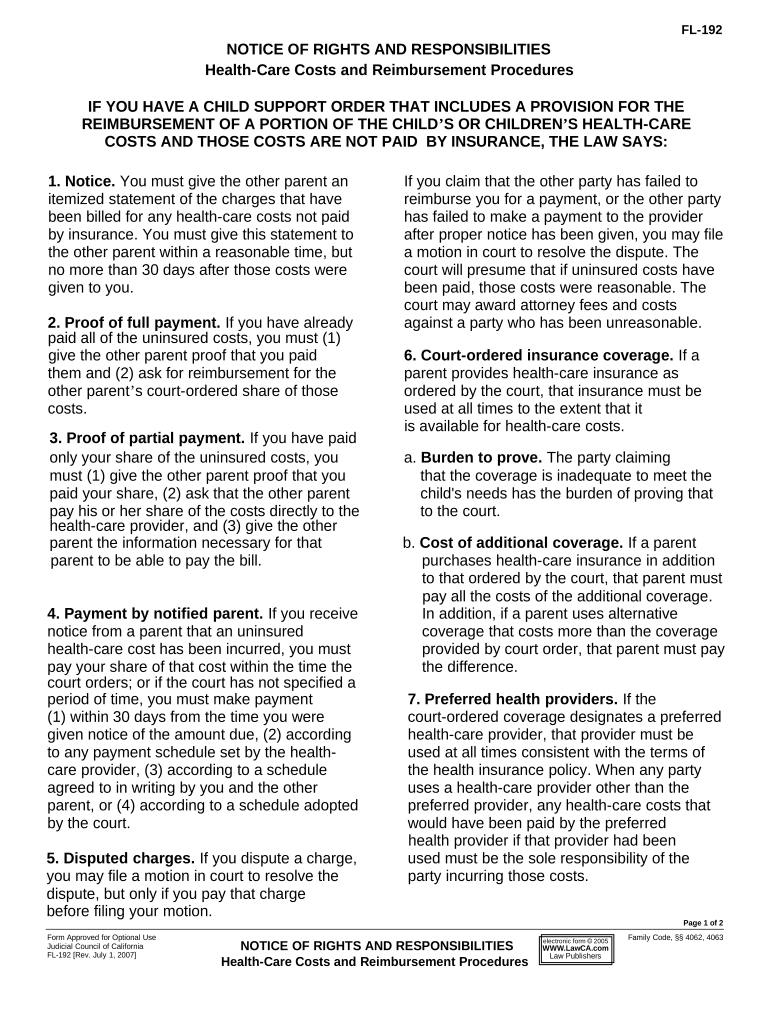
California Notice of Rights and Responsibilities Regarding Health-Care Costs

This template is fully customizable. Edit the text, fill out the fields, and send it for signature. Give it a try!
California Notice of Rights and Responsibilities Regarding Health-Care Costs

What the California Notice of Rights and Responsibilities Regarding Health-Care Costs Is

The California Notice of Rights and Responsibilities Regarding Health-Care Costs is a written disclosure that explains a patient’s financial obligations, available financial assistance, and the steps for disputing charges for health‑care services in California. It sets out who is responsible for payment, how estimates and bills are calculated, and contact information for billing inquiries. Providers deliver this notice with billing materials or upon request so patients can make informed decisions, access charity care if eligible, and follow formal dispute or appeal procedures.

Why this notice matters to patients and providers

The notice promotes billing transparency, helps patients understand payment responsibility and appeals options, and assists providers in meeting California consumer protection and health‑care billing rules. Clear notices reduce misunderstandings, support regulatory compliance, and document that the provider met disclosure obligations.

Why this notice matters to patients and providers

Typical users and distribution points

Typical users and roles that complete or distribute the California Notice include clinical billing staff, patient financial counselors, and administrative teams responsible for statements.

  • Hospital billing departments responsible for issuing statements and conducting charity care screening for eligible patients.
  • Outpatient clinics and physician practices that provide cost notices at registration or with billing statements to patients.
  • Patient financial counselors who explain payment options, sliding‑scale eligibility, and the formal dispute or appeal steps.

Organizations should track delivery, retain proof of notice distribution, and update templates when policy or regulatory language changes.

Essential parts of a professional notice

A complete notice uses clear headings, precise fields, and actionable instructions so patients and staff can understand costs, assistance, and dispute procedures.

Heading

State the formal title 'Notice of Rights and Responsibilities Regarding Health-Care Costs' and reference the provider policy that requires the disclosure.
Patient Info

Include full legal name, account number, and patient contact to link the notice unambiguously to the correct billing record.

Billing Responsibility

Clearly identify who is responsible for payment, whether patient, guarantor, or third party and note any insurance coordination instructions.

Financial Assistance

Describe eligibility criteria, application steps, and where to obtain free or reduced‑cost care, including any internal program names or forms.

Dispute Process

Provide step‑by‑step dispute instructions, required timelines for filing a complaint, and internal escalation contacts for billing appeals.

Provider Contacts

List billing office phone, email, mailing address, and hours for inquiries, plus a secondary contact for unresolved disputes or external agency referrals.

Security and compliance basics for notices and records

Encryption: TLS 1.2/1.3 in transit; AES-256 at rest
HIPAA BAA: Business Associate Agreement required
Access Controls: Role-based access and audit logging
Audit Trail: Timestamps, IP, and action history
Retention: Policies tied to legal requirements
Authentication: Multi-factor options for sensitive actions

Step-by-step: completing and issuing the notice

Follow these steps to complete, sign, and deliver the California Notice consistently and in compliance with state expectations.

  • 01
    Prepare Document: Load the latest approved template and verify legal language.
  • 02
    Collect Patient Data: Confirm identity, account, and service dates before populating fields.
  • 03
    Deliver Notice: Provide the notice with billing, at registration, or upon patient request.
  • 04
    Record Delivery: Log delivery method, date, and signer or recipient details for audit.

Typical digital workflow settings for issuing notices

Common platform settings help standardize delivery, authentication, and retention across teams.

Field Configuration
Storage Location Attach signed PDF to EHR and billing record
Delivery Method Email, patient portal, printed statement
Authentication Email link; SMS code or stronger where needed
Retention Policy Automated retention per legal schedule

Where completed notices are sent and stored

Options for routing completed notices include patient delivery channels and internal records systems to ensure accessibility and proof of distribution.

  • Email Delivery: Send signed PDF to patient email and record delivery receipt
  • Paper Included: Include printed notice with mailed billing statements
  • EHR Attachment: Attach signed notice to the patient’s electronic health record
  • Compliance Archive: Store a copy in a secure, access‑controlled archive for audits

Technical and platform considerations for digital delivery

Ensure the chosen platform supports secure formats, audit trails, and the authentication levels required for patient notices.

  • Supported Formats: PDF, DOCX, and native EHR attachments
  • Integrations: Salesforce, Microsoft 365, NetSuite, Google Workspace
  • Authentication Options: Email link, SMS code, or multi-factor

Key timelines and response expectations

Track statutory and operational deadlines for providing notices, responding to requests, and resolving disputes to maintain compliance.

Notice Delivery Timing:

Provide the notice with billing statements or upon patient request

Dispute Acknowledgment:

Acknowledge receipt of billing disputes promptly per internal policy

Dispute Resolution Window:

Resolve or escalate disputes within the timeframe set by provider policy

Record Retention Start:

Retention periods begin on creation or finalization date

HIPAA Retention Standard:

Maintain records for six years per 45 CFR §164.530(j)

Common mistakes to avoid when preparing the notice

  • Using outdated template language that omits current financial assistance criteria or contact details, which can lead to patient confusion and compliance gaps.
  • Failing to match patient identifiers (name, account number, date of service) to billing records, increasing the risk of misapplied payments or rejected disputes.
  • Delivering notices without proof of receipt or logging, which complicates audits and weakens the provider’s ability to demonstrate compliance.
  • Neglecting to include clear instructions for financial assistance and appeal steps, increasing unpaid balances and avoidable billing disputes.

Potential penalties and compliance risks

State Enforcement: Civil penalties under California consumer protection laws
Billing Disputes: Delayed disputes can increase liability and collection costs
HIPAA Violations: Fines and corrective action if PHI exposures occur
Reputational Risk: Negative publicity from billing complaints
Insurance Coordination: Incorrect notices risk claim denials
Operational Costs: Higher administrative burden from avoidable errors

Real-world examples of notice use

Illustrative scenarios show how organizations integrate the notice into billing and patient outreach workflows.

Community Clinic

A clinic includes the notice with every statement to low-income patients to clarify charity care options.

  • Clinic staff document application dates and alert patients to internal appeal steps.
  • This reduced unresolved balances and improved acceptance of financial assistance, while creating a clear audit trail for funding and compliance reviews.

Hospital System

A hospital attaches the notice to pre-service estimates for scheduled procedures to explain expected patient responsibility.

  • Finance sends the notice electronically and by mail.
  • The practice reduced patient disputes and shortened collections cycles by ensuring patients receive consistent information before services are rendered.

Practical tips for accurate and efficient completion

Adopt consistent templates, integrate notices into electronic workflows, and train staff to reduce errors and disputes.

Use a single approved template
Maintain one legally reviewed template to avoid inconsistent language. Centralize updates so every department uses the same version and reduce compliance risk.
Automate population of fields
Pull patient identity, dates of service, and charge amounts from the billing system to eliminate manual entry errors and speed delivery.
Log delivery and consent
Capture delivery receipts, signed acknowledgements, or documented patient refusals to demonstrate the provider met disclosure obligations and to support audits.
Review annually with counsel
Have legal or compliance review templates and processes yearly or when laws change to ensure the notice remains accurate and defensible.

Comparing eSignature vendor pricing and features for notice workflows

Platform choice affects cost, HIPAA readiness, bulk send capability, and envelope limits; compare features against your volume and compliance needs.

signNow DocuSign Adobe Sign PandaDoc HelloSign
Starting Price $8/user/mo $15/user/mo $14/user/mo $19/user/mo $15/user/mo
Free Trial 7-day free trial Varies by vendor Varies by vendor Varies by vendor Varies by vendor
Bulk Send Yes (Business Premium) Yes Yes Yes No
Audit Trail Yes Yes Yes Yes Yes
HIPAA Compliant Yes (BAA required) Yes Yes No No
Envelope Cap No cap 100 envelopes/user/year Varies by plan Varies by plan Varies by plan

Frequently asked questions about the California notice

Answers to common questions about when to provide the notice, permissible electronic delivery, retention, and who may sign on behalf of a patient.


Need help? Contact support

be ready to get more
Join over 28 million airSlate SignNow users