Establishing secure connection…Loading editor…Preparing document…

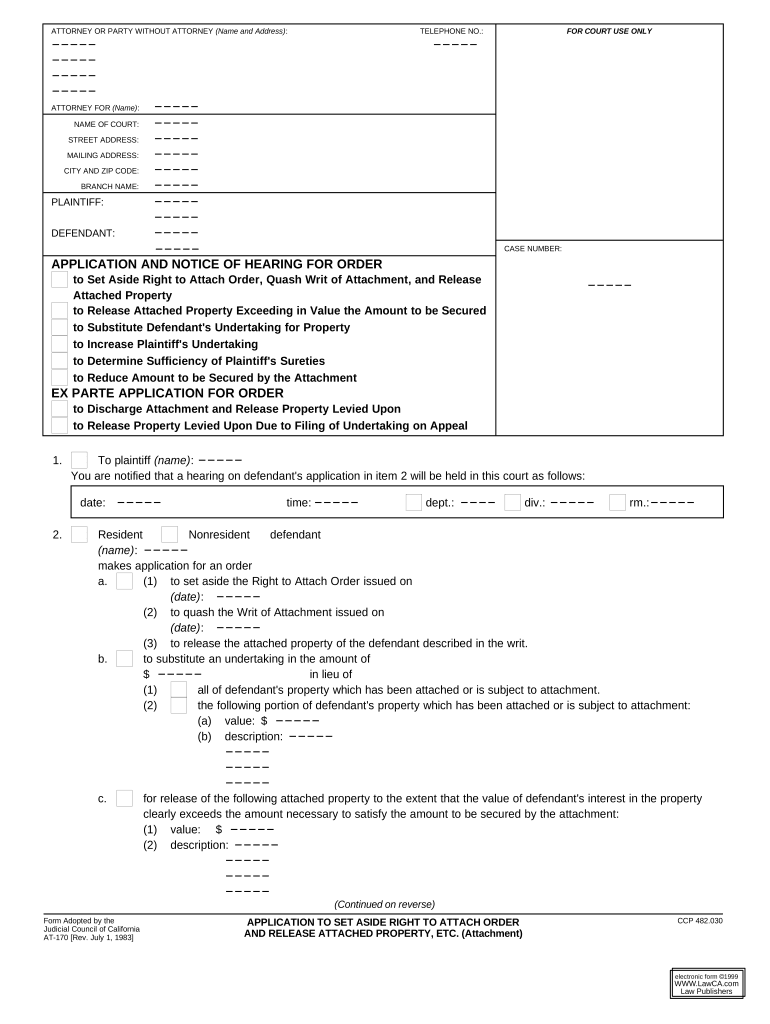
California Application to Set Aside Right to Attach Order and Release Attached Property

This template is fully customizable. Edit the text, fill out the fields, and send it for signature. Give it a try!
California Application to Set Aside Right to Attach Order and Release Attached Property

What this California application is and when it applies

The California Application to Set Aside Right to Attach Order and Release Attached Property is a court filing used to request that a superior court remove or limit a previously issued right to attach order and order the release of property that was attached to secure a creditor’s claim. It is typically filed by a judgment debtor, the owner of attached property, or counsel on their behalf and must state the factual and legal grounds supporting release. Because it seeks a judicial order, check local superior court rules on filing format, service, and any limits on electronic signatures.

Why you might file this application

This application preserves property rights and can stop or reverse an improper enforcement action, reduce storage or seizure costs, and restore access to assets while the underlying dispute proceeds.

Why you might file this application

Who commonly prepares and files this application

Common filers include judgment debtors, property owners, and civil defense counsel seeking release.

  • Judgment debtor seeking return of personal or business property seized under attachment.
  • Secured creditor or lien claimant requesting clarification or partial release of attached assets.
  • Civil defense counsel preparing supporting declarations and evidentiary exhibits for the court.

Filing may also follow negotiation; counsel often files to formalize agreed releases or to challenge scope of attachment.

Representative users and roles

Judgment Debtor

An individual or business against whom a right to attach order was entered; they typically supply ownership proof, supporting declarations, and requested relief to obtain release of specific property.

Plaintiff's Attorney

An attorney for the creditor or claimant who may oppose release or propose conditions; the attorney files opposition briefs, produces lien documentation, and negotiates bond or security to protect creditor interests.

Key information required on the application

Case Number: Court case identifier
Court Name: Superior Court designation
Judgment Amount: Amount claimed or secured
Property Description: Specific attached assets
Affiant Name: Person making declaration
Attachment Date: Date property was attached

Step-by-step process to prepare and file the application

Follow these core steps to prepare a compliant application and move toward a release order.

  • 01
    Gather documents: Collect writ, proof of service, title, and ownership records.
  • 02
    Draft application: Prepare form, declaration, and proposed order for the judge.
  • 03
    File with court: Submit via e-filing or clerk’s office per local rules.
  • 04
    Serve parties: Serve all affected parties and file proof of service.

Where and how to submit the application in California

Most applications are submitted to the superior court that issued the attachment; courts may accept electronic filing through approved e-filing services or require in-person clerk submission.

  • Superior Court Clerk: Primary filing point for paper or e-filed documents.
  • E-filing Portal: Use county-approved e-filing service if available.
  • Mail or Courier: Allowed where e-filing is unavailable; include stamped envelopes.
  • Personal Service: Serve opposing parties per California Code of Civil Procedure.

Typical e-filing and document workflow settings

Configure your filing workflow to match court requirements and to capture required metadata for service and clerk processing.

Field Configuration
Court Name Select county superior court
Document Type Application / Motion to Set Aside Release
Case Number Enter exact case number
Proof of Service Attach proof and date of service

Digital filing and signature considerations

Confirm whether the county superior court accepts e-filed motions and whether the application may be signed electronically before you choose a digital workflow.

  • eFile Compatibility: PDF/A preferred; follow county e-filing specs.
  • Signature Acceptance: Some courts require wet signatures or attorney e-signatures.
  • Authentication: Clerk may require registered e-filer credentials.

When permitted, electronic signing plus a reliable audit trail supports court acceptance and preserves proof of execution and service in the event of dispute.

Typical timelines and what to expect after filing

Timelines vary by county; plan for clerk review, service windows, and a possible hearing date when preparing the application.

Clerk Processing Time:

Typically 1–7 business days depending on county workload

Service Deadline:

Serve parties immediately after filing; file proof of service per local rule

Hearing Scheduling:

Hearing often set within 30–90 days, subject to court calendar

Emergency Relief:

Ex parte requests may be available for immediate release

Order Entry:

Clerk enters order after judge signs; check for required conforming copies

Key milestones from filing to release

Track these sequential milestones to monitor progress and meet procedural requirements.

01

Prepare and File

Draft application, attach exhibits, and file with the clerk.

02

Serve Affected Parties

Complete personal or mail service and file proof with the court.

03

Attend Hearing

Appear or submit on calendar; present declaration and evidence.

04

Order and Release

Court signs order directing clerk or sheriff to release property.

Consequences of defective or late filings

Denial of Relief: Motion denied
Monetary Sanctions: Possible fines or cost awards
Contempt Risk: Noncompliance may trigger contempt
Loss of Rights: Forfeiture of property rights
Perjury Exposure: False declarations risk criminal penalties
Delayed Release: Additional storage or enforcement costs

Common mistakes to avoid when preparing the application

  • Using an incorrect case caption or number, which can result in misfiling or clerk rejection and delay court consideration.
  • Submitting vague property descriptions without serial numbers, titles, or account identifiers, leading to partial or no release.
  • Failing to attach proof of ownership or updated lien searches, which weakens the factual basis for release.
  • Neglecting to serve all interested parties and file proof of service, potentially leaving the order vulnerable to later challenge.

Practical tips for a clean, efficient filing

Apply these practices to reduce rejection risk and speed the path to a release order.

Confirm court rules and format
Review county superior court local rules online or contact the clerk to confirm e-filing requirements, acceptable signature methods, page limits, and required coversheets before filing to avoid procedural rejections and subsequent delays.
Attach clear evidence
Include authoritative ownership documents, receipts, titles, or bills of sale and a current lien search to show why the property should be released and to prevent disputes at hearing.
Use precise legal descriptions
For real property include the legal description or assessor parcel number; for vehicles or equipment include VINs or serial numbers to ensure the judge can identify the property for release.
Prepare a proposed order
Draft a narrowly tailored proposed order for the judge to sign that specifies what is released, any conditions, and instructions to the sheriff or clerk to effectuate the release.

Real-world scenarios where the application is used

Two scenarios illustrate typical uses and outcomes when the application is supported by clear evidence and proper procedure.

Case Example 1

A small business owner files to release seized equipment after demonstrating title and mistaken identification of assets

  • court expedited hearing on narrowly disputed items
  • Brian Fitzgibbons, COO of Optica Ventures LLC, noted the interface is simple and helped streamline document submission while preserving required evidence and chain of custody for the hearing.

Case Example 2

A landlord seeks partial release of tenant property attached after opposing counsel agrees to limited bond

  • judge signs conditional release pending accounting
  • Tim Martin, Founder of Martin Properties, reported processing and executing documents online maintained compliance and sped resolution of asset releases.

eSignature vendor comparison for submitting and signing court documents

Compare core eSignature pricing and basic capabilities for use when electronic signing or internal approvals are permitted; signNow is listed first per platform comparison norms.

signNow DocuSign Adobe Sign PandaDoc HelloSign
Starting Price $8/user/mo $15/user/mo $14/user/mo $19/user/mo $15/user/mo
Free Trial 7-day free trial Varies by vendor Varies by vendor Varies by vendor Varies by vendor
Bulk Send Yes Yes Yes Yes Varies by vendor
Audit Trail Yes Yes Yes Yes Yes
HIPAA Compliant Yes Yes Yes No No
Envelope Cap No cap 100 envelopes/user/year Varies Varies Varies

Frequently asked questions and practical answers

Answers to common procedural and technical questions when preparing an application to set aside an attachment and request release of property.


Need help? Contact support

be ready to get more
Join over 28 million airSlate SignNow users