Establishing secure connection…Loading editor…Preparing document…

California Lis Pendens

This template is fully customizable. Edit the text, fill out the fields, and send it for signature. Give it a try!
California Lis Pendens

What a California Lis Pendens Is and when it matters

A California lis pendens is a recorded notice filed in the county recorder's office that alerts the public to pending litigation affecting title or possession of real property. It protects the plaintiff's interest by warning prospective buyers or lenders that the property is subject to a court dispute, creating a cloud on title. Recording does not determine merits; it preserves equitable rights while litigation proceeds and can affect marketability and financing until resolved or released by court order or dismissal.

Why a lis pendens matters for property disputes

Filing a lis pendens warns third parties and protects equitable property interests during litigation. It helps preserve remedies like injunctive relief or quiet title and deters transfers that could frustrate the plaintiff's claim while the case is pending.

Why a lis pendens matters for property disputes

Who typically prepares and relies on a lis pendens

Parties to real property litigation and their attorneys usually prepare and record lis pendens notices to preserve an interest in the property.

  • Property owners or buyers pursuing claims involving title defects, boundary disputes, quiet title, or specific performance, seeking to protect their equitable remedies while litigation runs.
  • Mortgage lenders or lienholders asserting priority or opposing transfers that would impair security interests, often using lis pendens to alert title companies and third parties.
  • Real estate attorneys and title companies who monitor recorded notices to advise clients on marketability, escrow holds, and the need for releases or bonding to clear title.

After filing, parties should monitor recording status, serve required parties per local rules, and be prepared to defend the notice if challenged.

Who can sign and file a lis pendens

Claimant / Plaintiff

A party with a plausible claim affecting title or possession may sign or authorize filing; typically the plaintiff or the plaintiff's attorney signs and certifies the factual basis for recording the notice.

Authorized Attorney

An attorney of record commonly prepares and records the lis pendens, certifying facts under penalty of perjury and handling service, recording fees, and any subsequent motions to expunge or release the notice.

Essential data elements and security safeguards

Claimant Name: Full legal name
Defendant Name: Full legal name
Legal Description: Parcel or lot description
Case Number: Court docket number
Recorder Details: County name and book/page
Filing Signature: Signed and dated

Core components of a professional California lis pendens

A complete lis pendens includes precise property identification, parties, case reference, concise statement of the claim, declaration of facts, and a clear signature block with contact and filing details.

Property Description

Provide the recorded legal description or assessor parcel number (APN). Accurate metes-and-bounds or lot-and-block text is crucial to bind the notice to the correct parcel and avoid misfiling.
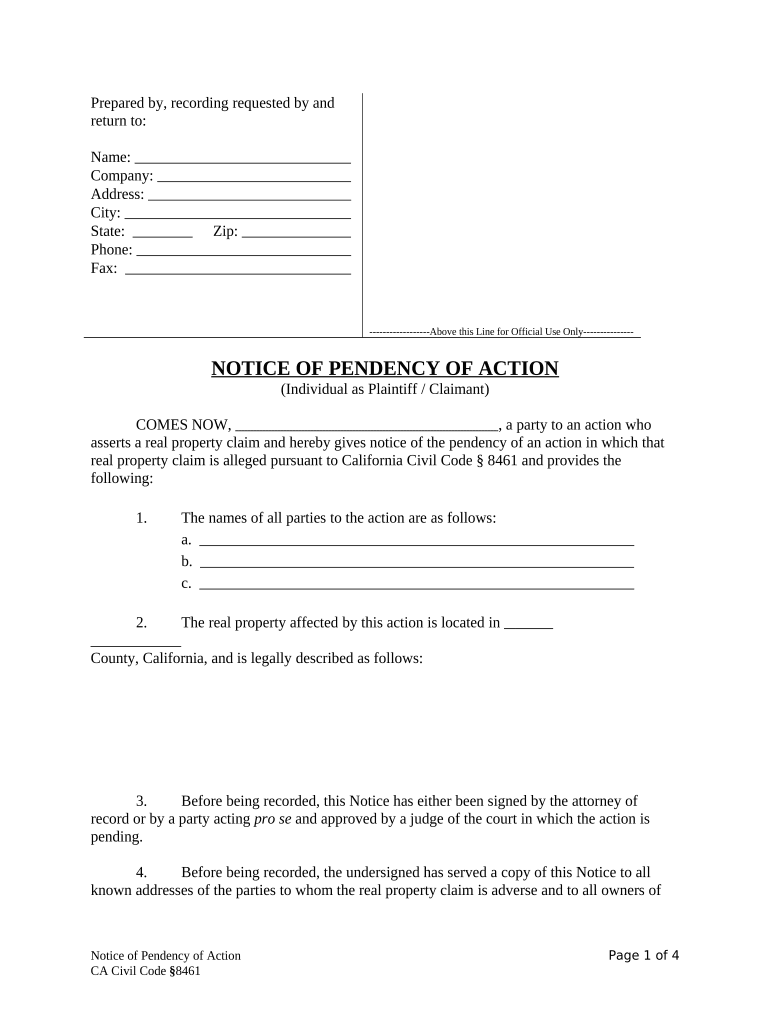
Parties Named

List claimant(s) and defendant(s) using full legal names and business entity designations. Errors in party names can invalidate the notice or prompt expungement motions.

Court Case Reference

Include the court name, county, and docket/case number. This allows record searches and title examiners to locate the underlying litigation without ambiguity.

Basis for Claim

A concise statement describing how the lawsuit affects title or possession. Avoid conclusory language; state facts that tie the claim to the property.

Signature and Verification

Signed by claimant or counsel, typically with a verification or declaration under penalty of perjury attesting to the notice's factual basis and accuracy.

Recording Metadata

List recording office, document number, and recording date; preserve copies of the recorded instrument, cover letter, and proof of service.

Step-by-step: preparing and recording a lis pendens in California

Follow a clear sequence to prepare, verify, record, and notify relevant parties. This reduces risk of rejection or later expungement proceedings.

  • 01
    Prepare Draft: Draft notice with precise legal description.
  • 02
    Verify Case: Confirm court name and docket number.
  • 03
    Record Notice: Submit to county recorder with required fee.
  • 04
    Serve Parties: Serve defendant and file proof of service.

Where and how a California lis pendens is submitted

Record lis pendens at the county recorder in the county where the property is located. Many counties accept in-person, mail, and electronic submissions.

  • County Recorder: Primary filing office for recorded notice.
  • Clerk of Court: Reference court filings for docket verification.
  • Service of Process: Serve parties per California Code of Civil Procedure.
  • Title Companies: Notify title insurers and escrow officers.

Digital filing and eSubmission considerations

Electronic submission availability varies by county; check local recorder rules before eFiling or using eRecording vendors.

  • Accepted Formats: PDF/A or standard PDF
  • Authentication: Signer identity verification required
  • Recording Receipt: Obtain electronic confirmation

Retain the recorder's stamped copy and confirmation; verify whether eRecording requires specific signer authentication or notarization in the county.

How to configure an online lis pendens workflow

A disciplined digital workflow reduces errors and accelerates recording when counties accept electronic submissions.

Field Validation Rules Auto-validate APN and docket fields
Signer Authentication Require verified email and phone
Document Format Use flattened PDF for recording
Auto-attach Pleadings Include complaint as exhibit
Proof of Service Upload filed proof with record

Timing to expect after filing a lis pendens

Timelines influence remedy preservation and title activity. Understand when the notice takes effect and when follow-up filings are required.

Recording Effective Date:

Notice is effective on recording date

Proof of Service Deadline:

Serve defendant promptly per local rules

Challenging the Notice:

Defendant may move to expunge at any time

Court Resolution:

Release upon dismissal or judgment

Title Clear Timing:

Title remains clouded until release

Key milestones from filing to release

A typical lis pendens lifecycle follows sequential milestones from recording through dispute resolution or release.

01

Record Notice

File at county recorder; creates cloud on title.

02

Serve Notice

Deliver proof of service to defendants and file in court.

03

Defense Motion

Defendant may move to expunge or challenge sufficiency.

04

Release or Judgement

Court order or dismissal ends the lis pendens impact.

Common mistakes to avoid when preparing a lis pendens

  • Using a mailing address instead of the legal description, which can misidentify the parcel and lead to expungement or re-recording delays.
  • Failing to verify the court docket number or case style, causing the recorder or title company to reject the notice or misfile it under a different matter.
  • Neglecting to serve defendants or file proof of service per California rules, which can undermine notice effectiveness and invite sanctions.
  • Overly broad or conclusory statements of claim without specific factual ties to the property, increasing risk of a successful expungement motion.

Potential legal consequences for incorrect or wrongful filings

Expungement: Court-ordered removal
Monetary Sanctions: Attorney fees or fines
Slander of Title: Civil liability claim
Criminal Penalty: Fraudulent filings possible
Bond Requirement: Court may require bond
Title Delay: Escrow and financing blocked

eSignature vendor comparison for lis pendens workflows

Common criteria for choosing an eSignature vendor include starting price, trial availability, bulk send, audit trail, HIPAA compliance, and envelope or session caps.

signNow DocuSign Adobe Sign PandaDoc HelloSign
Starting Price $8/user/mo $15/user/mo $14/user/mo $19/user/mo $15/user/mo
Free Trial 7-day free trial Varies Varies Varies Varies
Bulk Send Yes Varies Varies Varies Varies
Audit Trail Yes Yes Yes Yes Yes
HIPAA Compliant Yes Yes Yes No No

Frequently asked questions about California lis pendens

Answers to common questions about recording, effects on title, removal, and electronic filing options relevant to California property matters.


Need help? Contact support

be ready to get more
Join over 28 million airSlate SignNow users