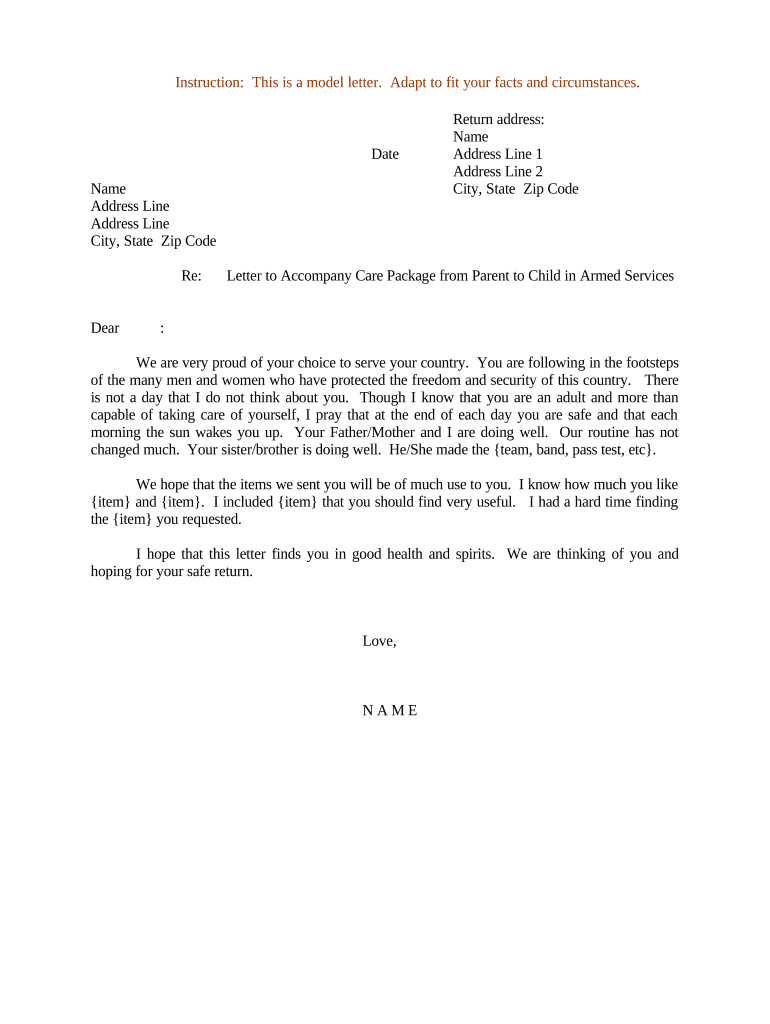
Letter to Accompany Care Package to Child in Armed Services
What this letter is and when it’s used
Why include a formal letter with the care package
A short, clear letter helps base or postal staff verify sender intent, speeds customs or military postal processing, documents contents for safety, and provides emotional support to the service member.
Who typically writes and sends these letters
Tailor the letter to the relationship and to any unit or postal instructions to avoid rejection or delay.
- Immediate family members: Send personal messages and verified contact details for return communication.
- Family friends or sponsors: Identify relationship and include how the service member knows the sender.
- Volunteer organizations: Include organization name, volunteer coordinator, and inventory for group shipments.
Typical signers and their role
Parent / Guardian
A parent or legal guardian usually signs to confirm family relationship, provide emergency contact details, and express supportive remarks. Include full name, primary phone, and email so military postal staff can contact you if needed.
Volunteer Coordinator
A nonprofit or community coordinator signs for group shipments; include organization contact, a packing list, and a point of contact for questions about contents or delivery problems.
Risks if the letter or package is incorrect
Common mistakes people make preparing the letter
- Using informal or incomplete addresses that do not match the official military postal format, which causes routing errors and delays.
- Failing to include a clear packing list or incorrectly declaring prohibited items, risking inspection or confiscation by customs or base personnel.
- Omitting a return address or reliable contact method, making it harder for postal or military staff to resolve delivery issues.
- Writing overly personal medical or security details; keep content concise and avoid sensitive personal data that the military may restrict.
Real-world packing letter examples
Family Letter Example
We are your parents and miss you every day, sending snacks and socks to keep you comfortable.
- Packing list: snacks (no alcohol), socks, handwritten cards.
- Include contact info, return address, and a short personal note; avoid detailed medical or operational descriptions and respect any unit-specific guidance.
Volunteer Shipment Example
Community group sending hygiene kits and morale items for a platoon member.
- Packing list: 20 hygiene kits, 30 snacks.
- Add organization name, coordinator contact, and an inventory sheet inside the package; label each box clearly and follow postal customs declaration rules for international shipments.
Step-by-step: preparing the letter and package
-
01Gather recipient details: Confirm full name, rank, unit, and official APO/FPO address.
-
02List contents: Provide a concise packing list and note any restricted items.
-
03Add sender contact: Include full return address, phone number, and email.
-
04Sign and date: Sign with your full name and add the mailing date at top.
How the letter helps the delivery process
-
Postal intake: Staff verify address and return contact before acceptance.
-
Customs review: Declared contents are checked against permitted lists.
-
Base processing: Unit postal clerks confirm recipient and distribute package.
-
Recipient receipt: Service member signs or logs acceptance on base records.
What a professional letter typically includes
Opening line
One-sentence greeting identifying the sender and relationship to the service member, for example 'Dear Specialist Smith — Love, Mom and Dad.' Keep it respectful and brief.
Address block
Full service-member mailing address using the official APO/FPO format shown by the military post office. Include unit/box number and any required routing codes.
Contents summary
Short list of contents and quantities. Note any perishable items, and explicitly state 'no prohibited items' if applicable to reassure reviewers.
Contact details
Complete return address, primary phone, and email so postal staff can contact sender if there is an issue or if the package is returned.
Digital or template workflow settings for repeat shipments
| Field | Configuration |
|---|---|
| Recipient block | Required field, validated format |
| Packing list | Optional multiline text field |
| Return contact | Required phone and email |
| Signature | Hand-signed or e-signed allowed |
Sharing and digital options for the letter
For organizations, integrate templates with cloud storage and version control to maintain consistent wording and up-to-date contact details.
- Print-and-insert: Create in Word or PDF, print, sign, and place inside the package.
- Template use: Create a reusable template with static fields and editable packing lists for volunteers.
- eSignature: Use an e-signature if allowed by the receiving unit; retain an audit trail for records.
Timing considerations for sending care packages
Holiday surge:
Ship 4–8 weeks early during holiday seasons
Perishable items:
Ship with at least 7–14 days transit window
Customs processing:
Allow 2–4 weeks for international customs
Unit rules change:
Verify current unit restrictions before each shipment
Tracking confirmation:
Keep tracking until delivery verified
Key milestones from preparation to delivery
Prepare letter and contents
Finalize packing list, sender details, and a signed letter.
Confirm recipient details
Verify rank, unit, and APO/FPO address with the service member.
Ship with proper labeling
Use carrier and customs forms that match military postal requirements.
Monitor tracking
Watch for customs or delivery holds and respond promptly if contacted.
eSignature vendor comparison for signing and storing letters
| signNow | DocuSign | Adobe Sign | PandaDoc | HelloSign | |
|---|---|---|---|---|---|
| Starting Price | $8/user/mo | $15/user/mo | $14/user/mo | $19/user/mo | $15/user/mo |
| Free Trial | 7-day free trial, no credit card | Varies by plan | Varies by plan | Varies by plan | Varies by plan |
| Bulk Send | Yes (Business Premium) | Yes | Yes | Yes | Varies |
| Audit Trail | Yes | Yes | Yes | Yes | Yes |
| HIPAA Compliant | Yes | Yes | Yes | No | No |
| Envelope Cap | No cap | 100 envelopes/user/year | Varies by plan | Varies by plan | Varies by plan |
Frequently asked questions about letters and care packages
-
What should not be included?
Avoid alcohol, weapons, perishable foods not allowed by the receiving unit, and materials that disclose sensitive operational details; check the unit or carrier restrictions before packing.
-
How should I address the package?
Use the official APO/FPO address format provided by the service member and include rank and unit. Confirm the format with the base postal office or the recipient to ensure correct routing.
-
Do I need a notarized letter?
Not typically for personal care packages. Notarization is only required when a letter serves as a legal document; consult unit or legal guidance if a declaration or permission requires authentication.
-
What if the package is returned?
Check the return reason on the carrier notice, contact the receiving unit or postal office for clarification, and ensure your return address and declared contents comply before resending.
-
Can I use an e-signed letter?
Many organizations use e-signatures for templates and recordkeeping; ensure the receiving unit accepts a printed copy of an e-signed letter and retain the audit trail for your records.
-
Who do I contact for customs questions?
Contact the carrier’s customs support or your local post office for international shipments. Keep documentation handy and declare contents accurately to avoid fines or delays.