Establishing secure connection…Loading editor…Preparing document…

Connecticut Lien

This template is fully customizable. Edit the text, fill out the fields, and send it for signature. Give it a try!
Connecticut Lien

What a Connecticut Lien Is and when it applies

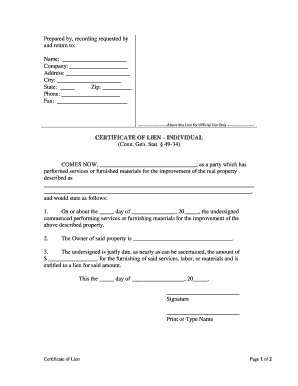
A Connecticut Lien is a statutory claim recorded against real property to secure payment for labor, materials, or services that improve or repair real estate. It typically arises when a contractor, subcontractor, or supplier has not been paid for work performed on a property. The lien creates a recorded encumbrance that can affect title and may be enforced by foreclosure if unpaid. Procedures, required notices, and enforcement steps vary with state law and the contract terms; confirm timing and content with Connecticut statutes or county recording offices before filing.

Why accurate Connecticut lien filings matter

A properly prepared Connecticut Lien protects payment rights, preserves priority against other creditors, and strengthens leverage for collection or negotiation. Accurate filing reduces the risk of litigation, rejection, or waiver and helps preserve the claimant's ability to enforce a lien by foreclosure if necessary.

Why accurate Connecticut lien filings matter

Who typically files or receives Connecticut liens

Common participants include construction contractors, subcontractors, material suppliers, property owners, and title companies; each has distinct responsibilities and interests.

  • General contractors and subcontractors who supplied labor or services and need to secure unpaid balances against the improved property.
  • Material suppliers and equipment lessors who provided goods used in the improvement and seek a recorded claim for unpaid invoices.
  • Property owners and title agents who receive notice and need to address encumbrances for sales, refinances, or closing.

Essential elements to include in a professional Connecticut lien

A complete lien combines clear party identification, precise property description, contract and job details, statement of amounts due, required notices, and a dated signature.

Claimant

Full legal name and business entity type for the person or firm asserting the lien, used for service and enforcement.
Property

Legal description sufficient for recording (lot, block, deed reference) plus street address and municipality to uniquely identify the affected real estate.

Contract Details

Contract date, contract number or purchase order reference, and a brief description of the work or materials supplied on the job.

Amount Due

Itemized unpaid balance showing principal, retainage, credits, and any agreed change orders or back charges supporting the claimed sum.

Time Frame

Dates of first and last labor/material delivery and the date of completion or termination that define the lien period.

Signature

Signed and dated by an authorized representative; include contact details and, where required, notarization or acknowledgment.

Required data fields at a glance

Claimant name: Exact legal name
Property site: Address and legal description
Contract date: MM/DD/YYYY or exact date
Work description: Concise invoice-level summary
Amount claimed: Numeric dollar amount
Authorized signature: Signer name and title

Step-by-step: preparing and submitting a Connecticut lien

Follow these core steps in sequence to reduce risk and preserve enforcement options.

  • 01
    1. Verify eligibility: Confirm you furnished labor or materials and that contract terms permit a lien.
  • 02
    2. Gather evidence: Collect invoices, delivery tickets, contract, and change orders supporting the claim.
  • 03
    3. Prepare the lien: Complete the lien form with legal property description and itemized amounts.
  • 04
    4. Record and serve: File with the county recording office and serve required notices to owner and contractors.

Where a Connecticut lien is filed and who receives copies

Recordings and service obligations follow statutory and local rules; use the recording office and proper service methods.

  • Recording office: File at the county or municipal land records office where the property is located.
  • Owner notice: Serve the property owner with the recorded claim or statutory notice as required.
  • General contractor: Provide a copy to the general contractor when required by statute or contract.
  • Title companies: Notify title insurer or agent if the lien may affect closing or financing.

Setting up an online filing workflow for lien documents

Configure a repeatable workflow that collects evidence, captures signatures, and routes documents to recording and service recipients.

Field Configuration
Document template Use a prefilled lien template to standardize entries and reduce errors.
Authentication Require signer email or SMS code to validate signer identity.
Service copies Automate sending recorded PDFs to owner, contractor, and title agent.
Archive Store final recorded document in encrypted cloud storage for retention.

Digital signing and technical requirements

Electronic filing and signing streamline lien preparation but require secure authentication and reliable records.

  • File formats: PDF, DOCX supported
  • Integrations: Link to cloud storage and ERPs
  • Authentication: Email, SMS, or advanced methods

Common mistakes when preparing a Connecticut lien

  • Missing or incorrect property legal description causes recording rejection and title ambiguity.
  • Failing to send required preliminary notices may forfeit lien rights under certain statutes or contracts.
  • Claiming incorrect amounts without itemized backup invites owner disputes and possible penalties.
  • Using an unauthorized signer or unsigned form can invalidate the recorded claim and delay enforcement.

Key risks from incorrect lien filings

Loss of priority: Late filing loses priority
Invalid claim: Form errors can void lien
Costly litigation: Enforcement may require foreclosure
Damage to reputation: Bad filings harm business
Bond requirement: Court may require bond
Statutory penalties: State fines or sanctions

Timing checkpoints and critical deadlines to track

Observe statutory filing and service deadlines carefully; many lien rights depend on strict timing tied to completion and notice dates.

Contract start:

Document contract date and mobilization for eligibility tracking.

Work completion:

Record final completion dates to trigger filing windows and notice duties.

Notice of intent:

Serve preliminary or intent notices when required to preserve claim rights.

Lien filing window:

File within the state statute's prescribed period after completion; periods vary by jurisdiction.

Enforcement period:

Begin foreclosure actions within statutory deadline or risk losing enforcement rights.

Real-world examples of digitized lien and document workflows

Two brief examples show how digital signing and standardized templates simplify lien-related processes.

Martin Properties

Tim Martin found online processing simplified compliance and signatures.

  • He managed mobile and offline signing for field teams.
  • The result was fewer delays at closing, clearer records for title, and faster resolution of payment disputes using consistent digital files and audit trails.

Optica Ventures

Brian Fitzgibbons emphasized ease of use for customers and staff.

  • Templates and templates reduced rework.
  • Standardized electronically signed lien documents reduced administrative overhead and improved turnaround when coordinating with owners, contractors, and county recorders.

FAQs and troubleshooting for Connecticut lien filings

Answers to common questions about completing, signing, filing, and enforcing Connecticut lien claims.


Need help? Contact support

be ready to get more
Join over 28 million airSlate SignNow users