Establishing secure connection…Loading editor…Preparing document…

Petition to Declare Minor Free from Custody

This template is fully customizable. Edit the text, fill out the fields, and send it for signature. Give it a try!
Petition to Declare Minor Free from Custody

What the Petition to Declare Minor Free from Custody Is

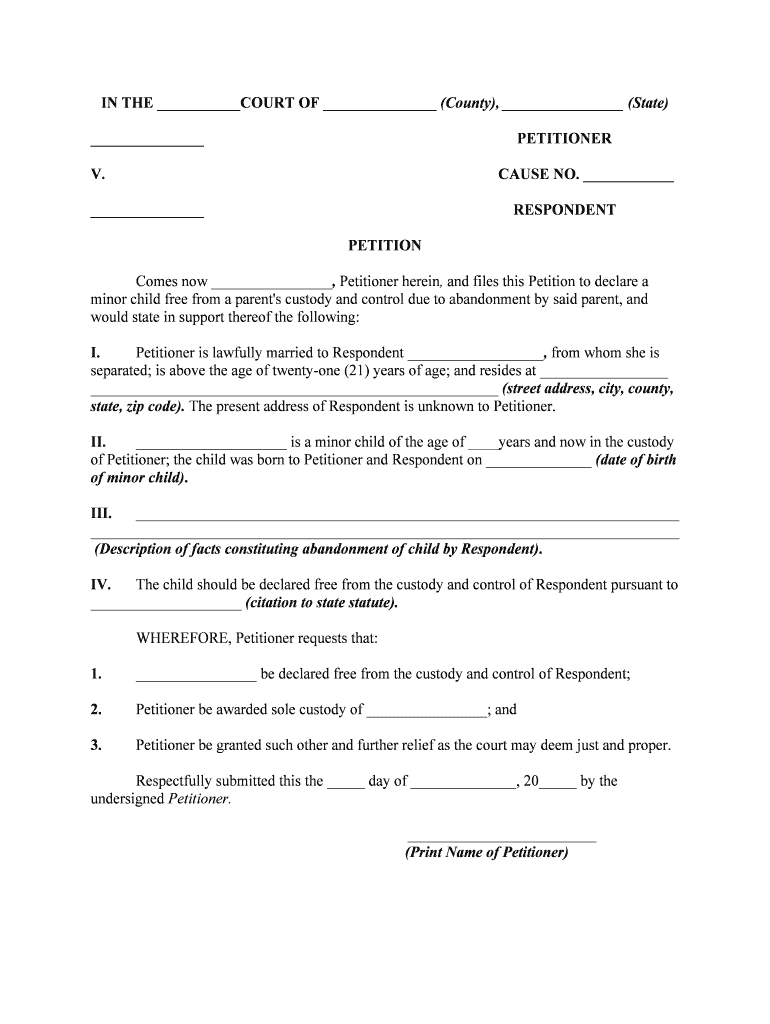
A Petition to Declare Minor Free from Custody is a family-court filing used when a party asks a court to recognize that a child is no longer subject to another person's custodial control. Typical uses include emancipation petitions, discharge of parental rights in limited circumstances, or requests to remove custodial obligations. The petition frames the legal facts, identifies the parties and minor, explains the legal basis for the requested change, and asks the court to enter an order. Court procedures, required forms, and outcomes vary by state and by the underlying legal theory.

Why This Petition Matters for the Child and Parties

Filing this petition clarifies the minor's legal status, resolves custody responsibilities, and provides a court order to formalize independence or termination of custody duties.

Why This Petition Matters for the Child and Parties

Who Typically Prepares and Files This Petition

Family law attorneys, self-represented petitioners, guardians ad litem, and court clerks commonly prepare or assist with these petitions.

  • Parents or legal guardians seeking to terminate or modify custody rights after a qualifying event.
  • Minors (often age-qualified) pursuing emancipation or a declaration of freedom from custody.
  • Child welfare attorneys, guardians, or social-services representatives filing on the minor's behalf.

Jurisdictional rules determine who may file, whether court-appointed counsel is required, and whether a guardian ad litem must be appointed.

Stepwise Completion Checklist

Follow these sequential steps to complete and prepare the petition for filing and service.

  • 01
    Gather Evidence: Collect birth certificate, school records, medical records, and affidavits supporting the request.
  • 02
    Draft Petition: Fill in parties, facts, grounds, and the specific relief in the petition form.
  • 03
    File with Court: Submit the petition to the appropriate family or juvenile court clerk and pay filing fees.
  • 04
    Serve Parties: Serve the respondent and any interested parties per state rules and obtain proof of service.

Where to File and What Happens After Filing

File in the family, juvenile, or probate court specified by state statutes; after filing the court sets a schedule for hearings and service.

  • Filing: Submit petition to family or juvenile court clerk.
  • Case Management: Court issues case number and scheduling order.
  • Hearing: Court holds hearing with evidence and witness testimony.
  • Order: Judge signs order resolving custody status.

How to Set Up an Online Filing and Signature Workflow

Configure a step-by-step e-filing and eSignature workflow that matches the court's filing and service rules.

Field Configuration
Document Upload PDF/A format, flattened where required
Signature Placement Place signature and date fields for each signer
Authentication Use email + SMS or stronger methods for identity
Delivery Save copies for parties and court filing

Sharing Options and Technical Requirements

Choose a platform that supports PDF, Word DOCX, and court-compatible exports, and integrates with cloud storage and case management tools.

  • File Formats: PDF, DOCX supported
  • Integrations: Salesforce, NetSuite, Google Workspace
  • Authentication: Email, SMS, KBA options

Ensure the platform can produce an audit trail, retain records, and export a court-ready signed PDF; verify any additional court e-filing format requirements before submission.

Typical Timelines and Deadlines to Expect

Timelines vary, but courts follow standard steps from filing to final order; plan for service, pretrial, and hearing windows.

Filing to Hearing:

Often 30–90 days depending on court calendar

Service Window:

Respondent usually served within 30–60 days

Response Deadline:

Respondent generally has 20–30 days to answer

Evidence Exchange:

Disclosure schedules set by judge, often 14–30 days

Final Order:

Entry can occur at hearing or following post-trial briefing

Key Milestones from Filing to Court Order

A concise milestone sequence helps track the petition through administrative and judicial stages.

01

File Petition

Petition is filed and case number assigned; clerk accepts documents.

02

Serve Parties

Proof of service filed showing respondents were notified of proceedings.

03

Pretrial/Discovery

Parties exchange records, affidavits, and scheduling information.

04

Hearing and Order

Judge hears evidence and issues a written order resolving custody status.

Required Information and Security Considerations

Personal Identifiers: Full names, DOBs, and addresses
Supporting Records: Birth certificates, medical records
Confidentiality: Redact sensitive PII when allowed
Encryption: TLS 1.2/1.3 in transit; AES-256 at rest
Audit Trail: Timestamps, IPs, action logs
Compliance: ESIGN, UETA, HIPAA where applicable

Core Components of a Complete Petition

A professional petition contains standardized sections and attachments so the court can evaluate jurisdiction, facts, and requested relief clearly.

Caption

Court name, case number, parties, and document title; required for clerk processing and correct docketing.
Jurisdiction Statement

Explanation of why the court has authority over the minor and parties, including residency or statutory basis for relief.

Statement of Facts

Chronological summary of relevant events and circumstances supporting the request to declare the minor free from custody.

Legal Basis

Cite controlling statutes or case law supporting emancipation, termination, or discharge of custody obligations.

Evidence List

Attach exhibits such as birth certificates, school records, affidavits, and medical or social-services reports.

Relief and Order

Precisely request the order language you want the judge to enter and include a proposed order for the court's use.

How This Petition Differs from Related Filings

Compare the Petition to Declare Minor Free from Custody with emancipation and guardianship filings to choose the correct procedure.

Criteria Petition to Declare Minor Free Emancipation Petition Guardianship Petition
Typical Purpose terminate custody establish independence appoint decision-maker
Court Type family/juvenile family/juvenile probate/family
Age Requirement varies by state often 16–18 no specific age threshold
Typical Outcome order ending custody adult-like autonomy appointment of guardian

Risks and Consequences of Errors

Dismissal Risk: Incomplete forms may lead to dismissal
Service Defects: Improper service can delay or void proceedings
Perjury Exposure: False statements risk criminal or civil penalties
Privacy Breach: Unredacted PII can violate confidentiality rules
Appeal Vulnerability: Poorly supported orders increase reversal risk
Cost Overruns: Late corrections may raise attorney and court costs

Common Mistakes to Avoid

  • Using inconsistent names between documents and IDs causes administrative delays and identity disputes.
  • Failing to attach supporting exhibits such as birth certificates or affidavits weakens the factual record at hearing.
  • Neglecting required service procedures results in continuances or dismissal of the petition.
  • Omitting precise relief language forces additional motions or ambiguity in the court's order.

Practical Tips for Accurate and Efficient Completion

Use a checklist and double-check identity information, service records, and exhibits before filing to minimize rework.

Standardize Names
Use names exactly as they appear on identification and prior court filings; mismatches cause processing delays and may require an explanatory affidavit.
Attach Exhibits
Number and tab supporting documents; reference exhibits in the petition so the judge can quickly verify factual claims during the hearing.
Follow Local Rules
Confirm page limits, formatting, and filing procedures with the local court clerk; courts often reject filings that do not follow local formatting rules.
Preserve Proofs
Keep service proofs, signed orders, and certified copies in both digital and physical form for the retention period applicable to your jurisdiction.

Who Signs and Authorizes the Petition

Petitioner

The petitioner or their attorney signs and verifies the petition under penalty of perjury; the signature verifies the facts and requests relief from the court.

Guardian ad Litem

When appointed, a guardian ad litem or court-appointed attorney may file recommendations or sign filings reflecting the child's best interests.

Illustrative Use Cases

Real-world scenarios show how petitions are used and what outcomes courts may order.

Contested Custody Change

A guardian files to terminate another party's custodial rights after verified abandonment

  • Court evaluates evidence and service proof
  • The judge issued an order terminating custody and clarified responsibility for healthcare and schooling, enabling the guardian to make independent decisions.

Minor Seeks Emancipation

A near-adult files demonstrating self-sufficiency and stable housing

  • Hearing examines finances, education, and maturity
  • The court granted limited emancipation, allowing the minor to contract and make certain personal decisions while retaining some protections.

eSignature Vendor Pricing Comparison for Filing and Signing

Compare starting prices and core capabilities for commonly used eSignature vendors; signNow is listed first per platform conventions.

signNow DocuSign Adobe Sign PandaDoc HelloSign
Starting Price $8/user/mo $15/user/mo $14/user/mo $19/user/mo $15/user/mo
Free Trial 7-day free trial Varies by vendor Varies by vendor Varies by vendor Varies by vendor
Bulk Send Yes Yes Yes Yes No
HIPAA Compliant Yes Yes Yes No No
Envelope Cap No cap 100 envelopes/user/year No cap No cap No cap

Frequently Asked Questions About the Petition

Answers to common procedural and technical questions to help avoid delays during filing and service.


Need help? Contact support

be ready to get more
Join over 28 million airSlate SignNow users