Establishing secure connection…Loading editor…Preparing document…

New Jersey Complaint

This template is fully customizable. Edit the text, fill out the fields, and send it for signature. Give it a try!
New Jersey Complaint

What a New Jersey Complaint Is and when it’s used

A New Jersey Complaint is the initiating pleading filed in a state civil action that notifies the court and opposing parties of the plaintiff's claims and the relief sought. It identifies the parties, alleges facts that establish subject-matter and personal jurisdiction, sets out causes of action and supporting legal theories, and includes a demand for relief. Complaints must comply with the New Jersey Court Rules on form and service; they start the litigation timeline, trigger service obligations, and enable the court to schedule pretrial deadlines and responses.

Why an accurate Complaint matters for your case

A clear, properly drafted complaint establishes the factual and legal foundation for a case, preserves claims within statutory deadlines, and narrows disputed issues for early case management. Precision in jurisdictional allegations and relief requested reduces procedural exposure and increases the likelihood of effective service and timely responses.

Why an accurate Complaint matters for your case

Who commonly prepares or files a New Jersey Complaint

Choose counsel or clerk guidance for unfamiliar procedural requirements to avoid service or pleading defects.

  • Plaintiff attorneys and law firms preparing pleadings and case strategy for civil litigation.
  • In-house counsel handling contract, employment, or commercial disputes where the company is plaintiff.
  • Self-represented litigants who must follow court rules for formatting, filing, and service.

Essential parts of a professional New Jersey Complaint

A well-structured complaint contains a caption, jurisdictional basis, factual narrative, claims, damages, and a clear demand for relief; supporting exhibits and a verification or signature block are also standard when required.

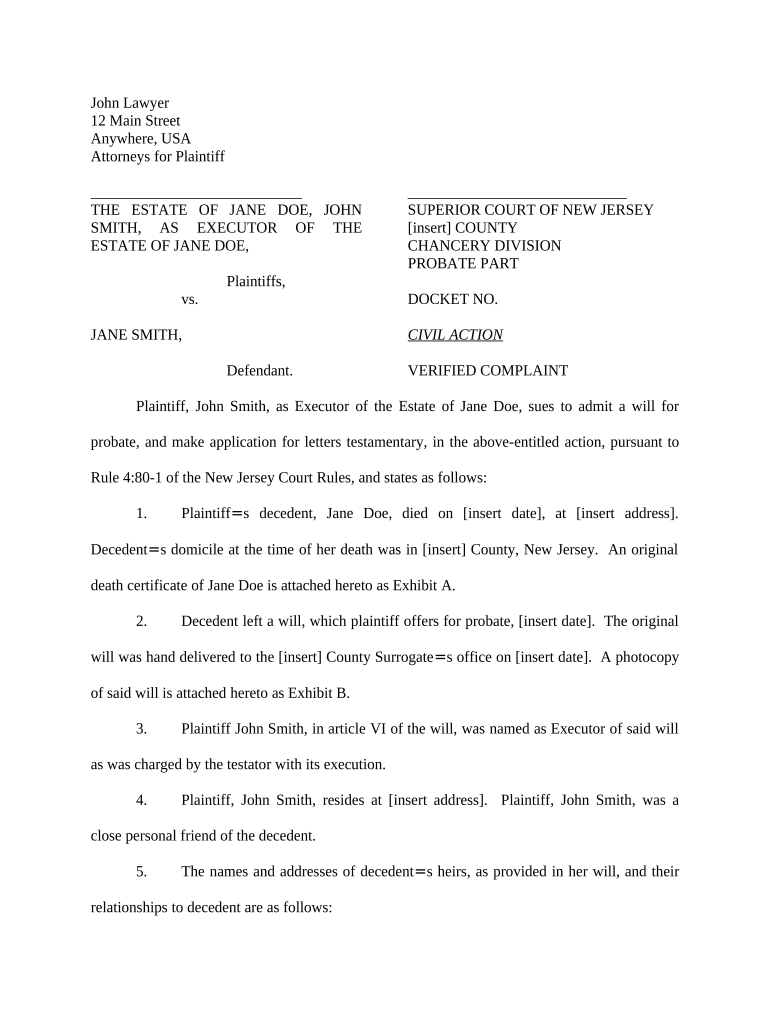
Caption

Court name, docket line, plaintiff and defendant names, and case number once assigned; must follow local form requirements.
Jurisdiction

Statement of subject-matter and personal jurisdiction with factual support showing why the New Jersey court has authority.

Statement of Facts

Chronological factual narrative with concise, specific allegations tied to each cause of action and relevant dates.

Causes of Action

Numbered counts that identify the legal theory (e.g., breach of contract, negligence) and the facts supporting each element.

Demand for Relief

Specific remedies requested (damages, injunctive relief, costs) and any statutory basis for those remedies.

Signature Block

Attorney or pro se signature, printed name, address, telephone, and date; include verification if required by court rule.

Stepwise approach to prepare and file your New Jersey Complaint

Follow a consistent sequence: gather facts, draft counts, complete cover information, sign and file with the court.

  • 01
    Gather Facts: Collect dates, contracts, communications, and witness information supporting each claim.
  • 02
    Draft Complaint: Write a concise factual narrative and separate numbered causes of action.
  • 03
    Complete Cover: Fill caption, party details, and case summary required by the court's filing system.
  • 04
    Sign and File: Sign in the proper block, pay required fees, and submit according to court e-filing rules.

Typical filing and service workflow for a complaint

The complaint progresses from drafting to filing, then service, and finally the defendant's response—each step has discrete procedural requirements.

  • Draft: Prepare the pleading with supporting exhibits attached as separate files.
  • File: Submit via the court’s e-filing system or clerk’s office with the filing fee.
  • Serve: Serve the defendant using authorized methods under New Jersey practice rules.
  • Respond: Defendant files an answer or motion within the time limits set by rules or court order.

How to configure an online workflow for complaint drafting and filing

Configure fields and routing so the complaint, exhibits, and signature blocks export cleanly to the court file and service documents are generated automatically.

Field Configuration
Service Method Set templates for personal, certified, or process-server service tracking
Signature Type Allow eSignature or wet-signature depending on court and opposing counsel preferences
PDF Format Export signed documents as PDF/A where the court accepts that archival format
Attachments Enable multi-file uploads and bookmark exhibits for clerk review

Technical requirements and integrations for eFiling and eSign

Maintain an archive of exported signed PDFs and metadata for service proof and court compliance.

  • File Formats: PDF, DOCX accepted by many courts; convert to PDF when required
  • Integrations: Link to case management or document storage (Salesforce, NetSuite, Box)
  • Authentication: Support email, SMS, or advanced signer authentication per court or counsel requests

Timing considerations and common scheduling expectations

Timing for filing, service, and responses varies by jurisdiction and claim type; verify deadlines with court rules and counsel before filing.

Filing Fee Timing:

Pay the court's filing fee at submission; local amounts vary by county and case type

Service Deadline:

Complete service within the period required by the court's rules or judge’s order

Defendant Response:

The court sets the response period; practice often requires an answer or motion within a specified number of days

Amendments:

Amendments before service are typically allowed; after service, court permission may be required

Statute of Limitations:

Preserve claims by filing before the applicable statute of limitations; limits vary by claim type and state law

Common preparation and filing mistakes to avoid

  • Using incorrect party names or corporate entities that prevent valid service and lead to dismissal.
  • Failing to attach or label key exhibits, which may cause the court to disregard critical factual support.
  • Omitting jurisdictional facts that demonstrate the court’s power to hear the case and allow a motion to dismiss.
  • Not complying with local form or e-filing rules, producing processing delays or rejected filings.

Consequences of defective or improper complaints

Dismissal: Case may be dismissed without prejudice
Default Risk: Ineffective service can lead to delay or default judgment vulnerability
Monetary Sanctions: Court may impose fines for frivolous or improper pleadings
Waiver: Failure to plead timely claims can result in waiver
Evidence Loss: Delays may degrade witness availability and documentary proof
Refile Costs: Additional fees and attorney hours to correct procedural defects

eSignature vendor comparison for signing and submitting complaints

Common eSignature plans and capabilities vary by vendor; the table compares starting price and a few verified feature differences relevant to legal workflows.

signNow DocuSign Adobe Sign PandaDoc HelloSign
Starting Price $8/user/mo $15/user/mo $14/user/mo $19/user/mo $15/user/mo
Free Trial 7-day free trial Yes Yes Yes Yes
Bulk Send Yes (Premium) Yes Yes Yes No
Audit Trail Yes Yes Yes Yes Yes
HIPAA Compliant Yes Yes Yes No No

Security and compliance essentials for electronically signed complaints

Encryption: TLS 1.2/1.3; AES-256 at rest
Audit Trail: Timestamped action and IP log
Certifications: SOC 2 Type II; ISO 27001
Legal Frameworks: ESIGN and UETA compliance
HIPAA Support: BAA available for covered workflows
Accessibility: WCAG 2.0 Level AA support

Frequently asked questions about New Jersey complaints and eSubmission

Answers to common procedural and technical questions about drafting, signing, filing, and serving complaints in New Jersey.


Need help? Contact support

be ready to get more
Join over 28 million airSlate SignNow users