Compliance Checklist
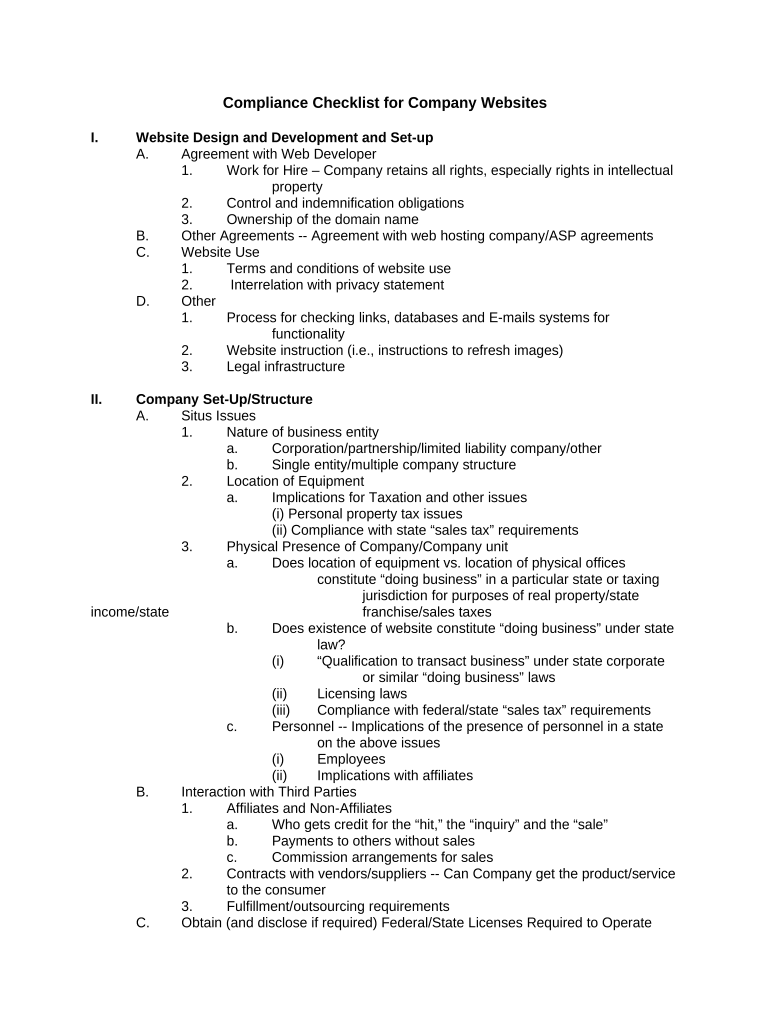
What the Compliance Checklist Is and when it matters
Why a Compliance Checklist improves accuracy and defensibility
A concise checklist standardizes required information, verifies identity and consent, and documents legal steps so records are reproducible and defensible under ESIGN (15 U.S.C. §7001) and UETA. It reduces rework, helps meet filing and retention deadlines, and captures the metadata auditors and regulators expect.

Typical users and teams that rely on a Compliance Checklist
Teams use checklists to centralize obligations and reduce missed steps across departments.
- Real estate closing teams: coordinate signatures, escrow instructions, disclosures, and notary steps to meet state deed requirements.
- Healthcare compliance officers: attach HIPAA authorizations, privacy addenda, and BAA confirmations for protected health information handling.
- Finance and payroll administrators: verify TIN/EIN accuracy, backup withholding triggers, and document delivery for IRS reporting.
Step-by-step process to complete a Compliance Checklist
-
01Prepare: Gather applicable law, templates, and supporting documents.
-
02Populate Fields: Complete required entries and attach supporting exhibits.
-
03Verify Identities: Confirm signer identity per policy (ID, MFA, KBA).
-
04Capture Evidence: Record signatures, timestamps, and audit-trail metadata for retention.
How to configure a digital workflow for the checklist
| Field | Configuration |
|---|---|
| Authentication | Email link, SMS code, or KBA depending on risk |
| Routing | Define signer order and parallel steps as required |
| Notifications | Set reminders, escalation, and completion alerts |
| Storage | Save signed PDF and audit trail to secure repository |
Typical flow when you submit a Compliance Checklist
-
Upload Document: Import PDF/DOCX and attach exhibits.
-
Add Fields: Place signature, date, and conditional fields.
-
Send to Signers: Deliver via email link or bulk send.
-
Archive: Store signed record and certificate of completion.
Technical and integration considerations for eSubmission
Confirm integrations, file formats, and security controls before digital completion.
- File Formats: Support for PDF, DOCX, and Excel inputs.
- Integrations: Connectors for Salesforce, NetSuite, Microsoft 365, and Google Workspace.
- Authentication: Options include email, SMS code, KBA, and advanced signer authentication.
Ensure your platform provides durable audit trails, TLS/AES encryption, and meets any industry-specific controls required for your records.
Timelines and typical processing expectations
Internal Completion:
Target 3–5 business days for signer collection and verification.
Tax Reporting:
Provide completed documentation to payroll/tax teams before IRS reporting deadlines.
Notary Scheduling:
Allow lead time for in-person or RON notarizations as required.
Audit Response:
Maintain signed records for immediate retrieval on audit requests.
Retention Start:
Retention begins from effective date or signature date as specified.
Frequent mistakes when preparing a Compliance Checklist
- Incomplete signer details: missing titles or mismatched legal names that cause re-execution delays.
- Wrong date formats: ambiguous entries that affect statute-of-limitations and retention calculations.
- Missing supporting documents: omission of required exhibits, authorizations, or ID copies.
- Weak authentication: relying solely on simple email links for high-risk or regulated transactions.
Key penalties and legal risks from improper checklists
Real-world examples showing checklist usage
Martin Properties — Tim Martin
The team needed remote closings without errors
- Immediate onsite signing reduced vacancy delays
- By standardizing the checklist and storing notarized PDFs with audit trails, they processed leases and closings remotely while preserving record integrity and retrieval for audits.
Fertility Centers of Illinois — John Butler
Clinical forms required strict privacy and signature evidence
- Electronic capture sped consent collection
- Implementing a checklist that included HIPAA authorizations, BAA confirmations, and time-stamped signatures ensured consistent recordkeeping and simplified compliance reviews.
Who typically signs and approves a Compliance Checklist
Compliance Officer
Responsible for designing the checklist, approving required fields, and confirming that authentication and retention settings meet legal and regulatory obligations. Often owns audit responses and periodic reviews.
Authorized Signer
An executive or delegated representative with authority to bind the organization who signs designated blocks and certifies accuracy; their role and title must appear on the checklist to establish signing authority.
Practical tips for accurate, efficient checklist completion
Frequently asked questions about Compliance Checklists
-
Are electronic signatures valid?
Yes. Electronic signatures are legally valid in interstate commerce under the ESIGN Act (15 U.S.C. §7001) and under UETA in most states, provided intent, consent, attribution, and record retention requirements are met.
-
When is an e-signature not allowed?
Certain documents remain excluded from e-signature acceptance, including wills, certain court orders, and specific health or government notices; consult state law and the ESIGN exceptions list before relying solely on e-signatures.
-
Do I need a notarization?
Some documents require a notary or witnesses by statute or to be recorded; for deeds and certain POAs check state requirements and use RON where authorized by statute and policy.
-
What HIPAA steps are required?
For protected health information include patient authorization language, ensure a signed BAA where applicable, and retain records six years per 45 CFR §164.530(j).
-
How do I correct a signed checklist?
Errata typically require a corrective signed addendum or a re-execution of the affected document; capture the correction with a dated, signed amendment and preserve both versions.
-
How long must I retain checklists?
Retention depends on the document and regulator: IRS records minimum 3 years (IRC §6501(a)); HIPAA six years; state or industry rules may require longer retention.