Establishing secure connection…Loading editor…Preparing document…

Construction Improvement Agreement

This template is fully customizable. Edit the text, fill out the fields, and send it for signature. Give it a try!
Construction Improvement Agreement

What a Construction Improvement Agreement Is and When It’s Used

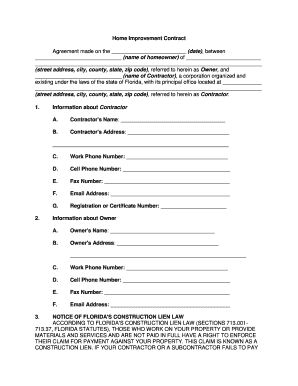
A Construction Improvement Agreement documents improvements or alterations to real property between an owner, contractor, or subcontractor. It defines scope, schedule, payment terms, responsibilities for permits and inspections, and who bears lien and warranty obligations. This agreement is commonly used for remodels, additions, tenant improvements, and subcontract scopes where a written record clarifies performance, change orders, and payment milestones to reduce disputes and support lien or claim enforcement if needed.

Why a Clear Construction Improvement Agreement Matters

A well-drafted agreement reduces payment disputes, clarifies scope and risk allocation, and supports lien or claim enforcement. It also documents consent and performance milestones that matter for remedies and compliance under state construction lien laws.

Why a Clear Construction Improvement Agreement Matters

Who Typically Completes a Construction Improvement Agreement

Use the agreement format that matches your role; owners and lead contractors generally control the primary contract terms while subcontractors use tailored scopes and payment provisions.

  • General contractors and project managers who coordinate subcontractors, schedule work, and control payments for site improvements.
  • Property owners and developers who establish scope, budget, acceptance standards, and retain rights for inspections and remedies.
  • Subcontractors, suppliers, and design professionals who need written terms for change orders, payment timing, and lien waivers.

Typical Signatories and Their Roles

General Contractor

Project lead responsible for overall construction schedule, coordinating subcontractors, and certifying progress payments; usually signs to accept subcontract performance and payment terms.

Property Owner

Contracting party that authorizes work, provides payment, and approves change orders; often holds final remedy rights and approves completion and retainage releases.

Essential Sections to Include in the Agreement

A professional Construction Improvement Agreement is organized to make responsibilities, payment, and dispute resolution clear. Include defined terms and attachments to avoid ambiguity.

Scope of Work

Detailed description of tasks, materials, plans, and any exhibits or drawings that precisely define what the contractor will deliver and what is excluded.
Price and Payment

Contract price, progress payment schedule, retainage amounts, procedures for invoices and approvals, and late-payment interest or withholding rules.

Schedule and Milestones

Start date, key milestones, completion date, liquidated damages or delays, and requirements for notices regarding schedule changes or force majeure.

Change Orders

Written change order process, approval authority, pricing method for extras, and time extensions tied to approved changes.

Warranties and Indemnities

Express workmanship and materials warranties, duration, claim procedures, and indemnity language allocating responsibility for third-party claims.

Lien and Release Terms

Mechanisms for lien waivers, conditional vs unconditional release on payment, notice requirements, and procedures for filing or releasing construction liens.

Step-by-Step: How to Complete and Execute This Agreement

Follow these steps to create a complete, enforceable Construction Improvement Agreement ready for signature and recordkeeping.

  • 01
    Draft the Scope: Describe scope with exhibits attached.
  • 02
    Set Payment Terms: Define schedule, retainage, and release conditions.
  • 03
    Review Change Orders: Establish approval and pricing process.
  • 04
    Execute and Distribute: All parties sign and receive fully executed copies.

How to Configure a Digital Workflow for This Agreement

Set up fields and signer order to match contractual roles and required approvals before sending for signature.

Field Configuration
Signer Order Define primary signer, approver, and optional witness
Required Fields Make signature, date, and price fields mandatory
Conditional Fields Show retainage or bond fields only if applicable
Notifications Enable email reminders and a completion certificate

Where to File, Send, or Submit the Completed Agreement

After execution, distribute originals and file copies where they support lien rights, permits, or contract administration.

  • Owner: Provide the owner a fully executed copy.
  • Contractor File: Retain a signed original for project records.
  • County Recorder: Record only if statute requires or to preserve lien priority.
  • Lender or Title: Send copies when required by financing or title conditions.

Digital Signing and File Formats to Use

Preserve an audit trail and a tamper-evident final PDF for each executed agreement; store copies according to your retention policy.

  • Supported Formats: PDF, DOCX, and fillable forms
  • Authentication: Email, SMS code, or stronger KBA
  • Integrations: Salesforce, Procore, NetSuite

Key Dates and Timing to Track

Track execution, notice, and filing deadlines carefully; missed deadlines can affect payment or lien rights.

Effective Date:

Date obligations begin; use for warranty and limitation periods

Milestone Payments:

Pay according to schedule to avoid stop-work or liens

Notice Deadlines:

Provide written notice for defects or claims within contractual windows

Lien Filing Window:

State law varies; file within statutory period to preserve lien

Retention Release:

Release retainage after certificate of completion or contractual acceptance

Project Milestones Usually Captured in the Agreement

A Construction Improvement Agreement often ties payment and obligations to milestone events; list them clearly to trigger payments and inspections.

01

Pre-Construction

Permits issued and mobilization notice given

02

Substantial Completion

Project ready for intended use, triggers inspection

03

Punch List Completion

Remaining items corrected before final payment

04

Final Acceptance

Owner signs acceptance and retainage release

Common Mistakes to Avoid When Preparing the Agreement

  • Vague scope or missing exhibits that create disputes over what work is included or excluded.
  • Unclear payment milestones or retention terms that lead to withheld payments or disputed invoices.
  • Missing change order process or approval authority for extra work and schedule adjustments.
  • Failing to include required notices or deadlines needed to preserve mechanic’s lien or claim rights.

Primary Risks and Consequences of an Incorrect Agreement

Lien Exposure: Improper notice or filing can forfeit lien rights
Payment Delays: Ambiguous invoicing terms cause withheld payments
Contract Breach: Noncompliance with milestones can trigger damages
Regulatory Fines: Permit noncompliance risks local penalties
Warranty Claims: Poorly defined warranty periods increase liability
Tax Withholding: Incorrect contractor classification can create tax exposure

eSignature Vendor Pricing and Feature Comparison Relevant to Construction Documents

Compare starting price and key feature availability for common eSignature vendors used to execute construction agreements. signNow is listed first per vendor ordering rules.

signNow DocuSign Adobe Sign PandaDoc HelloSign
Starting Price $8/user/mo $15/user/mo $14/user/mo $19/user/mo $15/user/mo
Free Trial 7-day free trial No No Yes, limited Yes, limited
Bulk Send Yes Yes Yes Yes No
Audit Trail Yes Yes Yes Yes Yes
HIPAA Compliant Yes Yes Yes No No
Envelope Cap No cap 100 envelopes/user/year Varies Varies Varies

Real-World Examples of Digital Execution for Construction Documents

These examples show how teams use online signing and recordkeeping to manage construction agreements and approvals.

Martin Properties — Field Execution

A small developer adopted online signing for tenant improvement agreements to speed approvals.

  • Mobile signing enabled on-site signatures by subcontractors.
  • I can process and execute all of these documents online with 100% compliance and built-in security. Whether on mobile or working offline, I can get forms back to their necessary parties efficiently.

Optica Ventures — Administrative Efficiency

A property manager standardized improvement scopes and used templates to reduce drafting time.

  • Templates reduced repetitive drafting.
  • The interface is simple and easy-to-use for our team; more importantly, it is just as easy for our customers.

Security and Compliance Considerations for Executing Agreements Digitally

Encryption: TLS 1.2/1.3 in transit; AES-256 at rest
Certifications: SOC 2 Type II and ISO 27001 available
HIPAA: HIPAA-compliant with BAA required
FDA/21 CFR: 21 CFR Part 11 compliance supported
ESIGN / UETA: Compliant with ESIGN and UETA standards
Accessibility: WCAG Level AA accessibility support

Frequently Asked Questions About Construction Improvement Agreements

Answers to common questions about validity, notarization, electronic signatures, and filing for construction agreements.


Need help? Contact support

be ready to get more
Join over 28 million airSlate SignNow users