Establishing secure connection… Loading editor… Preparing document…
Navigation

Fill and Sign the Decision After Trial 1 Form
Fill and Sign the Decision After Trial 1 Form

How it works

Open the document and fill out all its fields.
Apply your legally-binding eSignature.
Save and invite other recipients to sign it.

Rate template

4.4
60 votes
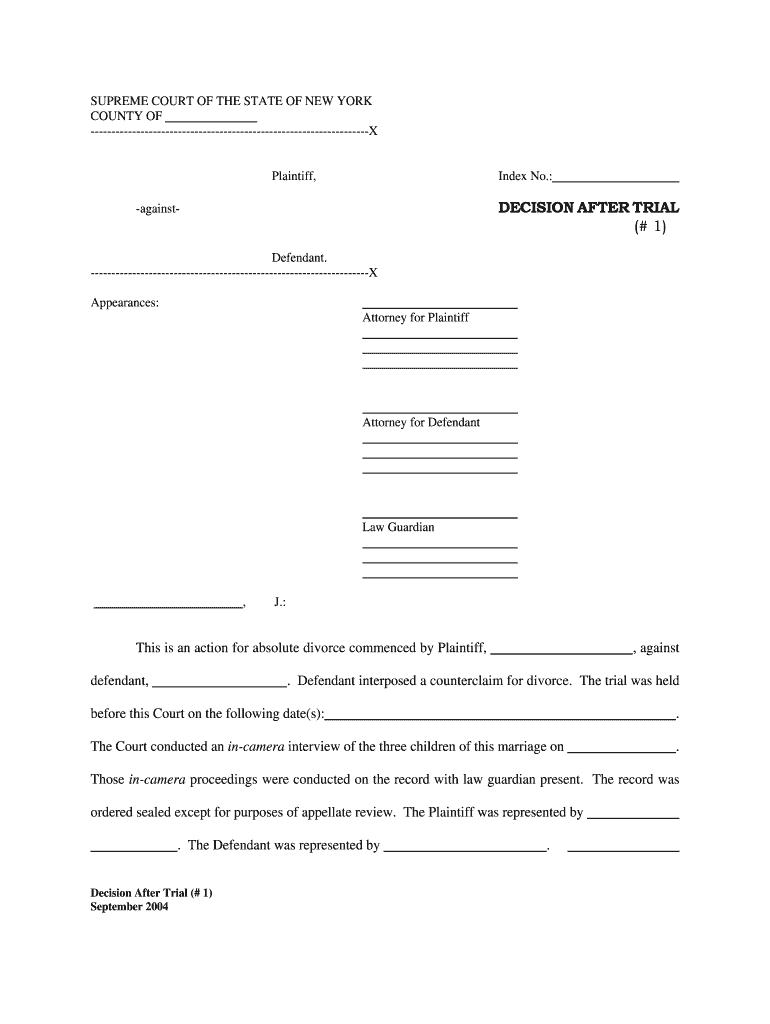
Decision After Trial (# 1) September 2004 SUPREME COURT OF THE STATE OF NEW YORK COUNTY OF -------------------------------------------------------------------X Plaintiff, Index No.: -against- DECISION AFTER TRIAL (# 1) Defendant. -------------------------------------------------------------------X Appearances: Attorney for Plaintiff Attorney for Defendant Law Guardian , J.: This is an action for absolute divorce commenced by Plaintiff, , against defendant, . Defendant interposed a counterclaim for divorce. The trial was held before this Court on the following date(s): . The Court conducted an in-camera interview of the three children of this marriage on . Those in-camera proceedings were conducted on the record with law guardian present. The record was ordered sealed except for purposes of appellate review. The Plaintiff was represented by . The Defendant was represented by . Index No.: Page 2. Decision After Trial (# 1) September 2004 was the fully appointed law guardian, who made a written recommendation to the Court following the close of proofs. Proposed findings and final submissions from counsel were received through . The Court has had a full opportunity to consider the evidence presented with respect to the issues in this proceeding, including the testimony offered and the exhibits received. The Court has further had an opportunity to observe the demeanor of the various witnesses called to testify and has made determinations on issues of credibility with respect to these witnesses. The Court now makes the following findings of fact and conclusions of law: I. FINDINGS OF FACT A. Grounds : 1. The parties were married on , in . 2. The action was commenced on . 3. The plaintiff is presently years old, born on . The defendant is years old, born on . Both parties appear to be in good health. 4. There are child(ren) born of this marriage, to-wit: 5. At the time of the commencement of this action, both plaintiff and defendant were residents of the State of , and both had continuously resided in the State of for a period in excess of one (1) year. Neither the plaintiff nor the defendant are in the military service of the United States, and there is no judgment or decree of divorce, separation or annulment granted with respect to this marriage by this Court or any other court of competent jurisdiction and no other actions are pending at the present time. 6. There exists no barrier, religious or otherwise, affecting the ability of either party to remarry Index No.: Page 3. Decision After Trial (# 1) September 2004 subsequent to a divorce being granted by this Court. 7. Both parties agree to take prior to the entry of final judgment, all steps solely within their power to remove any barrier to the other’s remarriage following the divorce. 8. The Court finds that the defendant knowingly, intelligently and voluntarily defaulted with respect to the grounds alleged by the plaintiff in his/her complaint. The Court further finds that the plaintiff knowingly, intelligently and voluntarily defaulted with respect to the grounds alleged by the defendant in his/her counterclaim. Consequently, the plaintiff proved and the Court finds as fact those allegations set forth by plaintiff in paragraphs of his/her complaint dated to be filed herewith as part of the Judgment Roll. The Court further finds that the defendant proved and the Court finds as fact those allegations set forth by the defendant in paragraphs of his/her counterclaim dated to be filed herewith as part of the Judgment Roll. B. Disposition of Property 9. The parties have resided at since . This real property is the marital residence and is a marital asset. The parties continued to reside at the marital residence through trial. 10. The fair market value of the marital residence is $ which is an agreed value by stipulation of the parties. The marital residence is encumbered by a note and mortgage in the approximate amount of $ , which constitutes marital debt. 11. The parties also own Index No.: Page 4. Decision After Trial (# 1) September 2004 12. The parties own: 13. The Court finds the following to be additional marital assets: (a) (b) (c) (d) (e) 14. Plaintiff has vested pension rights with . Plaintiff has unvested rights with his/her present employer 15. Defendant has unvested pension rights through his/her employer 16. There was no evidence presented as to the value of these pensions. C. Spousal Maintenance, Child Custody and Child Support 17. Plaintiff’s gross income for from his employment with was $ . Defendant’s gross income for 1995 from his/her employment with was $ . 18. Immediately prior to the commencement of trial, both parties through their attorneys Index No.: Page 5. Decision After Trial (# 1) September 2004 voluntarily, affirmatively, and permanently waived any claim of maintenance or other spousal support as against the other. 19. The most contentious issue during the course of this matrimonial proceeding and trial was the issue of custody. There are as previously noted child(ren) of this marriage, . The child(ren) are in good health with no identifiable special needs. The children were interviewed by the Court in-camera with the law guardian present on . 20. In all child custody determinations, the best interests of the child remain the absolute, paramount consideration of the Court. Friderwitzer v. Friderwitzer , 55 N.Y.2d 89 (1982); Eschbach v. Eschbach , 56 N.Y.2d 167 (1982). The testimony at trial established and the Court finds that during the children’s upbringing and through the date of trial, . 21. Both parties enjoy an extended family, to wit: . 22. Both parties were raised in the faith and practice . 23. The Court agrees with the law guardian’s conclusion and so finds that both plaintiff and defendant truly care about their children and that each has developed a strong love and emotional bond. The children likewise expressed a deep love and respect for each parent during the in-camera interview conducted by the Court. Each child also expressed a strong desire to primarily reside with . Given the age of the children, this is a factor which the Court does consider together with all of the other factors in this case. It Index No.: Page 6. Decision After Trial (# 1) September 2004 is not singularly determinative of the question. In determining the best interests of the children, other factors to be considered include a party’s ability to provide for the child’s emotional and intellectual development, the quality of the home environment, parental guidance, and stability of the respective proposed home. See Milton v. Dennis , 96 A.D.2d 628 (3rd Dept. 1983); Cornelius C. v. Linda C. , 123 A.D.2d 536 (1st Dept. 1986). 24. Both residences would adequately meet the residential needs of the children. 25. The mother has been the children’s primary caretaker notwithstanding the father’s obvious commitment and involvement with the lives of his/her children. The in-camera interview with the children supports the finding of this Court that the mother has remained the primary caretaker of the children which in turn has resulted in strong emotional bonding. 26. Both the Court appointed law guardian and mother have urged this Court to make a finding that joint custody with primary physical residency to mother would be in the best interests of the children. The Court does not concur in that recommendation. Joint custody is primarily encouraged “as a voluntary alternative for relatively stable, amicable parents behaving in a mature civilized fashion”. Braiman v. Braiman , 44 N.Y.2d 584 (1978). It necessarily pre-supposes a civilized level of communication and discourse which would allow both parents to engage in the decision making process for the benefit of their children. Joint custody should not be judicially imposed on embattled parents who appear either unable to unwilling to put aside their differences in making decisions relating to their children. Matter of Buffy E. v. Lance C. , 643 N.Y.S.2d 280 (4th Dept. 1996). There is nothing in this record to suggest that these parties are even minimally capable of making joint decisions with respect to their children notwithstanding this Court’s finding that both Index No.: Page 7. Decision After Trial (# 1) September 2004 parties are otherwise fit and loving parents. The Court finds that the best interests of the three children will be served by awarding sole custody to the plaintiff / defendant with liberal rights of visitation as hereinafter set forth to the plaintiff / defendant. 27. The award of child support is made in accordance with Domestic Relations Law §240(1-b) and is based upon the following findings: (a) The children of the marriage entitled to receive parental support are (b) The gross income of the plaintiff who is the non-custodial parent is $ per year. Social Security and Medicare taxes are 7.65% of gross income. (c) The gross income of the defendant who is the custodial parent is $ per year. Social Security and Medicare taxes are 7.65% of gross income. (d) The applicable child support percentage is 29%. (e) The basic child support obligation is $ per week. (f) The non-custodial parent’s pro rata share of the basic child support obligation is calculated as follows: (i) $ per week; (ii) % of future reasonable health care expenses not covered by insurance. (g) The non-custodial parent’s pro rata share of the basic child support obligation is neither unjust nor inappropriate. D. Defendant’s Application for Counsel Fees Index No.: Page 8. Decision After Trial (# 1) September 2004 28. The Court finds both parties to have limited to moderate financial resources. The Court further finds that although application for counsel fees was made in defendant’s ad damnum clause in her Answer and Counterclaim, she offered no testimony at trial in support of that application and in her Statement of Net Worth (Defendant’s Exhibit G) she lists “no counsel fee requirement”. Finally, the Court finds that defendant has or will have sufficient financial resources to pay her own counsel fees. II. CONCLUSIONS OF LAW A. That jurisdiction as required by §230 of the Domestic Relations Law has been obtained and the requirements of Domestic Relations Law have been met. B. The plaintiff is entitled to a judgment of absolute divorce against the defendant herein upon the grounds of . C. The defendant is entitled to a judgment of absolute divorce against the plaintiff upon the grounds of . D. Both plaintiff and defendant have taken or will take all steps solely within their power to remove all barriers to defendant’s or plaintiff’s remarriage following the divorce. E. Each party shall be permitted to resume the use of any pre-marriage surname. F. Defendant shall be awarded sole custody of the infant children of this marriage. G. Plaintiff shall be granted liberal visitation with the children upon mutual agreement of the parties, but not less than the following periods of time: 1. Alternate weekends from Friday at 6:00 p.m. through Sunday at 8:00 p.m. Index No.: Page 9. Decision After Trial (# 1) September 2004 2. During the week immediately prior to plaintiff’s weekend visitation, one evening to be agreed upon by the parties with due regard to their respective work schedules and the schedules of the children. Weekday visitation shall commence immediately following school through 8:30 p.m. that evening. 3. During the week immediately preceding a non-weekend visitation, plaintiff shall have two evenings per week as agreed upon by the parties with due regard to their respective work schedules and the schedules of the children. The visitation shall commence immediately following school until 8:30 p.m. 4. Plaintiff shall have four (4) weeks (not more than two (2) weeks consecutively) visitation during the summer months and shall notify defendant not later than May 1st of each year as to which weeks he has selected. 5. The parties shall alternate Christmas Eve and Christmas Day such that in the odd numbered years plaintiff shall have the children from Christmas Eve at 12:00 noon through Christmas Day at 12:00 noon and in the even numbered years defendant shall have the children from Christmas Day at 12:00 noon through December 26th at 8:00 p.m. 6. Plaintiff and defendant shall alternate the Thanksgiving holiday with plaintiff being entitled to the children in the even numbered years and defendant being entitled to the children in the odd numbered years. 7. All other major holidays which shall include New Year’s Day, Easter, Memorial Day, Fourth of July, and Labor Day shall be alternated between the parties. 8. Holiday visitation shall take priority over other regular scheduled visitation. Index No.: Page 10. Decision After Trial (# 1) September 2004 9. Summer visitation period shall not be scheduled so as to interfere with the other party’s scheduled holidays. 10. The plaintiff shall have the children on each and every Father’s Day and the defendant shall have the children on each and every Mother’s Day. Plaintiff shall have the children on his birthday. Defendant shall have the children on her birthday. 11. Plaintiff and defendant shall alternate the February/Winter school recess and the Spring/Easter school recess. Plaintiff shall be entitled to the February/Winter recess in the even numbered years and defendant in the odd numbered years. Defendant shall be entitled to the Spring/Easter recess with the children in the even numbered years and plaintiff shall have the children in the odd numbered years. 12. The parties shall alternate the children on the children’s actual birthdays. Defendant shall have the children on each child’s next immediate birthday following this decision and to be alternated with plaintiff thereafter. H. Plaintiff shall be provided reasonable access to all of the children’s health, dental and education records. I. Plaintiff is to have continuous reasonable telephone access to the children. J. Plaintiff shall pay to defendant child support in the amount of $ per week. Child support shall commence upon defendant vacating the marital residence and establishing her new residence as custodial parent. Plaintiff shall pay percent ( %) of all uninsured medical and dental expenses of the three children. Defendant shall pay percent ( %) of all uninsured medical and dental expenses of the three children. Plaintiff shall continue to maintain all existing medical, hospitalization and dental insurance for the benefit of defendant and Index No.: Page 11. Decision After Trial (# 1) September 2004 the children until such time as a Judgment or Decree of Divorce is signed and entered and thereafter for the benefit of the children. K. Pursuant to DRL §240(2)(b)(2), plaintiff shall pay child support to defendant by income deduction order through the County Support Collection Unit, located at . Each party shall furnish to counsel their respective social security numbers which shall be included in the Divorce Judgment. L. Plaintiff shall be entitled to claim the two older children as dependency exemptions for federal and state income tax purposes. Defendant shall be entitled to claim the youngest child as a dependency exemption for federal and state income tax purposes until such time as both of the two oldest children are no longer eligible to be claimed and thereafter the parties shall alternate the youngest child as a claimed exemption. Defendant shall be entitled to claim head of household filing status. Both parties shall fully cooperate with the other by executing all necessary papers and forms to permit the filing of these claims exemptions, including without limitation IRS Form 8332. M. Neither party is entitled to an award of maintenance as against the other. N. Defendant shall be paid a distributive award in the amount of $ representing . The award shall be paid to defendant by plaintiff within days from the date of this decision. O. There having been no evidence introduced regarding the value of the parties’ pensions, each party shall be entitled to a Majauskas award as against the other with an appropriate QDRO to be entered. P. Defendant shall maintain a minimum of $ life insurance on his life naming the three children as irrevocable beneficiaries, decreased to $ upon on child becoming emancipated Index No.: Page 12. Decision After Trial (# 1) September 2004 and $ upon two children becoming emancipated, the unemancipated child(ren) continuing as co-equal beneficiaries under the reduced coverage. Q. Each party shall be solely responsible for their own counsel fees. R. The law guardian, , shall be compensated by the parties for legal services rendered on behalf of the children. The law guardian shall submit an affirmation of services upon notice to plaintiff’s defendant’s counsel. The Court shall thereafter fix the award and allocate payment between plaintiff and defendant. This constitutes the decision and order of the Court. Let Judgment enter accordingly. Dated: J.S.C.

Practical tips on preparing your ‘Decision After Trial 1’ online

Are you fed up with the complications of handling paperwork? Look no further than airSlate SignNow, the premier eSignature solution for individuals and businesses. Bid farewell to the lengthy process of printing and scanning documents. With airSlate SignNow, you can seamlessly finish and sign paperwork online. Utilize the extensive features included in this user-friendly and affordable platform and transform your approach to document management. Whether you need to sign forms or gather signatures, airSlate SignNow manages it all effortlessly, with just a few clicks.

Follow this detailed guide:

  1. Log into your account or initiate a free trial with our service.
  2. Click +Create to upload a file from your device, cloud storage, or our template library.
  3. Open your ‘Decision After Trial 1’ in the editor.
  4. Click Me (Fill Out Now) to prepare the document on your end.
  5. Add and assign fillable fields for other participants (if needed).
  6. Continue with the Send Invite settings to request eSignatures from others.
  7. Save, print your copy, or convert it into a reusable template.

Don’t worry if you need to collaborate with your teammates on your Decision After Trial 1 or send it for notarization—our platform provides everything you require to accomplish such tasks. Register with airSlate SignNow today and elevate your document management to a new standard!

Here is a list of the most common customer questions. If you can’t find an answer to your question, please don’t hesitate to reach out to us.

Need help? Contact Support
Judgment enforcement New York
What happens after notice of entry of judgment
How often are motions for reconsideration granted
How long does a judge have to make a decision on a motion
Motion for reconsideration vs appeal
How long does a judgement last in NY
The longer it takes a judge to make a ruling is better or worse
What happens after a judgement is entered against you
Post trial motion vs appeal
Post trial motions in a Criminal case
Proposed judgment after jury trial California
Motion for new trial

The best way to complete and sign your decision after trial 1 form

Save time on document management with airSlate SignNow and get your decision after trial 1 form eSigned quickly from anywhere with our fully compliant eSignature tool.

How to Sign a PDF Online How to Sign a PDF Online

How to fill out and sign forms online

In the past, coping with paperwork took lots of time and effort. But with airSlate SignNow, document management is quick and simple. Our powerful and easy-to-use eSignature solution enables you to easily complete and eSign your decision after trial 1 form online from any internet-connected device.

Follow the step-by-step guide to eSign your decision after trial 1 form template online:

  • 1.Register for a free trial with airSlate SignNow or log in to your account with password credentials or SSO authorization option.
  • 2.Click Upload or Create and import a form for eSigning from your device, the cloud, or our form library.
  • 3.Click on the file name to open it in the editor and use the left-side menu to complete all the blank fields appropriately.
  • 4.Put the My Signature field where you need to eSign your sample. Provide your name, draw, or upload a photo of your regular signature.
  • 5.Click Save and Close to finish modifying your completed document.

As soon as your decision after trial 1 form template is ready, download it to your device, save it to the cloud, or invite other parties to eSign it. With airSlate SignNow, the eSigning process only takes a few clicks. Use our robust eSignature tool wherever you are to manage your paperwork successfully!

How to Sign a PDF Using Google Chrome How to Sign a PDF Using Google Chrome

How to fill out and sign documents in Google Chrome

Completing and signing documents is easy with the airSlate SignNow extension for Google Chrome. Installing it to your browser is a fast and effective way to manage your paperwork online. Sign your decision after trial 1 form sample with a legally-binding electronic signature in just a couple of clicks without switching between applications and tabs.

Follow the step-by-step guide to eSign your decision after trial 1 form template in Google Chrome:

  • 1.Navigate to the Chrome Web Store, search for the airSlate SignNow extension for Chrome, and install it to your browser.
  • 2.Right-click on the link to a document you need to sign and select Open in airSlate SignNow.
  • 3.Log in to your account using your credentials or Google/Facebook sign-in option. If you don’t have one, you can start a free trial.
  • 4.Use the Edit & Sign toolbar on the left to complete your template, then drag and drop the My Signature option.
  • 5.Insert a photo of your handwritten signature, draw it, or simply enter your full name to eSign.
  • 6.Verify all the details are correct and click Save and Close to finish modifying your paperwork.

Now, you can save your decision after trial 1 form template to your device or cloud storage, send the copy to other people, or invite them to eSign your form via an email request or a protected Signing Link. The airSlate SignNow extension for Google Chrome improves your document workflows with minimum effort and time. Try airSlate SignNow today!

How to Sign a PDF in Gmail How to Sign a PDF in Gmail How to Sign a PDF in Gmail

How to fill out and sign documents in Gmail

When you get an email containing the decision after trial 1 form for signing, there’s no need to print and scan a document or download and re-upload it to another tool. There’s a much better solution if you use Gmail. Try the airSlate SignNow add-on to promptly eSign any documents right from your inbox.

Follow the step-by-step guidelines to eSign your decision after trial 1 form in Gmail:

  • 1.Navigate to the Google Workplace Marketplace and look for a airSlate SignNow add-on for Gmail.
  • 2.Install the tool with a corresponding button and grant the tool access to your Google account.
  • 3.Open an email containing an attachment that needs approval and use the S key on the right sidebar to launch the add-on.
  • 4.Log in to your airSlate SignNow account. Opt for Send to Sign to forward the document to other parties for approval or click Upload to open it in the editor.
  • 5.Put the My Signature field where you need to eSign: type, draw, or import your signature.

This eSigning process saves efforts and only takes a couple of clicks. Use the airSlate SignNow add-on for Gmail to update your decision after trial 1 form with fillable fields, sign paperwork legally, and invite other parties to eSign them al without leaving your mailbox. Improve your signature workflows now!

How to Sign a PDF on a Mobile Device How to Sign a PDF on a Mobile Device How to Sign a PDF on a Mobile Device

How to complete and sign forms in a mobile browser

Need to rapidly submit and sign your decision after trial 1 form on a mobile phone while doing your work on the go? airSlate SignNow can help without needing to set up additional software apps. Open our airSlate SignNow tool from any browser on your mobile device and create legally-binding eSignatures on the go, 24/7.

Follow the step-by-step guidelines to eSign your decision after trial 1 form in a browser:

  • 1.Open any browser on your device and follow the link www.signnow.com
  • 2.Register for an account with a free trial or log in with your password credentials or SSO authentication.
  • 3.Click Upload or Create and pick a file that needs to be completed from a cloud, your device, or our form collection with ready-made templates.
  • 4.Open the form and fill out the empty fields with tools from Edit & Sign menu on the left.
  • 5.Place the My Signature field to the sample, then type in your name, draw, or add your signature.

In a few simple clicks, your decision after trial 1 form is completed from wherever you are. As soon as you're done with editing, you can save the document on your device, build a reusable template for it, email it to other people, or ask them to electronically sign it. Make your documents on the go prompt and effective with airSlate SignNow!


How to Sign a PDF on iPhone How to Sign a PDF on iPhone

How to complete and sign documents on iOS

In today’s business world, tasks must be accomplished rapidly even when you’re away from your computer. Using the airSlate SignNow mobile app, you can organize your paperwork and approve your decision after trial 1 form with a legally-binding eSignature right on your iPhone or iPad. Set it up on your device to conclude contracts and manage documents from just about anywhere 24/7.

Follow the step-by-step guide to eSign your decision after trial 1 form on iOS devices:

  • 1.Open the App Store, search for the airSlate SignNow app by airSlate, and install it on your device.
  • 2.Launch the application, tap Create to upload a form, and choose Myself.
  • 3.Select Signature at the bottom toolbar and simply draw your autograph with a finger or stylus to eSign the form.
  • 4.Tap Done -> Save after signing the sample.
  • 5.Tap Save or utilize the Make Template option to re-use this paperwork in the future.

This process is so simple your decision after trial 1 form is completed and signed within a few taps. The airSlate SignNow app works in the cloud so all the forms on your mobile device are kept in your account and are available any time you need them. Use airSlate SignNow for iOS to enhance your document management and eSignature workflows!


How to Sign a PDF on Android How to Sign a PDF on Android

How to complete and sign forms on Android

With airSlate SignNow, it’s easy to sign your decision after trial 1 form on the go. Install its mobile app for Android OS on your device and start enhancing eSignature workflows right on your smartphone or tablet.

Follow the step-by-step guide to eSign your decision after trial 1 form on Android:

  • 1.Open Google Play, find the airSlate SignNow application from airSlate, and install it on your device.
  • 2.Sign in to your account or create it with a free trial, then add a file with a ➕ option on the bottom of you screen.
  • 3.Tap on the imported document and select Open in Editor from the dropdown menu.
  • 4.Tap on Tools tab -> Signature, then draw or type your name to electronically sign the template. Fill out blank fields with other tools on the bottom if needed.
  • 5.Utilize the ✔ button, then tap on the Save option to end up with editing.

With a user-friendly interface and full compliance with primary eSignature requirements, the airSlate SignNow application is the best tool for signing your decision after trial 1 form. It even works without internet and updates all record adjustments once your internet connection is restored and the tool is synced. Fill out and eSign documents, send them for approval, and make multi-usable templates anytime and from anyplace with airSlate SignNow.

Sign up and try Decision after trial 1 form
  • Close deals faster
  • Improve productivity
  • Delight customers
  • Increase revenue
  • Save time & money
  • Reduce payment cycles







