Establishing secure connection…Loading editor…Preparing document…

Declaratory Judgment

This template is fully customizable. Edit the text, fill out the fields, and send it for signature. Give it a try!
Declaratory Judgment

What a Declaratory Judgment Is and when it’s used

A declaratory judgment is a judicial determination that resolves legal uncertainty between parties about their rights, duties, or legal relationships without ordering affirmative relief such as damages or injunctive performance. Courts use declaratory relief to clarify contract interpretation, statutory obligations, jurisdictional questions, insurance coverage disputes, or the validity of legal instruments before parties take further action. Because outcomes affect rights going forward, parties commonly seek declaratory judgments to remove uncertainty, prompt settlement, or establish a legal position before enforcement steps occur.

Why a Declaratory Judgment can be useful

A declaratory judgment avoids prolonged uncertainty by asking a court to state parties’ rights or obligations, which can prevent unnecessary performance, reduce future litigation risk, and enable informed business decisions under a court-sanctioned interpretation.

Why a Declaratory Judgment can be useful

Who typically prepares and files a Declaratory Judgment

In many matters the initiating party drafts the complaint and supporting evidence; counsel involvement is recommended where statutes, complex contracts, or constitutional issues are at stake.

  • Plaintiffs and claimants seeking interpretation of contracts, policies, or statutes with active or imminent disputes.
  • Defendants who prefer a binding court ruling to avoid duplicative or successive litigation.
  • Insurers and commercial parties clarifying coverage, indemnity, or contractual obligations before paying or denying claims.

Stepwise process for preparing and filing a Declaratory Judgment

Follow a clear sequence from fact-gathering to filing, service, and hearing to ensure jurisdictional and procedural compliance.

  • 01
    Gather Evidence: Collect contracts, correspondence, and documents supporting your legal position.
  • 02
    Draft Complaint: Prepare a concise complaint stating facts, legal basis, and the declaratory relief requested.
  • 03
    File With Court: Submit the complaint and required filing fee at the correct court and county clerk’s office.
  • 04
    Serve Parties: Serve defendants per local rules and obtain proof of service for the record.

Typical workflow from filing to judicial determination

A declaratory action proceeds through filing, notice, responsive pleadings, possible motions, discovery, and then a hearing or ruling—timeline varies by court.

  • File Complaint: Clerk accepts filing, assigns case number, issues filing stamp.
  • Serve Defendants: Certified or statutory service methods establish court jurisdiction over parties.
  • Responses/Motions: Defendants may move to dismiss or answer; jurisdiction challenges commonly arise.
  • Hearing or Ruling: Court resolves legal issue by declaratory order or directs further proceedings.

Checklist of procedural settings to confirm before filing

Confirm court-specific requirements such as filing method, page limits, and required exhibits to avoid administrative rejection.

Field Required Setting
Filing Method E-file or paper as allowed by court
Exhibits Number exhibits and paginate sequentially
Fees Pay clerk fee or apply for fee waiver
Service Verify permitted service options per local rules

Digital signing and e-filing considerations

Ensure the chosen eSignature provider supports required audit trails, retention, and any court-specific e-filing connectors.

  • File Formats: PDF or PDF/A required
  • Signature Method: Electronic signature with audit trail
  • Authentication: Email, SMS, or higher-strength identity proofing

Core components every professional Declaratory Judgment should include

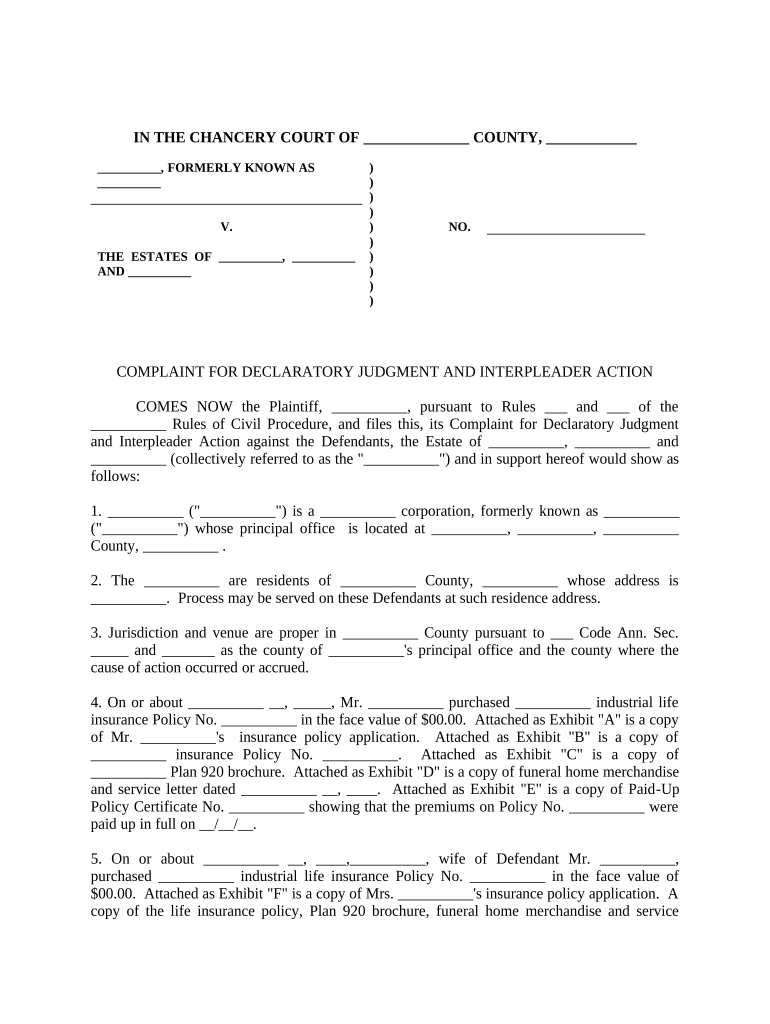
A complete pleading combines accurate captioning, a clear statement of facts, precise legal arguments, a compact request for declaratory relief, supporting exhibits, and compliance with local filing rules.

Caption

Complete court name, parties’ legal names, and case number placeholder so the clerk can assign the matter correctly upon filing.
Jurisdiction Allegation

Concise statement establishing subject-matter and personal jurisdiction with jurisdictional facts and venue citation.

Statement of Facts

Chronological factual narrative tied to the legal issue, including contract dates, policy numbers, and pertinent communications.

Cause of Action

Clear request for a declaratory ruling identifying the clause, statute, or dispute element needing court interpretation.

Exhibits

Attach key documents (contracts, policies, correspondence) and reference exhibits in the complaint where material facts rely on them.

Relief Language

Precise proposed judgment language so the court’s order resolves the specific uncertainty you seek to eliminate.

Supporting documents and export formats to prepare

Prepare certified exhibits and ensure the final submission is available in court-accepted formats for filing and distribution to parties.

Supporting Exhibits

Include contracts, policy forms, correspondence, and authenticated records that the court will rely on in interpreting rights.

Proof of Service

Attach completed service documents showing method, date, server identity, and recipient — necessary for the court record.

Proposed Order

Draft a short proposed order stating the exact declaratory relief for judicial signature to streamline disposition.

Export Formats

Save final documents as PDF/A and retain original native files for internal records and discovery purposes.

Security and compliance items to preserve evidentiary weight

Audit Trail: Preserve IP and timestamp
Encryption: TLS 1.2/1.3 in transit
Data at Rest: AES-256 encryption
Access Controls: Role-based permissions
BAA Availability: HIPAA BAA if required
Retention Logs: Immutable activity history

Common legal risks and potential penalties from defects

Service Failure: Dismissal for improper service
Jurisdiction Error: Case transferred or dismissed
Incomplete Pleading: Motion to dismiss likely
False Statement: Sanctions or fee awards
Late Filing: Statute-of-limitations bar
Incorrect Records: Evidentiary exclusion risk

Avoidable preparation mistakes that delay resolution

  • Using informal party names rather than exact legal entity names causes service and jurisdictional issues requiring amendment and re-service.
  • Failing to include or paginate key exhibits forces supplemental filings and can lead clerks to reject the submission for incomplete record.
  • Overbroad relief requests invite procedural challenges; narrowly tailored declaratory language reduces disputes over scope of the court’s ruling.
  • Neglecting to check local rules for e-filing, page limits, or required cover sheets leads to administrative rejection or strikes.

Timing and deadlines to watch when pursuing declaratory relief

Deadlines vary by case type and jurisdiction; confirm statute of limitations, local civil rules, and court calendars early in the process.

Statute of Limitations:

Varies by claim; file before limitations bar applies

Service Deadline:

Serve defendants per local rule after filing

Response Period:

Defendant typically 20–30 days to answer or move

E-filing Cutoffs:

Clerk office hours and system maintenance windows

Hearing Scheduling:

Judge sets hearing date based on procedural posture

Key milestones from filing to final decision

Track milestones with ownership and target dates to ensure timely service, motions, discovery, and hearing preparation.

01

Prepare Complaint

Draft and attach exhibits; verify caption and jurisdiction facts.

02

File and Pay

File with clerk and obtain case number and filing stamp.

03

Serve Parties

Complete service and file proof of service promptly.

04

Motion/Hearing

Respond to motions and prepare for oral argument or submitted decision.

Comparison of common eSignature providers for declaratory filings

Providers differ by price model, bulk send, audit trail detail, and HIPAA support. signNow is listed first for comparison purposes only.

signNow DocuSign Adobe Sign PandaDoc HelloSign
Starting Price $8/user/mo $15/user/mo $14/user/mo $19/user/mo $15/user/mo
Free Plan 7-day free trial No No Yes, limited Yes, limited
Bulk Send Yes Yes Yes Yes No
Audit Trail Yes Yes Yes Yes Yes
HIPAA Compliant Yes Yes Yes No No

Real-world examples illustrating typical uses

These customer snapshots show how organizations use declaratory-type documents and e-signature workflows to resolve uncertainty and move matters forward.

Optica Ventures

Optica streamlined contract clarity with consistent form language and electronic exhibits to reduce disputes.

  • The team used signed exhibits and indexed records to support a quick judicial ruling.
  • As COO Brian Fitzgibbons reported, clearer documentation and reliable execution reduced follow-up litigation and accelerated commercial decision-making for recurring contract terms.

Tech Data

Tech Data standardized dispute pleadings and routing for review using digital templates.

  • Bulk send reduced administrative delays in multi-party service.
  • CEO Bob Dutkowsky described improved internal coordination and faster resolution of contractual coverage questions when exhibits and affidavits were produced in a single, auditable electronic package.

Practical tips for accurate and efficient completion

Follow these practices to reduce procedural defects and increase the chance of a favorable and timely judicial decision.

Verify Parties
Confirm exact legal names and service addresses to avoid defective service and unnecessary amendments.
Be Specific
Draft narrow declaratory requests with precise wording to avoid overbreadth and remand for clarification.
Prepare Exhibits
Number, paginate, and reference each exhibit in the complaint to avoid evidentiary confusion at hearing.
Preserve Audit Trails
Retain signed copies, timestamps, and delivery receipts to support authentication and admissibility.

Frequently asked questions about Declaratory Judgment filings

Answers to common questions about jurisdiction, electronic evidence, notarization, and post-judgment steps for declaratory matters.


Need help? Contact support

be ready to get more
Join over 28 million airSlate SignNow users