Establishing secure connection…Loading editor…Preparing document…

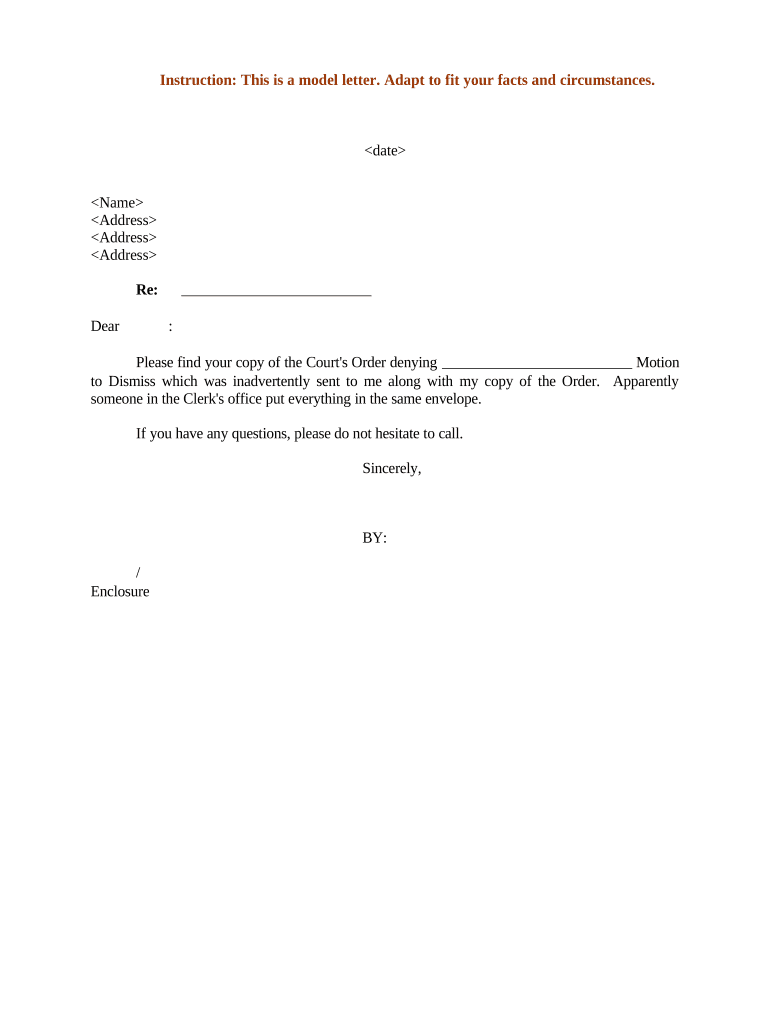
Letter Regarding Court's Order Denying Motion to Dismiss

This template is fully customizable. Edit the text, fill out the fields, and send it for signature. Give it a try!
Letter Regarding Court's Order Denying Motion to Dismiss

What this Letter Is and when it’s used

A Letter Regarding Court's Order Denying Motion to Dismiss is a written communication, typically from counsel, that documents a judge's denial of a motion to dismiss and explains immediate procedural consequences. It records the docket number, ruling date, and a concise summary of the court's reasons, then sets out required next steps such as deadlines to answer or amend pleadings, preservation of appellate issues, and who must be notified internally and externally. The letter creates an auditable record for the case file and assists litigation teams and clients in coordinating follow-up actions.

Why this letter matters for case management

A clear, timely letter converts a court ruling into actionable tasks, aligns counsel and clients on next steps, and preserves procedural rights. It reduces internal confusion by documenting deadlines and recommended responses in writing.

Why this letter matters for case management

Who typically sends and receives this letter

Typical senders and recipients vary by matter complexity and organizational role.

  • Lead counsel to client and co-counsel, summarizing the denial and recommended actions.
  • In-house legal or compliance teams, for internal risk assessment and insurer notification.
  • Litigation support or case managers, to update dockets, calendars, and document repositories.

Primary signer roles

Lead Counsel

Partner or associate overseeing litigation who signs and issues the letter; responsible for legal substance, citation to the order, and recommended next steps, and for ensuring client instructions are recorded.

Corporate Counsel

In-house attorney who reviews and circulates the letter internally to risk, compliance, and insurance contacts; may request further analysis or authorize settlement discussions.

Essential information to include

Case Caption: Exact party names
Court Name: Full court title
Docket Number: Court-assigned number
Order Date: MM/DD/YYYY format
Effected Deadline: Next procedural due date
Sender Contact: Name, email, phone

Common preparation pitfalls to avoid

  • Delaying circulation: failing to notify clients, co-counsel, or insurers within 24–48 hours causes missed response windows and inconsistent internal instructions.
  • Incomplete citation: omitting the docket number, judge, or precise order language creates ambiguity when tracking appellate preservation or follow-on motions.
  • Unclear instructions: giving vague next steps such as 'respond promptly' without a calendar date increases risk of missed deadlines and inadvertent default.
  • Wrong recipient list: excluding necessary parties such as claims handlers, local counsel, or trial teams hampers coordinated litigation strategy.

Consequences of errors or late responses

Missed Answer: Default judgment risk
Missed Appeal: Waiver of appellate issues
Incorrect Filing: Motion denied or stricken
I-9 / Payroll: Regulatory penalties
Tax Reporting: Filing penalty (IRC §6721)
Client Harm: Reputational or coverage loss

Step-by-step: drafting and issuing the letter

Follow a structured sequence to ensure accuracy, timely distribution, and enforceable recordkeeping when the court denies a motion to dismiss.

  • 01
    Confirm Order: Obtain and read the signed order in full
  • 02
    Summarize Ruling: Draft concise one-paragraph summary of holdings
  • 03
    Set Deadlines: Identify answer/amendment due dates and cite rules
  • 04
    Distribute: Send to client, co-counsel, insurers, and case team

Where to file, send, and log the letter

Use a coordinated routing plan so the letter reaches internal stakeholders and external recipients and is recorded in case systems without delay.

  • Court File: Attach only if court order requires submission
  • Client: Email signed letter to client and confirm receipt
  • Insurer: Notify carrier per policy notice provisions
  • Case System: Upload to matter management or document repository

Key components of a professional notice letter

A well-crafted letter balances brevity with the details necessary to act; include order specifics, procedural implications, client-facing recommendations, and administrative instructions for the case team.

Order Summary

Concise paragraph stating the court's disposition, the judge's key findings in plain language, and the order date to anchor subsequent actions and preserve appellate issues.
Procedural Impact

Clear statement of next required filings and timing, for example whether an answer, amended pleading, or leave to amend is appropriate and any deadlines to calendar.

Risk Assessment

Brief evaluation of litigation consequences, including strengths or vulnerabilities highlighted by the court's reasoning and suggestions for mitigation or discovery priorities.

Recommended Actions

Specific steps for counsel and client: draft answer, seek leave to amend, prepare discovery, or discuss settlement options with associated timelines.

Distribution List

Named recipients including client contacts, co-counsel, insurers, and support staff with instructions on confidential handling or escalation where necessary.

Administrative Details

Docket number, judge, clerk contact, attachments list, and signer's contact information for follow-up and recordkeeping.

How to customize the letter workflow for electronic delivery

Configure an online workflow that embeds the letter template, routes approvals, and records final distribution to preserve chain-of-custody and audit logs.

Field Configuration
Template Standardize header, order summary, and action checklist
Approval Flow Two-step review: supervising counsel then client sign-off
Distribution Auto-email to named recipients with delivery receipt
Archive Save signed PDF and audit trail in matter file

Digital delivery and signature considerations

Ensure the chosen platform complies with ESIGN and UETA, preserves records, and supports any required HIPAA BAA when health data is implicated.

  • Authentication: Email link or SMS code
  • Formats: PDF or DOCX supported
  • Integrations: Matter management systems

Typical deadlines and procedural windows to track

After a denial of a motion to dismiss, several standard timing rules apply; verify local rules and any court-specific scheduling orders that alter default periods.

Answer Deadline:

If no new date set, check FRCP 12(a)(4)(A) for timing on answers

Amend Pleadings:

Motion to amend often requires prompt application; local rules may set short response windows

Meet-and-Confer:

Schedule internal strategy meeting within 7–10 days after denial

Service of Documents:

Serve opposing counsel and clients immediately; confirm method and proof

Preserve Record:

File any necessary motions to preserve issues for appeal without delay

Key milestones after the denial — sequential view

Track milestones in order to preserve rights and meet court expectations; adjust for any specific scheduling orders entered by the court.

01

Order Issued

Judge signs and docket entry is created

02

Calendar Answer

Set internal calendar for answer or amended pleading

03

Client Update

Client meeting to review strategy and authorize next steps

04

Document Filing

File responsive pleading or motion as required

Common eSignature vendor pricing and feature snapshot for litigation letters

Compare basic pricing and feature availability across common vendors; select a plan that supports audit trails, retention, and any required compliance features.

signNow DocuSign Adobe Sign PandaDoc HelloSign
Starting Price $8/user/mo $15/user/mo $14/user/mo $19/user/mo $15/user/mo
Free Trial 7-day free trial Free trial available Free trial available Free trial available Free trial available
Bulk Send Yes Yes Yes Yes Yes
Audit Trail Yes Yes Yes Yes Yes
HIPAA Compliant Yes Yes Yes No No
Envelope Cap No cap 100 env/user/yr Varies Varies Varies

Frequently asked questions about preparing and sending the letter

Answers address common uncertainties about timing, signature validity, distribution, and retention for a court denial letter.


Need help? Contact support

be ready to get more
Join over 28 million airSlate SignNow users