Establishing secure connection…Loading editor…Preparing document…

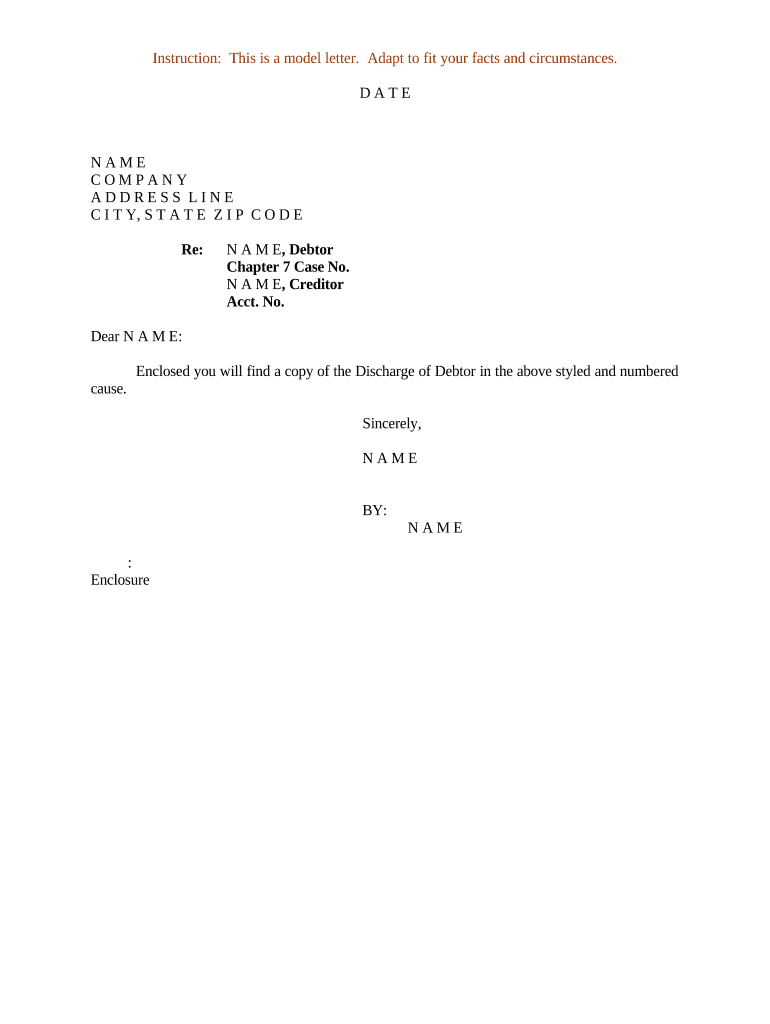
Letter Regarding Discharge of Debtor

This template is fully customizable. Edit the text, fill out the fields, and send it for signature. Give it a try!
Letter Regarding Discharge of Debtor

What a Letter Regarding Discharge of Debtor Is and When It’s Used

A Letter Regarding Discharge of Debtor is a formal written notice used to confirm that a debtor’s obligation has been released, a lien has been satisfied, or bankruptcy or repayment terms have resulted in a full or partial discharge. The letter documents the parties involved, the discharged obligation, the effective date of discharge, and any residual terms or conditions. It can originate from a creditor, trustee, lender, servicer, or attorney and serves both as evidence for the debtor and as a record for the creditor and third parties such as title companies, collection agencies, or tax preparers.

Why this letter matters for parties and third parties

A clear discharge letter preserves legal and commercial rights by documenting the end of an obligation, preventing duplicate collection efforts, and enabling accurate public record changes. It reduces disputes by providing an auditable statement of release and the terms that led to discharge.

Why this letter matters for parties and third parties

Typical users and recipients of a discharge letter

Keep a signed copy in both the creditor and debtor files and provide copies to any third parties that rely on discharge status.

  • Creditors and servicers who need to document lien release or account closure for legal and accounting records.
  • Debtors who require proof of discharge for credit reporting, refinancing, or title clearing.
  • Attorneys, trustees, and title companies that must confirm status before closing, recording, or advising clients.

Essential elements to include in a professional discharge letter

A precise structure reduces ambiguity. Include clear identification of the parties, account or lien details, a plain statement of discharge, effective date, reference numbers, and an authorized signature block so recipients can verify and act on the release.

Parties

Full legal names and contact information for debtor and creditor, including mailing address and a single point of contact for follow-up.
Account Details

Reference the original account number, loan number, lien instrument, or case number so third parties can match the discharge to existing records.

Discharge Statement

A concise declaration that the identified obligation is discharged, canceled, or satisfied in whole or in part, with the precise scope described.

Effective Date

The date when the discharge takes legal effect; use MM/DD/YYYY format and explain any backdating or conditional effective dates.

Conditions or Exceptions

Note any retained rights, residual obligations, or exceptions such as payment plans that remain in force despite partial discharge.

Signature Block

Authorized signatory name, title, organization, signature, and date; indicate whether notarization or witness signatures are provided.

Step-by-step: preparing and sending a discharge letter

Follow these sequential steps to prepare an enforceable and usable letter that third parties can rely on without additional clarification.

  • 01
    Gather Records: Locate original loan, lien, or judgment documents.
  • 02
    Draft Statement: Write a concise discharge statement and specify scope.
  • 03
    Authorize Signature: Obtain signature from an authorized officer or designee.
  • 04
    Distribute Copies: Send signed copies to debtor, recorder, title company, and internal file.

How to configure an online workflow for discharge letters

Set up a repeatable e-sign and distribution workflow to reduce processing time and ensure consistent records for each discharge.

Document Template Create a reusable template with auto-populated fields for names and reference numbers.
Signer Order Set the authorized creditor signing role first, then optional notary and recipient copy distribution.
Authentication Use email or SMS code verification; require stronger authentication for high-value discharges.
Audit Trail Enable full audit logging to capture timestamps, IP addresses, and signing events.
Auto-Distribution Configure automatic delivery of completed PDF to debtor and relevant third parties.

Where to send or file the signed discharge letter

Proper routing ensures the discharge is effective in public records, credit reporting, and tax files.

  • Debtor: Provide a signed copy to the debtor for their records and proof of release.
  • Recording Office: If the discharge relates to a recorded lien or deed, file the release with the county recorder or land records office.
  • Title Company: Send copies to any title company handling subsequent real estate transactions.
  • Internal Records: Store the executed letter in creditor files with the original loan or claim file.

Digital signing and secure eSubmission considerations

Ensure the platform supports exportable audit trails and tamper-evident signed PDFs so recipients and recorders can verify authenticity.

  • File Formats: PDF or PDF/A for long-term preservation.
  • Authentication: Email, SMS, or stronger KBA where required.
  • Retention: Store signed copies with audit logs for compliance.

Security and compliance checkpoints for electronic discharge letters

Encryption: TLS in transit, AES-256 at rest
Audit Trail: Timestamps, IP, and signer attribution
HIPAA Support: BAA required for PHI workflows
21 CFR Part 11: Support for regulated records when needed
Access Controls: Role-based permissions and SSO
Accessibility: WCAG 2.0 Level AA support

Common legal and administrative risks to avoid

Incorrect Identity: Wrong name prevents record matching
Missing Reference: Omitted account number creates ambiguity
Improper Execution: Unsigned or unauthorized signatures can invalidate the letter
Failure to Record: Recorded liens may remain until proper release is filed
Tax Reporting: Canceled debt may trigger IRS reporting obligations
Retention Lapse: Insufficient retention hinders audits or disputes

Frequent drafting mistakes and how they slow resolution

  • Using informal or vague language such as 'we consider this satisfied' instead of a formal release statement creates uncertainty for title companies and creditors.
  • Failing to include a clear reference to the original instrument or account number forces third parties to request supplemental documentation and delays clearance.
  • Not indicating whether the discharge is full or partial leads to disputes about residual liabilities and may prompt duplicate collection attempts.
  • Skipping notarization or witness steps when a related record requires them (for example, a lien release recorded against property) can prevent county recorders from accepting the document.

eSignature vendor pricing and capability snapshot for discharge letter workflows

Compare entry-level pricing and key features that matter for discharge letter workflows. signNow is shown first per vendor ordering rules.

signNow DocuSign Adobe Sign PandaDoc HelloSign
Starting Price $8/user/mo $15/user/mo $14/user/mo $19/user/mo $15/user/mo
Free Trial 7-day free trial Varies Varies Varies Varies
Bulk Send Yes Yes Yes Yes No
Audit Trail Yes Yes Yes Yes Yes
HIPAA Compliant Yes Yes Yes No No

Frequently asked questions about discharge letters

Answers to common questions about validity, recording, and electronic execution of discharge letters.


Need help? Contact support

be ready to get more
Join over 28 million airSlate SignNow users