Establishing secure connection…Loading editor…Preparing document…

Oregon Renunciation and Disclaimer of Property

This template is fully customizable. Edit the text, fill out the fields, and send it for signature. Give it a try!
Oregon Renunciation and Disclaimer of Property

What the Oregon Renunciation and Disclaimer of Property Is

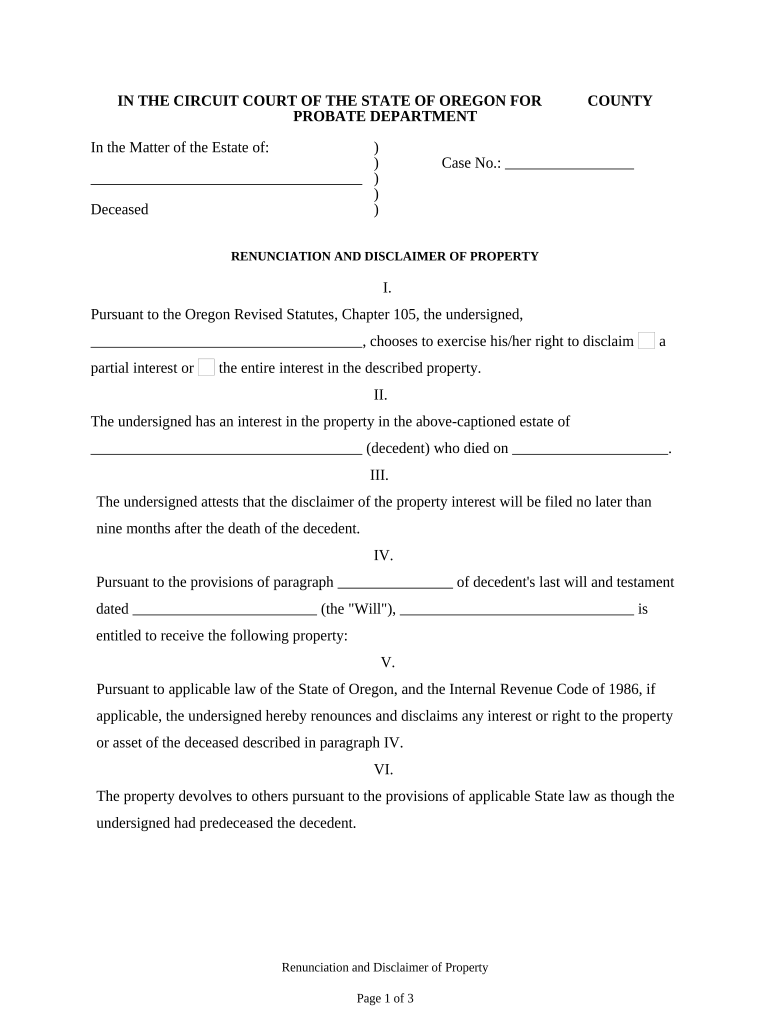
The Oregon Renunciation and Disclaimer of Property is a written declaration in which a person voluntarily refuses an interest in real or personal property that they would otherwise receive under a will, trust, or by intestate succession. The document clarifies that the renouncing party will not accept title, possession, or benefits from the specified property and explains how the disclaimed interest should pass to other beneficiaries. Properly executed, a disclaimer can affect probate distribution, creditor claims, and federal tax treatment of the disclaimed interest.

Why a Formal Renunciation or Disclaimer Matters

A recorded disclaimer creates a clear legal record that the claimant never accepted the property interest, guiding probate distribution and reducing later disputes. It can simplify transfer paths, preserve tax benefits under federal law, and prevent unintended acceptance of liabilities tied to the asset.

Why a Formal Renunciation or Disclaimer Matters

Who typically completes an Oregon Renunciation and Disclaimer

Several parties encounter this form during estate administration and inheritance planning.

  • Estate beneficiaries seeking to redirect assets to alternate heirs without accepting tax or creditor consequences.
  • Estate administrators or personal representatives documenting which assets should bypass an intended beneficiary.
  • Trustees or attorneys preparing estate settlement paperwork that reflects beneficiary decisions.

Use varies by role: beneficiaries usually execute the document, while attorneys or the personal representative handle filing and recording instructions.

Representative signers and their roles

Beneficiary

An individual named in a will, trust, or under intestacy who elects to refuse an interest. Their signed disclaimer prevents them from later claiming title and clarifies alternative distribution paths for the estate administrator.

Personal Representative

The executor or administrator oversees filing and recording the disclaimer, ensures compliance with probate procedures, and notifies interested parties so transfers proceed per the decedent's estate plan or applicable intestacy rules.

Key factual items to verify before signing

Full name: As on ID
Relationship: Heir relation
Property ID: Legal description
Decedent date: MM/DD/YYYY
Notary details: Journal entry
Filing county: Recorder name

Short risks from incorrect or late disclaimers

Tax consequences: Gift/estate tax issues
Creditor exposure: Potential liabilities
Probate delays: Extended administration
Record rejection: Recorder refusal
Loss of rights: Irrevocable disclaimer
Beneficiary disputes: Contested transfers

Common preparation mistakes to avoid

  • Failing to confirm whether recording or probate filing is required in the county where the property is located, which can invalidate local notice requirements.
  • Using imprecise property descriptions or legal identifiers instead of the formal legal description recorded with the county recorder's office.
  • Executing a disclaimer after taking possession or control of the property, which can be treated as acceptance and nullify the disclaimer.
  • Neglecting federal tax timing rules — disclaimers impacting gift/estate tax treatment generally must meet strict timeliness standards under federal law.

Step-by-step: Completing the Oregon Renunciation and Disclaimer

Follow these core steps to prepare, execute, and record a valid disclaimer in Oregon.

  • 01
    Identify interest: Specify the asset and record references.
  • 02
    Draft statement: Clear refusal language and intended disposition.
  • 03
    Execute formally: Sign in front of notary or witnesses.
  • 04
    File or record: Submit to probate court or county recorder as advised.

How the renunciation process typically flows

A concise operational flow shows who acts and when during a renunciation workflow.

  • Prepare form: Gather estate documents and legal description.
  • Sign and authenticate: Notary or required witnesses execute the document.
  • File where needed: Record or file with probate court.
  • Notify parties: Give copies to administrator and interested heirs.

Essential sections of a professional Oregon renunciation

A complete disclaimer contains specific labeled sections so courts and recorders can identify the intent, the property, and the effect of the renunciation.

Parties

Names and addresses of the disclaimant and decedent, including the disclaimant's relationship to the decedent and any identifying details required by the county recorder.
Property description

Precise legal description or account identifier for the disclaimed asset, including parcel number for real estate or account numbers for financial assets.

Statement of renunciation

Clear, unambiguous language stating that the signer refuses and will not accept any interest, title, or benefits in the listed property.

Effective date

The date on which the disclaimer takes effect, which can affect tax and probate calculations and should be specified in MM/DD/YYYY format.

Filing and recording

Instructions for where the executed disclaimer will be filed, whether with the probate court, county recorder, or trustee, plus any required copies.

Authentication

Notary acknowledgment or witness block and signature lines showing the disclaimant's signature and the notary's official stamp and journal entry.

Common digital workflow settings for online completion

Configure these options when using an electronic form or e-signature platform to collect disclaimers securely and in the correct order.

Field Configuration
Authentication method Email + SMS code or identity verification
Required attachments Attach death certificate and property records
Routing order Signer → Notary/Witness → Estate representative
Retention settings Store signed PDF and audit trail securely

Digital signing and file formats to prefer

Choose a platform that exports signed documents as tamper-evident PDFs and preserves a detailed audit trail.

  • File formats: PDF/A or PDF with embedded audit trail
  • Integrations: Works with Google Workspace, Microsoft 365, NetSuite
  • Authentication: Support for SMS, email, or advanced ID proofing

Ensure the chosen system also supports notarization workflows or produces a printable document compatible with the county recorder and probate court filing requirements.

eSignature provider comparison for executing disclaimers

Pricing and essential features across common eSignature vendors to help evaluate secure electronic execution and retention options.

signNow DocuSign Adobe Sign PandaDoc HelloSign
Starting Price $8/user/mo $15/user/mo $14/user/mo $19/user/mo $15/user/mo
Free Trial 7-day free trial Varied Varied Trial available Varied
Bulk Send Yes Yes Yes Yes No
Audit Trail Yes Yes Yes Yes Yes
HIPAA Compliant Yes Yes Yes No No

Frequently asked questions about Oregon renunciations and disclaimers

Answers to common procedural and legal questions to help determine if a disclaimer is appropriate and how to complete it.


Need help? Contact support

be ready to get more
Join over 28 million airSlate SignNow users