Establishing secure connection…Loading editor…Preparing document…

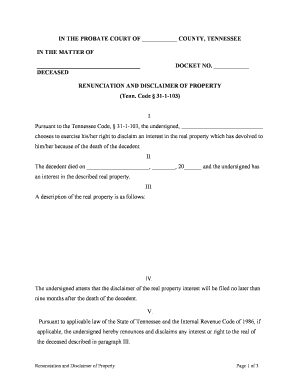
Tennessee Renunciation and Disclaimer of Property

This template is fully customizable. Edit the text, fill out the fields, and send it for signature. Give it a try!
Tennessee Renunciation and Disclaimer of Property

What the Tennessee Renunciation and Disclaimer of Property Is

The Tennessee Renunciation and Disclaimer of Property is a written instrument by which a person formally refuses or disclaims an interest in property, often after a decedent’s death or when an anticipated transfer would otherwise vest. A valid disclaimer is typically irrevocable, must be executed in writing, and must meet the timing and delivery requirements of applicable state law and federal tax rules when tax treatment is sought. In Tennessee contexts this form is used to direct property away from the disclaiming party and to preserve alternative distribution lines, estate planning goals, or tax-qualified disclaimer benefits where available under federal tax law.

Why a Written Renunciation or Disclaimer Matters

A properly executed Tennessee renunciation clarifies distribution, preserves alternate beneficiaries, and—when filed within statutory deadlines—can secure favorable federal tax treatment for disclaimers under applicable tax rules.

Why a Written Renunciation or Disclaimer Matters

Who typically completes this renunciation or disclaimer

The form is most often completed by heirs, beneficiaries, trustees, executors, and their legal or tax advisors when an interested party chooses to refuse property rights.

  • Beneficiaries declining an inheritance to allow alternate distribution
  • Trustees or personal representatives administering estates
  • Attorneys and tax advisers advising on estate or gift tax consequences

Work with the estate’s attorney or the probate court clerk when questions arise about timing, delivery, or recording requirements specific to Tennessee practice.

Typical signers and roles

Heir / Beneficiary

An individual entitled to property who elects to renounce or disclaim. The heir must sign knowingly and deliver the signed instrument per statutory timing to avoid unintended acceptance or tax consequences; legal advice is commonly recommended.

Executor / Trustee

The estate fiduciary who receives, records, or routes the disclaimer. An executor or trustee may need to acknowledge receipt and coordinate alternative distributions in line with the decedent’s will or trust terms and state probate rules.

Key legal and security considerations

Electronic validity: ESIGN and UETA apply
Encryption in transit: TLS 1.2/1.3
Encryption at rest: AES-256
Audit trail: Timestamp and IP logging
Healthcare BAA: Available when required
21 CFR support: Compliant options exist

Step-by-step: completing the Tennessee renunciation form

Follow these core steps in order to create a clear, effective renunciation or disclaimer and to help preserve legal and tax outcomes.

  • 01
    Identify parties: Name the disclaimant and the affected interest.
  • 02
    Describe property: Specify the asset, ownership share, and related account identifiers.
  • 03
    State disclaimer: Clearly declare irrevocable renunciation of the described interest.
  • 04
    Sign and deliver: Sign, date, and send per statute or probate instructions.

How to complete and route this form online

When preparing the form digitally, set fields and routing to ensure required signers, dates, and delivery steps are enforced.

Field Configuration
Signature Required for disclaimant; mandatory date field
Deliver To Executor/trustee email or probate clerk
Authentication Email or SMS code recommended
Retention Preserve signed copy and audit trail

Where to send or file a completed Tennessee disclaimer

A completed renunciation must be delivered to the parties specified by state law or the governing instrument; routing choices affect legal and tax consequences.

  • Executor/Personal Rep: Deliver for estate administration
  • Trustee: Deliver for trust-held property
  • Probate Court: File per local rules when required
  • Property Custodian: Deliver to title agent or account holder

Digital signing and evidence you should collect

Electronic completion can be valid under ESIGN and UETA, provided intent, consent, attribution, and retention are present.

  • Authentication: Email or SMS code
  • Audit Trail: Timestamp plus IP address
  • File Formats: PDF/A or DOCX recommended

Retain the signed record and the platform audit trail as the primary evidence of execution and delivery in case of probate or tax review.

Timing and deadlines to keep in mind

Timing affects whether a disclaimer is effective for estate distribution and tax purposes; check local probate deadlines and any federal tax windows that apply.

Immediate delivery:

Deliver signed instrument promptly to affected parties.

Tax qualification window:

Certain tax benefits require timely disclaimers under federal rules.

Probate notices:

Meet any local probate filing or notice deadlines.

Record retention:

Keep originals and signed copies indefinitely.

Consult counsel:

When in doubt, get estate or tax advice early.

Authentication, notarization, and witness steps

Confirm whether a notary or witnesses are required for the specific instrument and the asset type; state and instrument rules vary.

01

Signatory authentication

Signer must be identified and competent

02

Notary acknowledgement

Used for recordable transfers and clarity

03

Witness presence

Some states or instruments require witnesses

04

Remote notarization

RON may be allowed where state law permits

05

Recording

Real property disclaimers may require county recording

06

Proof of delivery

Keep return receipts or email confirmations

07

Court filing

File with probate when required

08

Clerk verification

Confirm local clerk acceptance rules

Common mistakes to avoid

  • Failing to describe the property precisely, which can make a disclaimer ambiguous or ineffective.
  • Missing statutory delivery or timing requirements that are necessary for tax-qualified disclaimers.
  • Signing before fully understanding tax implications, particularly where disclaimers affect generation-skipping or gift tax.
  • Delivering only an informal notice rather than a signed written instrument that meets state formality rules.

Consequences of an incorrect or late disclaimer

Rejected disclaimer: No legal effect
Tax impact: Loss of tax-qualified treatment
Estate delay: Probate complications
Unintended ownership: Disclaimed property may vest elsewhere
Creditor claims: Different rules may apply
Irrevocability: Most disclaimers cannot be rescinded

Practical examples of renunciation scenarios

Two concise examples show how a disclaimer can alter distribution and why precise drafting matters.

Case Study 1

A beneficiary refused a residual trust interest to allow siblings to inherit instead

  • The refusal cited a specific trust paragraph and was signed within the required timeframe
  • Result: the trustee implemented alternate distribution with minimal delay after receiving the signed instrument and confirming delivery.

Case Study 2

An heir disclaimed a deeded parcel to avoid creditor exposure

  • The disclaimant provided a signed writing and delivered it to the estate trustee
  • Result: title passed under the will’s alternate clause and recording was completed to reflect the new owner.

Practical tips for accurate and efficient completion

Follow these best practices to reduce rejection risk and to preserve legal and tax outcomes.

Describe assets precisely
Use parcel numbers, account IDs, or trust clause references to remove ambiguity and speed acceptance.
Confirm delivery route
Deliver the signed instrument to the executor, trustee, and any custodian required by the governing instrument or statute.
Document proof of delivery
Keep certified mail receipts or email confirmations to prove timely delivery if timing matters.
Get legal and tax advice
Consult counsel before signing when the disclaimer affects estate, gift, or generation-skipping taxes.

eSignature provider comparison for executing Tennessee renunciations

Compare common vendor pricing and feature indicators for e-signature platforms; signNow appears first per the comparison order below.

signNow DocuSign Adobe Sign PandaDoc HelloSign
Starting Price $8/user/mo $15/user/mo $14/user/mo $19/user/mo $15/user/mo
Free Trial 7-day free trial Varies by vendor Varies by vendor Varies by vendor Varies by vendor
Bulk Send Yes Yes Yes Yes No
Audit Trail Yes Yes Yes Yes Yes
HIPAA Compliant Yes Yes Yes No No

FAQs and troubleshooting for Tennessee disclaimers

Answers to frequent questions about validity, timing, and practical steps when preparing or accepting a renunciation in Tennessee.


Need help? Contact support

be ready to get more
Join over 28 million airSlate SignNow users