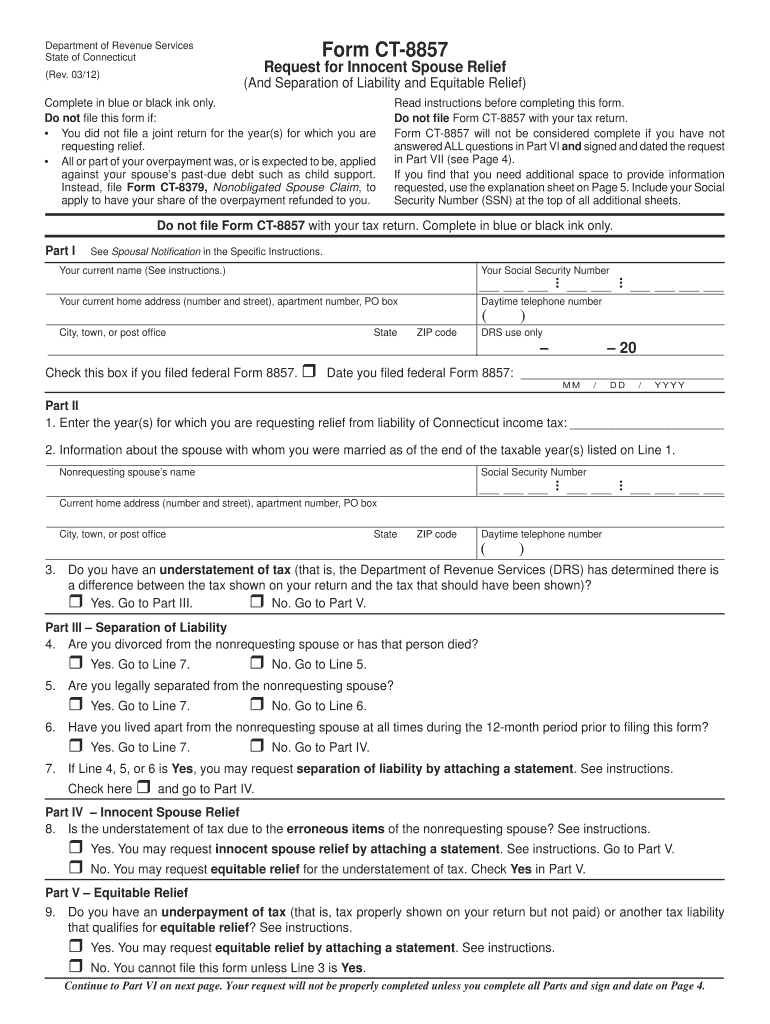
Connecticut Request for Innocent Spouse Relief
What the Connecticut Request for Innocent Spouse Relief Is
Why this request matters for Connecticut taxpayers
Filing an innocent spouse request can prevent collection actions against you for tax debts you did not earn or were unaware of, and it documents your position with tax authorities.
Who typically files a Connecticut innocent spouse request
If you match any of these profiles, keep detailed records and consider tax or legal advice before filing to ensure your request is complete and well documented.
- Separated or divorced taxpayers seeking to shift liability following allocation of income, deductions, or fraud by the other spouse.
- Taxpayers who signed joint returns but lacked knowledge of omissions or erroneous items on the return.
- Victims of identity fraud or undisclosed financial maneuvers by the other spouse seeking administrative relief.
Stepwise process to prepare and submit the request
-
01Gather records: Collect returns, notices, bank records and court documents supporting your claim.
-
02Draft statement: Write a concise chronological narrative explaining your lack of knowledge or involvement.
-
03Attach evidence: Include documents that substantiate your narrative and the degree of your noninvolvement.
-
04Submit properly: Send the request to the IRS and Connecticut DRS as required, keep proof of mailing or e-submission.
Where to send and how the submission flows
-
Prepare Form: Complete IRS Form 8857 or state form with supporting statement and exhibits.
-
Federal Filing: Submit Form 8857 to the IRS per instructions; include copies of federal notices.
-
State Filing: Send Connecticut-specific documentation to Connecticut Department of Revenue Services if state liability exists.
-
Await Acknowledgement: Keep delivery receipts and monitor correspondence for requests for additional information.
Configure an efficient online workflow for submissions
| Authentication method | Use email plus SMS code or stronger identity checks for signer validation. |
|---|---|
| Document format | Use PDF/A to preserve formatting and ensure long-term readability. |
| Attachment handling | Allow multiple PDFs and scanned images to be attached and indexed by tax year. |
| Audit trail retention | Capture timestamps, IPs, and signer attribution for evidentiary support. |
| Integrations | Connect with secure cloud storage and case management platforms for centralized records. |
Digital submission and platform requirements
Choose a platform that supports secure upload, consent capture, and a complete audit trail for tax and legal records.
- File types: PDF, DOCX, JPEG accepted; PDF/A recommended for records.
- Authentication: Email link, SMS code, or advanced multi-factor authentication available.
- Integrations: Works with cloud storage and major business systems for archival and sharing.
Timing and typical processing expectations
Statute of limitations for assessment:
IRC §6501(a) generally limits IRS assessment to three years from filing.
IRS acknowledgment timeframe:
Processing may take several months; complex cases often take longer.
No standard filing fee:
Filing innocent spouse requests with IRS and most states typically carries no government filing fee.
Document retention:
Keep copies until resolution and for applicable federal retention periods.
Follow-up requests:
Tax authorities may request additional evidence; respond promptly to avoid delays.
Key milestones from submission to resolution
Assemble and File
Gather facts, complete forms, and submit to IRS and state DRS with evidence.
Intake Review
Agency confirms receipt and may request clarifications or additional documents.
Substantive Evaluation
Authorities evaluate facts against legal standards for innocent spouse relief.
Decision and Notices
Agency issues determination; follow instructions for appeal or collection holds.
Common preparation pitfalls to avoid
- Failing to attach relevant supporting documents such as bank statements or separation agreements, which weakens your factual claim and lengthens processing.
- Using inconsistent names or tax identification numbers between documents, causing authentication delays or rejection by the agency.
- Submitting vague or emotional narratives rather than clear, chronological statements of facts and supporting evidence tied to specific tax items.
- Missing follow-up requests from the agency; delayed responses often result in administrative dismissal or extended collection activity.
Penalties and risks of incorrect or incomplete requests
Real-world examples of submitting an innocent spouse request
Optica Ventures — administrative clarity
A small business owner discovered unreported rental income by a former spouse
- Focused documentation of bank transfers and a separation decree
- The clear timeline and supporting bank records helped the agency isolate the spouse's income and speed administrative processing.
Fertility Centers of Illinois — medical expense separation
A taxpayer submitting medical expense allocations after divorce
- Itemized receipts and court-ordered settlement emphasized financial separation
- Detailed exhibits showing who paid specific expenses supported a favorable allocation and reduced joint liability exposure.
Comparing eSignature vendor pricing and capabilities for document workflows
| signNow | DocuSign | Adobe Sign | PandaDoc | HelloSign | |
|---|---|---|---|---|---|
| Starting Price | $8/user/mo | $15/user/mo | $14/user/mo | $19/user/mo | $15/user/mo |
| Free Trial | 7-day free trial, no credit card | Varies by vendor | Varies by vendor | Varies by vendor | Varies by vendor |
| Bulk Send | Yes (Business Premium) | Yes | Yes | Yes | No |
| Audit Trail | Yes | Yes | Yes | Yes | Yes |
| HIPAA Compliant | Yes | Yes | Yes | No | No |
| Envelope Cap | No envelope cap | 100 envelopes/user/year | Varies | Varies | Varies |
Frequently asked questions about preparing and filing the request
-
What is the legal basis for e-signatures?
Electronic signatures are legally enforceable under the federal ESIGN Act (15 U.S.C. ch. 96) and UETA where adopted; ensure intent, consent, attribution, and record retention are documented.
-
Do I file with IRS and Connecticut separately?
Yes. File federal Form 8857 with the IRS per its instructions and submit state-specific documentation to the Connecticut Department of Revenue Services if the unpaid tax is a Connecticut liability.
-
Can I e-sign supporting affidavits?
In most cases, yes, provided the electronic signature method meets intent and authentication requirements; confirm if notarization is required for affidavits in your jurisdiction.
-
What happens if the request is incomplete?
Incomplete submissions are often delayed or returned; agencies commonly request additional evidence, which extends resolution times and can result in continued collection activity.
-
Should I get attorney help?
Consider counsel if the facts are disputed, fraud is alleged, or substantial liability is at stake; attorney review reduces procedural errors and strengthens evidentiary presentation.
-
How long until a decision?
Processing times vary; simple cases may resolve in months while complex matters can take considerably longer depending on agency workload and the need for additional documentation.