Establishing secure connection…Loading editor…Preparing document…

California Notice of Emergency Removal, Objection to Removal, and Order After Hearing

This template is fully customizable. Edit the text, fill out the fields, and send it for signature. Give it a try!
California Notice of Emergency Removal, Objection to Removal, and Order After Hearing

What this California notice is and when it’s used

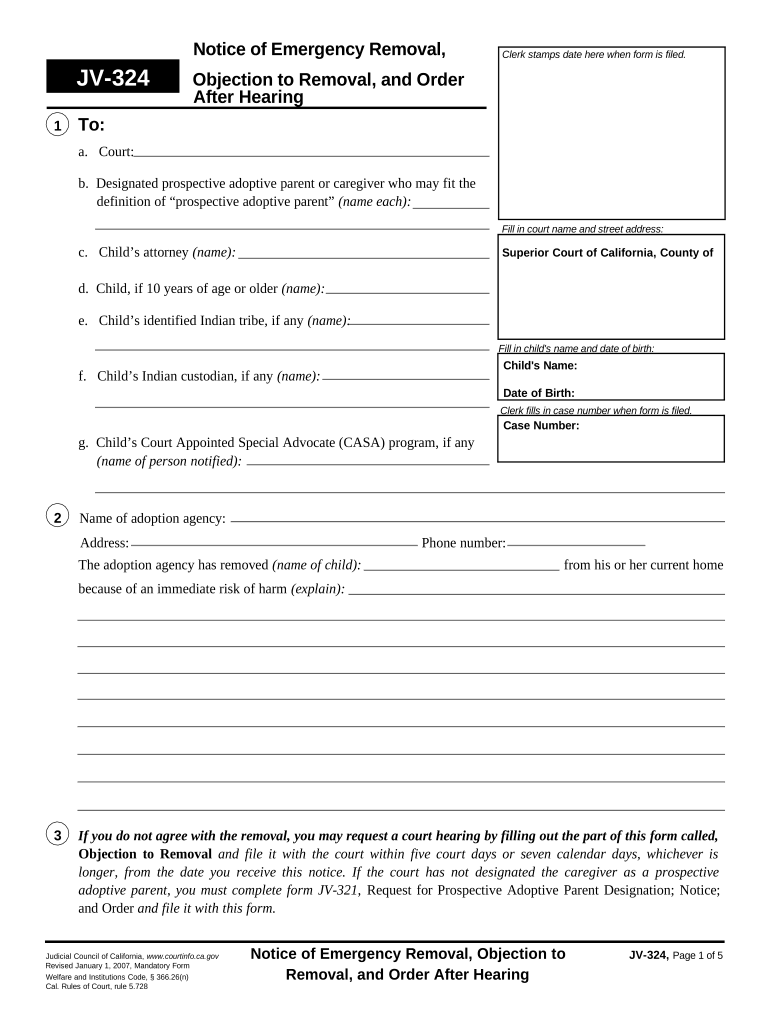
The California Notice of Emergency Removal, Objection to Removal, and Order After Hearing is a court- and agency-oriented form used to document an emergency removal action, a party’s objection to that removal, and the judge or hearing officer’s subsequent order. Typical contexts include child welfare, adult protective services, or behavioral-health emergency interventions where an immediate removal is authorized pending a hearing. The form records the factual basis for the emergency action, the procedural steps taken, any objections filed by affected parties, and the decision rendered at the post-removal hearing.

Why accurate completion matters for legal clarity

A complete, correctly executed notice preserves parties’ procedural rights, documents legal cause for emergency removal, and supports enforceability of the resulting order. Proper completion reduces risk of later challenge and helps ensure the hearing record reflects timely notice and correct service.

Why accurate completion matters for legal clarity

Who prepares and who receives this notice

Typical preparers and recipients include agency caseworkers, attorneys, court clerks, and respondents or their counsel.

  • County social services caseworkers who initiate removal and prepare supporting documentation for the hearing.
  • Attorneys for respondents or petitioning agencies who file objections or represent parties at the hearing.
  • Court clerks and hearing officers responsible for docketing the notice and entering the resulting order.

Ensure each recipient is identified and served according to local court and agency rules to avoid service defects or delays.

Primary signatories and roles

County Social Worker

A case-level official who completes the notice to record facts leading to emergency removal, signs the form to attest to observed conditions, and typically provides the factual affidavit or report supporting removal.

Presiding Hearing Officer

A judge or administrative hearing officer who reviews the notice and objections, signs the Order After Hearing to document the decision, and sets any follow-up requirements or timelines for reunification, placement review, or further hearings.

Essential sections to include on the notice

A professional, court-ready notice contains discrete sections so reviewers can quickly verify authority, chronology, service, and the court’s determination.

Caption

Court name, case number, parties, and caption information exactly matching the underlying case file to ensure correct docketing and linkage.
Grounds for Removal

Clear factual summary of imminent harm or risk, including dates, observations, and statutory basis for emergency removal authority.

Service Details

Who was served, how and when service occurred, and proof of notice to counsel and other required parties.

Objection Statement

A concise objection from the respondent or representative describing the grounds for opposing the removal or specific factual disputes.

Hearing Findings

Judge’s or hearing officer’s written findings and factual basis supporting the order after hearing, including any mitigation steps.

Signatures and Dates

Signature blocks for the preparer, respondent, counsel, and the judge or hearing officer with printed names and dates.

Step-by-step: completing and processing the notice

Follow a consistent sequence from facts to filing to hearing to reduce administrative errors and preserve rights.

  • 01
    Gather Evidence: Collect contemporaneous reports, witness statements, and medical or safety documentation.
  • 02
    Complete Notice: Fill all required fields clearly and attach supporting exhibits referenced in the narrative.
  • 03
    Serve Parties: Serve respondent, counsel, and required agencies per local rules; record proof of service.
  • 04
    File and Present: File with court clerk or agency, bring originals to hearing, and be prepared to offer exhibits and testimony.

Where and how the notice is submitted

Submission paths vary: local county court e-filing, agency intake, or in-person clerk filing depending on the jurisdiction and the urgency of the situation.

  • Court E-Filing: Upload as a supporting pleading to the existing case via the county e-filing portal.
  • Agency Intake: Provide the notice and supporting documents to the responsible county or state agency.
  • In-Person Filing: File with the court clerk if immediate physical filing or stamped originals are required.
  • Service to Parties: Deliver copies to respondents and counsel according to statutory and local rules.

Options for sharing and electronic submission

Notices can be shared by secure e-filing, authenticated e-mail, physical service, or a secure eSignature workflow depending on agency/court acceptance.

  • Supported Formats: PDF and DOCX are widely accepted by courts and agencies.
  • Authentication Needs: Email verification, SMS codes, or stronger KBA may be required for identity assurance.
  • Integration: Integrates with common case management and storage systems.

Confirm local court or agency e-filing rules before choosing an electronic delivery method to ensure acceptance and proper docketing.

Typical eSubmission workflow settings

Configure eSignature and e-filing settings to maintain chain-of-custody and an audit trail for the notice and attachments.

Field Configuration
Signature Method Email verification | Click-to-sign or PKI where required
Authentication Level Email-only | SMS code | KBA or ID analysis
Audit Trail Capture IP, timestamp, and signer attribution
File Format PDF/A preferred for long-term retention

Security and compliance considerations for electronic handling

Encryption in Transit: TLS 1.2/1.3 used
Encryption at Rest: AES-256 protection
Audit Trails: Detailed timestamps and IP logs
HIPAA Support: BAA available where required
Regulatory Standards: 21 CFR Part 11 compliance supported
Certifications: SOC 2 Type II and ISO 27001

Consequences of incorrect or late filings

Lost Appeal Rights: Procedural defaults possible
Service Defects: Notice not effective until properly served
Evidence Exclusion: Untimely exhibits may be denied
Fee Assessments: Additional court costs can accrue
Adverse Orders: Temporary orders may become permanent
Record Challenges: Incomplete records invite factual disputes

Common mistakes to avoid when preparing the notice

  • Failing to document contemporaneous facts and timestamps often weakens the factual basis for emergency removal and creates room for later dispute.
  • Using inconsistent names, case numbers, or captions across pleadings can result in misfiling or delays in docketing and service.
  • Neglecting to attach or reference supporting exhibits (medical reports, witness statements) leaves the notice evidentiary thin at the hearing.
  • Improper service or failing to follow local service rules risks dismissal of objections or invalidation of the hearing outcome.

Illustrative scenarios where the notice is used

These anonymized examples show common contexts where accurate notice completion is material to case outcomes.

County Child Welfare

A social worker documents an immediate removal after an at-home safety incident was observed

  • removal occurred at 02:15 AM and child placed in emergency foster care
  • At the subsequent hearing the notice, attached medical report, and witness statements formed the basis for a temporary placement order and a schedule for reunification services.

Behavioral Health Facility

Facility staff record an emergency transfer when a patient presents imminent risk to self

  • staff completed the notice and notified the county behavioral-health unit
  • The Order After Hearing documented placement and required follow-up assessments and community-based services.

Practical tips for accurate, efficient completion

Small process changes reduce rework and improve defensibility at hearing.

Standardize Templates
Use a single approved template so caption, case number, and signature blocks match court expectations and reduce manual entry errors.
Attach Exhibits
Number and reference each exhibit in the notice narrative to make it easy for the court and opposing parties to locate supporting materials during the hearing.
Record Proof of Service
Save affidavits or e-service receipts and file proof promptly to avoid disputes over notice timing or delivery method.
Use Secure eSign Workflows
When permitted, use authenticated e-signatures with full audit trails to capture signer attribution and timestamps.

Typical eSignature vendor comparison for handling notices and court filings

Compare feature and pricing dimensions relevant to secure e-signature and document workflows; signNow is shown first per vendor ordering rules.

signNow DocuSign Adobe Sign PandaDoc HelloSign
Starting Price $8/user/mo $15/user/mo $14/user/mo $19/user/mo $15/user/mo
Free Trial 7-day trial Yes Yes Yes Yes
Bulk Send Yes Yes Yes Yes No
Audit Trail Yes Yes Yes Yes Yes
HIPAA Compliant Yes Yes Yes No No

Frequently asked questions and common troubleshooting

Answers to recurring questions about completing, serving, and e-filing the notice, and how to preserve record integrity for hearings.


Need help? Contact support

be ready to get more
Join over 28 million airSlate SignNow users