Establishing secure connection…Loading editor…Preparing document…

Tax Refund Suit Regarding Employee vs. Independent Contractor

This template is fully customizable. Edit the text, fill out the fields, and send it for signature. Give it a try!
Tax Refund Suit Regarding Employee vs. Independent Contractor

What the Tax Refund Suit Regarding Employee vs. Independent Contractor Is

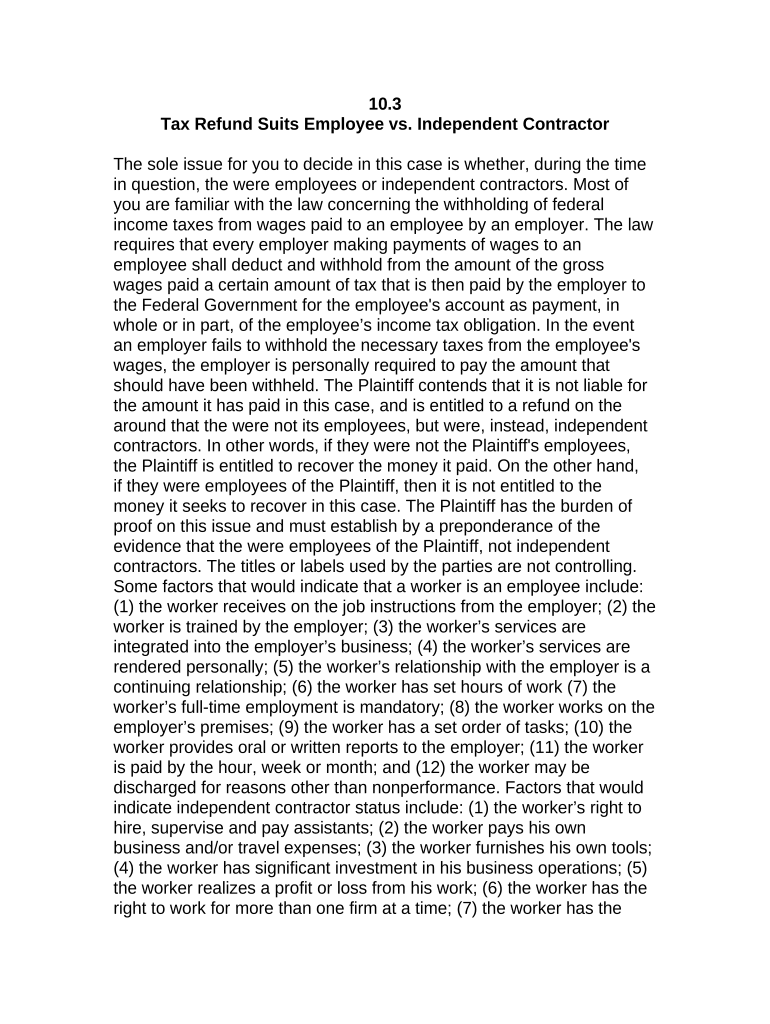
The Tax Refund Suit Regarding Employee vs. Independent Contractor is a legal claim filed when a worker contests a payer’s classification and seeks recovery of withheld taxes, misreported income, or other payments resulting from alleged misclassification. The suit compiles contracts, pay records, tax forms (W-2, 1099-NEC/MISC), and witness statements, and asserts legal and tax authority grounds to obtain corrected reporting, refunds, or reclassification remedies from the employer or relevant tax agency.

Why this suit matters for classification and tax recovery

A Tax Refund Suit Regarding Employee vs. Independent Contractor clarifies worker status, preserves limitations-period timelines, centralizes evidence for tax authorities or courts, and can produce corrected information returns or refunds where withholding or reporting was improper.

Why this suit matters for classification and tax recovery

Who typically prepares or benefits from this suit

Individuals disputing employer classification, independent contractors seeking refunds, payroll specialists, CPAs, and employment law attorneys commonly prepare or use this document.

  • Workers seeking tax refunds after receiving incorrect 1099 or W-2 forms.
  • CPAs and enrolled agents filing amended returns or requesting IRS corrections.
  • Employment lawyers pursuing reclassification claims, wage adjustments, and administrative appeals.

Core elements a professional refund suit should include

A professional Tax Refund Suit Regarding Employee vs. Independent Contractor combines factual timelines, documentary exhibits, statutory citations, and a clear statement of relief to demonstrate misclassification and to quantify tax or wage corrections sought.

Parties

List plaintiff and defendant with full legal names, taxpayer identification numbers, employer EIN, contact details, and precise dates of engagement to avoid identity or filing mismatches.
Classification Summary

Provide a concise timeline of work performed, degree of control, payment method, and benefits tied to IRS common law factors and relevant state tests to support status arguments.

Tax Forms

Attach copies of W-2s, 1099-NEC/1099-MISC, payroll reports, and prior returns; highlight discrepancies and request corrected information returns where appropriate.

Evidence

Include contracts, invoices, timesheets, communications, and witness affidavits that demonstrate control, financial arrangements, and reporting practices.

Legal Claims

Cite federal tax code, IRS guidance on worker classification, and applicable state employment statutes or precedents supporting reclassification or refund relief.

Relief Sought

Specify refunds, adjusted tax credits, corrected W-2/1099 issuance, repayment of withheld amounts, and any interest or statutory penalties requested.

Required information and critical data fields

Full legal name: Enter legal name as on ID
Taxpayer Identification: Provide SSN or EIN per IRS
Dates of Service: Start and end dates MM/DD/YYYY
Attached Forms: List W-2, 1099s, paystubs
Contact Information: Phone, email, and mailing address
Requested Refund Amount: Specify exact dollar amount claimed

Penalties and legal risks of incorrect filings

Late 1099 Filing: IRC §6721 penalties apply
Intentional Disregard: Higher penalties; no maximum cap
Backup Withholding: 24% may be withheld
I-9 Violations: Potential DHS fines $281–$2,789
Statute of Limitations: 3–6 years for refunds
Reputational Risk: Employer audits and enforcement referrals

Step-by-step: preparing and filing the refund suit

Follow these steps to assemble evidence, confirm classification, and file the appropriate administrative claim or court action to pursue a tax refund or corrected reporting.

  • 01
    Gather Records: Collect contracts, invoices, paystubs, and tax forms.
  • 02
    Confirm Classification: Compare facts to IRS common law and state tests.
  • 03
    Prepare Complaint: Draft suit or administrative claim with exhibits.
  • 04
    File and Serve: Submit to court or tax authority and serve defendant.

Where to file or submit a claim

Choose the correct forum—IRS administrative channels, a state tax agency, or civil court—based on the relief sought, statutory remedies, and procedural prerequisites.

  • IRS Claim: Submit an amended return or administrative refund claim per IRS procedures.
  • State Agency: File with state department of revenue when state taxes or contributions are implicated.
  • Civil Court: File in state or federal court seeking refund, reclassification, or related damages.
  • Administrative Appeal: Exhaust agency appeal steps when required before litigation.

Digital workflow setup for preparing and signing the suit

Configure an e-filing workflow that supports secure uploads, field placement, signer authentication, and retention of certified audit trails for evidentiary use.

Field Configuration
Document upload PDF or DOCX; retain originals and timestamp
Field placement Add signature, date, and initial fields
Signer authentication Email link, SMS code, or ID verification
Notification routing Auto-send copies to tax counsel and claimant

Technical and platform requirements for eFiling and signatures

Digital filing benefits from secure platforms that support audit trails, e-signatures, and document exports in court-admissible formats.

  • Formats: PDF/A and DOCX supported
  • Integrations: Connect to cloud storage and case management
  • Authentication: Multi-factor and ID verification options

Choosing between courtroom suit, agency claim, or amended return

Different remedies exist for misclassification-related refunds; choose court litigation, administrative claims, or amended returns based on desired relief, procedural costs, and required evidence.

Comparison of refund claim filing options Court Suit Administrative Claim Amended Return
Who files worker worker or cpa taxpayer
Where filed state/federal court state tax agency irs return
Typical timeline months–years months filing season
Evidence needed detailed exhibits tax forms prior returns

eSignature vendor pricing and feature snapshot for refund claim workflows

This pricing comparison summarizes baseline plans and core features across common eSignature vendors to inform platform selection for tax refund claim workflows.

signNow DocuSign Adobe Sign PandaDoc HelloSign
Starting Price $8/user/mo $15/user/mo $14/user/mo $19/user/mo $15/user/mo
Free Trial 7‑day free trial Varies Varies Varies Varies
Bulk Send Yes Yes Yes Yes Yes
Audit Trail Yes Yes Yes Yes Yes
HIPAA Compliant Yes Yes Yes No No

Common mistakes that delay or weaken refund claims

  • Failing to match taxpayer identification numbers between W-2/1099 and IRS records can trigger backup withholding and delay refunds; always verify SSN/EIN accuracy before filing.
  • Omitting signed contracts, time logs, or communication threads weakens classification claims; preserve originals and maintain chain-of-custody to support admissibility.
  • Filing in the wrong forum or missing administrative remedies may bar relief; determine if IRS administrative claims are required before pursuing litigation.
  • Using unsecured or non-compliant eSignature tools can compromise admissibility; ensure platforms comply with ESIGN/UETA and preserve audit trails and tamper evidence.

Key deadlines and timing expectations

Timely filing preserves rights and reduces exposure to penalties; observe IRS and state reporting deadlines as you assemble refund claims.

Amended Return Deadline:

Claim refunds by filing Form 1040X within three years of original return.

1099 Deadlines:

Provide recipient copies by Jan 31; IRS filing dates depend on form and method.

Statute of Limitations:

Refund claims typically within 3 years; 6 years if substantial understatement.

I-9 Retention:

Keep I-9 for 3 years after hire or 1 year after termination (8 CFR §274a.2).

Evidence Preservation:

Preserve digital logs, RON recordings, and originals while claim is active.

Illustrative examples of misclassification refund claims

These example scenarios show typical evidence sets and procedural choices used to seek refunds or corrected reporting.

Independent Contractor Claim

A freelance electrician received 1099s but had company-directed schedules and equipment provided

  • Collected signed contracts, time logs, and messages
  • The worker filed a refund suit with exhibits, requested corrected information returns, and the employer issued corrected W-2s and a tax refund after review.

Payroll Error Remedy

A graphic designer discovered duplicate withholding entries and incorrect 1099 issuance for overlapping periods

  • Filed amended returns and refund claims
  • After compiling invoices, bank records, and correspondence, the claimant submitted administrative claims that corrected reporting errors and recovered withheld amounts.

Practical best practices for accurate and efficient completion

Adopt these practices to create a legally sound, well-documented refund claim that minimizes delays and strengthens evidentiary value.

Verify taxpayer IDs and reported forms
Cross-check SSN/EIN, names, and dates across W-2s, 1099s, and payroll records before filing. Correcting TIN mismatches early prevents backup withholding, IRS rejections, and refund processing delays.
Preserve originals, digital files, and metadata
Maintain original contracts, emails, time sheets, and digital metadata. Use tamper-evident storage and platforms that log IP, timestamps, and changes to establish chain-of-custody and strengthen evidentiary weight.
Exhaust required administrative remedies before litigation
Determine whether IRS or state refund procedures must be used before suing. Filing required administrative claims can preserve rights and sometimes speed resolution; consult counsel on timing.
Use compliant eSignature and secure storage
Select platforms compliant with ESIGN and UETA and, where applicable, HIPAA. Verify audit trail integrity, signer authentication, and the ability to export certified copies for courts or tax examiners.

Who may sign or authorize filings

Claimant — Worker

The individual filing the refund suit must sign documents verifying the facts and authorizing representation. If a tax professional files on the worker’s behalf, supply a signed authorization or power of attorney for communications with IRS or state agencies.

Employer Representative

An authorized officer or HR designee signs employer responses and corrected returns. Corporate authorization should be documented, and counsel may execute filings on the employer’s behalf in contested matters.

Key milestones from preparation to resolution

Map milestones from initial evidence gathering through filing, discovery, and final resolution to track deadlines and maintain case momentum.

01

Evidence Collection

Assemble contracts, pay records, and communications before filing.

02

Pre-filing Notices

Send demand letters or administrative claims when required.

03

Filing and Service

File suit or agency claim and serve defendant per rules.

04

Resolution and Enforcement

Obtain judgment, corrected returns, or agency refunds; enforce collection.

Frequently asked questions about filing and enforcing refund suits

Answers to common questions about preparing, submitting, and enforcing a Tax Refund Suit Regarding Employee vs. Independent Contractor, including filing venue, documentation, and deadlines.


Need help? Contact support

be ready to get more
Join over 28 million airSlate SignNow users