Establishing secure connection…Loading editor…Preparing document…

Letter Reminder to Employee to Renew Driver's License

This template is fully customizable. Edit the text, fill out the fields, and send it for signature. Give it a try!
Letter Reminder to Employee to Renew Driver's License

What the Letter Reminder to Employee to Renew Driver's License Is

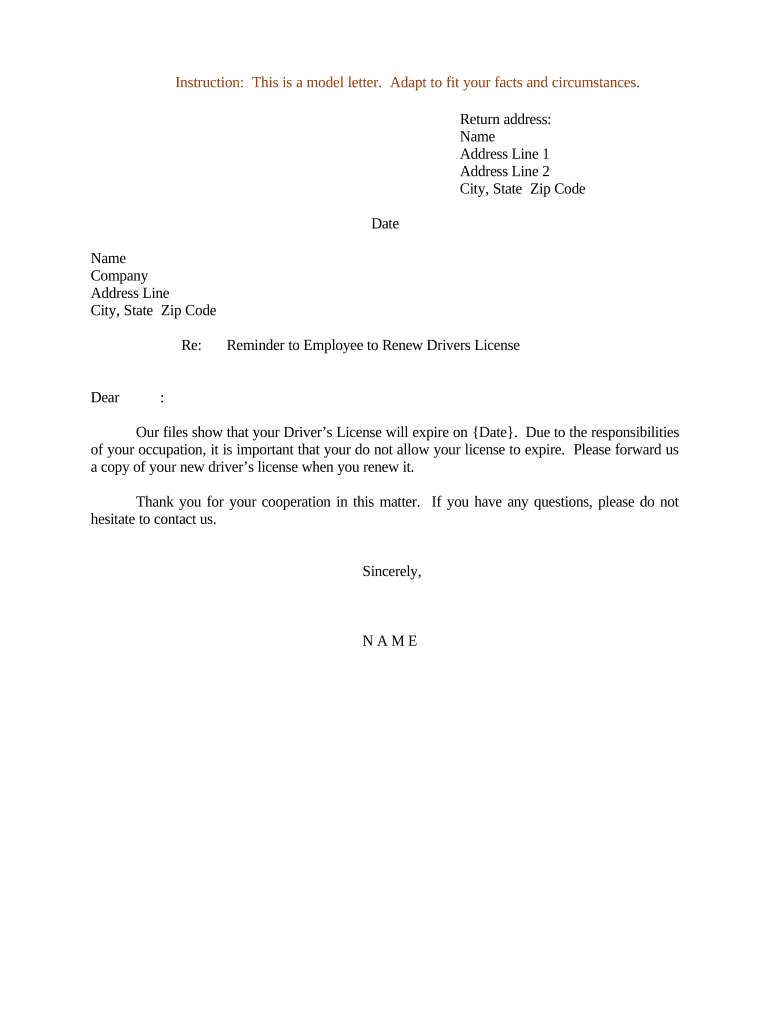
A Letter Reminder to Employee to Renew Driver's License is a formal written notice from an employer asking an employee to renew a state-issued driver's license that is required for job duties. The letter documents the employer's expectation, requests proof of a renewed credential by a specified date, and outlines any temporary work restrictions or reporting steps if renewal is delayed. It serves as a record for HR and compliance teams, supports fleet safety and insurance requirements, and helps maintain up-to-date driving authorization for roles that require operating company vehicles.

Why an Organized Renewal Reminder Matters

A clear renewal reminder reduces operational risk by prompting timely renewals, preserves insurance coverage, and documents employer due diligence in maintaining compliant driver authorization.

Why an Organized Renewal Reminder Matters

Who Typically Sends and Receives This Letter

Employers and HR teams use this letter to manage driving credentials; employees who operate vehicles receive the notice and respond.

  • HR Manager — Issues reminders, records responses, and updates personnel files promptly.
  • Fleet Supervisor — Monitors drivers, coordinates temporary reassignments, and tracks proof of renewal.
  • Individual Employee — Provides updated license copy and confirms new expiration date to employer.

Use the letter consistently to ensure a documented workflow and to support insurance and regulatory compliance.

Essential Elements to Include in the Letter

A professional letter is concise, factual, and clearly states the required action, deadline, acceptable proof, and next steps if the license is not renewed.

Employer ID

Identify the employer or department sending the notice, include contact name and phone or email for questions and document submission.
Employee Details

List the employee's full legal name, job title, and employee ID so the response can be matched to HR records without ambiguity.

License Information

State the license type (e.g., CDL or standard), current expiration date on file, and the specific data the employee must provide.

Requested Proof

Specify acceptable proof such as a scanned copy of the renewed license, a DMV receipt, or a state-issued digital credential and file format.

Deadline

Give a clear date for receipt of proof and note any interim restrictions or reporting obligations if the deadline is missed.

Consequences

Explain potential temporary reassignment, suspension of driving privileges, or disciplinary steps consistent with company policy.

Required Information to Capture

Employee Name: Full legal name
Employee ID: Company identifier
License Number: State-issued number
Expiration Date: MM/DD/YYYY
Issuing State: Two-letter state
Proof Received: File name or receipt

Step-by-Step: Preparing and Sending the Letter

Follow these steps to create, distribute, and record a renewal reminder while keeping an auditable trail for HR and fleet compliance.

  • 01
    Confirm Records: Verify current license data in personnel and fleet systems before sending.
  • 02
    Draft Letter: Include required elements: identity, deadline, and acceptable proof.
  • 03
    Send Notice: Deliver via secure email or internal HR portal with read receipt where possible.
  • 04
    Record Response: Attach received proof to the employee file and update expiration date.

How to Configure an Online Reminder Workflow

Set up a repeatable digital workflow that issues reminders, accepts attachments, and logs responses for auditability.

Template Create a reusable letter template with merge fields for employee and license data.
Authentication Require company SSO or secure email verification to confirm recipient identity.
Reminder Schedule Send initial notice 60 days prior, follow-up at 30 and 7 days before expiration.
Attachment Handling Allow PDF or image uploads and automatically store in the HR record.
Record Storage Save completed letters and attachments to a secure, access-controlled HR repository.

Typical Routing: From Draft to File

A straightforward routing model minimizes delays: create, notify, receive, verify, and archive.

  • Create: HR drafts the notice and inserts employee-specific fields.
  • Notify: System sends the letter to the employee with instructions for proof.
  • Receive: Employee uploads renewed license or receipt through secure channel.
  • Verify: Supervisor or HR confirms validity and updates records.

Digital Signing and Submission Requirements

Choose a platform that supports secure delivery, attachment uploads, and an auditable completion record.

  • File Formats: PDF, JPG, PNG accepted for uploaded license proofs.
  • Authentication Options: Email verification, SMS code, or SSO work well for identity confirmation.
  • Audit Records: Platform should capture timestamp, IP, and user action logs.

Ensure chosen tools meet your security and retention policies and that HR staff can export proofs for insurer or regulator review.

Suggested Timeline and Deadlines

A proactive timeline reduces noncompliance and allows time for renewals and administrative follow-up.

Initial Notice Sent:

60 days before recorded expiration to prompt early action.

First Follow-Up:

30 days before expiration to remind and escalate if needed.

Final Reminder:

7 days before expiration with consequences and temporary restrictions noted.

Renewal Due Date:

Date the employee must provide proof of renewed license.

HR Update Deadline:

Update HR record within 3 business days of receiving proof.

Common Mistakes to Avoid

  • Unclear proof requirements cause delays; specify accepted file types and supporting receipts to prevent back-and-forth.
  • Failing to document responses leaves gaps in audit trails; always attach proof and note verification steps in the personnel file.
  • Sending reminders without follow-up increases safety risk; define escalation steps and temporary work restrictions in policy.
  • Not aligning with insurance requirements can void coverage; confirm license class requirements and insurer reporting obligations.

Risks If the Letter Is Inaccurate or Not Enforced

Operational Risk: Unlicensed driving exposes the company to liability
Insurance Exposure: Claims may be contested if drivers lack valid credentials
Regulatory Risk: Industry regulators may cite noncompliance
Disciplinary Claims: Inconsistent enforcement can lead to employee disputes
Safety Impact: Increased accident risk without verified credentials
Recordkeeping Gaps: Missing proof complicates audits and investigations

Real-World Examples of Reminder Workflows

Two brief examples show how companies used digital reminders to collect renewed licenses and update records.

Optica Ventures LLC

HR standardized reminders and used a simple upload portal for drivers

  • This reduced manual follow-up and consolidated proofs
  • The team reported fewer scheduling delays and clearer audit trails after implementing the process.

Martin Properties

A small fleet adopted mobile-friendly reminders and attachment uploads

  • Drivers could submit renewed IDs from smartphones
  • Management recorded renewals immediately, reducing administrative backlog and insurance inquiries.

Practical Tips for Accurate, Efficient Letters

Apply consistent formatting, explicit requirements, and automated tracking to reduce ambiguity and administrative overhead.

Standardize Templates
Use a consistent template with merge fields to reduce manual errors and ensure every notice contains the same required elements and deadlines.
Specify Acceptable Proof
List accepted file formats and examples (scanned license, DMV receipt) and indicate file naming conventions to speed verification.
Automate Reminders
Configure scheduled reminders at 60, 30, and 7 days to improve completion rates and document each sent notice in the employee record.
Log Verification Steps
When proof is received, record verifier name, verification date, and method to create a defensible audit trail for insurers or regulators.

Who Signs or Approves the Letter

HR Manager

Responsible for issuing the letter, maintaining personnel files, and confirming receipt of renewal proof; often signs the notice or approves automated sends on behalf of the employer.

Fleet Supervisor

Verifies that the renewed license matches vehicle class requirements, updates fleet rosters, and authorizes continued driving duties pending HR record updates.

Frequently Asked Questions about License Renewal Notices

Answers to frequent questions help HR and employees handle edge cases while preserving compliance and safety.


Need help? Contact support

eSignature Pricing and Feature Comparison for Renewal Workflows

Vendor pricing and features influence the cost and scale of automated reminder and proof-collection workflows; signNow is shown first per comparison conventions.

signNow DocuSign Adobe Sign PandaDoc HelloSign
Starting Price $8/user/mo $15/user/mo $14/user/mo $19/user/mo $15/user/mo
Free Trial 7-day free trial Varies by offer Varies by offer Varies by offer Varies by offer
Bulk Send Yes Yes Yes Yes No
Audit Trail Yes Yes Yes Yes Yes
HIPAA Compliant Yes Yes Yes No No
be ready to get more
Join over 28 million airSlate SignNow users