Establishing secure connection…Loading editor…Preparing document…

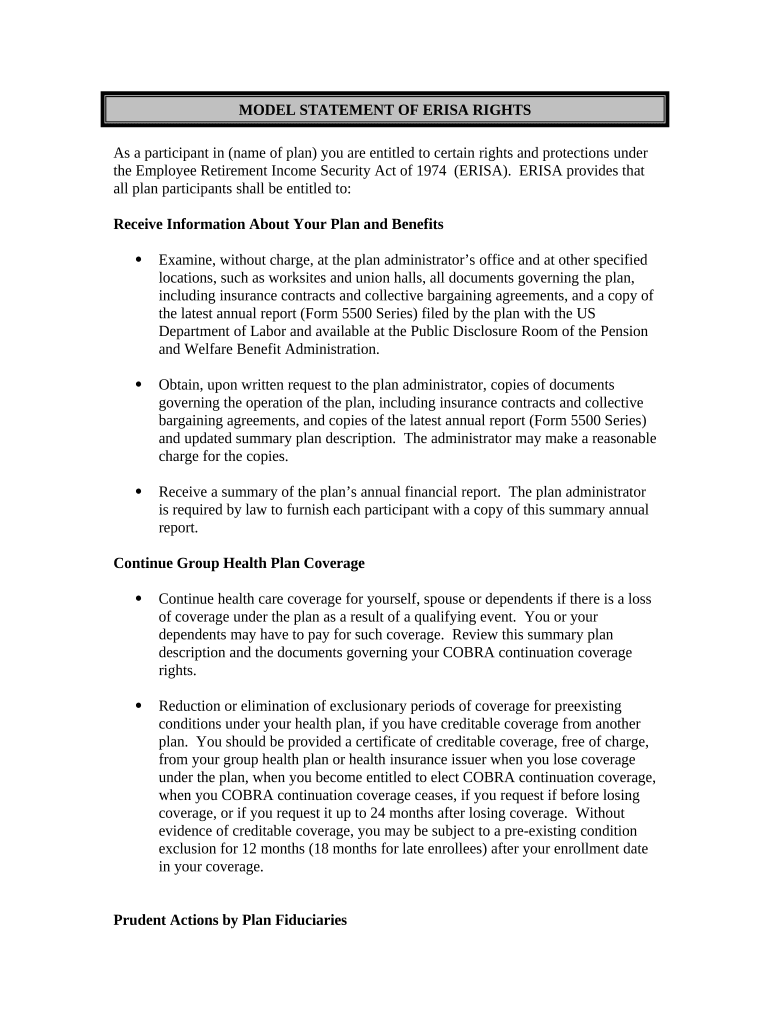
Model Statement of ERISA Rights

This template is fully customizable. Edit the text, fill out the fields, and send it for signature. Give it a try!
Model Statement of ERISA Rights

What the Model Statement of ERISA Rights Is and Why It Matters

The Model Statement of ERISA Rights describes the notice employers must provide to plan participants under ERISA explaining their rights to examine plan documents, obtain copies, and file claims and civil actions. It summarizes procedures for claims, appeals, and access to plan records, and identifies plan administrator contact details. Employers typically distribute it with enrollment materials, summary plan descriptions, or benefit changes. The statement supports transparency and helps participants understand administrative remedies and timeframes for filing claims or seeking judicial review under ERISA.

Why Including the Model Statement Improves Compliance and Clarity

Providing the Model Statement of ERISA Rights satisfies ERISA disclosure obligations, clarifies participant remedies, and reduces administrative disputes by setting expectations for access, appeals, and timelines. Clear delivery supports compliance with federal reporting and fiduciary standards.

Why Including the Model Statement Improves Compliance and Clarity

Who Prepares and Distributes the Model Statement

Employers, plan administrators, and benefits teams use the Model Statement of ERISA Rights to explain participant rights and procedures.

  • Private employers administering ERISA-covered retirement and welfare plans, including 401(k), pension, and health plans.
  • Plan administrators responsible for claims determinations, appeals processing, and maintaining plan records for participant review.
  • HR and benefits vendors preparing enrollment packets, SPDs, termination notices, or claim communications.

Core Elements to Include in the Model Statement of ERISA Rights

A professional Model Statement of ERISA Rights includes clear contact details, claim and appeal steps, timelines, document access instructions, and references to legal remedies and administrative processes.

Administrator Info

Identify plan administrator by name, mailing address, phone number, and email. Specify who handles claims and where participants should direct written requests to ensure proper routing and timely responses.
Claims Process

Describe the precise steps to file an initial benefit claim, required forms or documentation, acceptable delivery methods, and any internal review stages so participants know how to initiate a claim.

Appeals Procedure

Outline levels of appeal, submission timelines, reviewer independence expectations, and how to request additional evidence or a hearing during the internal appeal process.

Access to Records

Explain how participants may inspect and obtain copies of plan documents, SPDs, contracts, and claim files; include any fees, response times, and format options.

Timeframes

State specific deadlines for claim decisions, appeal filing windows, and statute of limitations considerations that affect litigation rights under ERISA.

Legal Remedies

Summarize participant rights to bring civil actions under 29 U.S.C. §1132, judicial review standards, and when exhaustion of administrative remedies is required.

Step-by-Step: Prepare and Issue the Model Statement

Follow these steps to prepare and distribute the Model Statement of ERISA Rights accurately and consistently to participants.

  • 01
    Gather Plan Data: Collect administrator contact, SPD, and claim forms.
  • 02
    Insert Dates: Enter effective and revision dates MM/DD/YYYY.
  • 03
    Place Signature: Sign or include administrator authorization if required.
  • 04
    Distribute: Provide with enrollment and SPD notices by chosen method.

Configure an Online Distribution Workflow

Configure an online distribution workflow that captures consent, logs delivery, and preserves a tamper-evident audit trail for ERISA disclosures.

Field Configuration
Consent Capture Require signer consent and record timestamp
Authentication Email verification or SMS code for signers
Audit Trail Enable IP, timestamp, and event logs
Retention Preserve signed copy and logs per policy

Technical Requirements for Electronic Delivery and Recordkeeping

Select platforms that support secure delivery, audit trails, and data retention consistent with ERISA and recordkeeping obligations.

  • Document Formats: PDF and DOCX with locked fields
  • Authentication Options: Email, SMS code, or single-sign-on
  • Integrations: HRIS, benefits vendors, cloud storage

Where and How Participants Submit Claims and Requests

Routing and submission options depend on plan rules; use the administrator address, secure email, or designated claims portal as specified in the statement.

  • Mail Submission: Send to administrator mailing address with proof of delivery.
  • Email Submission: Use the official admin email; retain sent message evidence.
  • Portal Upload: Submit via plan portal; save confirmation receipts.
  • In-Person: Deliver to administrator office with signed receipt.

Typical Deadlines for Claims, Appeals, and Notice Distribution

Common claim and appeal deadlines are set by federal regulation and the plan; include both regulatory defaults and any shorter plan-specific timeframes.

Initial Claim Deadline:

Plan decides within 30 days; extensions permitted (see 29 C.F.R. §2560.503-1)

Disability Claims:

Initial decision within 45 days; limited extensions allowed

Appeal Filing Window:

Typical 60–180 days depending on plan language

SPD Distribution:

Provide SPD and statement at enrollment and material changes

Litigation Timeframe:

Statute of limitations varies; check plan and 29 U.S.C. §1132

Common Preparation Errors to Avoid

  • Using outdated or non-model language that omits appeal timeframes or administrator contact details, which can lead to participant confusion and compliance gaps.
  • Failing to distribute the statement at required events such as enrollment, SPD issuance, or material modifications, creating risk of late claims or disputes.
  • Providing unclear delivery records; lack of proof of distribution increases exposure in audits or litigation and complicates remedial steps.
  • Combining the statement with unrelated documents without highlighting rights, reducing visibility and the likelihood participants will read critical procedures.

Consequences of Incorrect or Missing Statements

Noncompliance Risk: Participant disputes and administrative claims
Fiduciary Exposure: Potential ERISA breach claims
Civil Remedies: Court-ordered relief under 29 U.S.C. §1132
Corrective Measures: DOL investigations and corrective notices
Operational Delays: Appeal processing slowdowns, increased costs
Reputational Harm: Loss of participant trust and confidence

How the Model Statement Differs from the Summary Plan Description

Quick comparison shows how the Model Statement of ERISA Rights differs from the Summary Plan Description in scope and required distribution.

Document Type Model Statement Summary Plan Description
Purpose notice of rights full plan terms
Typical Length one page multiple pages
When Distributed enrollment/claims enrollment/plan changes
Legal Effect notice obligation governing plan terms

eSignature Vendor Comparison for Distributing ERISA Notices

Basic pricing and feature comparison for common eSignature vendors relevant to distributing ERISA notices and capturing consent.

signNow DocuSign Adobe Sign PandaDoc HelloSign
Starting Price $8/user/mo $15/user/mo $14/user/mo $19/user/mo $15/user/mo
Free Trial 7-day free trial Varies Varies Varies Varies
Bulk Send Yes Yes Yes Yes No
Audit Trail Yes Yes Yes Yes Yes
HIPAA Compliant Yes Yes Yes No No
Envelope Cap No cap 100 envelopes/user/year Varies Varies Varies

Key Milestones from Drafting to Archival

Key milestones in distributing and processing the Model Statement of ERISA Rights map the lifecycle from drafting through final record retention.

01

Prepare Statement

Draft and review language; obtain legal review as needed.

02

Distribute to Participants

Issue at enrollment, SPD delivery, and on material plan changes.

03

Track Acknowledgements

Record delivery receipts or signed confirmations for each participant.

04

Archive Records

Store signed copies and audit logs according to retention policy.

Frequently Asked Questions About the Model Statement of ERISA Rights

Answers to frequent questions on completing, distributing, and enforcing the Model Statement of ERISA Rights, and how to handle common exceptions.


Need help? Contact support

be ready to get more
Join over 28 million airSlate SignNow users