Establishing secure connection… Loading editor… Preparing document…
Navigation

Fill and Sign the Ex 21 Form
Fill and Sign the Ex 21 Form

How it works

Open the document and fill out all its fields.
Apply your legally-binding eSignature.
Save and invite other recipients to sign it.

Rate template

4.8
53 votes
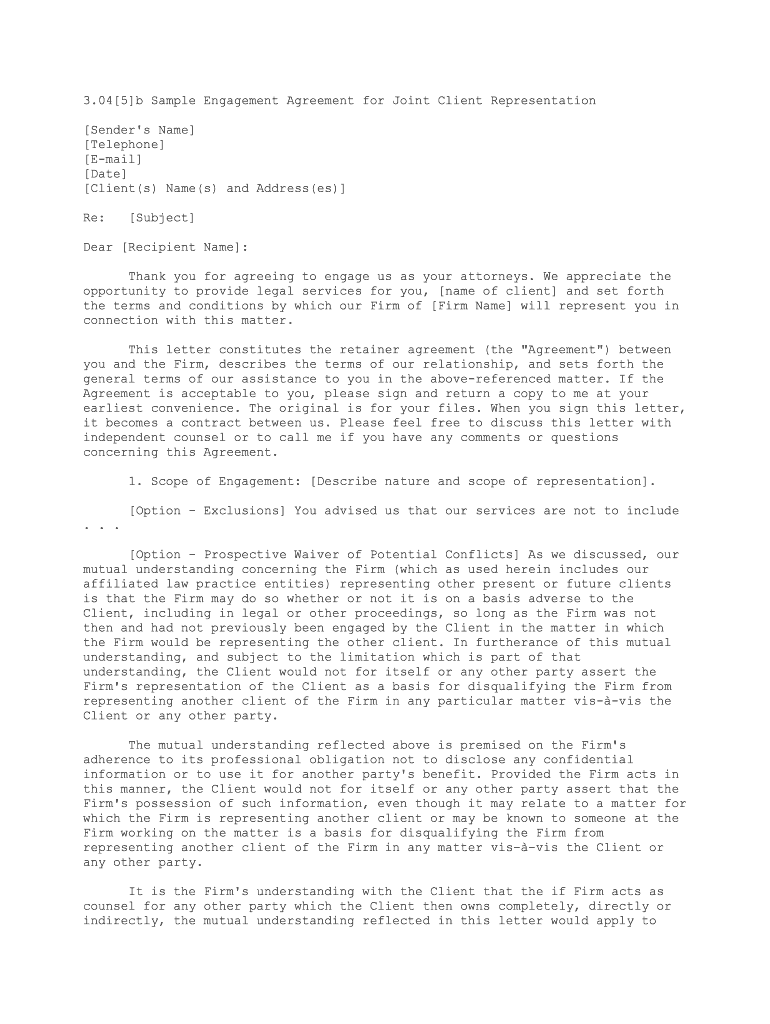
3.04[5]b Sample Engagement Agreement for Joint Client Representation [Sender's Name] [Telephone] [E-mail] [Date] [Client(s) Name(s) and Address(es)] Re: [Subject]Dear [Recipient Name]: Thank you for agreeing to engage us as your attorneys. We appreciate the opportunity to provide legal services for you, [name of client] and set forth the terms and conditions by which our Firm of [Firm Name] will represent you in connection with this matter. This letter constitutes the retainer agreement (the "Agreement") between you and the Firm, describes the terms of our relationship, and sets forth the general terms of our assistance to you in the above-referenced matter. If the Agreement is acceptable to you, please sign and return a copy to me at your earliest convenience. The original is for your files. When you sign this letter, it becomes a contract between us. Please feel free to discuss this letter with independent counsel or to call me if you have any comments or questions concerning this Agreement. 1. Scope of Engagement: [Describe nature and scope of representation]. [Option - Exclusions] You advised us that our services are not to include . . . [Option - Prospective Waiver of Potential Conflicts] As we discussed, our mutual understanding concerning the Firm (which as used herein includes our affiliated law practice entities) representing other present or future clients is that the Firm may do so whether or not it is on a basis adverse to the Client, including in legal or other proceedings, so long as the Firm was not then and had not previously been engaged by the Client in the matter in which the Firm would be representing the other client. In furtherance of this mutual understanding, and subject to the limitation which is part of that understanding, the Client would not for itself or any other party assert the Firm's representation of the Client as a basis for disqualifying the Firm from representing another client of the Firm in any particular matter vis-à-vis the Client or any other party. The mutual understanding reflected above is premised on the Firm's adherence to its professional obligation not to disclose any confidential information or to use it for another party's benefit. Provided the Firm acts in this manner, the Client would not for itself or any other party assert that the Firm's possession of such information, even though it may relate to a matter for which the Firm is representing another client or may be known to someone at the Firm working on the matter is a basis for disqualifying the Firm from representing another client of the Firm in any matter vis-à-vis the Client or any other party. It is the Firm's understanding with the Client that the if Firm acts as counsel for any other party which the Client then owns completely, directly or indirectly, the mutual understanding reflected in this letter would apply to that party as well. With respect to affiliated parties generally, including parties owned by the Client and parties that hold direct or indirect ownership interest in the Client, it is the Firm's understanding with the Client that the Firm is not being asked to provide, and will not be providing, legal advice to, or establishing an attorney-client relationship with, any such affiliated party and will not be expected to do so unless the Firm has been asked and has agreed expressly to do so.The waivers and agreements in this letter would continue in effect if the Firm's representation of the Client was ended by the Client (which it would be free to do at any time) or by the Firm (which would be subject to ethical requirements). [Option - Limitations on Obligation] You acknowledge that we are not your general counsel and that our acceptance of this engagement does not involve an undertaking to represent you or your interests and any matter other than that described above. Furthermore, you acknowledge that our representation does not entail a continuing obligation to advise you concerning subsequent legal developments that might have a bearing on your affairs generally or, after the completion of the matter as to which we are representing you, subsequent legal developments related to or that might have a bearing on that matter. [Option - Additional Services] While this letter is intended to deal with the specific legal services described above, these terms and conditions will also apply to any additional legal services that we may agree to provide that are outside the initial scope of representation. [Option - Clarifying client identity] We have been engaged to represent ABC Corporation. As counsel to that corporation, we do not represent its shareholders and/or officers individually. 2. Joint Representation: [Firm] has been retained to jointly represent [identify clients] (the "Clients") in the above referenced matter. Although each of the Clients understands that it/he/she has the right to retain separate counsel, each of them also believes that a joint [action] [defense] of this lawsuit is currently the most appropriate option for handling of this matter. In order to obtain joint representation by [Firm], each of the Clients therefore acknowledges that it/he/she understands and accepts the following considerations and risks associated with a joint representation: (a) There are significant advantages to presenting a common legal [action] [defense], including the advantage of lessening overall costs. Asserting a common defense or claim, however, may require that all participating Clients take common positions as to all issues. [Firm], as attorneys representing a common group of Clients, cannot take inconsistent positions for various Clients in the same matter. Accordingly, there is the potential that the individual interests of one of the Clients on a particular issue may not be the same as the interests of the other Client. (b) As a general matter, communications between an individual client and its/his/her counsel are privileged and confidential. In a joint representation, however, [Firm] will be under an obligation to keep all of the Clients fully informed of the facts material to their representation. Accordingly, consistent with our obligation to represent all of the Clients, [Firm] will be required to disclose to all Clients information that one Client may consider to be confidential. In addition, in the event a dispute were to arise [between] [among] the Clients, any information conveyed to [Firm] regarding matters of common interest would not be privileged or confidential in any proceeding filed to resolve such a dispute.(c) In the event that a conflict of interest arises between the Clients, [Firm] would have to consider withdrawing from representing one or more Clients. By your signature on this letter, you therefore acknowledge and agree that if [Firm] determines that it needs to withdraw from representing you and/or any other Client(s): (i) [Firm] may continue to represent any or all of the remaining Client(s) at its sole option; (ii) any disclosures made to [Firm] prior to its withdrawal may be used in the representation of the remaining Client(s); and (iii) you shall not seek to disqualify [Firm] from continuing to represent the remaining Client(s). If you are aware, or during [Firm's] representation become aware, of any reason why you believe [Firm's] joint representation of you and the other Clients should be discontinued, please contact me immediately. If at any time you consider that your individual interests would be better served by retaining separate counsel, you are entitled to do so. In that event, the issue of who shall bear the costs and expenses associated with your defense is a matter that will have to be resolved between you and [list clients]. 3. Retainer: You have agreed to pay us a retainer of $____ for our representation described herein. That amount will be deposited into our trust account and shall be retained and applied to the last billing in the matter. To the extent our final fees are less than the balance of your retainer, after deducting outstanding costs, if any, the balance shall be returned to you at the conclusion of the matter. [Alternative if retainer will be applied to hourly fees] You have agreed to pay us a retainer of $____ for our representation described herein. That amount will be deposited into our client trust account and will be drawn against to compensate us for services rendered and costs incurred. The retainer must be replenished each month to ensure that your client trust account always includes the retainer amount of $______. To the extent our final fees are less than the balance of your retainer, after deducting outstanding costs, if any, the balance shall be returned to you at the conclusion of the matter. [Alternative if retainer is to be followed by billing] Our fees for the services rendered will be based upon the time spent by our personnel. My own current billing rate for this matter is $____ per hour. Rates for other attorneys in this firm range from $____ per hour for the most junior associate to $____ per hour for our most senior attorneys. The rate for paralegals is $____ per hour. The rates of our attorneys and paralegals are subject to change. We will receive an initial retainer in the amount of $_______ against fees, costs and disbursements and our retainer statement is enclosed. If the retainer is exceeded by our time and disbursement charges, additional billings will be made on a periodic basis, also at our customary rates, as outlined above. We would expect any additional billings to be paid promptly. If a bill is not paid within thirty (30) days, we reserve the right to withdraw as your counsel. Any unused portion of the retainer will be refunded to you after the conclusion of the matter and the preparation of final billing runs. 4. Fees for Services: [Name] will take principal responsibility for this matter, and his hourly rate is $_____. As appropriate, [Name] will enlist the assistance of other associates and paralegals, whose time is charged at much lower rates. The hourly rate for [Associate], who will assist [Partner] in this engagement is $_____. The hourly rate for paralegals is $_____. All fees shall be charged in accordance with the attached Billing Policies. 5. Costs and Expenses: In addition to fees for legal services, there are certain costs and expenses that you may be obligated to pay. Costs over $______ shall be billed directly to you. You agree to pay these bills on a timely basis according to their terms. All charges and expenses shall be charged in accordance with the attached Billing Policies. 6. Payment of Fees and Expenses: All fees and costs shall be payable on a monthly basis in accordance with the attached Billing Policies. 7. Permission to Use Information in Marketing of the Law Firm: By signing this Agreement, you agree that your name, logo, and a general description of this matter may be used by [Firm] in its business development efforts and materials. If you do not wish for this information to be used in the manner specified, please draw a line through and initial this paragraph. 8. Cooperation: In order to enable us to effectively render the services contemplated, you agree to disclose fully and accurately all facts and to keep us apprised of all developments relating to the litigation. You agree to cooperate fully with us and to make yourselves or your firm representatives available to attend meetings, discovery proceedings and conferences, hearings and other proceedings as necessary. We will attempt to schedule depositions, hearings, etc. at convenient times, but it is the nature of litigation that such schedules are often not within our control. 9. Termination of Representation: It is understood that, subject to any limitations imposed by the court, [Firm] or you may terminate [Firm's] representation in accordance with the attached Billing Policies. 10. Warranty: You acknowledge that we have made no guarantees as to the outcome or the amounts recoverable in connection with this matter. 11. Client Documents: We will maintain any documents you furnish us in our client file (or files) for this matter. At the conclusion of the matter (or earlier, if appropriate), it is your obligation to advise us as to which, if any, of the documents in our files you wish us to turn over to you. We will retain any remaining documents in our files for a reasonable period of time and ultimately destroy them in accordance with our record retention program schedule then in effect. In the event that our representation is terminated and you have not paid for all services rendered and/or other charges accrued on your behalf to the date of our withdrawal, we may, to the extent permitted by law, assert a retaining lien against any documents or files remaining in our possession until such charges are paid. 12. Choice of Law: All of the rights and obligations of [Firm] and you arising under or related to this agreement shall be governed by the laws of the State of _______. 13. Arbitration: Any controversy, dispute or claim arising out of or relating to our fees, charges, performance of legal services, obligations reflected in this letter, or other aspects of our representation shall be resolved through a confidential, binding arbitration, in [City, State] in accordance with the rules then in affect of [administered by] the [arbitration body], and judgment on the award rendered may be entered in any court having jurisdiction thereof. YOU ACKNOWLEDGE THAT BY AGREEING TO ARBITRATION, YOU ARE RELINQUISHING YOUR RIGHT TO BRING AN ACTION IN COURT AND THAT YOU ARE WAIVING YOUR RIGHT TO A TRIAL BY JURY.14. Attorneys' Fees: If any controversy, dispute or claim arising out of or relating to our fees, charges, performance of legal services, obligations reflected in this letter, or other aspects of our representation, the prevailing party will be entitled to recover from the losing party all costs and expenses it incurs in bringing and prosecuting and defending any litigation or arbitration, including reasonable attorneys' fees and costs at trial and appeal. [Option - Conflicts of Interest]: Concurrently with this letter, we are delivering another letter, a "conflicts waiver letter," to you which discusses potential or actual conflicts of interest related to this representation. Our agreement to undertake this representation is conditioned on our receipt of a signed copy of the conflicts waiver letter. 15. Confirmation of Agreement: If the foregoing is agreeable to you, please acknowledge your understanding and agreement by signing and returning a copy of this letter, which shall control all obligations set forth herein except as may subsequently be agreed upon in writing. Our engagement will commence upon our receipt of the signed copy of this letter and your check in the amount of $_________. For your convenience, we have enclosed a self-addressed, stamped envelope. [Option] If more than one party signs below, we each agree to be liable jointly and severably, for all obligations under this letter. We appreciate your confidence in our firm and assure you that we will make every effort to perform our services in a prompt and efficient manner. Very truly yours, [FIRM] By: _________________________ Agreed and accepted on _____________, 20__ [CLIENT'S NAME] By: ___________________________ Title:_________________________

Useful advice on setting up your ‘Ex 21’ online

Are you exhausted by the burden of handling documents? Look no further than airSlate SignNow, the premier digital signature solution for individuals and organizations. Bid farewell to the lengthy process of printing and scanning documents. With airSlate SignNow, you can easily complete and authorize documents online. Take advantage of the powerful features packed into this user-friendly and affordable platform and transform your method of document management. Whether you need to sign forms or collect electronic signatures, airSlate SignNow manages it all effortlessly, requiring only a few clicks.

Adhere to these comprehensive instructions:

  1. Access your account or sign up for a complimentary trial with our service.
  2. Select +Create to upload a document from your device, cloud storage, or our template library.
  3. Open your ‘Ex 21’ in the editor.
  4. Click Me (Fill Out Now) to prepare the document on your end.
  5. Add and allocate fillable fields for others (if needed).
  6. Proceed with the Send Invite settings to request eSignatures from others.
  7. Save, print your copy, or convert it into a reusable template.

Don’t fret if you need to collaborate with your teammates on your Ex 21 or send it for notarization—our solution offers everything you require to achieve such tasks. Create an account with airSlate SignNow today and elevate your document management experience to a new level!

Here is a list of the most common customer questions. If you can’t find an answer to your question, please don’t hesitate to reach out to us.

Need help? Contact Support

The best way to complete and sign your ex 21 form

Save time on document management with airSlate SignNow and get your ex 21 form eSigned quickly from anywhere with our fully compliant eSignature tool.

How to Sign a PDF Online How to Sign a PDF Online

How to fill out and sign paperwork online

Previously, coping with paperwork required lots of time and effort. But with airSlate SignNow, document management is quick and simple. Our powerful and user-friendly eSignature solution enables you to easily complete and eSign your ex 21 form online from any internet-connected device.

Follow the step-by-step guide to eSign your ex 21 form template online:

  • 1.Register for a free trial with airSlate SignNow or log in to your account with password credentials or SSO authentication.
  • 2.Click Upload or Create and import a file for eSigning from your device, the cloud, or our form collection.
  • 3.Click on the file name to open it in the editor and use the left-side toolbar to complete all the empty fields properly.
  • 4.Drop the My Signature field where you need to eSign your sample. Provide your name, draw, or upload a photo of your regular signature.
  • 5.Click Save and Close to accomplish editing your completed document.

As soon as your ex 21 form template is ready, download it to your device, export it to the cloud, or invite other people to electronically sign it. With airSlate SignNow, the eSigning process only requires several clicks. Use our powerful eSignature solution wherever you are to deal with your paperwork efficiently!


How to Sign a PDF Using Google Chrome How to Sign a PDF Using Google Chrome

How to fill out and sign paperwork in Google Chrome

Completing and signing paperwork is easy with the airSlate SignNow extension for Google Chrome. Adding it to your browser is a fast and beneficial way to manage your paperwork online. Sign your ex 21 form template with a legally-binding eSignature in just a couple of clicks without switching between programs and tabs.

Follow the step-by-step guide to eSign your ex 21 form in Google Chrome:

  • 1.Go to the Chrome Web Store, find the airSlate SignNow extension for Chrome, and add it to your browser.
  • 2.Right-click on the link to a form you need to eSign and choose Open in airSlate SignNow.
  • 3.Log in to your account with your credentials or Google/Facebook sign-in option. If you don’t have one, you can start a free trial.
  • 4.Use the Edit & Sign menu on the left to fill out your template, then drag and drop the My Signature field.
  • 5.Insert an image of your handwritten signature, draw it, or simply type in your full name to eSign.
  • 6.Verify all data is correct and click Save and Close to finish editing your form.

Now, you can save your ex 21 form template to your device or cloud storage, send the copy to other individuals, or invite them to eSign your form via an email request or a protected Signing Link. The airSlate SignNow extension for Google Chrome enhances your document workflows with minimum effort and time. Try airSlate SignNow today!


How to Sign a PDF in Gmail How to Sign a PDF in Gmail How to Sign a PDF in Gmail

How to fill out and sign forms in Gmail

Every time you get an email with the ex 21 form for approval, there’s no need to print and scan a file or save and re-upload it to a different program. There’s a better solution if you use Gmail. Try the airSlate SignNow add-on to quickly eSign any documents right from your inbox.

Follow the step-by-step guidelines to eSign your ex 21 form in Gmail:

  • 1.Go to the Google Workplace Marketplace and locate a airSlate SignNow add-on for Gmail.
  • 2.Set up the program with a corresponding button and grant the tool access to your Google account.
  • 3.Open an email containing an attached file that needs signing and use the S sign on the right panel to launch the add-on.
  • 4.Log in to your airSlate SignNow account. Select Send to Sign to forward the document to other parties for approval or click Upload to open it in the editor.
  • 5.Put the My Signature option where you need to eSign: type, draw, or import your signature.

This eSigning process saves time and only takes a few clicks. Use the airSlate SignNow add-on for Gmail to adjust your ex 21 form with fillable fields, sign forms legally, and invite other parties to eSign them al without leaving your inbox. Boost your signature workflows now!


How to Sign a PDF on a Mobile Device How to Sign a PDF on a Mobile Device How to Sign a PDF on a Mobile Device

How to fill out and sign forms in a mobile browser

Need to rapidly complete and sign your ex 21 form on a smartphone while working on the go? airSlate SignNow can help without needing to install additional software programs. Open our airSlate SignNow tool from any browser on your mobile device and add legally-binding electronic signatures on the go, 24/7.

Follow the step-by-step guide to eSign your ex 21 form in a browser:

  • 1.Open any browser on your device and follow the link www.signnow.com
  • 2.Register for an account with a free trial or log in with your password credentials or SSO authentication.
  • 3.Click Upload or Create and import a file that needs to be completed from a cloud, your device, or our form library with ready-to go templates.
  • 4.Open the form and complete the blank fields with tools from Edit & Sign menu on the left.
  • 5.Add the My Signature field to the sample, then type in your name, draw, or add your signature.

In a few simple clicks, your ex 21 form is completed from wherever you are. As soon as you're done with editing, you can save the document on your device, build a reusable template for it, email it to other individuals, or invite them electronically sign it. Make your documents on the go fast and productive with airSlate SignNow!


How to Sign a PDF on iPhone How to Sign a PDF on iPhone

How to fill out and sign documents on iOS

In today’s corporate environment, tasks must be done quickly even when you’re away from your computer. Using the airSlate SignNow mobile app, you can organize your paperwork and sign your ex 21 form with a legally-binding eSignature right on your iPhone or iPad. Set it up on your device to close deals and manage documents from just about anywhere 24/7.

Follow the step-by-step guidelines to eSign your ex 21 form on iOS devices:

  • 1.Go to the App Store, find the airSlate SignNow app by airSlate, and set it up on your device.
  • 2.Launch the application, tap Create to add a form, and select Myself.
  • 3.Choose Signature at the bottom toolbar and simply draw your autograph with a finger or stylus to eSign the sample.
  • 4.Tap Done -> Save after signing the sample.
  • 5.Tap Save or take advantage of the Make Template option to re-use this document in the future.

This process is so straightforward your ex 21 form is completed and signed in just a couple of taps. The airSlate SignNow app works in the cloud so all the forms on your mobile device are kept in your account and are available whenever you need them. Use airSlate SignNow for iOS to improve your document management and eSignature workflows!


How to Sign a PDF on Android How to Sign a PDF on Android

How to complete and sign paperwork on Android

With airSlate SignNow, it’s simple to sign your ex 21 form on the go. Install its mobile app for Android OS on your device and start enhancing eSignature workflows right on your smartphone or tablet.

Follow the step-by-step guide to eSign your ex 21 form on Android:

  • 1.Open Google Play, find the airSlate SignNow app from airSlate, and install it on your device.
  • 2.Log in to your account or create it with a free trial, then import a file with a ➕ key on the bottom of you screen.
  • 3.Tap on the imported document and select Open in Editor from the dropdown menu.
  • 4.Tap on Tools tab -> Signature, then draw or type your name to eSign the template. Fill out blank fields with other tools on the bottom if required.
  • 5.Utilize the ✔ key, then tap on the Save option to end up with editing.

With an easy-to-use interface and total compliance with primary eSignature requirements, the airSlate SignNow application is the perfect tool for signing your ex 21 form. It even works offline and updates all form adjustments once your internet connection is restored and the tool is synced. Fill out and eSign documents, send them for eSigning, and create re-usable templates anytime and from anyplace with airSlate SignNow.

Sign up and try Ex 21 form
  • Close deals faster
  • Improve productivity
  • Delight customers
  • Increase revenue
  • Save time & money
  • Reduce payment cycles


